Search Results (Searched for: )

  • tuxcnc
29 Sep 2026 17:40
Replied by tuxcnc on topic NativeCAM is dangerous.

I still haven't found the source of my error.
 
I am sure that the reason for your error lies solely in your settings.
NativeCAM performs implicit operations, so the result may be surprising, although formally correct.
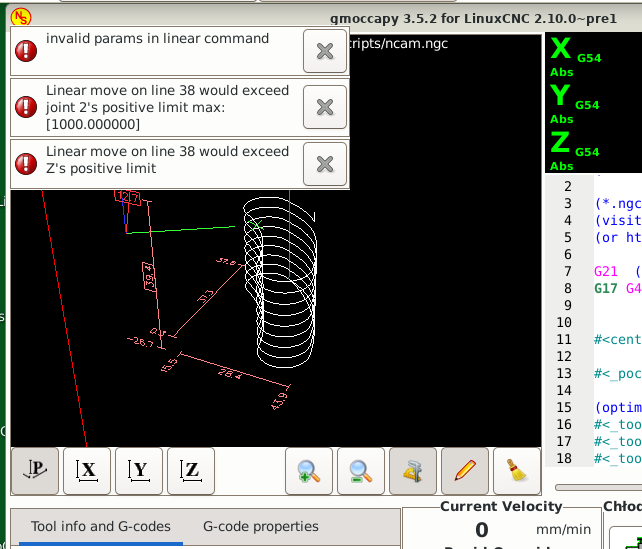
I managed to achieve this effect:
 
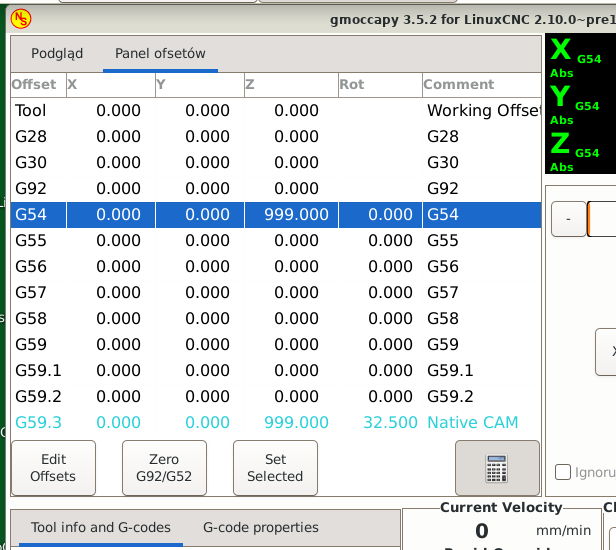
I did it by entering an absurd offset in G54.
NativeCAM clearly copied it to G59.3, and then tried to perform some operation and went outside the working space.
It may be more subtle for you, but it probably works the same.
 
Thank you for the tip with G59.3.
Of course, G54-G59.3 are basically there to execute the same program in absolute coordinates in a different place in the workspace. Expect codes G55, G56, etc. to be used sequentially as needed. Of course, you can reserve one of them for something and not use it for anything else, but it should be the last available code and not a random one...
In Gmoccapy you can even add an appropriate comment to the offset table, as seen above.
It's always better than ruining the G57...
  • hermann1976
29 Sep 2026 15:51 - 29 Sep 2026 15:52
Replied by hermann1976 on topic NativeCAM is dangerous.
Hello tuxcnc,

Many thanks for your feedback and your willingness to help me with my problem.

I can certainly understand your concerns.

I believe a clear approach is necessary. However, i think it is common practice to switch from one coordinate system—such as G54—to another during a program's execution. This offers many advantages.
I wrote a dovetail milling program (independently of NativCAM) that is variable; it automatically calculates the dovetails based on the varying widths and components of a drawer—sides, front and back pieces, etc.—and mills them accordingly.
The individual dovetails are milled within a loop where the coordinates remain relative to the same reference point. After one dovetail is cut, the G59.3 coordinate system is shifted, and the loop runs again. This continues until the entire row is finished. This keeps the G-code compact and manageable.
The situation is similar with NativCAM.
It just needs to be clearly communicated that G59.3 must not be used as a general workpiece zero point, but is reserved specifically for NativCAM.
You can set your preference in the settings (see attached image).
It is also important to include G54 in the initialization settings (see attached image).
This ensures that the system switches back to G54 after the program runs, and selects G54 again upon restarting after an interruption, thereby restoring the initial state.
Unfortunately, I was unable to trace or reproduce the error you described. Whenever I ran a program, the result was always consistent.

Thanks again for your help.
I still haven't found the source of my error.

(tranlated with GoogleTranslate)
  • Japoo_Ness
29 Sep 2026 12:15
Then, I need to connect the shielding for the encoder signals and the driver signals. Is it okay to connect the chassis from the 7I97T to a bus bar with these shields, or is it better another way?

I also want to ask: doesn't this keep this ground somewhat floating, since it doesn't have a discharge path, or am I wrong? Or when you mean ground, do you mean power ground?
  • my1987toyota
29 Sep 2026 09:17
Replied by my1987toyota on topic LinuxCNC-Branded USB Drives
    I will have to see what it comes out to with tarrifs in the US (Thanks to the current administration image missing /media/kunena/emoticons/angry.png).
I will most likely get at least one.
  • my1987toyota
29 Sep 2026 09:05
Replied by my1987toyota on topic 7i76EU Availibility ?
Ordered mine Sunday. Thanks PCW. Looking forward to it's arrival.
  • yaska
29 Sep 2026 08:52
I mean the MV3C. The “C” stands for “compact”; it's a smaller model and is only available in 200V. The MV3 is available in both 200V and 400V.
  • tuxcnc
29 Sep 2026 07:41
NativeCAM is dangerous. was created by tuxcnc
User hermann1976 in the thread forum.linuxcnc.org/nativecam/59280-nativ...-transfer-to-control described strange behavior of LinuxCNC after generating a program with NativeCAM.
Partly out of desire to help, and partly out of curiosity, I started digging into the topic...
Although I wasn't able to reproduce the error described, but I found something much more important...

Well, there are no miracles in IT.
It is not possible for the same program to work correctly sometimes and then interrupt its operation by reporting an error.
Damage to the computer had to be ruled out because the error was repeatable and could not be due to random causes.
Since the reported error concerned going beyond the machine's working space, the first suspect was the offset subsystem.
And in fact, my default coordinate system is G54, and after running ncam.ngc it switched to G57 to return to G54 after finishing or interrupting.
This is so important that the operator may not notice it at all.
Although I didn't find G57 in ncam.ngc, there is a line #<_off_rot_coord_system>=57 (I removed the spaces). In turn, in the subroutines called from ncam.ngc there are lines G#<_off_rot_coord_system>, so it is it.
I didn't look any further in the code, I just decided to check if it was possible to take the program outside the working space by entering absurd offsets.

And this is where I really got scared.

Well, ncam.ngc overwrites the offset table !
He simply treats global data as his own private data.
After finishing the operation, it does not restore the previous data (which would not work anyway if the program was interrupted), it just leaves its garbage.

If the operator now executes another program that is using G57 that has executed correctly hundreds or thousands of times, he or she will get an unpleasant surprise, because the machine will work in other place than expected.

This is simply dangerous and therefore unacceptable.
  • hermann1976
29 Sep 2026 06:29 - 29 Sep 2026 16:17
No, i mean when i push the Button on the left upper corner in NativCAM then the Programm will load autmomaticly in linuxcnc in program drive.
The video:

  • RMJ fabrication
29 Sep 2026 06:23
Ok much appreciated here is my current hal and ini files 
 

File Attachment:

File Name: my_LinuxCN...9-29.hal
File Size:11.08 KB
 

File Attachment:

File Name: my_LinuxCN...9-29.ini
File Size:5.31 KB

And yes my z axis home/limit is at the top of travel.
  • tommylight
29 Sep 2026 01:45
Replied by tommylight on topic Exchange Simodrive 610 to new components
I would first check the encoders, the thin slotted disk sometimes rusts and keeps getting worse with time.
You can check the Granite Devices, i did use Argon drives and they are quite versatile, but knowing how much time it takes, i would just go for the cheap china drives with motors.
  • tommylight
29 Sep 2026 01:20
By any chance do you mean 626VM3 ?
Is this it?
forum.linuxcnc.org/30-cnc-machines/33529-hurco-bmc-20p-retrofit
Unfortunately, i do not have access to it anymore as the shop moved.
  • tommylight
29 Sep 2026 01:14
Nice plane, looks great made out of wood.
As for machinist, i am building a styrofoam cutter to make wings for RC planes, after building some 15 drones and a single 3D printed plane that has yet to fly.
I have built several styro cutters,eve a huge 5 axis one, but his one is for me. :)
  • tommylight
29 Sep 2026 01:09
What do you mean by "new program to the control" ?
Do you have 2 PC's running this and the one at the machine has issues, or what exactly?
Can you do a short video and upload to youtube or google drive?
  • snowgoer540
29 Sep 2026 00:05
If you want, you can post a backup of your config here, and I'll take a look at.

Your Z axis limit switch is at the top of travel right?
  • tommylight
28 Sep 2026 22:13
Moved to "user exchange".
-
I am in Europe and i can speak German, but i am of no use for probing, i still did not build a proper mill. I can figure out everything for sure, but the time it would take is probably much longer than someone with experience.
Also, i never charge for helping here or whatever is initiated from here.
Displaying 541 - 555 out of 11917 results.
Time to create page: 0.129 seconds
Powered by Kunena Forum