
- Other Stuff
- Show Your Stuff
- Turn G-code: conversational lathe cycle generator for LinuxCNC (12 cycles)
Turn G-code: conversational lathe cycle generator for LinuxCNC (12 cycles)
- Odessit
- Offline
- New Member
-

Less
More
- Posts: 7
- Thank you received: 2
27 Sep 2026 09:00 #349926
by Odessit
Turn G-code: conversational lathe cycle generator for LinuxCNC (12 cycles) was created by Odessit
Hi all,
I run a small CNC lathe on LinuxCNC, and I got tired of writing the same turning, threading and grooving code by hand. So over the past months I built a desktop tool for it: you fill in a form (diameters, lengths, feeds, speeds), watch the toolpath in a 2D preview, and save a ready .ngc file for the machine.
What it does - 12 cycles:
- OD turning, facing, boring, grooving, drilling, cut-off
- Taper (OD/ID), sphere (including concave profiles, e.g. a pulley groove)
- Chamfer / radius (OD/ID, front/back)
- Threading: OD/ID, right/left hand, multi-start, adjustable lead-in / run-out
- Tapered threads
- Archimedean spiral (face spiral groove)
Things that were important to me:
- Live 2D toolpath preview before you save anything
- G7/G8 (diameter/radius mode) with one switch for all cycles
- G32 or G33 threading syntax, with a configurable pitch word (I/K/F)
- Coolant M-codes, tool number, comments, M30 - all can be turned on or off to match your habits and your postprocessor
- mm and inch; English and Russian UI
Most cycles (turning, facing, taper, sphere, threading, boring, chamfer/radius) have been proven by real cuts on my machine, not just air runs. Tapered threads and a couple of others so far only have air / single-block runs - feedback is welcome.
To be upfront: this is paid software. There is a free 15-day trial, no key needed. After that it's $25 for one month (no auto-renewal), or $60 for 3 months and then $20/month. Linux .deb (Debian 11+ / Ubuntu 20.04+, amd64) and Windows.
Site with screenshots of every cycle: turngcode.com
Trial download: turngcode.com/en/trial/
I know there are free options too (NGCGUI, Probe Basic conversational, etc.), and they are great. This one is aimed at people who want a complete set of lathe cycles in one simple form, with a preview, without writing subroutines.
Happy to answer questions, and I'd appreciate honest criticism.
I run a small CNC lathe on LinuxCNC, and I got tired of writing the same turning, threading and grooving code by hand. So over the past months I built a desktop tool for it: you fill in a form (diameters, lengths, feeds, speeds), watch the toolpath in a 2D preview, and save a ready .ngc file for the machine.
What it does - 12 cycles:
- OD turning, facing, boring, grooving, drilling, cut-off
- Taper (OD/ID), sphere (including concave profiles, e.g. a pulley groove)
- Chamfer / radius (OD/ID, front/back)
- Threading: OD/ID, right/left hand, multi-start, adjustable lead-in / run-out
- Tapered threads
- Archimedean spiral (face spiral groove)
Things that were important to me:
- Live 2D toolpath preview before you save anything
- G7/G8 (diameter/radius mode) with one switch for all cycles
- G32 or G33 threading syntax, with a configurable pitch word (I/K/F)
- Coolant M-codes, tool number, comments, M30 - all can be turned on or off to match your habits and your postprocessor
- mm and inch; English and Russian UI
Most cycles (turning, facing, taper, sphere, threading, boring, chamfer/radius) have been proven by real cuts on my machine, not just air runs. Tapered threads and a couple of others so far only have air / single-block runs - feedback is welcome.
To be upfront: this is paid software. There is a free 15-day trial, no key needed. After that it's $25 for one month (no auto-renewal), or $60 for 3 months and then $20/month. Linux .deb (Debian 11+ / Ubuntu 20.04+, amd64) and Windows.
Site with screenshots of every cycle: turngcode.com
Trial download: turngcode.com/en/trial/
I know there are free options too (NGCGUI, Probe Basic conversational, etc.), and they are great. This one is aimed at people who want a complete set of lathe cycles in one simple form, with a preview, without writing subroutines.
Happy to answer questions, and I'd appreciate honest criticism.
The following user(s) said Thank You: COFHAL
Please Log in or Create an account to join the conversation.
- tommylight
-

- Offline
- Moderator
-

Less
More
- Posts: 21957
- Thank you received: 7478
27 Sep 2026 16:07 #349932
by tommylight
Replied by tommylight on topic Turn G-code: conversational lathe cycle generator for LinuxCNC (12 cycles)
I have approved this, it is for payed software with a trial version, so if anyone has anything against it, let me know.
Thank you.
Thank you.
Please Log in or Create an account to join the conversation.
- Odessit
- Offline
- New Member
-
Less
More
- Posts: 7
- Thank you received: 2
27 Sep 2026 16:46 #349933
by Odessit
Replied by Odessit on topic Turn G-code: conversational lathe cycle generator for LinuxCNC (12 cycles)
Thank you for approving it, tommylight - and for being upfront about it being paid software. That's exactly how I wanted to present it.
If anyone has questions, finds a bug, or thinks a cycle behaves wrong on their machine, please post here - I'll answer and fix what I can.
If anyone has questions, finds a bug, or thinks a cycle behaves wrong on their machine, please post here - I'll answer and fix what I can.
Please Log in or Create an account to join the conversation.
- Odessit
- Offline
- New Member
-
Less
More
- Posts: 7
- Thank you received: 2
30 Sep 2026 17:19 #350012
by Odessit
Replied by Odessit on topic Turn G-code: conversational lathe cycle generator for LinuxCNC (12 cycles)
Small update: the Archimedean spiral cycle (face spiral groove/thread) is now verified by a real cut on my lathe, not just an air run. Cut-tested so far: turning, facing, taper, sphere, threading, boring, chamfer/radius and the spiral.
I also wrote a few articles that may be useful even if you never use the program:
- Threading in LinuxCNC: G33 vs G76 - turngcode.com/en/blog/threading-in-linuxcnc-g33-g76/
- G7/G8: diameter or radius mode - turngcode.com/en/blog/g7-g8-diameter-or-radius-linuxcnc/
- Tapered threads on a CNC lathe - turngcode.com/en/blog/tapered-threads-on-cnc-lathe/
- Using the generated code on other controls - turngcode.com/en/blog/turn-gcode-on-different-cnc-controls/
Questions and bug reports are welcome here.
I also wrote a few articles that may be useful even if you never use the program:
- Threading in LinuxCNC: G33 vs G76 - turngcode.com/en/blog/threading-in-linuxcnc-g33-g76/
- G7/G8: diameter or radius mode - turngcode.com/en/blog/g7-g8-diameter-or-radius-linuxcnc/
- Tapered threads on a CNC lathe - turngcode.com/en/blog/tapered-threads-on-cnc-lathe/
- Using the generated code on other controls - turngcode.com/en/blog/turn-gcode-on-different-cnc-controls/
Questions and bug reports are welcome here.
Please Log in or Create an account to join the conversation.
- Odessit
- Offline
- New Member
-
Less
More
- Posts: 7
- Thank you received: 2
03 Oct 2026 18:51 - 03 Oct 2026 19:21 #350083
by Odessit
Replied by Odessit on topic Turn G-code: conversational lathe cycle generator for LinuxCNC (12 cycles)
Update: Archimedean spiral - real cut on video
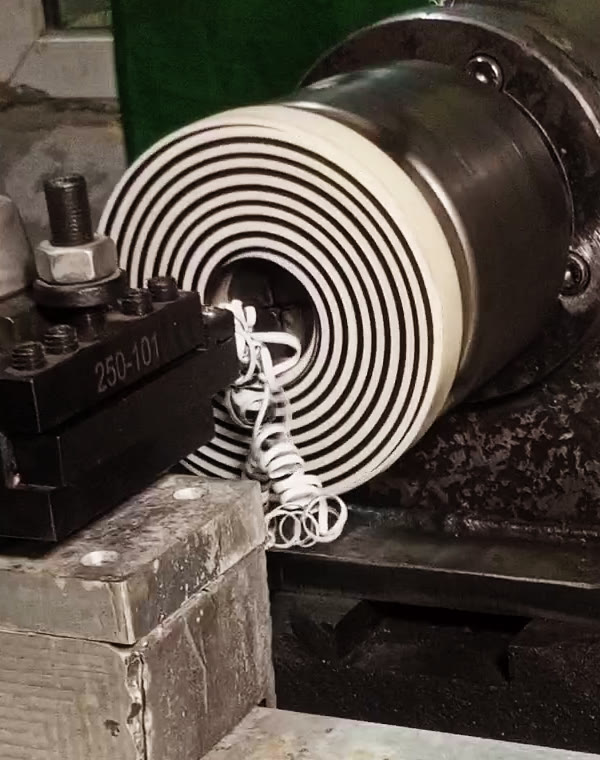
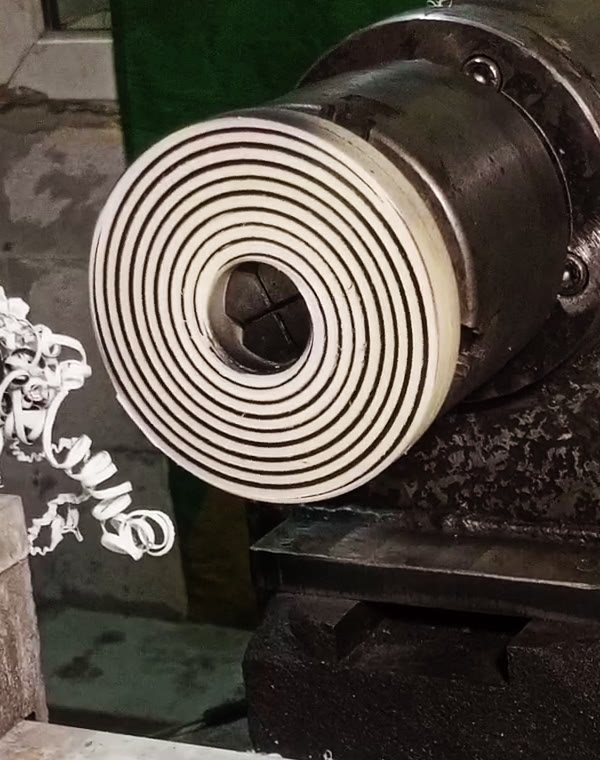
Here is the face spiral cycle cut on my lathe, start to finish (real cut, not an air run). Two frames are attached; a short video of the whole cut (49 s, sped up 2-4x, with music) is on the cycle page:
turngcode.com/en/features/archimedean-spiral/
I painted the face black before cutting so the spiral is easy to see on camera; the paint went on a bit unevenly, so some lands look thinner than they are. The video colour is slightly corrected for contrast, nothing else is edited.
Parameters: diameter 10 -> 110 mm, 3 starts, 2 mm insert (groove) + 2 mm land = 4 mm per turn, spiral lead 12 mm, 1 mm deep in 3 passes + 1 finishing pass, 50 RPM, right-hand.
How it works: the spiral is a G33 move along X, synchronized with the spindle encoder - the same way threads are cut, only across the face instead of along Z. The program works out the lead from the insert width, the land between turns and the number of starts.
Handy detail: the hand of the spiral is set simply by the order of the diameters. Start at the small diameter and finish at the large one - you get a right-hand spiral. Swap the start and end diameters (cut from the outside in) - and the same cycle gives a left-hand spiral, with the same spindle direction.
More on the geometry, lead and speeds, with a sample program:
turngcode.com/en/blog/archimedean-spiral-face-groove/
Questions and criticism welcome.
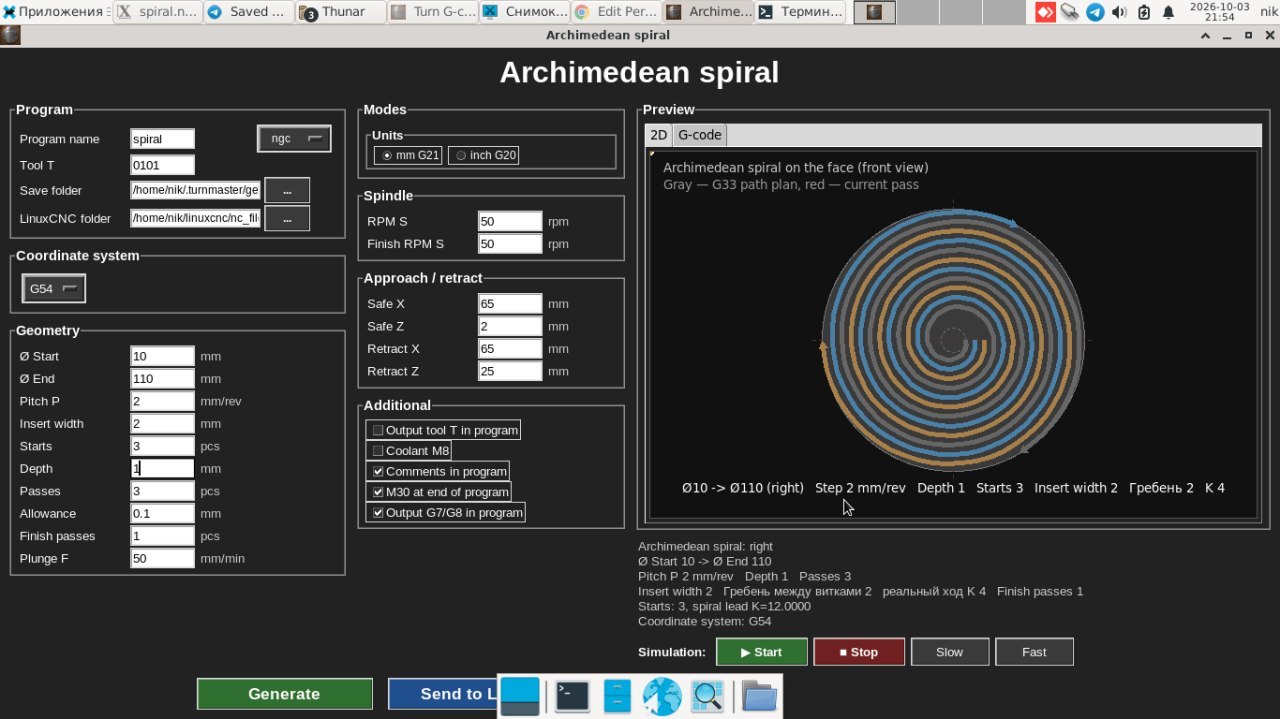
 And here is the cycle form with exactly these parameters (English UI):
- Geometry: start and end diameter, pitch P (the land between turns), insert width, number of starts, depth, number of passes, finishing allowance and finishing passes, plunge feed.
- Spindle: roughing and finishing RPM.
- Approach / retract: safe X/Z and retract X/Z.
- Options: tool T number in the program, coolant M8, comments, M30 at the end, G7/G8 output.
The program works out the real pitch per turn (insert width + land = 4 mm) and the spiral lead (x 3 starts = 12 mm) by itself. The 2D preview on the right shows the planned G33 path and the current pass, so you can check the spiral before the machine moves. Generate writes the .ngc file, Send to LinuxCNC hands it over to LinuxCNC.
Here is the face spiral cycle cut on my lathe, start to finish (real cut, not an air run). Two frames are attached; a short video of the whole cut (49 s, sped up 2-4x, with music) is on the cycle page:
turngcode.com/en/features/archimedean-spiral/
I painted the face black before cutting so the spiral is easy to see on camera; the paint went on a bit unevenly, so some lands look thinner than they are. The video colour is slightly corrected for contrast, nothing else is edited.
Parameters: diameter 10 -> 110 mm, 3 starts, 2 mm insert (groove) + 2 mm land = 4 mm per turn, spiral lead 12 mm, 1 mm deep in 3 passes + 1 finishing pass, 50 RPM, right-hand.
How it works: the spiral is a G33 move along X, synchronized with the spindle encoder - the same way threads are cut, only across the face instead of along Z. The program works out the lead from the insert width, the land between turns and the number of starts.
Handy detail: the hand of the spiral is set simply by the order of the diameters. Start at the small diameter and finish at the large one - you get a right-hand spiral. Swap the start and end diameters (cut from the outside in) - and the same cycle gives a left-hand spiral, with the same spindle direction.
More on the geometry, lead and speeds, with a sample program:
turngcode.com/en/blog/archimedean-spiral-face-groove/
Questions and criticism welcome.
- Geometry: start and end diameter, pitch P (the land between turns), insert width, number of starts, depth, number of passes, finishing allowance and finishing passes, plunge feed.
- Spindle: roughing and finishing RPM.
- Approach / retract: safe X/Z and retract X/Z.
- Options: tool T number in the program, coolant M8, comments, M30 at the end, G7/G8 output.
The program works out the real pitch per turn (insert width + land = 4 mm) and the spiral lead (x 3 starts = 12 mm) by itself. The 2D preview on the right shows the planned G33 path and the current pass, so you can check the spiral before the machine moves. Generate writes the .ngc file, Send to LinuxCNC hands it over to LinuxCNC.
Last edit: 03 Oct 2026 19:21 by Odessit.
Please Log in or Create an account to join the conversation.
- Odessit
- Offline
- New Member
-
Less
More
- Posts: 7
- Thank you received: 2
06 Oct 2026 18:20 #350150
by Odessit
Replied by Odessit on topic Turn G-code: conversational lathe cycle generator for LinuxCNC (12 cycles)
A quick question: is it OK to add Turn G-code (commercial, with a free 15-day trial) to the CAM table on the wiki Cam page (wiki.linuxcnc.org/cgi-bin/wiki.pl?Cam), next to CamBam / Estlcam / SheetCam? If yes, could someone PM me the wiki password? Thanks.
Please Log in or Create an account to join the conversation.
- tommylight
-
- Offline
- Moderator
-
Less
More
- Posts: 21957
- Thank you received: 7478
06 Oct 2026 18:48 #350152
by tommylight
Replied by tommylight on topic Turn G-code: conversational lathe cycle generator for LinuxCNC (12 cycles)
I do not know the Wiki password, and the PM is disabled on this forum ( i think). That info should be in the Wiki, see if you can find something like "how to edit pages" or similar.
SheetCam is not a trial version, it is a limited output version (at least it was), no idea about the others but i tend to think they also have usable limited versions, not trials.
Either way, Open Source project so only open source stuff should be here, and that puts us in a bind as there is often talk about Fusion360 and other payed stuff.
-
We do have several versions of lathe conversational and macros, all free and open source and included with LinuxCNC, but i have limited experience with them, so i would really appreciate if someone else can share what is different or what is better in your software.
BTW, if it turns out we already had everything your software can do, i will really be disappointed, as i allowed this based on you being a member here for quite some time, and hoping you already checked before putting me in a very bad position.
So here is an idea, make a comparison chart between the included stuff and your software, that helps a lot in winning customers.
SheetCam is not a trial version, it is a limited output version (at least it was), no idea about the others but i tend to think they also have usable limited versions, not trials.
Either way, Open Source project so only open source stuff should be here, and that puts us in a bind as there is often talk about Fusion360 and other payed stuff.
-
We do have several versions of lathe conversational and macros, all free and open source and included with LinuxCNC, but i have limited experience with them, so i would really appreciate if someone else can share what is different or what is better in your software.
BTW, if it turns out we already had everything your software can do, i will really be disappointed, as i allowed this based on you being a member here for quite some time, and hoping you already checked before putting me in a very bad position.
So here is an idea, make a comparison chart between the included stuff and your software, that helps a lot in winning customers.
Please Log in or Create an account to join the conversation.
- Odessit
- Offline
- New Member
-
Less
More
- Posts: 7
- Thank you received: 2
06 Oct 2026 19:31 #350153
by Odessit
Replied by Odessit on topic Turn G-code: conversational lathe cycle generator for LinuxCNC (12 cycles)
Thanks Tom, fair points. Understood about the wiki - open source only, I'll leave it.
Good idea about the comparison chart, here it is:
turngcode.com/en/blog/turn-gcode-vs-free-linuxcnc-lathe-tools/
To be honest about the overlap: the basics (turning, facing, boring, chamfer/radius, simple threading) are covered by the free Lathe Macros and LatheEasyStep too, and LatheEasyStep does free contours and keyway slotting, which Turn G-code doesn't. Where Turn G-code is different: multi-start threads, tapered threads over the full length (G76 only tapers the entry/exit), set run-in/run-out, concave sphere and the face spiral, it runs standalone on Linux or Windows without touching the config, and has output options for controls without G76.
If anything in the table about the free tools is wrong, please correct me and I'll fix it.
Good idea about the comparison chart, here it is:
turngcode.com/en/blog/turn-gcode-vs-free-linuxcnc-lathe-tools/
To be honest about the overlap: the basics (turning, facing, boring, chamfer/radius, simple threading) are covered by the free Lathe Macros and LatheEasyStep too, and LatheEasyStep does free contours and keyway slotting, which Turn G-code doesn't. Where Turn G-code is different: multi-start threads, tapered threads over the full length (G76 only tapers the entry/exit), set run-in/run-out, concave sphere and the face spiral, it runs standalone on Linux or Windows without touching the config, and has output options for controls without G76.
If anything in the table about the free tools is wrong, please correct me and I'll fix it.
The following user(s) said Thank You: tommylight
Please Log in or Create an account to join the conversation.
- tommylight
-
- Offline
- Moderator
-
Less
More
- Posts: 21957
- Thank you received: 7478
06 Oct 2026 21:07 #350156
by tommylight
-
First, thank you for making me feel a lot better about this, i checked your website, and the first thing you mention is the fact that LinuxCNC has such tools. Thank you for the respect.
Also checked the comparison, but i can not decide anything as i have very little experience with a CNC lathe, so i will leave that to others to decide for themselves.
-
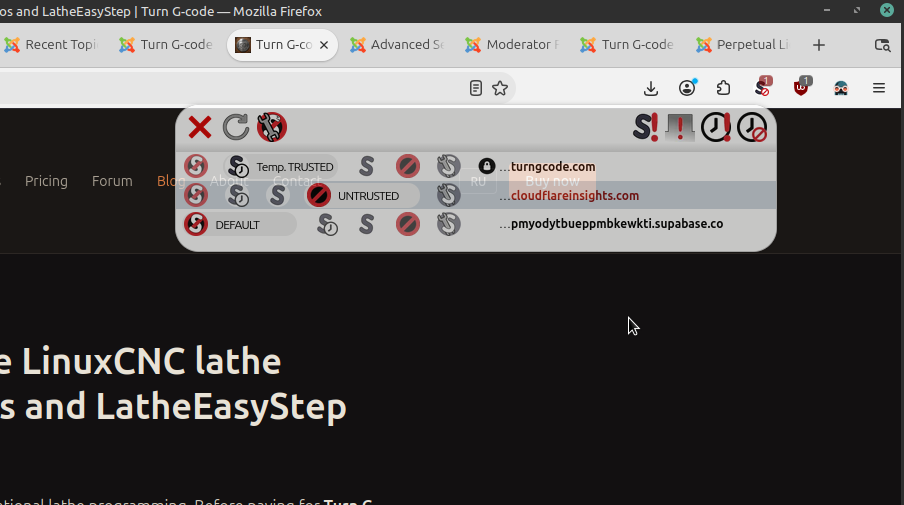
As for the website, see the attached picture, it is trying to run a script that points to a fuzzy website, see above the mouse.
This should be easy to remove, just check your HTML/CSS/JS files for that web name and remove it.
It also may be functional, but since everything works fine without it, you might as well remove it.
Again, thank you for being fair and respectful, very much appreciated.
Replied by tommylight on topic Turn G-code: conversational lathe cycle generator for LinuxCNC (12 cycles)
I did not say that, at least id did not want to say that, i meant i am sure about SheetCAM, but not about the rest, so if the rest have trial versions, it should also be possible to add yours, and i mentioned where the password should be, but last i checked the wiki was 15 years ago.Thanks Tom, fair points. Understood about the wiki - open source only, I'll leave it.
-
First, thank you for making me feel a lot better about this, i checked your website, and the first thing you mention is the fact that LinuxCNC has such tools. Thank you for the respect.
Also checked the comparison, but i can not decide anything as i have very little experience with a CNC lathe, so i will leave that to others to decide for themselves.
-
As for the website, see the attached picture, it is trying to run a script that points to a fuzzy website, see above the mouse.
This should be easy to remove, just check your HTML/CSS/JS files for that web name and remove it.
It also may be functional, but since everything works fine without it, you might as well remove it.
Again, thank you for being fair and respectful, very much appreciated.
Attachments:
Please Log in or Create an account to join the conversation.
- Odessit
- Offline
- New Member
-
Less
More
- Posts: 7
- Thank you received: 2
07 Oct 2026 19:05 #350159
by Odessit
Replied by Odessit on topic Turn G-code: conversational lathe cycle generator for LinuxCNC (12 cycles)
Thanks Tom, and sorry for misreading you on the wiki.
▎ About the script: that's Cloudflare Web Analytics (static.cloudflareinsights.com), the visit counter of Cloudflare, which hosts the site. No cookies, no tracking across sites, just page view counts so I can see which pages people actually read. NoScript flags it, and the site works fine without it, so blocking it is totally OK.
▎ If anyone still has edit access to the wiki CAM page, I'd be glad to have a line for Turn G-code there (commercial, 15-day trial), next to SheetCAM and the others.
▎ About the script: that's Cloudflare Web Analytics (static.cloudflareinsights.com), the visit counter of Cloudflare, which hosts the site. No cookies, no tracking across sites, just page view counts so I can see which pages people actually read. NoScript flags it, and the site works fine without it, so blocking it is totally OK.
▎ If anyone still has edit access to the wiki CAM page, I'd be glad to have a line for Turn G-code there (commercial, 15-day trial), next to SheetCAM and the others.
Please Log in or Create an account to join the conversation.
- Other Stuff
- Show Your Stuff
- Turn G-code: conversational lathe cycle generator for LinuxCNC (12 cycles)
Time to create page: 0.138 seconds