

- Posts: 42
- Thank you received: 2
temporary work offsets. external offset or something else?
2 years 10 months ago #287318
by lunada
Replied by lunada on topic temporary work offsets. external offset or something else?
well crap, i didnt realize that there wasn't a numerical input box for pyvcp. I swore i had seen one before.
Please Log in or Create an account to join the conversation.
2 years 10 months ago #287322
by lunada
Replied by lunada on topic temporary work offsets. external offset or something else?
hmm it doesnt look like g52 is going to work either. i'm trying to add or subtract from the current work offset, not just tell the machine where it is. so for example, if the corner of the spoilboard is x0y0z0 but the part is 3" from there in x and y, i just want to offset the work offset by 3" instead of changing it, if that makes sense. That way the machine doesnt need to be in any specific position when the temporary offset is entered, it just shifts the whole program by that amount (probably like the external offset would, except i dont want the machine to move until the program starts)
Please Log in or Create an account to join the conversation.

2 years 10 months ago #287337
by Aciera
GladeVCP does have an entry widget but you would have to change to a gui that uses gtk.
Replied by Aciera on topic temporary work offsets. external offset or something else?
Yes, there is the 'spinbox' widget, but that might be a bit of a pain since you have to use the the up/down arrows to adjust the value as it does not take values using the keyboard:well crap, i didnt realize that there wasn't a numerical input box for pyvcp. I swore i had seen one before.
GladeVCP does have an entry widget but you would have to change to a gui that uses gtk.
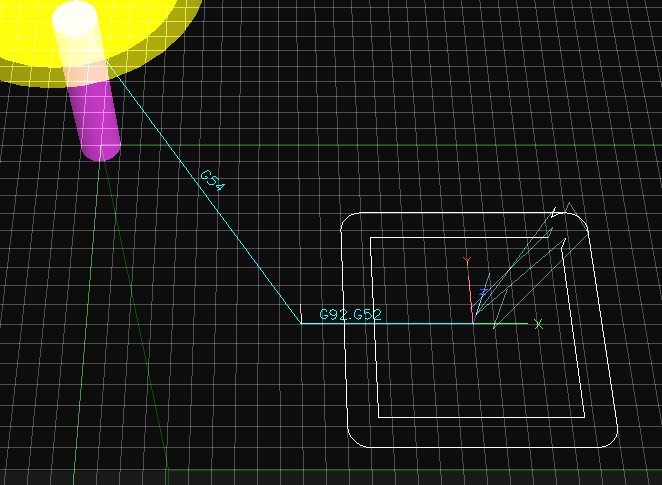
Sounds exactly what G52 does, add an offset to the current work offset. This screen shot shows the effect of 'G52 x80' on top of an existing G54 offset. :hmm it doesnt look like g52 is going to work either. i'm trying to add or subtract from the current work offset, not just tell the machine where it is. so for example, if the corner of the spoilboard is x0y0z0 but the part is 3" from there in x and y, i just want to offset the work offset by 3" instead of changing it, if that makes sense.
The following user(s) said Thank You: lunada
Please Log in or Create an account to join the conversation.
2 years 10 months ago #287344
by Aciera
Replied by Aciera on topic temporary work offsets. external offset or something else?
Here is an alternative that calls up a popup window for the operator to input the X,Y,Z offset values which get stored oin motion.analog-in-(00, 01, 02) pins. In a second step these values are then used to set the current work offset. You would probably want to create a custom pyvcp button that calls 'M401' as an MDI command.

This is an adaptation of an older tcl remap I found on the forum. It works but it may need a bit of polishing as I'm not really familiar with tcl. This could probably be done in python as well.
This is the content of 'M141' in the 'mcodes' folder:
This is the '401remap.ngc' in the 'remap_subs' that would be called by the custom button:
The [RS274NGC] section of your ini file would need to include:
This is an adaptation of an older tcl remap I found on the forum. It works but it may need a bit of polishing as I'm not really familiar with tcl. This could probably be done in python as well.
This is the content of 'M141' in the 'mcodes' folder:
Code:
#!/usr/bin/tclsh
# EDIT here to set ::the_pin_name as required:
set ::the_pin_name_1 motion.analog-in-00
set ::default_value_x 0
set ::the_pin_name_2 motion.analog-in-01
set ::default_value_y 0
set ::the_pin_name_3 motion.analog-in-02
set ::default_value_z 0
# Note: This file must:
# have execute permissions (chmod +x this_file_name)
# be located according to rules for user M codes
# exist before starting LinuxCNC
#------------------------------------------------------------------
set ::prog [file tail $::argv0]
set ::value_x $::default_value_x
set ::value_y $::default_value_y
set ::value_z $::default_value_z
package require Hal
package require Tk
proc go {} {
if [catch {
puts "$::prog:$::the_pin_name_1 before: [hal getp $::the_pin_name_1]"
hal setp $::the_pin_name_1 $::value_x
puts "$::prog:$::the_pin_name_1 after: [hal getp $::the_pin_name_1]"
puts "$::prog:$::the_pin_name_2 before: [hal getp $::the_pin_name_2]"
hal setp $::the_pin_name_2 $::value_y
puts "$::prog:$::the_pin_name_2 after: [hal getp $::the_pin_name_2]"
puts "$::prog:$::the_pin_name_3 before: [hal getp $::the_pin_name_3]"
hal setp $::the_pin_name_3 $::value_z
puts "$::prog:$::the_pin_name_3 after: [hal getp $::the_pin_name_3]"
hal setp $::the_pin_name_3 $::value_z
} msg ] {
set ::value_x "FIXME"
set ::value_y "FIXME"
set ::value_z "FIXME"
popup "ERROR\n\n$msg"
} else {
exit 0
}
}
proc abort {} {
popup "Aborting Gcode program"
exit 1
}
proc err_exit {msg} {
popup $msg
exit 1
}
proc popup {msg} {
puts stderr "$::prog: $msg"
tk_messageBox \
-title "$::prog Set Offset" \
-type ok \
-message "$msg"
}
wm title . "$::prog Set Offset"
wm protocol . WM_DELETE_WINDOW {puts "$::prog: window close disallowed"}
pack [label .l1 -text "X:"] -side left
pack [entry .e1 -textvar ::value_x] -side left
pack [label .l2 -text "Y:"] -side left
pack [entry .e2 -textvar ::value_y] -side left
pack [label .l3 -text "Z:"] -side left
pack [entry .e3 -textvar ::value_z] -side left
bind .e1 <Return> go
pack [button .b -text Go -command go] -side left
pack [button .a -text Abort -command abort] -side left
This is the '401remap.ngc' in the 'remap_subs' that would be called by the custom button:
Code:
o<401remap> sub
; open user input popup
M141
; update motion.analog pins
M66 E0 L0
; set current work offset
G10 L2 P0 X#<_hal[motion.analog-in-00]> Y#<_hal[motion.analog-in-01]> Z#<_hal[motion.analog-in-02]>
o<401remap> endsub
The [RS274NGC] section of your ini file would need to include:
Code:
[RS274NGC]
USER_M_PATH = ./mcodes
SUBROUTINE_PATH = ./remap_subs
HAL_PIN_VARS = 1
REMAP = M401 modalgroup=10 ngc=401remap
The following user(s) said Thank You: lunada
Please Log in or Create an account to join the conversation.

2 years 10 months ago #287358
by andypugh
Replied by andypugh on topic temporary work offsets. external offset or something else?
For this I would use a GladeVCP box and an action widget.
If you look here at section 7.5 and 7.6:
linuxcnc.org/docs/stable/html/gui/gladev...mand_on_button_press
You can create an on-screen button that runs an MDI command, and it can use values direct from the screen, no need to export to G-code analogue inputs.
If you look here at section 7.5 and 7.6:
linuxcnc.org/docs/stable/html/gui/gladev...mand_on_button_press
You can create an on-screen button that runs an MDI command, and it can use values direct from the screen, no need to export to G-code analogue inputs.
Please Log in or Create an account to join the conversation.
2 years 10 months ago - 2 years 10 months ago #287359
by Aciera
Replied by Aciera on topic temporary work offsets. external offset or something else?
Ah thanks, I wasn't aware that we could use GladeVCP panels with the axis gui.
[edit]
Just to give you one more option:
Here is a custom mcode using python that works on it's own. Calling it will open a popup for XYZ values (includes value checking) and a click on the 'Set' button will set the current work offsets to the entered values, so there are no halpins involved.
[edit]
Just to give you one more option:
Here is a custom mcode using python that works on it's own. Calling it will open a popup for XYZ values (includes value checking) and a click on the 'Set' button will set the current work offsets to the entered values, so there are no halpins involved.
Code:
#!/usr/bin/python3
import linuxcnc
import tkinter as tk
from tkinter import Tk, X, BOTH, LEFT
from tkinter import ttk
from tkinter.ttk import Frame, Label, Entry, Button
# add/remove the entries needed
entry_list = ('X','Y','Z')
class SimpleDialog(Frame):
def __init__(self):
super().__init__()
self.initUI()
def initUI(self):
self.master.title("Enter Offset ")
self.pack(fill=BOTH, expand=True)
self.entries = []
for entry in entry_list:
self.e = self.createEntry(entry)
self.entries.append(self.e)
self.label_error = ttk.Label(self, foreground='red')
self.label_error.pack(fill=X, padx=5, expand=True)
frame_last = Frame(self)
frame_last.pack(fill=X)
self.btn = Button(frame_last, text="Set", command=self.onSubmit)
self.btn.pack(padx=5, pady=5)
self.btn.bind('<Return>', self.onSubmit)
def createEntry(self, entry):
frame = Frame(self)
frame.pack(fill=X)
lbl = Label(frame, text=entry+":", width=4)
lbl.pack(side=LEFT, padx=5, pady=2)
self.vcmd = (self.register(self.validate), '%P', '%W')
self.entry = Entry(frame)
self.entry.insert(0, '0')
self.entry.config(validate='focusout', validatecommand=self.vcmd)
self.entry.pack(fill=X, padx=5, expand=True)
return self.entry
def show_message(self, w, error='', color='black'):
color_state = []
self.label_error['text'] = error
for i in range(len(self.entries)):
if w == str(self.entries[i]):
self.entries[i]['foreground'] = color
color_state.append(str(self.entries[i].cget('foreground')))
if 'red' in color_state:
self.btn.configure(state="disabled")
else:
self.btn.configure(state="normal")
def validate(self, value, w):
try:
result = float(value)
self.show_message(w)
return True
except ValueError:
self.show_message(w, 'Invalid entry.', 'red')
return False
def onSubmit(self, *args):
value1 = float(self.entries[0].get())
value2 = float(self.entries[1].get())
value3 = float(self.entries[2].get())
# Get rid of the error message if the user clicks the
# close icon instead of the submit button
try:
root.destroy()
except:
pass
c = linuxcnc.command()
c.mdi('G10 L2 P0 X%f Y%f Z%f ' % (value1, value2, value3))
self.quit()
# This part triggers the dialog
root = Tk()
# the more entries in the list the longer the window needs to be
l = len(entry_list)
root.geometry("250x" + str(l*22+60) + "+300+300")
app = SimpleDialog()
root.mainloop()
Last edit: 2 years 10 months ago by Aciera.
The following user(s) said Thank You: lunada
Please Log in or Create an account to join the conversation.
Time to create page: 0.143 seconds