LinuxCNC compatible industrial PC

More
1 year 5 months ago #328425 by dbtayl

do not use inexpensive power supplies, not worth the headache they cause, the time wasted finding they are the problem, nor the damage they might cause, and some are danger to life by not being isolated from the mains.
 
Definitely this! Bad power supplies are a nightmare. Maybe they work OK. Maybe they just die early. Worse cases are fire/shock, impossible-to-diagnose issues, dying and taking your entire system with it, etc. Some of the cheap supplies are terrifyingly bad.

Years back I was working with Intel NUCs in an automotive application. They would have all sorts of strange behavior- crashes, reboots, stuttering, video artifacts, ...- when run off a cheap inverter. Apparently the inverter was sufficient to cause problems... after going through the 110Vac -> 19V DC adapter, and the internal 19Vdc -> 12/5/3.3/1.8Vdc converters.


Slightly more on topic, I've got a fanless Celeron PC like this one (looks like it at least, I don't have the exact model, but it's a J6412 chipset): www.amazon.com/HUNSN-Fanless-Industrial-...g/dp/B0CGLR51SL?th=1
 It's... fine. Jitter numbers are nothing special (~30000 ns IIRC), but I also haven't had any thermal issues with it. I admittedly haven't watched the CPU temperature directly to have hard data to back that up, and my shop space is stably at a relatively low temperature. I specifically wanted fanless so there was no place for dust, metal chips, etc. to ingress.

I suspect you can lock the CPU frequency at the lowest to keep temps down, though I haven't bothered.
The following user(s) said Thank You: tommylight

Please Log in or Create an account to join the conversation.

More
1 year 5 months ago #328427 by tommylight
In Linux you can always check temperatures with
sensors
in a terminal, it will show something like this
Code:
cnc@512NVME:~$ sensors coretemp-isa-0000 Adapter: ISA adapter Package id 0: +38.0°C (high = +80.0°C, crit = +100.0°C) Core 0: +30.0°C (high = +80.0°C, crit = +100.0°C) Core 4: +31.0°C (high = +80.0°C, crit = +100.0°C) Core 8: +27.0°C (high = +80.0°C, crit = +100.0°C) Core 12: +31.0°C (high = +80.0°C, crit = +100.0°C) Core 16: +32.0°C (high = +80.0°C, crit = +100.0°C) Core 20: +30.0°C (high = +80.0°C, crit = +100.0°C) Core 28: +32.0°C (high = +80.0°C, crit = +100.0°C) Core 29: +32.0°C (high = +80.0°C, crit = +100.0°C) Core 30: +32.0°C (high = +80.0°C, crit = +100.0°C) Core 31: +32.0°C (high = +80.0°C, crit = +100.0°C) hidpp_battery_0-hid-3-3 Adapter: HID adapter in0: 0.00 V acpitz-acpi-0 Adapter: ACPI interface temp1: +27.8°C amdgpu-pci-0300 Adapter: PCI adapter vddgfx: 768.00 mV fan1: 0 RPM (min = 0 RPM, max = 3000 RPM) edge: +41.0°C (crit = +100.0°C, hyst = -273.1°C) (emerg = +105.0°C) junction: +43.0°C (crit = +110.0°C, hyst = -273.1°C) (emerg = +115.0°C) mem: +44.0°C (crit = +100.0°C, hyst = -273.1°C) (emerg = +105.0°C) PPT: 10.00 W (cap = 219.00 W) nvme-pci-0400 Adapter: PCI adapter Composite: +31.9°C (low = -273.1°C, high = +69.8°C) (crit = +79.8°C) cnc@512NVME:~$

Please Log in or Create an account to join the conversation.

More
1 year 5 months ago #329296 by workshop54
I did some configuration and testing on the Fitlet3.

I made changes in the BIOS, ran the script created by mozmck ( forum.linuxcnc.org/38-general-linuxcnc-q...ead-and-irq-affinity ) and did the latency test (results in the thread forum.linuxcnc.org/38-general-linuxcnc-q...ead-and-irq-affinity ). It doesn't look too good so far for the Fitlet3.

Does anyone have ideas on how to improve it because I'm all out of ideas (for now)

Please Log in or Create an account to join the conversation.

More
1 year 5 months ago #329297 by unknown
Just run the latency tests that come with linuxcnc. If they look ok go with it.
But I've never had much faith with the Atom platform for Linuxcnc.

Please Log in or Create an account to join the conversation.
More
1 year 5 months ago #329305 by workshop54
I started with the latency tests, but then I found the script to run latency tests.

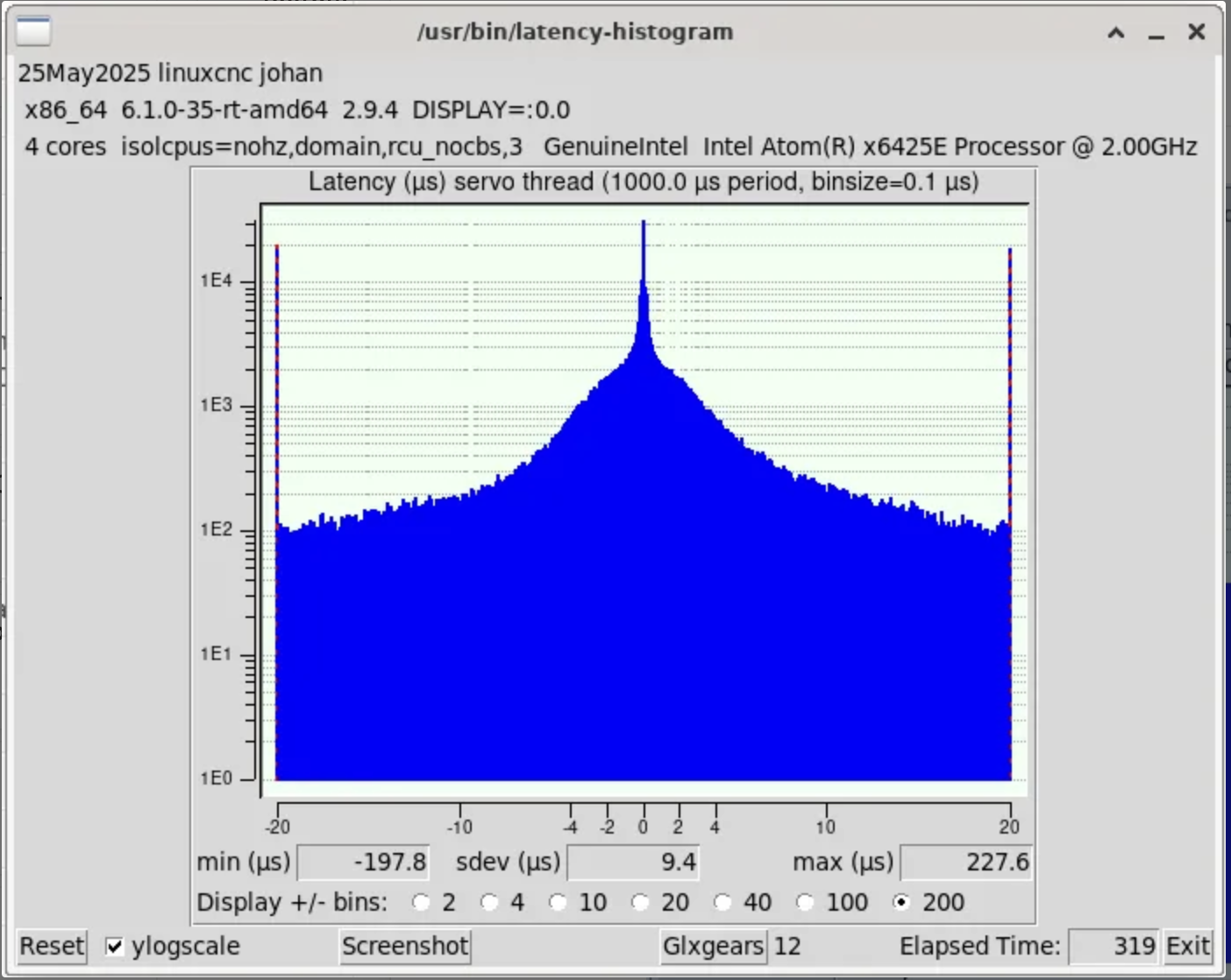
The best result I got with with latency-histogram --nobase was about 230000


I logged every change I made and the results after the change, which gives me some nice insights what happens, but I cannot get the latency any lower. 

I mentioned the "Atom platform", but I don't have enough experience with hardware to know exactly what you mean by that. I can make an educated guess, but that's basically it. 
So instead of looking for PC's of a specific brand and type, would it be better to look at platforms that work well?
 

Please Log in or Create an account to join the conversation.

More
1 year 5 months ago #329310 by unknown
try isolcpus=2,3

Please Log in or Create an account to join the conversation.

Time to create page: 0.405 seconds
Powered by Kunena Forum
