LinuxCNC compatible industrial PC

More
1 year 5 months ago #329313 by unknown
Atom is the cpu.

I've had good results with 3rd gen 4 core i5s, specifically Lenovo M73 tower, works well enough for software step generation.

Ex corporate PCs (x86/64 platforms)seem to be best bang for buck, RPi5 with a NVMe drive are quite quick, latency is usable, I've had one on the test bench communicating with a 7i92 for a few weeks with no issues. Spent a few weeks in January putting together the RPi Linuxcnc images that are for upload.
Odroid have a good range of compact x86/64 boards, I have an earlier model H3 plus that's been in for 4 or 5 years.

Asrok J series MB work well, either 4 or dual core.
The following user(s) said Thank You: workshop54

Please Log in or Create an account to join the conversation.

More
1 year 5 months ago #329453 by workshop54
I tried your suggestion, but that didn't work either.

I decided to follow the advice you guys gave me earlier and just buy and old PC (a Lenovo ThinkCentre M83 SFF). Let's hope that will yield better results.

Please Log in or Create an account to join the conversation.
More
1 year 5 months ago #329476 by PCW
Note that for Mesa Ethernet cards the latency test is not terribly useful.
What is much more important is network latency. Default Mesa driver settings
will drop (timeout) packets if the return data takes more than 80% of the
servo period. As long as you do not drop packets due to these timeouts, latency is
relatively unimportant/

if you have a mesa card, try this:

sudo chrt 99 ping -i .001 -q -c 60000 10.10.10.10

(this will run for 1 minute and print delay statistics)
 
Change the IP address if you use 192.168.1.121

 
The following user(s) said Thank You: workshop54

Please Log in or Create an account to join the conversation.

More
1 year 4 months ago #329557 by workshop54
Thanks PCW,

I'll give that a try.

Please Log in or Create an account to join the conversation.

More
1 year 4 months ago #329559 by workshop54
Hi PCW,

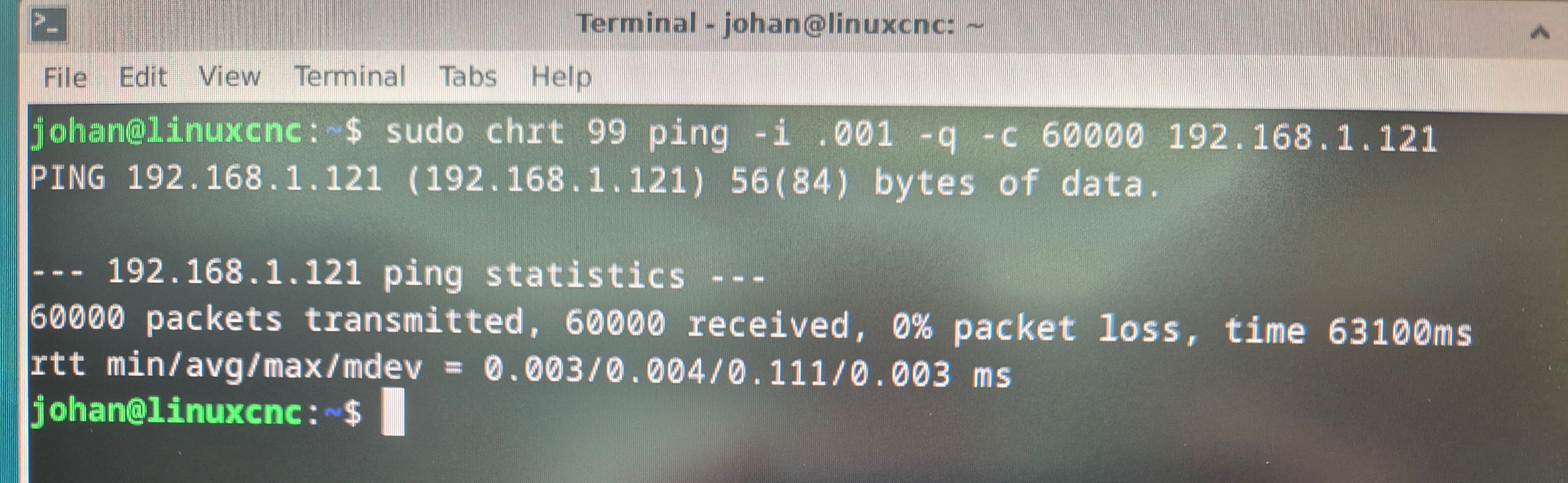
Here are the results of the test you suggested. It is on a completely fresh install of LinuxCNC and I only changed the network settings using the standard ISO image. What do you think?


Please Log in or Create an account to join the conversation.

More
1 year 4 months ago #329561 by PCW
It looks like you have the host IP address set to 192.168.1.121.
This will not work, you need to set the host address to something
different but in  the same network range, say 192.168.1.100

(in other words, you were not pinging the Mesa card but rather the host itself)
 
The following user(s) said Thank You: workshop54

Please Log in or Create an account to join the conversation.

Time to create page: 0.072 seconds
Powered by Kunena Forum
