
- Hardware & Machines
- Computers and Hardware
- LinuxCNC latency and jitter improvements with PREEMPT_RT kernel parameter tuning
LinuxCNC latency and jitter improvements with PREEMPT_RT kernel parameter tuning
- tommylight
-
 Topic Author
- Offline
- Moderator
-

Less
More
- Posts: 22002
- Thank you received: 7488
15 Sep 2025 16:31 #335033
by tommylight
LinuxCNC latency and jitter improvements with PREEMPT_RT kernel parameter tuning was created by tommylight
Bumped into this today, goes in great detail on how to tweak and tune for good latency:
dantalion.nl/2024/09/29/linuxcnc-latency...arameter-tuning.html
Not my article.
dantalion.nl/2024/09/29/linuxcnc-latency...arameter-tuning.html
Not my article.
The following user(s) said Thank You: juergen-home, wsmagee
Please Log in or Create an account to join the conversation.
- tommylight
-
Topic Author
- Offline
- Moderator
-
Less
More
- Posts: 22002
- Thank you received: 7488
31 Oct 2025 21:03 #337602
by tommylight
Replied by tommylight on topic LinuxCNC latency and jitter improvements with PREEMPT_RT kernel parameter tuning
Found another one
blog.loriowar.com/how-to-reduce-jitter-on-linuxcnc
blog.loriowar.com/how-to-reduce-jitter-on-linuxcnc
Please Log in or Create an account to join the conversation.
- tommylight
-
Topic Author
- Offline
- Moderator
-
Less
More
- Posts: 22002
- Thank you received: 7488
31 Oct 2025 21:24 #337607
by tommylight
Replied by tommylight on topic LinuxCNC latency and jitter improvements with PREEMPT_RT kernel parameter tuning
I agree, but pretty good, non the less.
I am adding this one from our forum by Mozmck as i looked for it several times and could not find it, i am thinking this should be in the "computers and hardware" section, not in the "general LinuxCNC questions".
forum.linuxcnc.org/38-general-linuxcnc-q...ead-and-irq-affinity
I am adding this one from our forum by Mozmck as i looked for it several times and could not find it, i am thinking this should be in the "computers and hardware" section, not in the "general LinuxCNC questions".
forum.linuxcnc.org/38-general-linuxcnc-q...ead-and-irq-affinity
Please Log in or Create an account to join the conversation.
- abu
-

- Offline
- Senior Member
-

Less
More
- Posts: 47
- Thank you received: 18
29 Nov 2025 18:52 - 29 Nov 2025 20:27 #339443
by abu
Replied by abu on topic LinuxCNC latency and jitter improvements with PREEMPT_RT kernel parameter tuning
Warning: I have a machine with a 12-core Intel i7 (numbered 0 to 11). The numbers shown in this answer will vary depending on the number of cores in each machine. Do not use Ctrl+C/Ctrl+V. You must read the articles cited in the thread. The calculations for the numbers are there.
Ladies and gentlemen, this looks promising!
It seems that POSIX realtime (PREEMPT_RT kernels) is finally working decently.
This is my machine (linuxcnc info):
The file: /tmp/linuxcnc_info.txt
can be posted to a forum or a web site like:
pastebin.com
in order to provide information about the linuxcnc
system and configuration.
VIEWER=kate
Date: sáb 29 nov 2025 19:36:45 CET
UTC Date: sáb 29 nov 2025 18:36:45 UTC
this program: /home/xiuser/linuxcnc/scripts/linuxcnc_info
uptime: 19:36:45 up 1:04, 1 user, load average: 0,35, 0,50, 0,79
lsb_release -a: Distributor ID: Debian
Description: Debian GNU/Linux 12 (bookworm)
Release: 12
Codename: bookworm
linuxcnc: /home/xiuser/linuxcnc/scripts/linuxcnc
pwd: /home/xiuser
USER: xiuser
LOGNAME: xiuser
HOME: /home/xiuser
EDITOR:
VISUAL:
LANGUAGE:
TERM: xterm-256color
COLORTERM: truecolor
DISPLAY: :0.0
DESKTOP: lightdm-xsession
display size: 3360x1080 pixels (889x285 millimeters)
PATH: /home/xiuser/linuxcnc/scripts:/home/xiuser/linuxcnc/bin:/home/xiuser/.local/bin:/home/xiuser/linuxcnc/bin:/home/xiuser/linuxcnc/scripts:/home/xiuser/linuxcnc/tcl:/usr/local/bin:/usr/bin:/bin:/usr/local/games:/usr/games
uname items:
nodename -n: HPi7
kernel-name -s: Linux
kernel-vers -v: #1 SMP PREEMPT_RT Debian 6.12.57-1~bpo12+1 (2025-11-17)
machine -m: x86_64
processor -p: unknown
platform -i: unknown
oper system -o: GNU/Linux
/proc items:
cmdline: BOOT_IMAGE=/boot/vmlinuz-6.12.57+deb12-rt-amd64 root=UUID=6dec6435-2cb8-427a-9697-c8d82ce45bdb ro net.ifnames=0 skew_tick=1 nosmt=force kthread_cpus=0-5 irqaffinity=0-5 rcu_nocb_poll rcu_nocbs=6-11 nohz=on nohz_full=6-11 isolcpus=6-11 intel_pstate=disable amd_pstate=disable idle=poll cpufreq.off=1 cpuidle.off=1 intel_idle.max_cstate=0 amd_idle.max_cstate=0 nowatchdog nosoftlockup i915.force_probe=!4680 xe.force_probe=4680
model name: 12th Gen Intel(R) Core(TM) i7-12700
cores: 12
cpu MHz: 3685.961
parport:
serial:
Versions:
gcc: gcc (Debian 12.2.0-14+deb12u1) 12.2.0
python: Python 3.11.2
git: git version 2.39.5
git commit: 2cee0486b4
tcl: 8.6
tk: 8.6
glade: glade 3.40.0
linuxcnc_var all:
LINUXCNCVERSION: 2.10.0~pre0
LINUXCNC_AUX_GLADEVCP: /usr/share/linuxcnc/aux_gladevcp
LINUXCNC_AUX_EXAMPLES: /usr/share/linuxcnc/aux_examples
REALTIME: /home/xiuser/linuxcnc/scripts/realtime
RTS: uspace
HALLIB_DIR: /home/xiuser/linuxcnc/lib/hallib
PYTHON: /usr/bin/python3.11
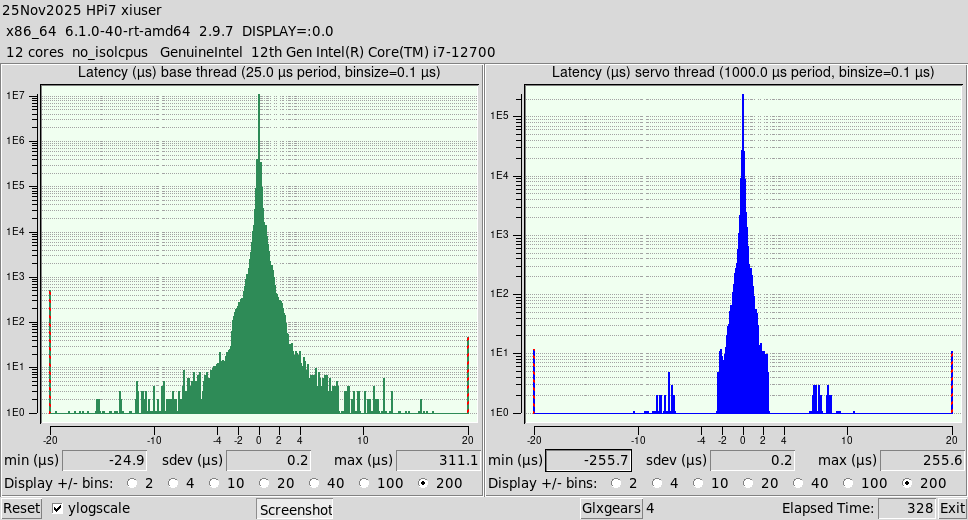
This is the latency histogram before tuning:
And this is the histogram after the changes...
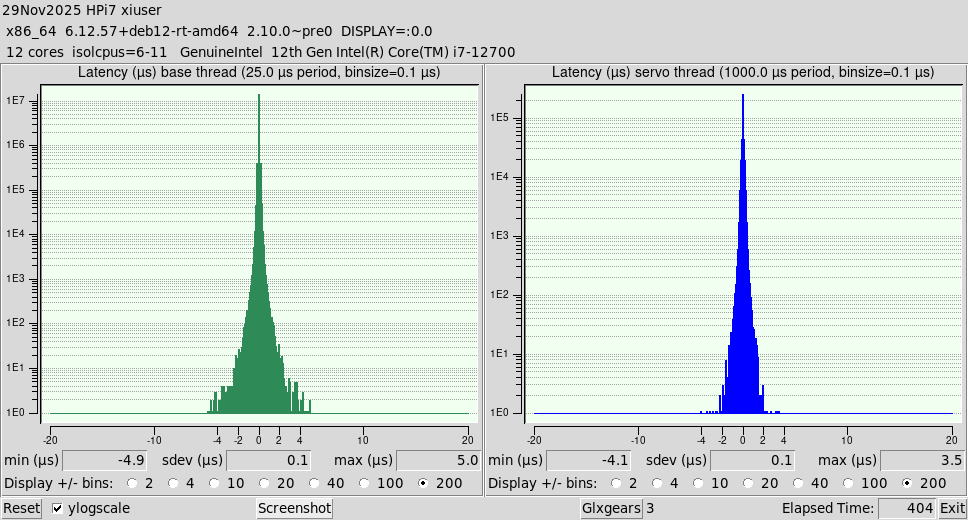
First change: A new kernel that includes the new Intel Xe video driver, which will replace the venerable i915. Xe is in kernels >= 6.12.
kernel-vers -v: #1 SMP PREEMPT_RT Debian 6.12.57-1~bpo12+1 (2025-11-17)
Second change: the GRUB_CMDLINE_LINUX_DEFAULT boot line in Grub. Now cmdline is:
cmdline: BOOT_IMAGE=/boot/vmlinuz-6.12.57+deb12-rt-amd64 root=UUID=6dec6435-2cb8-427a-9697-c8d82ce45bdb ro net.ifnames=0 skew_tick=1 nosmt=force kthread_cpus=0-5 irqaffinity=0-5 rcu_nocb_poll rcu_nocbs=6-11 nohz=on nohz_full=6-11 isolcpus=6-11 intel_pstate=disable amd_pstate=disable idle=poll cpufreq.off=1 cpuidle.off=1 intel_idle.max_cstate=0 amd_idle.max_cstate=0 nowatchdog nosoftlockup i915.force_probe=!4680 xe.force_probe=4680
Note: force_probe => i915 OFF and Xe ON. My video device ID is 4680. Yours may be different. lspci gives the ID for each machine.
Third change: Modifying kernel parameters at runtime:
sudo sysctl kernel.timer_migration=0
sudo sysctl kernel.sched_rt_runtime_us=-1
Ladies and gentlemen, this looks promising!
It seems that POSIX realtime (PREEMPT_RT kernels) is finally working decently.
This is my machine (linuxcnc info):
The file: /tmp/linuxcnc_info.txt
can be posted to a forum or a web site like:
pastebin.com
in order to provide information about the linuxcnc
system and configuration.
VIEWER=kate
Date: sáb 29 nov 2025 19:36:45 CET
UTC Date: sáb 29 nov 2025 18:36:45 UTC
this program: /home/xiuser/linuxcnc/scripts/linuxcnc_info
uptime: 19:36:45 up 1:04, 1 user, load average: 0,35, 0,50, 0,79
lsb_release -a: Distributor ID: Debian
Description: Debian GNU/Linux 12 (bookworm)
Release: 12
Codename: bookworm
linuxcnc: /home/xiuser/linuxcnc/scripts/linuxcnc
pwd: /home/xiuser
USER: xiuser
LOGNAME: xiuser
HOME: /home/xiuser
EDITOR:
VISUAL:
LANGUAGE:
TERM: xterm-256color
COLORTERM: truecolor
DISPLAY: :0.0
DESKTOP: lightdm-xsession
display size: 3360x1080 pixels (889x285 millimeters)
PATH: /home/xiuser/linuxcnc/scripts:/home/xiuser/linuxcnc/bin:/home/xiuser/.local/bin:/home/xiuser/linuxcnc/bin:/home/xiuser/linuxcnc/scripts:/home/xiuser/linuxcnc/tcl:/usr/local/bin:/usr/bin:/bin:/usr/local/games:/usr/games
uname items:
nodename -n: HPi7
kernel-name -s: Linux
kernel-vers -v: #1 SMP PREEMPT_RT Debian 6.12.57-1~bpo12+1 (2025-11-17)
machine -m: x86_64
processor -p: unknown
platform -i: unknown
oper system -o: GNU/Linux
/proc items:
cmdline: BOOT_IMAGE=/boot/vmlinuz-6.12.57+deb12-rt-amd64 root=UUID=6dec6435-2cb8-427a-9697-c8d82ce45bdb ro net.ifnames=0 skew_tick=1 nosmt=force kthread_cpus=0-5 irqaffinity=0-5 rcu_nocb_poll rcu_nocbs=6-11 nohz=on nohz_full=6-11 isolcpus=6-11 intel_pstate=disable amd_pstate=disable idle=poll cpufreq.off=1 cpuidle.off=1 intel_idle.max_cstate=0 amd_idle.max_cstate=0 nowatchdog nosoftlockup i915.force_probe=!4680 xe.force_probe=4680
model name: 12th Gen Intel(R) Core(TM) i7-12700
cores: 12
cpu MHz: 3685.961
parport:
serial:
Versions:
gcc: gcc (Debian 12.2.0-14+deb12u1) 12.2.0
python: Python 3.11.2
git: git version 2.39.5
git commit: 2cee0486b4
tcl: 8.6
tk: 8.6
glade: glade 3.40.0
linuxcnc_var all:
LINUXCNCVERSION: 2.10.0~pre0
LINUXCNC_AUX_GLADEVCP: /usr/share/linuxcnc/aux_gladevcp
LINUXCNC_AUX_EXAMPLES: /usr/share/linuxcnc/aux_examples
REALTIME: /home/xiuser/linuxcnc/scripts/realtime
RTS: uspace
HALLIB_DIR: /home/xiuser/linuxcnc/lib/hallib
PYTHON: /usr/bin/python3.11
This is the latency histogram before tuning:
And this is the histogram after the changes...
First change: A new kernel that includes the new Intel Xe video driver, which will replace the venerable i915. Xe is in kernels >= 6.12.
kernel-vers -v: #1 SMP PREEMPT_RT Debian 6.12.57-1~bpo12+1 (2025-11-17)
Second change: the GRUB_CMDLINE_LINUX_DEFAULT boot line in Grub. Now cmdline is:
cmdline: BOOT_IMAGE=/boot/vmlinuz-6.12.57+deb12-rt-amd64 root=UUID=6dec6435-2cb8-427a-9697-c8d82ce45bdb ro net.ifnames=0 skew_tick=1 nosmt=force kthread_cpus=0-5 irqaffinity=0-5 rcu_nocb_poll rcu_nocbs=6-11 nohz=on nohz_full=6-11 isolcpus=6-11 intel_pstate=disable amd_pstate=disable idle=poll cpufreq.off=1 cpuidle.off=1 intel_idle.max_cstate=0 amd_idle.max_cstate=0 nowatchdog nosoftlockup i915.force_probe=!4680 xe.force_probe=4680
Note: force_probe => i915 OFF and Xe ON. My video device ID is 4680. Yours may be different. lspci gives the ID for each machine.
Third change: Modifying kernel parameters at runtime:
sudo sysctl kernel.timer_migration=0
sudo sysctl kernel.sched_rt_runtime_us=-1
Attachments:
Last edit: 29 Nov 2025 20:27 by abu. Reason: Warning
The following user(s) said Thank You: tommylight
Please Log in or Create an account to join the conversation.
- rodw
-

- Offline
- Platinum Member
-

Less
More
- Posts: 12159
- Thank you received: 4151
29 Nov 2025 20:58 #339452
by rodw
Replied by rodw on topic LinuxCNC latency and jitter improvements with PREEMPT_RT kernel parameter tuning
This one at least mentions network latency. In my view this is more important than system latency where you are not using software stepping.Found another one
blog.loriowar.com/how-to-reduce-jitter-on-linuxcnc
Please Log in or Create an account to join the conversation.
- wsmagee
- Offline
- New Member
-

Less
More
- Posts: 2
- Thank you received: 1
21 Dec 2025 19:04 #340376
by wsmagee
Replied by wsmagee on topic LinuxCNC latency and jitter improvements with PREEMPT_RT kernel parameter tuning
I need good latency for software stepping. I am using a parallel port and a
HobbyCNC PRO Stepper
board.
I needed to update my LinuxCNC computer as it was still using Debian 9 on a really old computer. I had ok latency on that old computer.
But during the move to Debian 12 I decided to use a somewhat newer PC as well, the "new" one having an AMD A-8 processor.
During initial tests, Debian 12 worked well on this old AMD-A8 machine, but the latency was horrid.
I found this article as well: dantalion.nl/2024/09/29/linuxcnc-latency...arameter-tuning.html and after tuning mine I now have excellent latency for my needs. (Big thanks to "dantalion" if they ever see this post, I could not find any way to contact them to thank them in their blog.)
Before tuning: 200,000+ microsecond base threads
After tuning :6,000 and below.
I ended up only setting 1 of the 4 processors for the real time tasks, vs 1/2 of them. As when I was watching the cores using HTOP while running latency tests, one core appeared to be doing nothing. And the non-realtime cores were getting hit pretty hard by other tasks when making the system work. So I figured I would just let one core handle the real-time, and let the other three cores take care of other stuff. Not sure if this will cause me a problem at some point, but so far it all seems to be working well, when actually running LinuxCNC and performing some real world initial tests.
Below is what I ended up doing, I am posting steps and my settings below for others that may be new to Linux and struggling with how/where to make the edits. I have not found anything that walks through all the steps. If you are using this, just be sure you read the above mentioned article and change the lines that impact the cores.
I don't fully understand all of the settings, but applying all of them noted in the blog post seemed to work for me.
What I did was:Edit Boot Parameters:
- open the terminal
- edit the grub file using nano: sudo nano /etc/default/grub
- edit one line in grub (put a # in front of the existing GRUB_CMDLINE_LINUX_DEFAULT="quiet" line to comment it out, then make a new line below it.) My new line is: GRUB_CMDLINE_LINUX_DEFAULT="quiet splash skew_tick=1 nosmt=force kthread_cpus=0-1 irqaffinity=0-1 rcu_nocb_poll rcu_nocbs=2-3 nohz=on nohz_full=2-3 isolcpus=2-3 intel_pstate=disable amd_pstate=disable idle=poll cpufreq.off=1 cpuidle.off=1 intel_idle.max_cstate=1 amd_idle.max_cstate=1 nowatchdog nosoftlockup"
- save the file and close out of nano
- update grub: sudo update-grubEdit sysctl parameters:Make a new file for the custom config and add contents to it: sudo nano /etc/sysctl.d/99-custom.conf
- added the following lines:
kernel.timer_migration=0
kernel.sched_rt_runtime_us=-1
- save file and close out of nano
- I think rebooted computer.
Also I experimented with another machine that had an AMD A10 core, but that would result in 2 of the cores showing as inactive in htop, I think it has something to do with this chip being really 2 chips with dual cores, vs the AMD A8 is a single chip with 4 cores. I'm sure there is a way to address that, but since the A8 chipped worked out, I never pursued anymore.
I needed to update my LinuxCNC computer as it was still using Debian 9 on a really old computer. I had ok latency on that old computer.
But during the move to Debian 12 I decided to use a somewhat newer PC as well, the "new" one having an AMD A-8 processor.
During initial tests, Debian 12 worked well on this old AMD-A8 machine, but the latency was horrid.
I found this article as well: dantalion.nl/2024/09/29/linuxcnc-latency...arameter-tuning.html and after tuning mine I now have excellent latency for my needs. (Big thanks to "dantalion" if they ever see this post, I could not find any way to contact them to thank them in their blog.)
Before tuning: 200,000+ microsecond base threads
After tuning :6,000 and below.
I ended up only setting 1 of the 4 processors for the real time tasks, vs 1/2 of them. As when I was watching the cores using HTOP while running latency tests, one core appeared to be doing nothing. And the non-realtime cores were getting hit pretty hard by other tasks when making the system work. So I figured I would just let one core handle the real-time, and let the other three cores take care of other stuff. Not sure if this will cause me a problem at some point, but so far it all seems to be working well, when actually running LinuxCNC and performing some real world initial tests.
Below is what I ended up doing, I am posting steps and my settings below for others that may be new to Linux and struggling with how/where to make the edits. I have not found anything that walks through all the steps. If you are using this, just be sure you read the above mentioned article and change the lines that impact the cores.
I don't fully understand all of the settings, but applying all of them noted in the blog post seemed to work for me.
What I did was:Edit Boot Parameters:
- open the terminal
- edit the grub file using nano: sudo nano /etc/default/grub
- edit one line in grub (put a # in front of the existing GRUB_CMDLINE_LINUX_DEFAULT="quiet" line to comment it out, then make a new line below it.) My new line is: GRUB_CMDLINE_LINUX_DEFAULT="quiet splash skew_tick=1 nosmt=force kthread_cpus=0-1 irqaffinity=0-1 rcu_nocb_poll rcu_nocbs=2-3 nohz=on nohz_full=2-3 isolcpus=2-3 intel_pstate=disable amd_pstate=disable idle=poll cpufreq.off=1 cpuidle.off=1 intel_idle.max_cstate=1 amd_idle.max_cstate=1 nowatchdog nosoftlockup"
- save the file and close out of nano
- update grub: sudo update-grubEdit sysctl parameters:Make a new file for the custom config and add contents to it: sudo nano /etc/sysctl.d/99-custom.conf
- added the following lines:
kernel.timer_migration=0
kernel.sched_rt_runtime_us=-1
- save file and close out of nano
- I think rebooted computer.
Also I experimented with another machine that had an AMD A10 core, but that would result in 2 of the cores showing as inactive in htop, I think it has something to do with this chip being really 2 chips with dual cores, vs the AMD A8 is a single chip with 4 cores. I'm sure there is a way to address that, but since the A8 chipped worked out, I never pursued anymore.
The following user(s) said Thank You: tommylight
Please Log in or Create an account to join the conversation.
- rodw
-
- Offline
- Platinum Member
-
Less
More
- Posts: 12159
- Thank you received: 4151
21 Dec 2025 23:35 #340385
by rodw
Replied by rodw on topic LinuxCNC latency and jitter improvements with PREEMPT_RT kernel parameter tuning
I also cover RT tuning in this video
What's not immediately clear that the servo thread and base thread are the only RT components used by Linuxcnc so that is why you only see one core in use.
What's not immediately clear that the servo thread and base thread are the only RT components used by Linuxcnc so that is why you only see one core in use.
Please Log in or Create an account to join the conversation.
- Hardware & Machines
- Computers and Hardware
- LinuxCNC latency and jitter improvements with PREEMPT_RT kernel parameter tuning
Time to create page: 0.241 seconds