Lenovo T14 Gen2 AMD - CRAZY High Latency - Am I screwed?

More
8 months 3 weeks ago #342691 by Looby
Like it could be a cooling issue? I guess I can pull the cooler off but the fans are barely spinning and fdoesnt feel warm at all.

Please Log in or Create an account to join the conversation.

More
8 months 3 weeks ago - 8 months 3 weeks ago #342720 by NWE

Cant get any to run live as they just hang at a blank cursor screen.
[1]

Cant even get anything installed due to a "bad archive mirror" error.
[2]

What causes this so I have some idea what to avoid in the future? What in the hardware would cause this?
[3]
 
 
1. I'm currently fighting with a pc with that disease. It seams to be a GPU related issue. I've tried literally everything I can think of, no luck. Odd thing is, I have an identical machine at a client, running the same hardware on Debian just fine. I'm ready to try swapping out the brand new Gigabyte RTX4060 8GB graphics card with another one, beginning to think I might have hit a genuine hardware fault. I'm running various other 4060's and this is the only one doing this.

Might be a bit tough to get into any diagnostics on the live boot to see what is failing. In my case I was able to ssh into the pc from another machine right next to it so I could look at things like: "sudo dmesg", "sudo lspci -v", "sudo journalctl -b 0" and discover the gpu is not properly starting. That pc is booting an SSD with Debian already installed, with open-ssh running. I tried Nvidia drivers of several varieties.

I do not know what graphics your machine runs, it might not even be Nvidia.

2. First thing I check when I get that error: Is my pc's clock set correctly? Usually that is the problem. It does not have to be perfectly correct, but there is a limit to where security certificates fail to work. I open a terminal and:
check the date:
nwe@debian:~$ date
Mon Feb  9 04:39:11 AM CST 2026
set the date:
nwe@debian:~$ sudo date -s "Mon Feb  9 04:39:11 AM 2026"
[sudo] password for nwe: {typed my password and hit enter}
Mon Feb  9 04:39:11 AM CST 2026

3. I feel your pain. Some hardware/software combinations simply fail to work correctly. It seems there's a lot of hardware that 'just works'. In general, avoiding low end hardware and very very new hardware can save you lots of grief. Search the forums and buy something that is working, I mean exactly the same model and version, lands you a pretty good chance of success. But, as you can read in my #1 above, not even that is a guarrantee. Two identical machines. One just works. The other just doesn't.

I'm not pointing fingers at Linux saying this. My biggest letdown of all time regarding unexpected incompatibilities was on a proprietary os.
Last edit: 8 months 3 weeks ago by NWE. Reason: corrected terminal command

Please Log in or Create an account to join the conversation.

More
8 months 2 weeks ago #342967 by Looby
Sorry for not responding but Ive been trying other distributions (Mint, Ubuntu, and some wonky 3rd one I cant remember) hoping for better results and all end in either failed installs or crappy results.

I have another pc im hoping to try but havent gotten to it yet. Ill try the clock correction thing tomorrow and see if that yields anything better.

Please Log in or Create an account to join the conversation.
More
8 months 2 weeks ago #343095 by Looby
ooook. 

* Repasted CPU cooler.
* Took SSD out and wiped separately
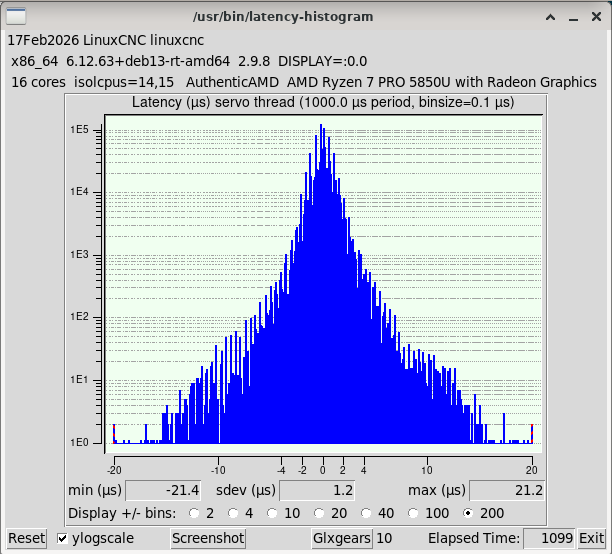
* Reinstalled linuxcnc debian trixie package and did a couple tweaks from the links you posted.  All didnt work for me

Now im down to 21.2 microseconds in histogram with nobase.  10 glxgears and 4 x 4k youtube videos running.

 
The following user(s) said Thank You: NWE

Please Log in or Create an account to join the conversation.

More
8 months 2 weeks ago #343096 by NWE
Very good, looks like a win.

Please Log in or Create an account to join the conversation.

Time to create page: 0.178 seconds
Powered by Kunena Forum
