Boltonbrass wrote: Andy you are my savior. All I need is Bolton Brass engraved on a 1/2" round piece of brass with a single letter or number below it.
This might not be too hard, you only need a few extra letters (B,o,l,t,n,r,a,s)
But: The point of this routine was to generate the numbers on-the-fly for scale rings of various types (0-360, -180-180, 0-10. 0-25 etc)
For engraving the same words many times it is probably sensible
just to use a CAM system like Fusion360 to create the G-code once
:
If you want to use this G-code, then it might help to explain how it works.
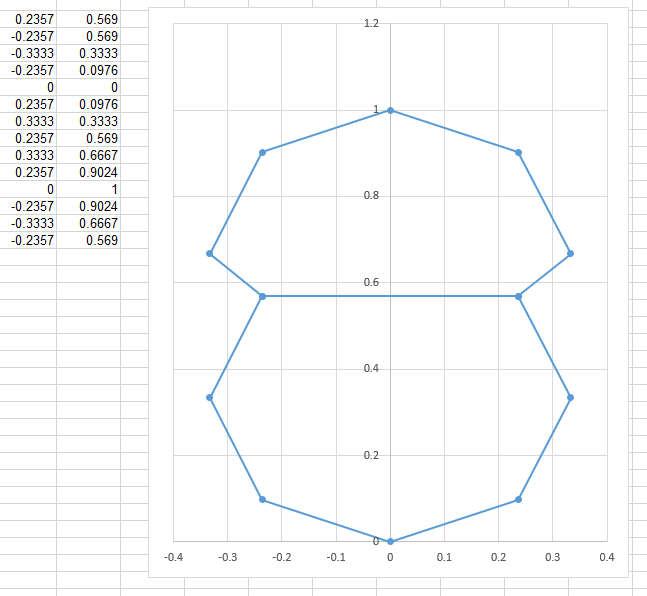
Each number is created by joining points on two octagons. (generally). I worked out the coordinates of the required points, typed them in (probably in Excel) and then formed them in to the subroutines (again, probably using Excel, but it was quite a while ago)
This is the number 8
Code:
O8 sub
G92 A0 X0
G0 A[0.2357 * #41] X[0.5690 * #42] Z[#<_dia> / 2 + 1]
G1 Z[#<_dia> / 2 - #<_depth>]
A[-.2357 * #41] X[0.5690 * #42]
A[-.3333 * #41] X[0.3333 * #42]
A[-.2357 * #41] X[0.0976 * #42]
A[0.0000 * #41] X[0.0000 * #42]
A[0.2357 * #41] X[0.0976 * #42]
A[0.3333 * #41] X[0.3333 * #42]
A[0.2357 * #41] X[0.5690 * #42]
A[0.3333 * #41] X[0.6667 * #42]
A[0.2357 * #41] X[0.9024 * #42]
A[0.0000 * #41] X[1.0000 * #42]
A[-.2357 * #41] X[0.9024 * #42]
A[-.3333 * #41] X[0.6667 * #42]
A[-.2357 * #41] X[0.5690 * #42]
G0 Z[#<_dia> / 2 + 1]
G92.1
O8 endsub
The factors #41 and #42 are used to scale in the A and X directions. Here are the points plotted in Excel:
You would Need to create the letters you need in the same way, and form them into a subroutine looking like the existing digits.
I would suggest using ASCII to name the subroutines:
B = 66
o = 111
l = 108
t = 116
n = 110
r = 114
a = 97
s = 115
. Please tell me you make money doing this......
I actively avoid making money from this. It's important to me to keep it a hobby.