
- Posts: 109
- Thank you received: 0
image to g-code problem
- grey1beard
- Offline
- Premium Member
-

Less
More
11 years 8 months ago - 11 years 8 months ago #56365
by grey1beard
image to g-code problem was created by grey1beard
Just trying a quick experiment to see if a relatively simple method of producing the shape I want would work using the 'image to g-code' conversion.
however, it threw up the error shown in the screen grab attached. The thumbnail above the error window is the .jpg in question, and is designed to produce a dome with 24 ribs outside.
Any ideas as to getting this to work would be gratefully received.
John
however, it threw up the error shown in the screen grab attached. The thumbnail above the error window is the .jpg in question, and is designed to produce a dome with 24 ribs outside.
Any ideas as to getting this to work would be gratefully received.
John
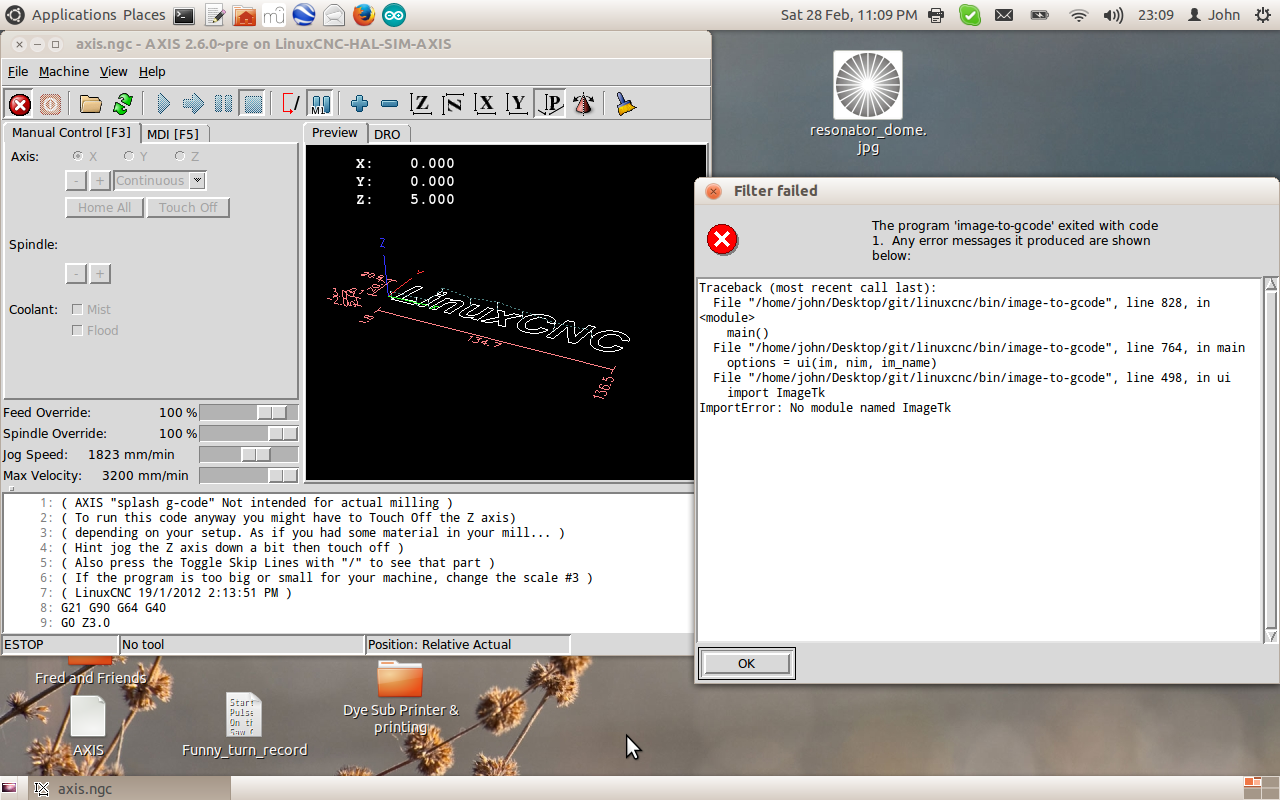
Last edit: 11 years 8 months ago by grey1beard. Reason: spelling
Please Log in or Create an account to join the conversation.
- grey1beard
- Offline
- Premium Member
-
Less
More
- Posts: 109
- Thank you received: 0
11 years 8 months ago #56366
by grey1beard
Replied by grey1beard on topic image to g-code problem
Perhaps the first question should have been "where do I find the ini file to see if the Filter has the required lines inserted or not.
I thought I had done this successfully before, but so long ago I've forgotten the details !
John
I thought I had done this successfully before, but so long ago I've forgotten the details !
John
Please Log in or Create an account to join the conversation.
- dgarrett
- Offline
- Platinum Member
-

Less
More
- Posts: 492
- Thank you received: 297
11 years 8 months ago #56368
by dgarrett
Replied by dgarrett on topic image to g-code problem
you probably need to
Code:
sudo apt-get install libtk-img
Please Log in or Create an account to join the conversation.
- BigJohnT
- Offline
- Administrator
-

Less
More
- Posts: 3981
- Thank you received: 994
11 years 8 months ago #56369
by BigJohnT
Configuration files will be in /linuxcnc/config/name of your config
JT
Replied by BigJohnT on topic image to g-code problem
grey1beard wrote: Perhaps the first question should have been "where do I find the ini file to see if the Filter has the required lines inserted or not.
I thought I had done this successfully before, but so long ago I've forgotten the details !
John
Configuration files will be in /linuxcnc/config/name of your config
JT
Please Log in or Create an account to join the conversation.
- grey1beard
- Offline
- Premium Member
-
Less
More
- Posts: 109
- Thank you received: 0
11 years 7 months ago #56375
by grey1beard
Replied by grey1beard on topic image to g-code problem
Hi dgarrett.
Did that, but no change, still the same error window.
Hi John,
Thanks, so I went there and found the [FILTER] entry as per the manual, so I went back to the actual error window and tried to understand its meaning.
I assume that a "module" is an entry that should be present, but where ?
Should it be in the .ini file, as above, or in .../git/linuxcnc/bin image-to-gcode file ?
John
Did that, but no change, still the same error window.
Hi John,
Thanks, so I went there and found the [FILTER] entry as per the manual, so I went back to the actual error window and tried to understand its meaning.
I assume that a "module" is an entry that should be present, but where ?
Should it be in the .ini file, as above, or in .../git/linuxcnc/bin image-to-gcode file ?
John
Please Log in or Create an account to join the conversation.
- grey1beard
- Offline
- Premium Member
-
Less
More
- Posts: 109
- Thank you received: 0
11 years 7 months ago #56376
by grey1beard
Replied by grey1beard on topic image to g-code problem
Just checked the image-to-gcode file and have copied the portion referred to here
Hope that helps !
John
def ui(im, nim, im_name):
import Tkinter
import ImageTk
import pickle
import nf
app = Tkinter.Tk()
rs274.options.install(app)
app.tk.call("source", os.path.join(BASE, "share", "axis", "tcl", "combobox.tcl"))
Hope that helps !
John
Please Log in or Create an account to join the conversation.
Time to create page: 2.656 seconds