
- Posts: 31
- Thank you received: 0
trouble accessing hal variables from custom M code
- gerrg
- Offline
- Junior Member
-

Less
More
4 years 9 months ago #233015
by gerrg
trouble accessing hal variables from custom M code was created by gerrg
So I've been trying to change the duty cycle of a PWM signal that I setup from a custom M code... but something's not working right. This is my first time messing with custom M codes, so i'm sure there's something small that i'm missing, I'm just not sure what that is. Here's my current setup.
In my main INI file i have this to set the location of my custom M code files:
Then I setup my PWM in a hal file. The file is being pointed to in the INI file by the way
and finally, I have my M100 file (no file type, the entire file name is "M100"), and it's in the "m_codes" folder specified above
I've tried looking at the hal meter to make sure the pwm value changes or not, and it's not changing. I can change the default value in the hal file, and restart linuxCNC and then value changes then... but so far it's not changing with the M code. Any thoughts of where i'm messing up? Thanks a bunch!
In my main INI file i have this to set the location of my custom M code files:
Code:
[RS274NGC]
USER_M_PATH = /home/gerrg/linuxcnc/configs/PrintNC/m_codes/
Then I setup my PWM in a hal file. The file is being pointed to in the INI file by the way
Code:
#setup PWM generator
loadrt pwmgen ouput_type=0
addf pwmgen.update servo-thread
addf pwmgen.make-pulses servo-thread
### ---mist signals start---
#configure PWM signals
#set to a scale from 0 to 100, and over a 2 second period
setp pwmgen.0.enable 1
setp pwmgen.0.scale 100
setp pwmgen.0.pwm-freq .5
setp pwmgen.0.value 55
#mist coolant stuff
loadrt and2 count=2
addf or2.1 servo-thread
addf and2.0 servo-thread
#setup our three inputs (physical button, M7 command, and pwm signal)
net mistOnButton <= hm2_7i76e.0.7i76.0.0.input-31
net mistOnCmd <= iocontrol.0.coolant-mist
net mistOnPWM <= pwmgen.0.pwm
#make M7 command act on PWM signal
net mistOnCmd => and2.0.in0
net mistOnPWM => and2.0.in1
#make output signal based off PWM signal or button
net mistOnButton => or2.1.in0
net and2.0.out => or2.1.in1
net mistOutOn <= or2.1.out
net mistOutOn => hm2_7i76e.0.7i76.0.0.output-09
### ---mist signals end---
and finally, I have my M100 file (no file type, the entire file name is "M100"), and it's in the "m_codes" folder specified above
Code:
#!/bin/bash
#Intended to be run as a remapped M100 command. Used to set the pmw value for the mist system
pwmValue=$1
halcmd setp pwmgen.0.value $pwmValue
exit 0
I've tried looking at the hal meter to make sure the pwm value changes or not, and it's not changing. I can change the default value in the hal file, and restart linuxCNC and then value changes then... but so far it's not changing with the M code. Any thoughts of where i'm messing up? Thanks a bunch!
- andypugh
- Offline
- Moderator
-

Less
More
- Posts: 19899
- Thank you received: 4655
4 years 9 months ago #233051
by andypugh
Replied by andypugh on topic trouble accessing hal variables from custom M code
I think that the word "remapped" in the M-code comment is wrong, as this is a conventional user M-code rather than a remap. (Not important, unless you have a REMAP line in the INI )
Have you set the M100 file to be executable?
If you run the M100 file from the command-line does it work? (it should, but LinuxCNC will need to be running at the same time)
Start LinuxCNC itself from the command-line in order to see error logging that might help.
(The "&" returns you to the command line after starting LinuxCNC so that you can carry on entering commands.)
Have you set the M100 file to be executable?
If you run the M100 file from the command-line does it work? (it should, but LinuxCNC will need to be running at the same time)
Start LinuxCNC itself from the command-line in order to see error logging that might help.
Code:
linuxcnc &
- gerrg
- Offline
- Junior Member
-
Less
More
- Posts: 31
- Thank you received: 0
4 years 9 months ago #233101
by gerrg
Replied by gerrg on topic trouble accessing hal variables from custom M code
good point about the comment. I'll change that now. I do not have it remapped in the ini file (i'm happy to share my ini and hal files if that helps at all by the way)
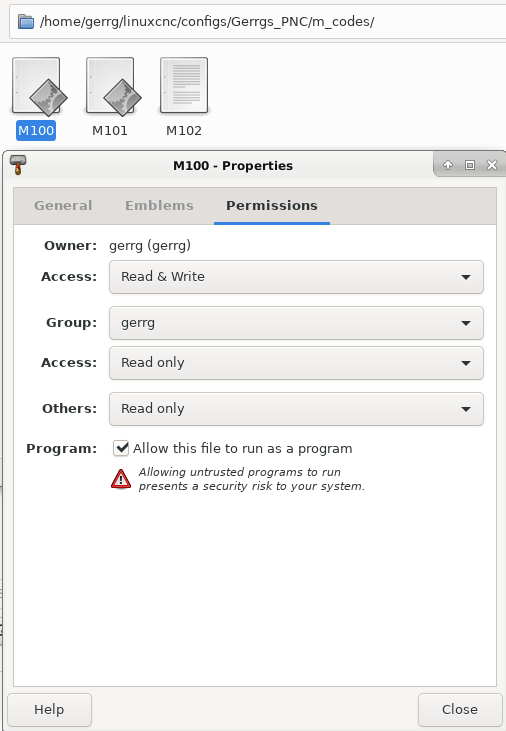
If I right click on the M100 file and go to permissions, it has "Allow this file to run as a program" checked... so I think that's right.
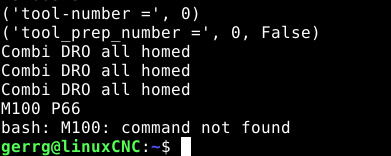
When i run linuxcnc through the terminal with the &, I home my machine and then send a "M100 P66" command, and it says command not found. I'm glad you told me about the 'linuxcnc &" terminal command. That's very helpful for debugging!
it sounds like it's not seeing the M100 file, or least not as a command, so that's a step in the right direction towards figuring things out! Thoughts on what to check next?
If I right click on the M100 file and go to permissions, it has "Allow this file to run as a program" checked... so I think that's right.
When i run linuxcnc through the terminal with the &, I home my machine and then send a "M100 P66" command, and it says command not found. I'm glad you told me about the 'linuxcnc &" terminal command. That's very helpful for debugging!
it sounds like it's not seeing the M100 file, or least not as a command, so that's a step in the right direction towards figuring things out! Thoughts on what to check next?
- Todd Zuercher
- Offline
- Platinum Member
-

Less
More
- Posts: 4793
- Thank you received: 1480
4 years 9 months ago - 4 years 9 months ago #233111
by Todd Zuercher
Replied by Todd Zuercher on topic trouble accessing hal variables from custom M code
When running an M1xx code from the command line, it must be executed as a bash script. So you would type "bash M100 66". (Note that you do not use the P.) And you must be in the dir the file is located.
Some other things to check because they were tripping me up just now when I was trying to test this. If you place the Mxx code files in your nc_files dir you don't have to put the custom M-code path in your INI file. Also make sure that the ini file you are editing and saving your M-code path in is actually the one that you are exicuting (this one got me), and Linuxcnc must be restarted before changes made to the config files (hal or ini) will be used. If you edit the config while Linuxcnc is running the changes will not take effect.
Some other things to check because they were tripping me up just now when I was trying to test this. If you place the Mxx code files in your nc_files dir you don't have to put the custom M-code path in your INI file. Also make sure that the ini file you are editing and saving your M-code path in is actually the one that you are exicuting (this one got me), and Linuxcnc must be restarted before changes made to the config files (hal or ini) will be used. If you edit the config while Linuxcnc is running the changes will not take effect.
Last edit: 4 years 9 months ago by Todd Zuercher.
- gerrg
- Offline
- Junior Member
-
Less
More
- Posts: 31
- Thank you received: 0
4 years 9 months ago #233115
by gerrg
Replied by gerrg on topic trouble accessing hal variables from custom M code
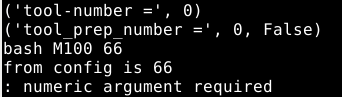
Okay, so I went back out and went to my m_codes folder in the terminal again. started up linuxCNC and did "bash M100 66" and it did infact change the value (I also had it echo out the value, and that worked too. So that's good at least. I had some blank lines which were giving a problem at first, but i just deleted those and it worked fine from the terminal after that
then i went to the linuxCNC program and the MDI tab and entered "M100 P72", but the value didn't change at all. I also put a copy of the M100 file in the NC folder and tried it from there (both with and without the m-code path in the ini file), but couldn't get it to work from either place, or any combination of path in the ini file (or the entire m code path line commented out entirly). the terminal command always worked, but never worked from the MDI tab.
I don't think it's a problem, but i kept getting a message in the terminal ":numeric argument required". it would still run the bash command from the terminal though and would change the value, so it's all a step in the right direction i think.
Also, I did save all my M100 and ini files and such and restart before testing out something different. And I did double check it was the right config... but I also only have a single linuxCNC config on that machine, so that helps. Next try?
then i went to the linuxCNC program and the MDI tab and entered "M100 P72", but the value didn't change at all. I also put a copy of the M100 file in the NC folder and tried it from there (both with and without the m-code path in the ini file), but couldn't get it to work from either place, or any combination of path in the ini file (or the entire m code path line commented out entirly). the terminal command always worked, but never worked from the MDI tab.
I don't think it's a problem, but i kept getting a message in the terminal ":numeric argument required". it would still run the bash command from the terminal though and would change the value, so it's all a step in the right direction i think.
Also, I did save all my M100 and ini files and such and restart before testing out something different. And I did double check it was the right config... but I also only have a single linuxCNC config on that machine, so that helps. Next try?
- andypugh
- Offline
- Moderator
-
Less
More
- Posts: 19899
- Thank you received: 4655
4 years 9 months ago #233118
by andypugh
I just tried a test setup with an M100 and it all seemed to work as expected with LinuxCNC.
Can you attach the INI file and the M100 file?
Replied by andypugh on topic trouble accessing hal variables from custom M code
The #! at the beginning should do that automatically. A test script that I just created (to echo hello) worked that way.When running an M1xx code from the command line, it must be executed as a bash script. So you would type "bash M100 66".
I just tried a test setup with an M100 and it all seemed to work as expected with LinuxCNC.
Can you attach the INI file and the M100 file?
Time to create page: 0.280 seconds