
Cutter compensation G41/42
- 3D-Master
- Offline
- Elite Member
-

Less
More
- Posts: 238
- Thank you received: 5
17 Aug 2026 14:19 #348811
by 3D-Master
Cutter compensation G41/42 was created by 3D-Master
coming from Heidenhain i can just move in one axis including RL/RR (Heidenhain cutter compensation) and the tool will move in one axis as well but it seems like linuxcnc doesnt move in one axis but two. If there is not much space but i need to use cutter comp, then i move to the starting point of the entry radius with 5% distance of the endmill and the entry radius is 5% bigger than the endmill as well and this works flawlessly with Heidenhain.
attached images:
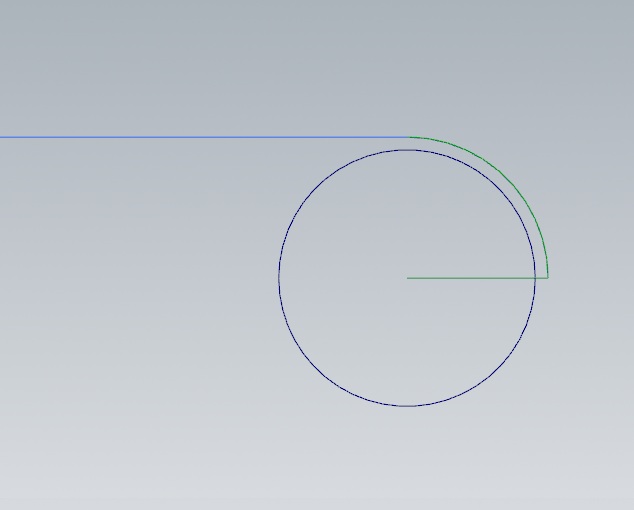
1: starting point. Circle is cutter, green line is entry move and blue line is contour to cut.
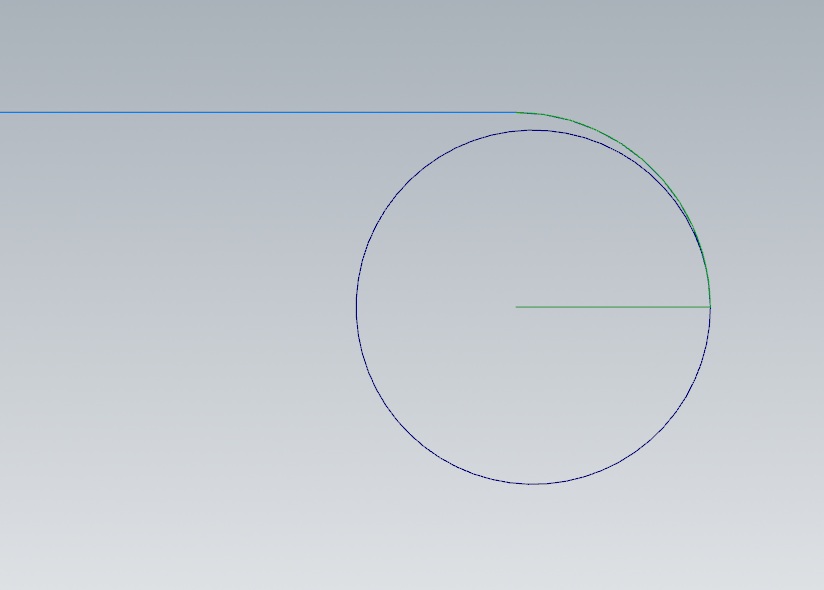
2: moving straight to the starting point of the entry radius then continuing moving along the entry radius.
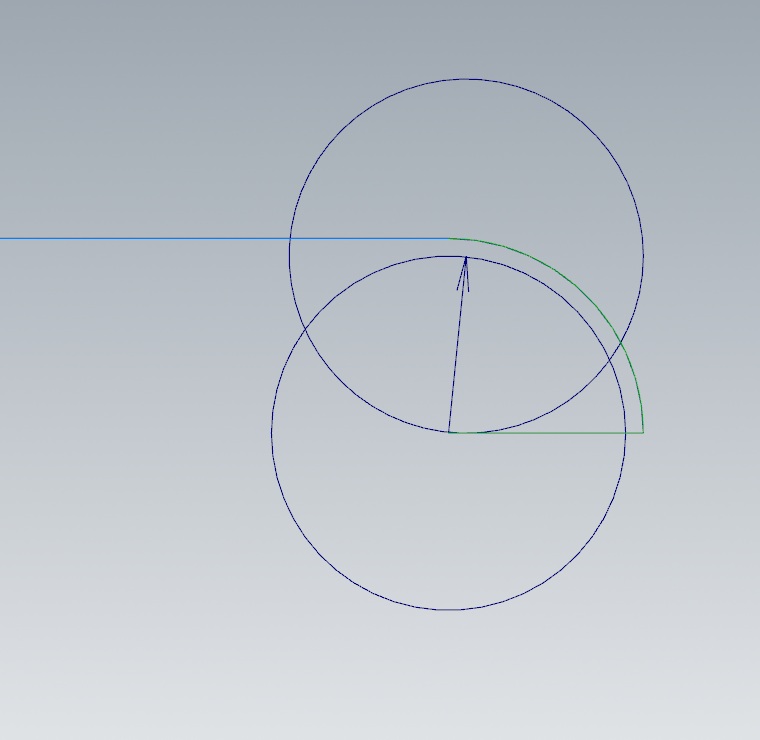
3: this is what i believe linuxcnc does, it moves the tool to the left completely through the entry radius
is there anything i can do to achieve what i can with Heidenhain? (can this be hacked?)
How would you do this?
The exit move is exactly the same (though mirrored) but linuxcnc doesnt have an issue with that.
attached images:
1: starting point. Circle is cutter, green line is entry move and blue line is contour to cut.
2: moving straight to the starting point of the entry radius then continuing moving along the entry radius.
3: this is what i believe linuxcnc does, it moves the tool to the left completely through the entry radius
is there anything i can do to achieve what i can with Heidenhain? (can this be hacked?)
How would you do this?
The exit move is exactly the same (though mirrored) but linuxcnc doesnt have an issue with that.
Please Log in or Create an account to join the conversation.
- Todd Zuercher
-
- Away
- Platinum Member
-

Less
More
- Posts: 4786
- Thank you received: 1476
18 Aug 2026 09:52 #348834
by Todd Zuercher
Replied by Todd Zuercher on topic Cutter compensation G41/42
What does your G-code for the above move look like? The answer might be as simple as adding another line of code, or moving the line where the G41/42 is issued.
Please Log in or Create an account to join the conversation.
- Aciera
-

- Offline
- Administrator
-

Less
More
- Posts: 4818
- Thank you received: 2176
19 Aug 2026 09:37 #348855
by Aciera
Replied by Aciera on topic Cutter compensation G41/42
You might also want to read the relevant documentation (see chapter 4):
linuxcnc.org/docs/stable/html/gcode/tool-compensation.html
linuxcnc.org/docs/stable/html/gcode/tool-compensation.html
Please Log in or Create an account to join the conversation.
- 3D-Master
- Offline
- Elite Member
-
Less
More
- Posts: 238
- Thank you received: 5
23 Aug 2026 12:10 #348935
by 3D-Master
Replied by 3D-Master on topic Cutter compensation G41/42
sorry i didnt get a notification
tool diameter is 10mm
N2 T1 M6
N3 G43 H1
N4 G64 P0.010
N5 S10000 M03
N6 G0 X50.000 Y-30.500 Z20.000
N7 G0 Z0.000
N8 G1 X55.500 F2000 G41
N9 G3 X50.000 Y-25.000 I-5.500 J0.000
N10 G1 X-50.000
N11 G3 X-55.500 Y-30.500 I0.000 J-5.500
N12 G1 X-50.000 G40
N13 G0 Z20.000
also i had read the documentation and also tried to compensate the tool diameter to the right but it will never do the compensation move that i need. i will see if i can use #5410 for my postprocessor so i dont need to use g41/42 ever again.
tool diameter is 10mm
N2 T1 M6
N3 G43 H1
N4 G64 P0.010
N5 S10000 M03
N6 G0 X50.000 Y-30.500 Z20.000
N7 G0 Z0.000
N8 G1 X55.500 F2000 G41
N9 G3 X50.000 Y-25.000 I-5.500 J0.000
N10 G1 X-50.000
N11 G3 X-55.500 Y-30.500 I0.000 J-5.500
N12 G1 X-50.000 G40
N13 G0 Z20.000
also i had read the documentation and also tried to compensate the tool diameter to the right but it will never do the compensation move that i need. i will see if i can use #5410 for my postprocessor so i dont need to use g41/42 ever again.
Please Log in or Create an account to join the conversation.
Time to create page: 0.375 seconds