
- Posts: 63
- Thank you received: 17
Glade Panel in Axis blocks arrow keys
- +Jan+
- Offline
- Senior Member
-

Less
More
8 years 9 months ago - 8 years 9 months ago #104924
by +Jan+
Glade Panel in Axis blocks arrow keys was created by +Jan+
Hello,
i made a glade side Panel for axis which works fine:
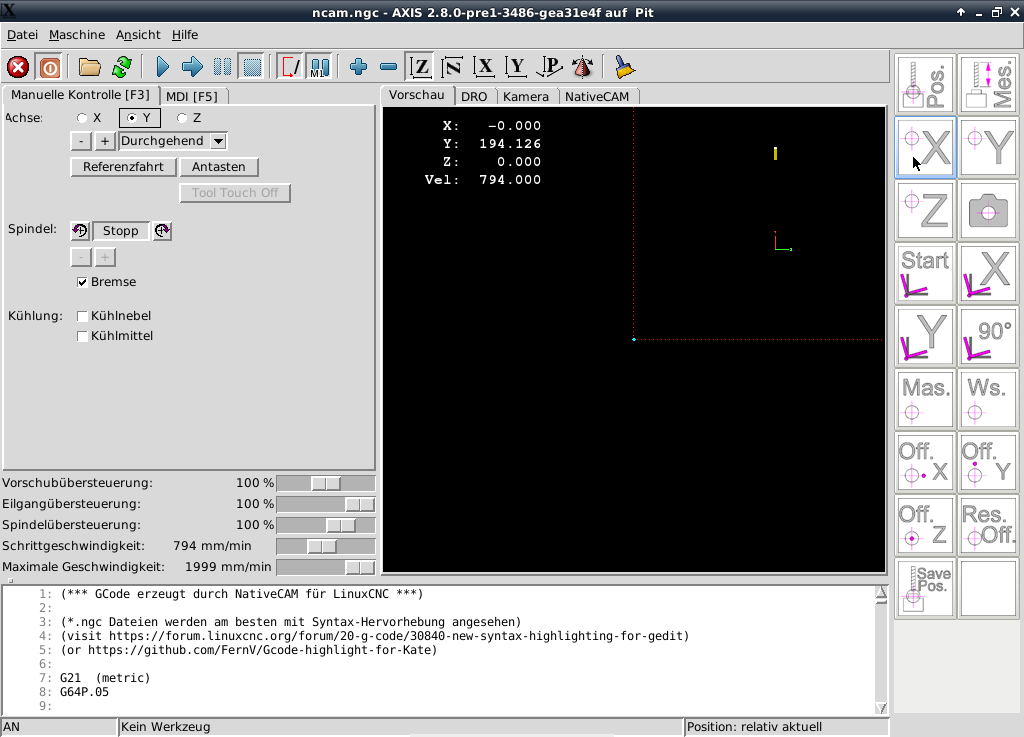
Here is my problem:
If you move the mouse into the side panel while moving the machine with the cursor keys, the machine continues moving even if you let go of the key. This can only be stopped by moving the mouse out of the panel and pressing the cursor keys again. Is there a way to avoid this dangerous behaviour?
I attached the whole config (a lot of copy and paste in it :blush: )
i made a glade side Panel for axis which works fine:
Here is my problem:
If you move the mouse into the side panel while moving the machine with the cursor keys, the machine continues moving even if you let go of the key. This can only be stopped by moving the mouse out of the panel and pressing the cursor keys again. Is there a way to avoid this dangerous behaviour?
I attached the whole config (a lot of copy and paste in it :blush: )
Last edit: 8 years 9 months ago by +Jan+.
Please Log in or Create an account to join the conversation.
- +Jan+
- Offline
- Senior Member
-
Less
More
- Posts: 63
- Thank you received: 17
8 years 9 months ago #105033
by +Jan+
Replied by +Jan+ on topic Glade Panel in Axis blocks arrow keys
No Idea? Maybe wrong Forum Category?
Best Wishes
Jan
Best Wishes
Jan
Please Log in or Create an account to join the conversation.
- cmorley
- Offline
- Moderator
-

Less
More
- Posts: 7368
- Thank you received: 2181
8 years 9 months ago #105059
by cmorley
Replied by cmorley on topic Glade Panel in Axis blocks arrow keys
Focus issues are difficult to fix correctly.
From the manual:
linuxcnc.org/docs/2.7/html/gui/gladevcp....key_handling_in_axis
I can't say if this behavior is new bug or not - I would bet that it is untested by linuxcnc builtin tests..
Are you using version 2.7 or master?
It would be helpful if someone could test 2.6 ,2.7 and master to see if the behavior changed.
Chris M
From the manual:
linuxcnc.org/docs/2.7/html/gui/gladevcp....key_handling_in_axis
I can't say if this behavior is new bug or not - I would bet that it is untested by linuxcnc builtin tests..
Are you using version 2.7 or master?
It would be helpful if someone could test 2.6 ,2.7 and master to see if the behavior changed.
Chris M
Please Log in or Create an account to join the conversation.
- +Jan+
- Offline
- Senior Member
-
Less
More
- Posts: 63
- Thank you received: 17
8 years 9 months ago #105127
by +Jan+
Replied by +Jan+ on topic Glade Panel in Axis blocks arrow keys
Hello Chris,
I`ve did some further tests:
- Testing the behaviour with standard sample glade configs: Same Problem
- Embedding the glade panel as tab: Same Problem
- Updateding from 2.7.11 to 2.7.12 and then to 2.8 Master: Same Problem
The ESC key works in all configurations.
I`ve found an old topic with about a very similar problem (no solution): forum.linuxcnc.org/48-gladevcp/28429-gla...widgets?limitstart=0
I'm grateful for every idea how this problem could be solved.
Best wishes
Jan
I`ve did some further tests:
- Testing the behaviour with standard sample glade configs: Same Problem
- Embedding the glade panel as tab: Same Problem
- Updateding from 2.7.11 to 2.7.12 and then to 2.8 Master: Same Problem
The ESC key works in all configurations.
I`ve found an old topic with about a very similar problem (no solution): forum.linuxcnc.org/48-gladevcp/28429-gla...widgets?limitstart=0
I'm grateful for every idea how this problem could be solved.
Best wishes
Jan
Please Log in or Create an account to join the conversation.
- cmorley
- Offline
- Moderator
-
Less
More
- Posts: 7368
- Thank you received: 2181
8 years 9 months ago #105142
by cmorley
Replied by cmorley on topic Glade Panel in Axis blocks arrow keys
looking in lib/python/gladevcp/xembed.py
looks like the keys you want are purposely ignored:
You could try changing this to see what happens.
Probably just want to not ignore the key release...
Chris M
looks like the keys you want are purposely ignored:
Code:
def keyboard_forward(window, forward):
""" XXX: Keyboard events forwardind
This is kind of hack needed to properly function inside Tk windows.
Gtk app will receive _all_ events, even not needed. So we have to forward
back things that left over after our widgets. Connect handlers _after_
all others and listen for key-presss and key-release events. If key is not
in ignore list - forward it to window id found in evironment.
"""
if not forward:
return
try:
forward = int(forward, 0)
except:
return
from Xlib.protocol import event
from Xlib import display, X
from Xlib.xobject import drawable
d = display.Display()
fw = drawable.Window(d.display, forward, 0)
ks = gtk.keysyms
ignore = [ ks.Tab, ks.Page_Up, ks.Page_Down
, ks.KP_Page_Up, ks.KP_Page_Down
, ks.Left, ks.Right, ks.Up, ks.Down
, ks.KP_Left, ks.KP_Right, ks.KP_Up, ks.KP_Down
, ks.bracketleft, ks.bracketright
]
def gtk2xlib(e, fw, g, type=None):
if type is None: type = e.type
if type == gtk.gdk.KEY_PRESS:
klass = event.KeyPress
elif type == gtk.gdk.KEY_RELEASE:
klass = event.KeyRelease
else:
return
kw = dict(window=fw, detail=e.hardware_keycode,
state=e.state & 0xff,
child=X.NONE, root=g._data['root'],
root_x=g._data['x'], root_y=g._data['y'],
event_x=0, event_y=0, same_screen=1)
return klass(time=e.time, **kw)
def forward(w, e, fw):
if e.keyval in ignore:
return
g = fw.get_geometry()
fe = gtk2xlib(e, fw, g)
if not fe: return
fw.send_event(fe)
window.connect_after("key-press-event", forward, fw)
window.connect("key-release-event", forward, fw)
window.add_events(gtk.gdk.KEY_PRESS_MASK)
window.add_events(gtk.gdk.KEY_RELEASE_MASK)
You could try changing this to see what happens.
Probably just want to not ignore the key release...
Chris M
Please Log in or Create an account to join the conversation.
- +Jan+
- Offline
- Senior Member
-
Less
More
- Posts: 63
- Thank you received: 17
8 years 9 months ago - 8 years 9 months ago #105146
by +Jan+
Replied by +Jan+ on topic Glade Panel in Axis blocks arrow keys
Hello Chris,
thanks a lot for this comment.
I found the file (on my machine the path is /usr/lib/pymodules/python2.7/gladevcp) and did some modifications.
I tried to remove the whole ignore section:
This leads to the following behaviour:
- Pushing the arrow key for x+ or x- , moving the mouse into the glade panel and then releasing the arrow key ==> release not detected
- Moving than with the mouse out of the glade panel and hitting the arrow key once again ==> release detected and machine stops
- Pushing x+ or x- arrow key, moving the mouse into the glade panel and then releasing the arrow key ==> RELEASE DETECTED!
- Then pushing the arrow key y+ or y-, moving the mouse into the glade panel and releasing the arrow key ==> release not detected
- Moving than with the mouse out of the glade panel and hitting the arrow key once again ==> release detected and machine stops
- Pushing y+ or y- arrow key, moving the mouse into the glade panel and then releasing the arrow key ==> RELEASE DETECTED!
- But then the release of x+ and x- is not detected anymore... and so on...
- For Z the behaviour is different: If I move the mouse into the glade panel the axis does not stop if I release the page up/down key, but the direction can be inverted while while the mouse is inside the panel (which is not possibile on the other axes).
For easier understanding I recorded the screen and logged the keys:
I do not need to move the axes while the mouse is inside the glade panel, but then the machine has to stop when I move into the glade panel. Any idea to reach this goal?
Best wishes
Jan
thanks a lot for this comment.
I found the file (on my machine the path is /usr/lib/pymodules/python2.7/gladevcp) and did some modifications.
I tried to remove the whole ignore section:
Code:
...
d = display.Display()
fw = drawable.Window(d.display, forward, 0)
ks = gtk.keysyms
ignore = [
]
def gtk2xlib(e, fw, g, type=None):
...
This leads to the following behaviour:
- Pushing the arrow key for x+ or x- , moving the mouse into the glade panel and then releasing the arrow key ==> release not detected
- Moving than with the mouse out of the glade panel and hitting the arrow key once again ==> release detected and machine stops
- Pushing x+ or x- arrow key, moving the mouse into the glade panel and then releasing the arrow key ==> RELEASE DETECTED!
- Then pushing the arrow key y+ or y-, moving the mouse into the glade panel and releasing the arrow key ==> release not detected
- Moving than with the mouse out of the glade panel and hitting the arrow key once again ==> release detected and machine stops
- Pushing y+ or y- arrow key, moving the mouse into the glade panel and then releasing the arrow key ==> RELEASE DETECTED!
- But then the release of x+ and x- is not detected anymore... and so on...
- For Z the behaviour is different: If I move the mouse into the glade panel the axis does not stop if I release the page up/down key, but the direction can be inverted while while the mouse is inside the panel (which is not possibile on the other axes).
For easier understanding I recorded the screen and logged the keys:
I do not need to move the axes while the mouse is inside the glade panel, but then the machine has to stop when I move into the glade panel. Any idea to reach this goal?
Best wishes
Jan
Last edit: 8 years 9 months ago by +Jan+.
Please Log in or Create an account to join the conversation.
Time to create page: 0.700 seconds