
mirror backplot
- billykid
-
 Topic Author
- Offline
- Platinum Member
-

Less
More
- Posts: 486
- Thank you received: 82
11 Jun 2026 11:57 #347029
by billykid
mirror backplot was created by billykid
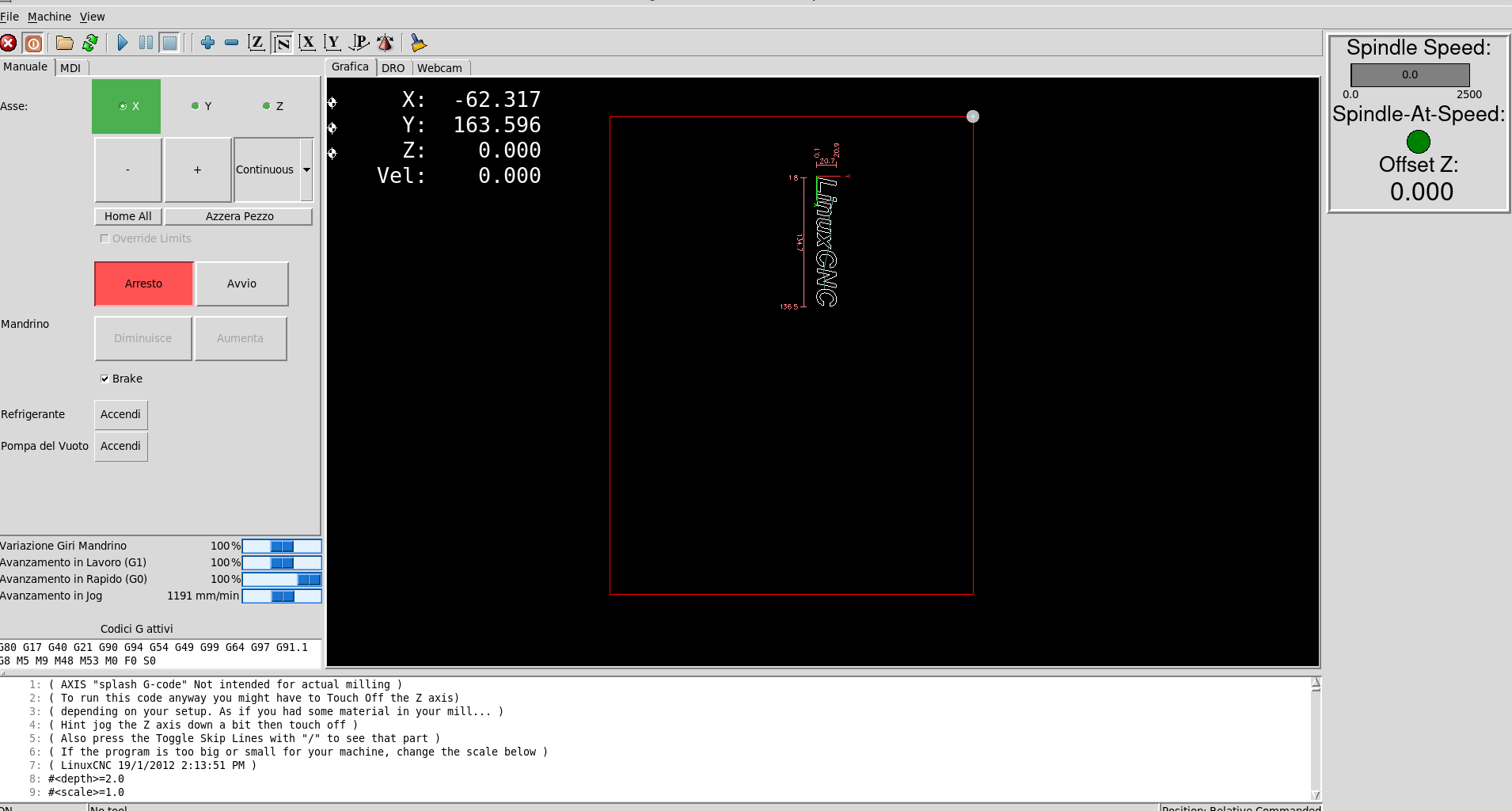
I've had this CNC with a closed-loop DC servo for a long time, and it works well for both movement and backplot with the home dot at x0 y0 as seen in the photo. The only problem is that it only works well with the y-axis inverted; the y-axis moves away in a negative direction. I decided to set the axis to positive as the x-axis, but the home dot moves to the left, and I haven't found a way to set them in step... basically, the plot moves outside the work area. Could it be that I changed the order of the pwmgens to match x and spindle on a 7i40hv and y and z on another to use two different voltages for the motors?
Please Log in or Create an account to join the conversation.
- tommylight
-

- Away
- Moderator
-

Less
More
- Posts: 21893
- Thank you received: 7464
11 Jun 2026 12:45 #347030
by tommylight
Replied by tommylight on topic mirror backplot
hal and ini ?
Please Log in or Create an account to join the conversation.
- billykid
-
Topic Author
- Offline
- Platinum Member
-
Less
More
- Posts: 486
- Thank you received: 82
11 Jun 2026 16:29 #347031
by billykid
Replied by billykid on topic mirror backplot
Here they are, I changed TCL with a modified one but it's not its fault, it does the same with the original one.
Please Log in or Create an account to join the conversation.
- tommylight
-
- Away
- Moderator
-
Less
More
- Posts: 21893
- Thank you received: 7464
11 Jun 2026 18:01 #347033
by tommylight
Replied by tommylight on topic mirror backplot
MIN_LIMIT = -380
MAX_LIMIT = 0.01
Wrong for Y axis, should be reversed.
Might also need to change direction and/or homing directions, by adding - in front of the scale and HOME_ values.
MAX_LIMIT = 0.01
Wrong for Y axis, should be reversed.
Might also need to change direction and/or homing directions, by adding - in front of the scale and HOME_ values.
Please Log in or Create an account to join the conversation.
- billykid
-
Topic Author
- Offline
- Platinum Member
-
Less
More
- Posts: 486
- Thank you received: 82
11 Jun 2026 18:10 #347034
by billykid
Replied by billykid on topic mirror backplot
Tom, I tried everything, inverted the home encoder phases and all the possible settings... if I set the correct axis (reversed) everything is fine but the plot is mirrored and home moved to the left outside the frame.
Please Log in or Create an account to join the conversation.
- tommylight
-
- Away
- Moderator
-
Less
More
- Posts: 21893
- Thank you received: 7464
12 Jun 2026 00:04 #347038
by tommylight
Replied by tommylight on topic mirror backplot
You are looking at the wrong Z.
Please Log in or Create an account to join the conversation.
- billykid
-
Topic Author
- Offline
- Platinum Member
-
Less
More
- Posts: 486
- Thank you received: 82
12 Jun 2026 06:50 #347039
by billykid
Replied by billykid on topic mirror backplot
In the screenshot of the first post the view is that of the real machine, with x0 y0 at the top right but y moving away becomes negative and if I modify the axis to make it positive, home moves to the left and the backplot is mirrored.
Please Log in or Create an account to join the conversation.
- Aciera
-

- Offline
- Administrator
-

Less
More
- Posts: 4806
- Thank you received: 2163
12 Jun 2026 17:34 - 12 Jun 2026 17:36 #347044
by Aciera
Replied by Aciera on topic mirror backplot
Just so we are on the same page:
1. Are you sure your tool directions when jogging are according to the right hand rule ( tool movement as seen relative to the table)
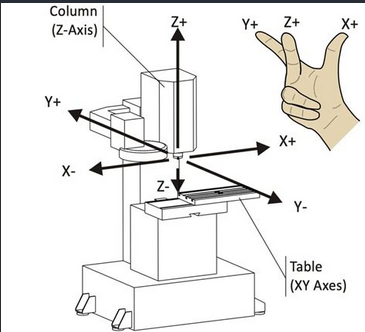
2. After homing the machine which end of the axes is the tool located (ie is it at the positive/negative end of the machine axis)
1. Are you sure your tool directions when jogging are according to the right hand rule ( tool movement as seen relative to the table)
2. After homing the machine which end of the axes is the tool located (ie is it at the positive/negative end of the machine axis)
Attachments:
Last edit: 12 Jun 2026 17:36 by Aciera.
Please Log in or Create an account to join the conversation.
- billykid
-
Topic Author
- Offline
- Platinum Member
-
Less
More
- Posts: 486
- Thank you received: 82
14 Jun 2026 16:32 #347073
by billykid
Replied by billykid on topic mirror backplot
I'm definitely wrong because I was a machinery repairman. I started in the '80s with Olivetti CNZ machines, all transistors with delay lines.  The last 20 years of work have been spent welding and cutting. I built a small CNC and a plasma cutter for fun. In the photo, you can see the machine in the home position; the crosshead to the left is negative, and the carriage coming forward is positive. It doesn't look right because with the handwheel clockwise, one axis is positive and the other negative, it's easy to make a mistake. But if I invert the crosshead to make them go the same way, the plot is mirrored. But I don't even waste too much time on it because I have Sanmotion AC motors, so I'll do everything properly.
The last 20 years of work have been spent welding and cutting. I built a small CNC and a plasma cutter for fun. In the photo, you can see the machine in the home position; the crosshead to the left is negative, and the carriage coming forward is positive. It doesn't look right because with the handwheel clockwise, one axis is positive and the other negative, it's easy to make a mistake. But if I invert the crosshead to make them go the same way, the plot is mirrored. But I don't even waste too much time on it because I have Sanmotion AC motors, so I'll do everything properly. 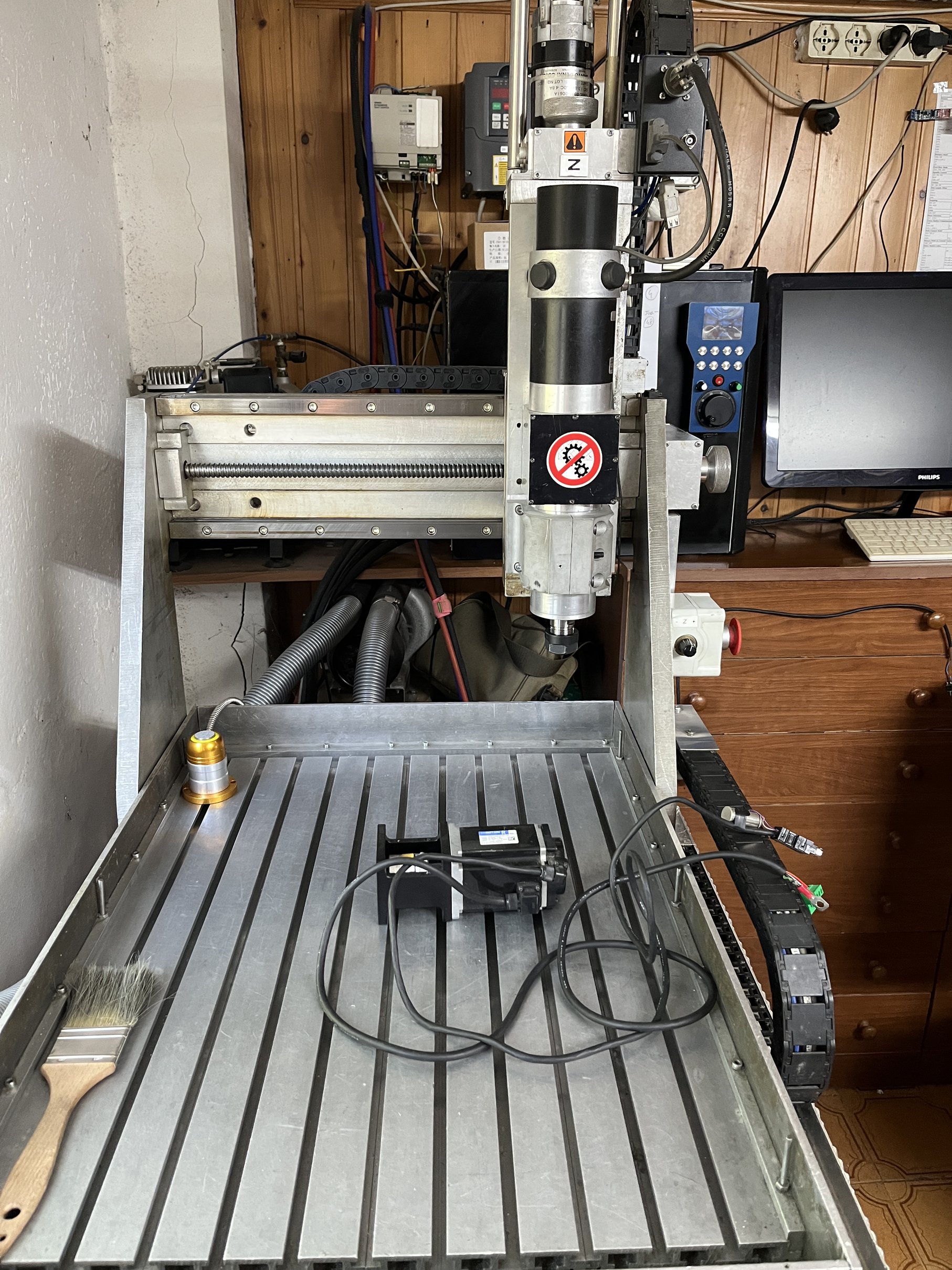
Please Log in or Create an account to join the conversation.
- rodw
-

- Offline
- Platinum Member
-
Less
More
- Posts: 12128
- Thank you received: 4140
15 Jun 2026 06:53 #347079
by rodw
Replied by rodw on topic mirror backplot
Linuxcnc will let you do anything but there is an expected paradigm. If you go against the paradigm, life becomes painful.
Think of the home position as being 0,0 on those Cartesian graphs you drew at school and the table represents one of those quadrants.
So if the current position is home, X & Y need to be negative values to move away from home.
Another way of looking at the expected paradigm is that the front of the machine is where you stand at the machine. Home should be on your left and closest to you with the gantry going across your chest. So to satisfy that rule, you need to stand at the back of the machine behind the gantry.
So you could
1. stand behind the machine
2, Turn the machine around so the back as shown is the front of the machine
3. Live with negative X & Y coordinates
4. Move your home switches to the front left of the machine
5. In your homing configuration, set the home position to max-X and max-Y coordinates so it knows the home switches are at the back of the machine.
I might add if your origin/home respects the cartesian origin and you accept the quadrant you are in, it all becomes moot when you place your workpiece on the table and set the part origin with G54 offsets. Once you touch off, everything is referenced to the part origin.
Think of the home position as being 0,0 on those Cartesian graphs you drew at school and the table represents one of those quadrants.
So if the current position is home, X & Y need to be negative values to move away from home.
Another way of looking at the expected paradigm is that the front of the machine is where you stand at the machine. Home should be on your left and closest to you with the gantry going across your chest. So to satisfy that rule, you need to stand at the back of the machine behind the gantry.
So you could
1. stand behind the machine
2, Turn the machine around so the back as shown is the front of the machine
3. Live with negative X & Y coordinates
4. Move your home switches to the front left of the machine
5. In your homing configuration, set the home position to max-X and max-Y coordinates so it knows the home switches are at the back of the machine.
I might add if your origin/home respects the cartesian origin and you accept the quadrant you are in, it all becomes moot when you place your workpiece on the table and set the part origin with G54 offsets. Once you touch off, everything is referenced to the part origin.
Please Log in or Create an account to join the conversation.
Time to create page: 0.658 seconds