
- Posts: 19899
- Thank you received: 4655
Display Encoder position with button to zero.
- andypugh
- Offline
- Moderator
-

Less
More
9 years 3 months ago #95403
by andypugh
Replied by andypugh on topic Display Encoder position with button to zero.
Incidentally, GladeVCP has an already-built DRO widget that can display the positions in either coordinate system and can switch units.
- Beezerlm
- Offline
- New Member
-

Less
More
- Posts: 14
- Thank you received: 0
9 years 3 months ago #95432
by Beezerlm
Well the X axis is a manual axis. If I use the touch off feature or G10L20 Nothing will change on the readout because the "commanded" position is X0.000 even though the axis is sitting at an actual (encoder) position of X0.010. It appears as though the encoder position is ignored and the ideal (or what I call commanded) position is used to establish the offset.
Another example, If I start the machine and everything is at zero, then run and mdi of "G90 G1. F5.0 X.010" my readout will still say zero because the encoder has not moved. But if I use touch-off or G10L20, it will read X-0.010 because the actual position is .010" below the commanded position. Sorry if this is not clear but this is the best I can explain it.
Essentially I just want the X axis to work as a digital readout that I can zero with the click of a button.
Replied by Beezerlm on topic Display Encoder position with button to zero.
I don't know why anyone would want to zero the encoder position, G10L20 some axis 0 zeros the machine offset not the commanded position.
Well the X axis is a manual axis. If I use the touch off feature or G10L20 Nothing will change on the readout because the "commanded" position is X0.000 even though the axis is sitting at an actual (encoder) position of X0.010. It appears as though the encoder position is ignored and the ideal (or what I call commanded) position is used to establish the offset.
Another example, If I start the machine and everything is at zero, then run and mdi of "G90 G1. F5.0 X.010" my readout will still say zero because the encoder has not moved. But if I use touch-off or G10L20, it will read X-0.010 because the actual position is .010" below the commanded position. Sorry if this is not clear but this is the best I can explain it.
Essentially I just want the X axis to work as a digital readout that I can zero with the click of a button.
- Beezerlm
- Offline
- New Member
-
Less
More
- Posts: 14
- Thank you received: 0
9 years 3 months ago #95433
by Beezerlm
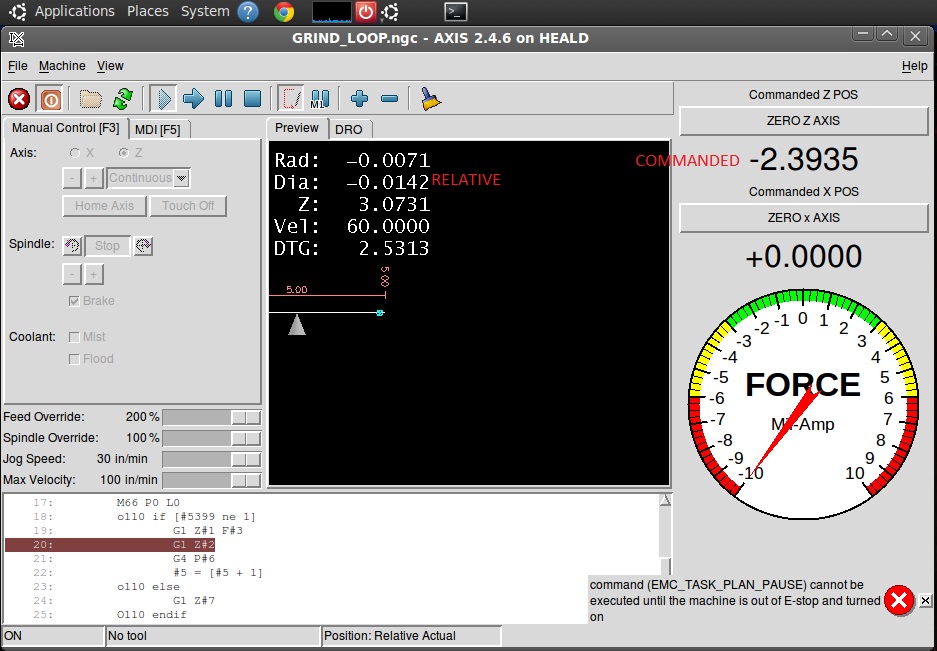
I currently have the zpos-cmd pin displayed in addition to the standard relative coordinates. I would like to see both commanded position and actual relative position. This works fine other than the zpos-cmd never changes when I touch off or home the axis. It is at zero when I start LinuxCNC and I can't find a way to reset it other than to restart LinuxCNC
Replied by Beezerlm on topic Display Encoder position with button to zero.
andypugh wrote:
Beezerlm wrote: I noticed the commanded position does not change when using the touch-off feature.
It should!
Is the GUI displaying Machine Coordinates or Relative Coordinates?
Maybe you need to net to the halui.axis.N.pos-relative pin?
I currently have the zpos-cmd pin displayed in addition to the standard relative coordinates. I would like to see both commanded position and actual relative position. This works fine other than the zpos-cmd never changes when I touch off or home the axis. It is at zero when I start LinuxCNC and I can't find a way to reset it other than to restart LinuxCNC
- andypugh
- Offline
- Moderator
-
Less
More
- Posts: 19899
- Thank you received: 4655
9 years 3 months ago #95434
by andypugh
Replied by andypugh on topic Display Encoder position with button to zero.
The encoder counters all have a reset pin. Link the GUI button to that? (you probably need to make the following error numbers enormous)
linuxcnc.org/docs/2.7/html/man/man9/encoder.9.html
encoder.N.reset
linuxcnc.org/docs/2.7/html/man/man9/encoder.9.html
encoder.N.reset
- Beezerlm
- Offline
- New Member
-
Less
More
- Posts: 14
- Thank you received: 0
9 years 3 months ago #95437
by Beezerlm
Replied by Beezerlm on topic Display Encoder position with button to zero.
Andy - I tied the button to pin hm2_7i43.0.encoder.01.reset and it works great for the X.
I also did this for the Z but if the zpos-cmd is at 0.500", it will zero the encoder and then walk 0.500 to meet the zpos-cmd. Is there a way to reset both the zpos-cmd and the encoder simultaneously?
I also did this for the Z but if the zpos-cmd is at 0.500", it will zero the encoder and then walk 0.500 to meet the zpos-cmd. Is there a way to reset both the zpos-cmd and the encoder simultaneously?
- Beezerlm
- Offline
- New Member
-
Less
More
- Posts: 14
- Thank you received: 0
9 years 3 months ago #95448
by Beezerlm
Replied by Beezerlm on topic Display Encoder position with button to zero.
I'm sure you are wondering why I want to do this for Z so I will try to Explain:
The Z axis is controlled by a hydraulic cylinder with a moog servo valve. This being the case, there is a small amount of "Stick and Slip" on the Z axis when trying to make very fine movements. It may float back and forth about ±.0004" while trying to land on position. I have a hard stop with an adjustable fine thread screw so when we have to grind up to a shoulder we can approach it slowly and carefully. The operator may have to command the position just beyond the hard stop (using the MPG) to keep some pressure on it while adjusting the screw to its final position. Once the face is ground or touched, I want to set that at zero. As the machine is currently configured, If the commanded position is beyond the stop, it won't zero the axis at the hard stop location (actual encoder position).
Hopefully you can understand what I was trying to say. Let me know if I can clarify better.
The Z axis is controlled by a hydraulic cylinder with a moog servo valve. This being the case, there is a small amount of "Stick and Slip" on the Z axis when trying to make very fine movements. It may float back and forth about ±.0004" while trying to land on position. I have a hard stop with an adjustable fine thread screw so when we have to grind up to a shoulder we can approach it slowly and carefully. The operator may have to command the position just beyond the hard stop (using the MPG) to keep some pressure on it while adjusting the screw to its final position. Once the face is ground or touched, I want to set that at zero. As the machine is currently configured, If the commanded position is beyond the stop, it won't zero the axis at the hard stop location (actual encoder position).
Hopefully you can understand what I was trying to say. Let me know if I can clarify better.
Time to create page: 6.760 seconds