
- Posts: 4793
- Thank you received: 1481
Help with pinout. 2 motors (joints) on one axis. 2.8
- Todd Zuercher
- Offline
- Platinum Member
-

Less
More
9 years 3 months ago - 9 years 3 months ago #95994
by Todd Zuercher
The actual pinout is completely arbitrary. At least as far as what interface pins do what (parallel port pins, other io pins). You need to separate what you are thinking an axis letter X,Y,Z... is from what a motor or degree of freedom aka a joint is. In Linuxcnc they can be the same such as for most trivial kinematic machines (most milling machines), or completely different (most robots). In Linuxcnc the axis letters are for representation of location and movement in the Cartesian space coordinate system. Your Joints are your physical motors and moving parts of your machine.
So the two joints that you are going to assign to the two motors on your X axis of your gantry machine will be controlled separately with different homing switches, and step-generators (or PID loops in the case of servos). They will be commanded identical movements while maintaining the squaring offsets you programed into their homing process when you configured the machine.
Replied by Todd Zuercher on topic Help with pinout. 2 motors (joints) on one axis. 2.8
joel0407 wrote: I think I understand the joint-axis linking enough for where I'm up to but I'm struggling to understand the pinout assignment. Having 2 pins assigned to Xstep and 2 pins assigned to Xdir is fine. That to me is no different to physically connecting 2 wires to the was pin though. It as it's not specifying which one is different it doesn't give the software the ability to control each motor separately which is needed for homing.
The actual pinout is completely arbitrary. At least as far as what interface pins do what (parallel port pins, other io pins). You need to separate what you are thinking an axis letter X,Y,Z... is from what a motor or degree of freedom aka a joint is. In Linuxcnc they can be the same such as for most trivial kinematic machines (most milling machines), or completely different (most robots). In Linuxcnc the axis letters are for representation of location and movement in the Cartesian space coordinate system. Your Joints are your physical motors and moving parts of your machine.
So the two joints that you are going to assign to the two motors on your X axis of your gantry machine will be controlled separately with different homing switches, and step-generators (or PID loops in the case of servos). They will be commanded identical movements while maintaining the squaring offsets you programed into their homing process when you configured the machine.
Last edit: 9 years 3 months ago by Todd Zuercher.
Please Log in or Create an account to join the conversation.
- joel0407
- Offline
- Premium Member
-

Less
More
- Posts: 95
- Thank you received: 22
9 years 3 months ago #95995
by joel0407
Replied by joel0407 on topic Help with pinout. 2 motors (joints) on one axis. 2.8
Yep, understand that separation of joints (motors) and Axis (Cartesian space). The problem is I can't find that separation in the pinouts.
I have 2 motors on one axis. I need them to move independently to square the gantry should it become out of alignment. To do that I can't send the same signal to 2 different motors otherwise they will both do the same thing. As they home, if one hits the home sensor before the other then I need that motor to stop and the other to continue. That will not happen if I am sending the same signal to both motors. If that was the case then if one stopped then so would the other. If one moved then so would the other.
How do I define the difference.
I have 2 motors on one axis. I need them to move independently to square the gantry should it become out of alignment. To do that I can't send the same signal to 2 different motors otherwise they will both do the same thing. As they home, if one hits the home sensor before the other then I need that motor to stop and the other to continue. That will not happen if I am sending the same signal to both motors. If that was the case then if one stopped then so would the other. If one moved then so would the other.
How do I define the difference.
Please Log in or Create an account to join the conversation.
- joel0407
- Offline
- Premium Member
-
Less
More
- Posts: 95
- Thank you received: 22
9 years 3 months ago #95996
by joel0407
Replied by joel0407 on topic Help with pinout. 2 motors (joints) on one axis. 2.8
This is from "andy pugh" in a similar thread:
"In hardware you can wire the two motors in series (this is probably a bad idea) or parallel (also not a great idea)
In hardware you can take the step-dir wires to two drivers.
In software you can take the step pulses to two different sets of output pins.
in software you can send the motor position to two different step generators.
In software you can send the axis position to two different motor positions."
I want to do option 3 for the software.
"In hardware you can wire the two motors in series (this is probably a bad idea) or parallel (also not a great idea)
In hardware you can take the step-dir wires to two drivers.
In software you can take the step pulses to two different sets of output pins.
in software you can send the motor position to two different step generators.
In software you can send the axis position to two different motor positions."
I want to do option 3 for the software.
Please Log in or Create an account to join the conversation.
- joel0407
- Offline
- Premium Member
-
Less
More
- Posts: 95
- Thank you received: 22
9 years 3 months ago #95998
by joel0407
Replied by joel0407 on topic Help with pinout. 2 motors (joints) on one axis. 2.8
Here is his post:
andypugh wrote:
sandman92k wrote: need some direction on how to configure linuxcnc to run two steppers for y axis,
This is partly because there are a number of different ways to do it.
In hardware you can wire the two motors in series (this is probably a bad idea) or parallel (also not a great idea)
In hardware you can take the step-dir wires to two drivers.
In software you can take the step pulses to two different sets of output pins.
in software you can send the motor position to two different step generators.
In software you can send the axis position to two different motor positions.
The last way is the most sophisticated, and the most difficult to set up, but does allow you to home both sides and auto-square.
The easiest way (and a way that does not require any hardware changes if you later decide on the last way) is to take the Y-stepgen step/dir signals to two sets of output pins. You can configure that way in Stepconf, see how Ystep and Ydir each go to two pins
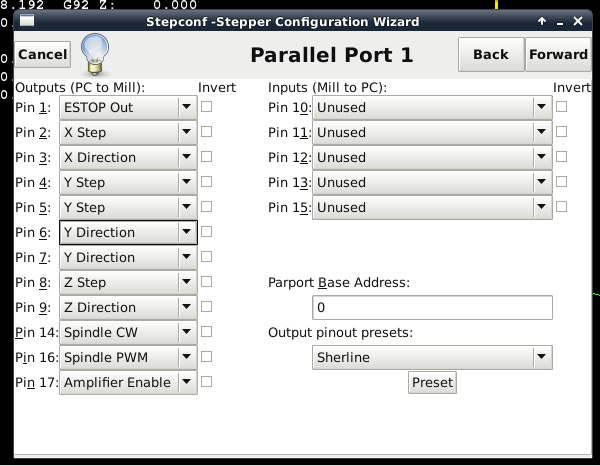
Please Log in or Create an account to join the conversation.
- Todd Zuercher
- Offline
- Platinum Member
-
Less
More
- Posts: 4793
- Thank you received: 1481
9 years 3 months ago - 9 years 3 months ago #95999
by Todd Zuercher
Replied by Todd Zuercher on topic Help with pinout. 2 motors (joints) on one axis. 2.8
If you are running into problems with a limited number of io pins. Adding more than one parallel port is supported. I know up to at least 3 are allowed, as I've used that many on some machines. And other interface options (such as from Mesa and Pico Systems) can offer way more io and add other benefits such as hardware stepping, and high speed encoder reading. These options include interfaces via parallel port, PCI, PCIe, and Ethernet.
Last edit: 9 years 3 months ago by Todd Zuercher.
Please Log in or Create an account to join the conversation.
- joel0407
- Offline
- Premium Member
-
Less
More
- Posts: 95
- Thank you received: 22
9 years 3 months ago #96000
by joel0407
Replied by joel0407 on topic Help with pinout. 2 motors (joints) on one axis. 2.8
I can set the Pinouts to a whole heap of things but what I really need it to set them to joints (motors).
Please Log in or Create an account to join the conversation.
Time to create page: 0.180 seconds