Button Toggle

More
2 years 4 weeks ago #311138 by tommylight
Replied by tommylight on topic Button Toggle

Trying to understand why "generic-1" and "generic-2" are necessary.
Those can be "mom" and "dad", it does not matter, they are signal names that you freely assign to connections between hal pins
Code:
net generic-1 toggle.0.in <= pyvcp.drive-disable
can also be
Code:
net generic-1 toggle.0.in net generic-1 pyvcp.drive-disable
and so can
Code:
net generic-2 toggle.0.out => hm2_7i96s.0.ssr.00.out-01
can be
Code:
net generic-2 toggle.0.out net generic-2 hm2_7i96s.0.ssr.00.out-01
But your single line can not as you have it as there are two separate signals that have to be wired to 4 inputs/outputs.
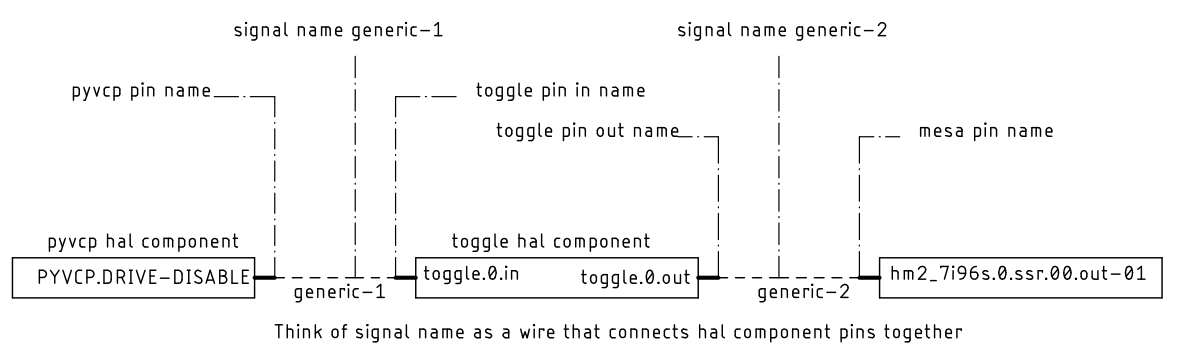
Think of generic-1 (or mom or dad or) as a bus bar, toggle.0.in is one of the wires and pyvcp.drive-disable is the other wire tied together at the bus bar.
The following user(s) said Thank You: Benb, Project_Hopeless

Please Log in or Create an account to join the conversation.
More
2 years 4 weeks ago - 2 years 4 weeks ago #311153 by Benb
Replied by Benb on topic Button Toggle
It looks like you having problem distinguishing hal pin names from hal signal names. It's a common mistake by new linuxcnc hal users. further to Tom's explanation, I draw a block diagram, The dashed lines are your signal names generic-1 on the left and generic-2 on the right. If you connect them together you short circuit the input and output of the toggle component. 

 
Last edit: 2 years 4 weeks ago by Benb.
The following user(s) said Thank You: tommylight, Project_Hopeless

Please Log in or Create an account to join the conversation.

More
2 years 4 weeks ago - 2 years 4 weeks ago #311199 by Project_Hopeless
Replied by Project_Hopeless on topic Button Toggle

Benb post=311153 userid=20877It looks like you having problem distinguishing hal pin names from hal signal names. It's a common mistake by new linuxcnc hal users. further to Tom's explanation, I draw a block diagram, The dashed lines are your signal names generic-1 on the left and generic-2 on the right. If you connect them together you short circuit the input and output of the toggle component. 


Thank-you for taking the time to draw it out.  Its' more clear now!

I'm a jack (novice) of all code master of none.  HAL for some reason just ties me in knots! :)
 
Last edit: 2 years 4 weeks ago by Project_Hopeless.
The following user(s) said Thank You: tommylight

Please Log in or Create an account to join the conversation.
More
2 years 3 weeks ago - 2 years 3 weeks ago #311382 by Benb
Replied by Benb on topic Button Toggle
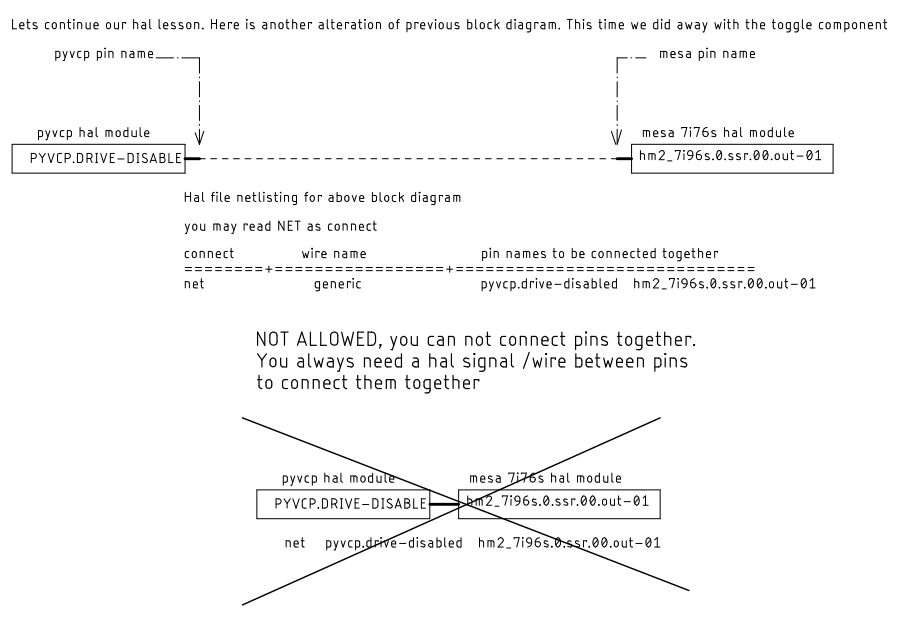
Here as another alteration of previous block diagram. This time we did away with the toggle componentOne thing you should learn is to draw block diagrams before you starting to write your hal netlisting. You will find as you start writing complex hal files block diagrams help tremulously in keeping you sane. I don’t know how to other members write their hal netlisting. In my case there is no way I can write hal without using block diagrams.

 If you look at the first block diagram to control halui machine on and off with one pushbutton. The reason the block diagram is complex because Hal which is real time program is communication with halui a user land non realtime program. The non realtime component timing is unpredictable and make RT comp communication with non realtime comp  difficult It requires trial and error intuition and luck to get to two to talk consistently no matter the jitter of the controllers.

I which someone could convert Halui to run in real time memory.
Last edit: 2 years 3 weeks ago by Benb.

Please Log in or Create an account to join the conversation.

More
2 years 3 weeks ago #311393 by timo
Replied by timo on topic Button Toggle
Project_Hopeless is not the only person, having those difficulties. :-)

To use block diagrams is maybe worth a try, did not think of it yet. Maybe it helps me to clean up the chaos of a .hal file that i created.

Do you use a special software for those blocks diagrams?

Please Log in or Create an account to join the conversation.

More
2 years 3 weeks ago - 2 years 3 weeks ago #311450 by Benb
Replied by Benb on topic Button Toggle
Hal has the same functionality as function block diagrams FDB language used in PLC and advanced “distributed controls systems” DCS used in large plants such as oil refineries utility power plants … The first step when designing a control system is to use a graphical software Package. You compile the graphical file into a netlist file similar to hal file. So, what I am trying to convey is that hal file is a secondary operation when creating a control system. The first operation is FBD. wiki.linuxcnc.org/cgi-bin/wiki.pl?Eagle2HAL To answer your question I do I use schematic capture software to automatically generate hal files. I use AutoCAD cadsoft eagle software package based on: and Ed Nisley’s Blogs explain how to create your own symbols and convert them to device library. wiki.linuxcnc.org/cgi-bin/wiki.pl?Eagle2HAL softsolder.com/2013/02/28/eagle-6-4-sche...-creation-checklist/ Ed Nisley has also created kicad-to-hal softsolder.com/2021/03/25/kicad-to-hal-basic-schematic-symbols/
If I was starting fresh, I would learn kicad-to-hal because AutoCAD eagle is no longer being update
It took me a while to learn cadsoft software but the effort was worth it.
Last edit: 2 years 3 weeks ago by Benb.

Please Log in or Create an account to join the conversation.

Time to create page: 0.070 seconds
Powered by Kunena Forum
