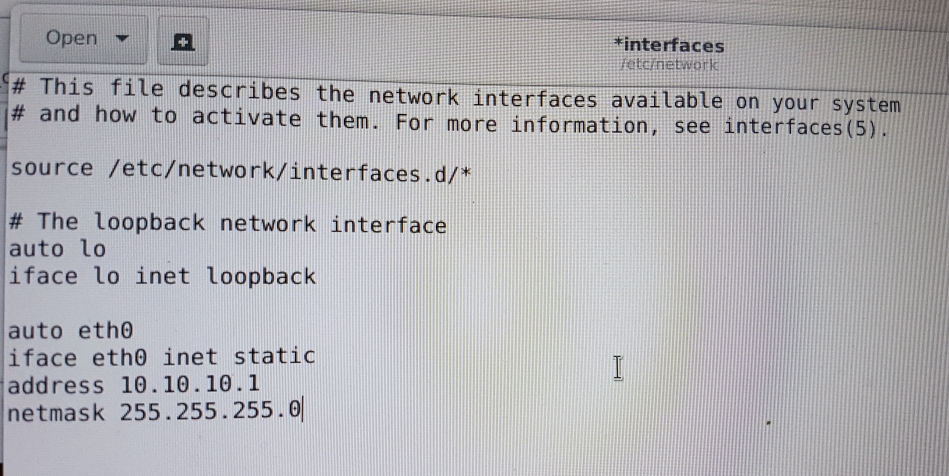
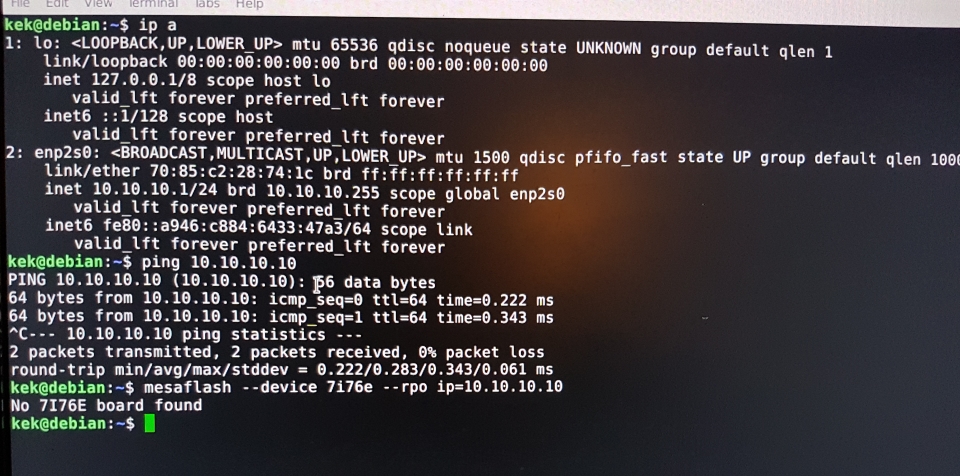
But the interface is not called eth0, the interface is called enp2s0, that is the name you have to use.
auto enp2s0
iface enp2s0 inet static
address 10.10.10.1
netmask 255.255.255.0
If your mesa board is 192.168.1.121, your address must be 192.168.1.xxx
If your mesa board is 10.10.10.10, your address must be 10.10.10.xxx
When you change the /etc/network/interfaces file please reboot for the changes to take affect. Make sure too that there is NO HUB between the mesa card and your NIC. Just one cable. I use a patch cable, no need to dig out a crossover cable.
Once the networking side is good we can go further on.
If you do not have an interface named eth0 do not use that name in the interfaces file.
The mesaflash command looks odd, try this as mentioned before.
Code:
sudo mesaflash --device 7i76e --addr xxx.xxx.xxx.xxx --readhmi