
too long hm2_7i97.0.read.tmax or something else?
- m0602232
- Offline
- Junior Member
-

Less
More
- Posts: 33
- Thank you received: 14
25 Mar 2026 11:32 #344714
by m0602232
too long hm2_7i97.0.read.tmax or something else? was created by m0602232
Hello.
I'm having hard time getting Linuxcnc run without "Unexpected realtime delay on task 0 with period 1000000". What I have tried so far is the "regular" isolcpu approach:
GRUB_CMDLINE_LINUX_DEFAULT="quiet splash isolcpus=5 nohz_full=5 rcu_nocbs=5 irqaffinity=0-4 intel_idle.max_cstate=1 processor.max_cstate=1"
Also tried to isolate cpu number 4, no difference.
packet error-total stays at 0.
I tried to add [HMOT](CARD0).read-request servo-threadin the end of the servo-thread. That makes read.tmax drop significantly and realtime delay error does not appear but causes weird spiking in servo-thread.time when any of the axis(or spindle) is moving. The spikes also appear as joint following error. So maybe it's only hiding the problem from servo-thread?
Here are .tmax's, i know theres a lot of them but the problem was there right from the beginning when there were not so many.
Parameters:
Owner Type Dir Value Name
207 s32 RW 13227 air-pressure.tmax
73 s32 RW 9832 and2.0.tmax
73 s32 RW 4353 and2.1.tmax
73 s32 RW 7964 and2.2.tmax
73 s32 RW 10403 and2.3.tmax
73 s32 RW 5666 and2.4.tmax
73 s32 RW 7674 and2.5.tmax
73 s32 RW 7831 and2.6.tmax
73 s32 RW 4339 and2.7.tmax
207 s32 RW 16332 axes-power-rdy.tmax
207 s32 RW 12813 c-drop.tmax
52 s32 RW 138371 classicladder.0.refresh.tmax
207 s32 RW 10878 coarse-filter.tmax
82 s32 RW 7483 comp.0.tmax
82 s32 RW 13396 comp.1.tmax
76 s32 RW 14106 conv-s32-float.0.tmax
76 s32 RW 12091 conv-s32-float.1.tmax
76 s32 RW 15938 conv-s32-float.2.tmax
76 s32 RW 10591 conv-s32-float.3.tmax
76 s32 RW 6288 conv-s32-float.4.tmax
76 s32 RW 4193 conv-s32-float.5.tmax
207 s32 RW 19851 fine-filter.tmax
46 s32 RW 195887 hm2_7i97.0.read-request.tmax
46 s32 RW 1370631 hm2_7i97.0.read.tmax
46 s32 RW 272796 hm2_7i97.0.write.tmax
88 s32 RW 31149 limit3.0.tmax
88 s32 RW 22704 limit3.1.tmax
39 s32 RW 37291 motion-command-handler.tmax
39 s32 RW 185440 motion-controller.tmax
94 s32 RW 5629 mult2.0.tmax
58 s32 RW 12861 mux2.0.tmax
58 s32 RW 2823 mux2.1.tmax
61 s32 RW 13096 near.0.tmax
61 s32 RW 11833 near.1.tmax
91 s32 RW 5106 not.0.tmax
85 s32 RW 14364 oneshot.0.tmax
85 s32 RW 11632 oneshot.1.tmax
85 s32 RW 17464 oneshot.2.tmax
85 s32 RW 14563 oneshot.3.tmax
85 s32 RW 12845 oneshot.4.tmax
70 s32 RW 10989 or2.0.tmax
49 s32 RW 36452 pid.s.do-pid-calcs.tmax
49 s32 RW 30455 pid.s_orient.do-pid-calcs.tmax
49 s32 RW 33685 pid.x.do-pid-calcs.tmax
49 s32 RW 16981 pid.y.do-pid-calcs.tmax
49 s32 RW 28642 pid.z.do-pid-calcs.tmax
207 s32 RW 11362 probe-batt.tmax
207 s32 RW 5467 probe-motion-inhibit.tmax
79 s32 RW 35861 process_wsums.tmax
67 s32 RW 12354 scale.0.tmax
67 s32 RW 22722 scale.1.tmax
67 s32 RW 14129 scale.2.tmax
67 s32 RW 6315 scale.3.tmax
67 s32 RW 13441 scale.4.tmax
40 s32 RW 1624528 servo-thread.tmax
207 s32 RW 11772 spindle-lube.tmax
55 s32 RW 12661 sum2.0.tmax
55 s32 RW 10884 sum2.1.tmax
55 s32 RW 15876 sum2.2.tmax
55 s32 RW 19655 sum2.3.tmax
55 s32 RW 6870 sum2.4.tmax
207 s32 RW 21391 transf-over-temp.tmax
64 s32 RW 13011 tristate-bit.0.tmax
207 s32 RW 22251 x-encoder.tmax
207 s32 RW 7564 y-encoder.tmax
processor: Intel(R) Core(TM) i5-8400T CPU @ 1.70GHz
Thanks in advance for anyone trying to help, i've been struggling with this a good couple of weeks now.
Regards
Ossi
I'm having hard time getting Linuxcnc run without "Unexpected realtime delay on task 0 with period 1000000". What I have tried so far is the "regular" isolcpu approach:
GRUB_CMDLINE_LINUX_DEFAULT="quiet splash isolcpus=5 nohz_full=5 rcu_nocbs=5 irqaffinity=0-4 intel_idle.max_cstate=1 processor.max_cstate=1"
Also tried to isolate cpu number 4, no difference.
packet error-total stays at 0.
I tried to add [HMOT](CARD0).read-request servo-threadin the end of the servo-thread. That makes read.tmax drop significantly and realtime delay error does not appear but causes weird spiking in servo-thread.time when any of the axis(or spindle) is moving. The spikes also appear as joint following error. So maybe it's only hiding the problem from servo-thread?
Here are .tmax's, i know theres a lot of them but the problem was there right from the beginning when there were not so many.
Parameters:
Owner Type Dir Value Name
207 s32 RW 13227 air-pressure.tmax
73 s32 RW 9832 and2.0.tmax
73 s32 RW 4353 and2.1.tmax
73 s32 RW 7964 and2.2.tmax
73 s32 RW 10403 and2.3.tmax
73 s32 RW 5666 and2.4.tmax
73 s32 RW 7674 and2.5.tmax
73 s32 RW 7831 and2.6.tmax
73 s32 RW 4339 and2.7.tmax
207 s32 RW 16332 axes-power-rdy.tmax
207 s32 RW 12813 c-drop.tmax
52 s32 RW 138371 classicladder.0.refresh.tmax
207 s32 RW 10878 coarse-filter.tmax
82 s32 RW 7483 comp.0.tmax
82 s32 RW 13396 comp.1.tmax
76 s32 RW 14106 conv-s32-float.0.tmax
76 s32 RW 12091 conv-s32-float.1.tmax
76 s32 RW 15938 conv-s32-float.2.tmax
76 s32 RW 10591 conv-s32-float.3.tmax
76 s32 RW 6288 conv-s32-float.4.tmax
76 s32 RW 4193 conv-s32-float.5.tmax
207 s32 RW 19851 fine-filter.tmax
46 s32 RW 195887 hm2_7i97.0.read-request.tmax
46 s32 RW 1370631 hm2_7i97.0.read.tmax
46 s32 RW 272796 hm2_7i97.0.write.tmax
88 s32 RW 31149 limit3.0.tmax
88 s32 RW 22704 limit3.1.tmax
39 s32 RW 37291 motion-command-handler.tmax
39 s32 RW 185440 motion-controller.tmax
94 s32 RW 5629 mult2.0.tmax
58 s32 RW 12861 mux2.0.tmax
58 s32 RW 2823 mux2.1.tmax
61 s32 RW 13096 near.0.tmax
61 s32 RW 11833 near.1.tmax
91 s32 RW 5106 not.0.tmax
85 s32 RW 14364 oneshot.0.tmax
85 s32 RW 11632 oneshot.1.tmax
85 s32 RW 17464 oneshot.2.tmax
85 s32 RW 14563 oneshot.3.tmax
85 s32 RW 12845 oneshot.4.tmax
70 s32 RW 10989 or2.0.tmax
49 s32 RW 36452 pid.s.do-pid-calcs.tmax
49 s32 RW 30455 pid.s_orient.do-pid-calcs.tmax
49 s32 RW 33685 pid.x.do-pid-calcs.tmax
49 s32 RW 16981 pid.y.do-pid-calcs.tmax
49 s32 RW 28642 pid.z.do-pid-calcs.tmax
207 s32 RW 11362 probe-batt.tmax
207 s32 RW 5467 probe-motion-inhibit.tmax
79 s32 RW 35861 process_wsums.tmax
67 s32 RW 12354 scale.0.tmax
67 s32 RW 22722 scale.1.tmax
67 s32 RW 14129 scale.2.tmax
67 s32 RW 6315 scale.3.tmax
67 s32 RW 13441 scale.4.tmax
40 s32 RW 1624528 servo-thread.tmax
207 s32 RW 11772 spindle-lube.tmax
55 s32 RW 12661 sum2.0.tmax
55 s32 RW 10884 sum2.1.tmax
55 s32 RW 15876 sum2.2.tmax
55 s32 RW 19655 sum2.3.tmax
55 s32 RW 6870 sum2.4.tmax
207 s32 RW 21391 transf-over-temp.tmax
64 s32 RW 13011 tristate-bit.0.tmax
207 s32 RW 22251 x-encoder.tmax
207 s32 RW 7564 y-encoder.tmax
processor: Intel(R) Core(TM) i5-8400T CPU @ 1.70GHz
Thanks in advance for anyone trying to help, i've been struggling with this a good couple of weeks now.
Regards
Ossi
Please Log in or Create an account to join the conversation.
- m0602232
- Offline
- Junior Member
-
Less
More
- Posts: 33
- Thank you received: 14
25 Mar 2026 11:58 #344715
by m0602232
Replied by m0602232 on topic too long hm2_7i97.0.read.tmax or something else?
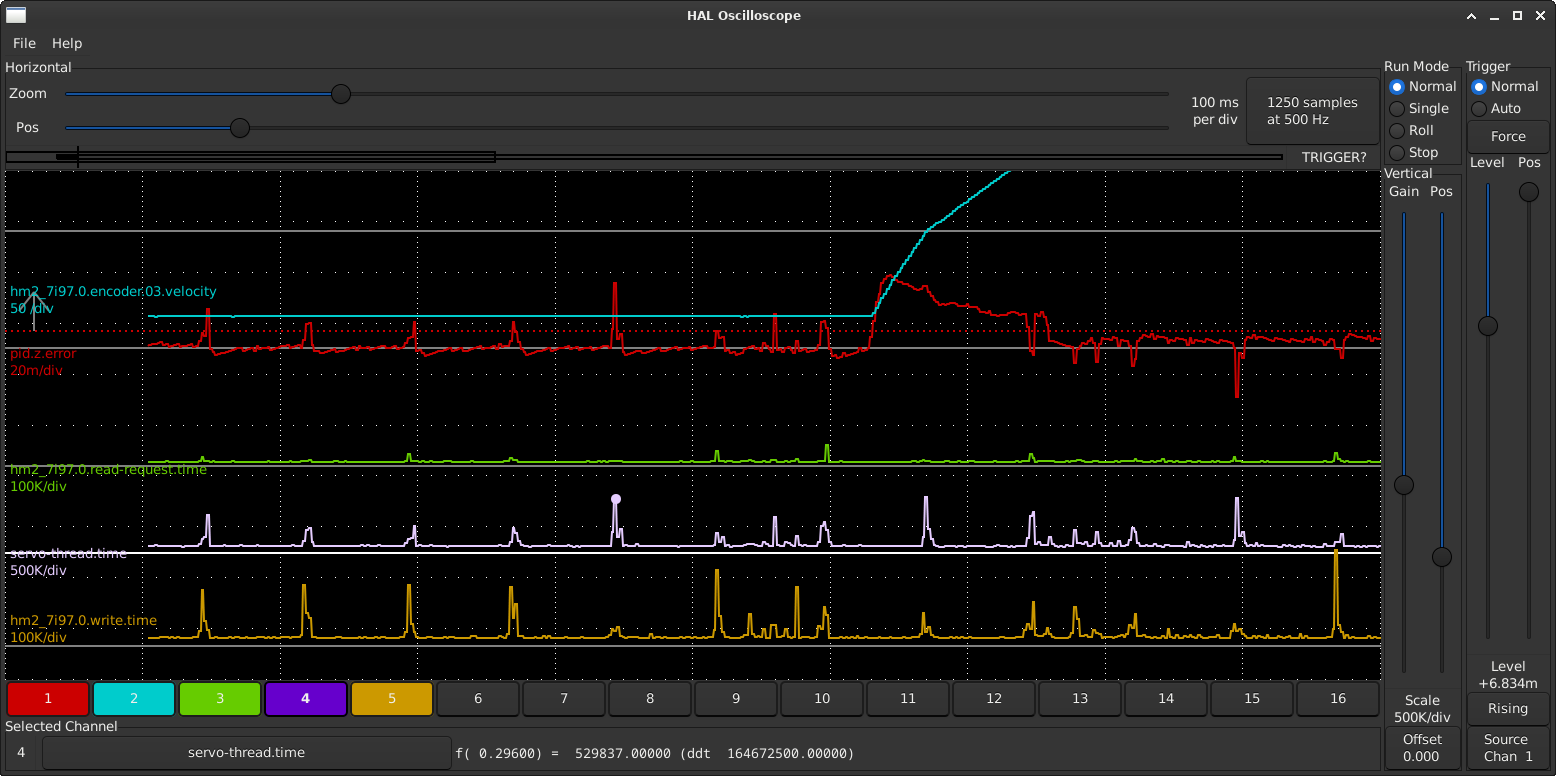
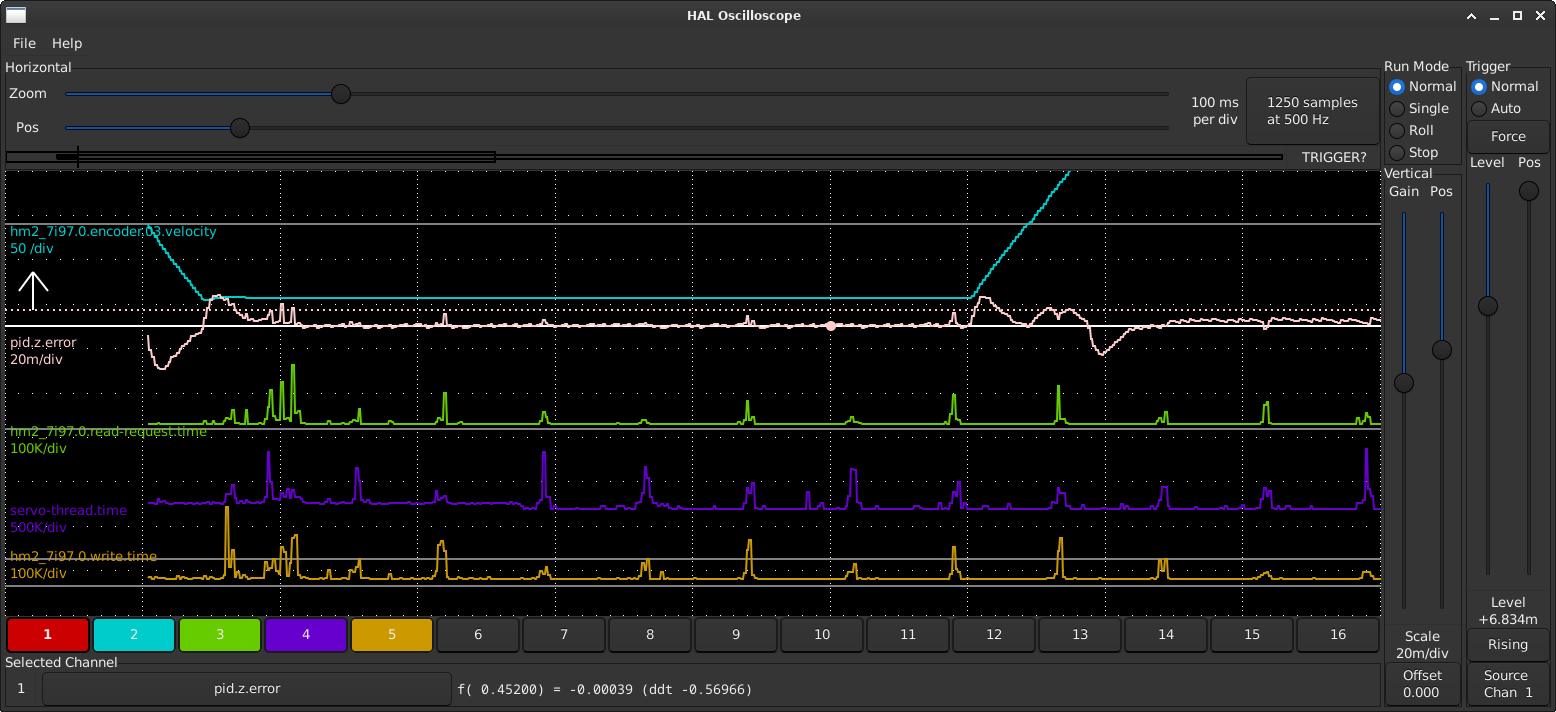
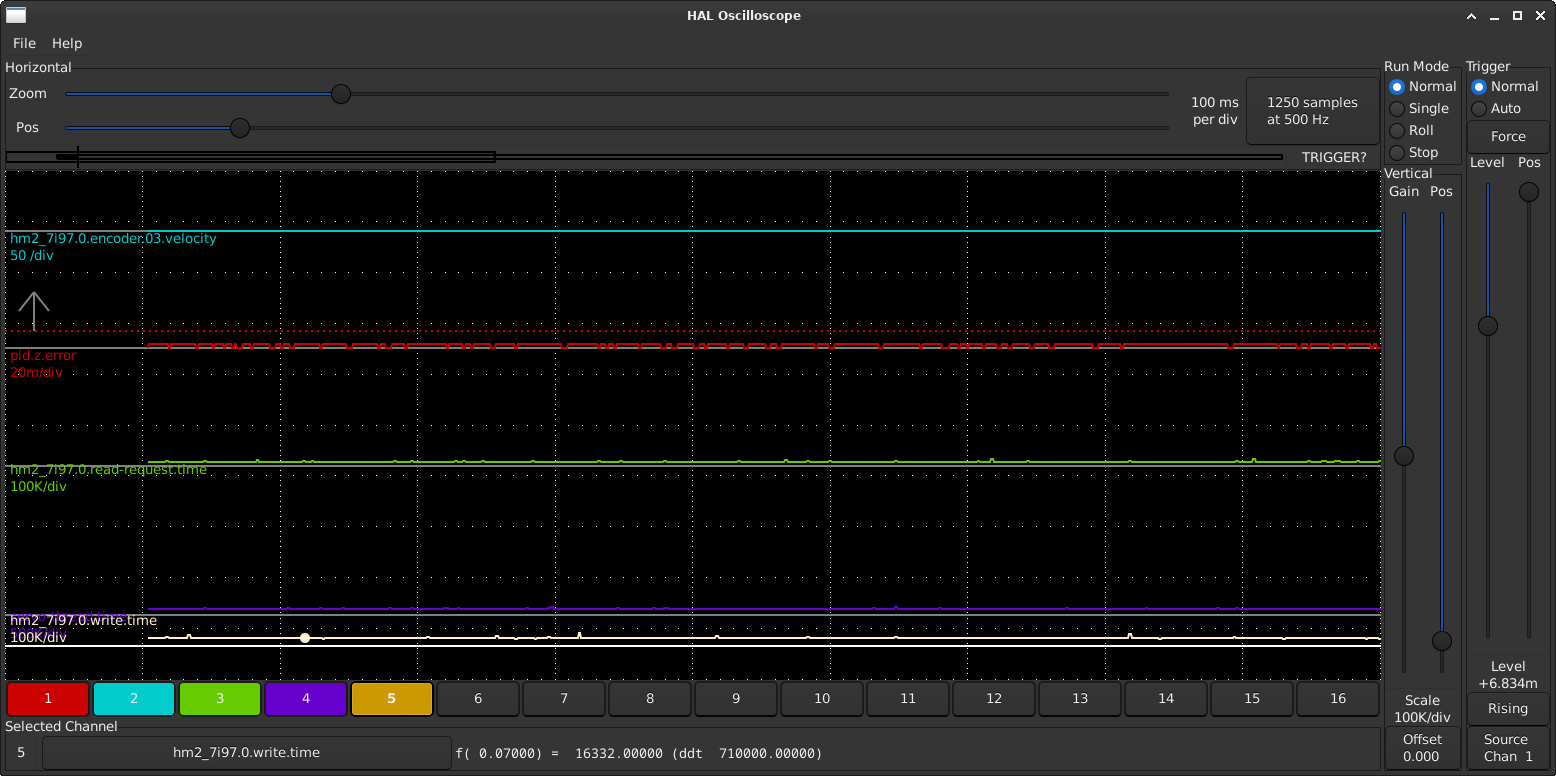
Halscope screenshots of spiking attached. These are captured having [HMOT](CARD0).read-request at the beginning and at the end of servo-thread. The following error spikes go crazy when read-request at the end but also visible when at the beginning. When servos are stationary no spiking.
Please Log in or Create an account to join the conversation.
- PCW
-

- Offline
- Moderator
-

Less
More
- Posts: 18093
- Thank you received: 5325
25 Mar 2026 15:40 - 25 Mar 2026 15:41 #344722
by PCW
Replied by PCW on topic too long hm2_7i97.0.read.tmax or something else?
read-request is only intended for use with multiple Ethernet cards
What does:
sudo chrt 99 ping -i .001 -q -c 60000 10.10.10.10
report? (it will run 1 minute and print timing statistics)
(replace 10.10.10.10 by card IP address if that differs)
Is all power management disabled in the BIOS?
If the PC has a Intel MAC have you disabled IRQ coalescing (man hm2_eth)
One further step is to pin the Ethernet IRQ to the last processor
What does:
sudo chrt 99 ping -i .001 -q -c 60000 10.10.10.10
report? (it will run 1 minute and print timing statistics)
(replace 10.10.10.10 by card IP address if that differs)
Is all power management disabled in the BIOS?
If the PC has a Intel MAC have you disabled IRQ coalescing (man hm2_eth)
One further step is to pin the Ethernet IRQ to the last processor
Last edit: 25 Mar 2026 15:41 by PCW.
Please Log in or Create an account to join the conversation.
- m0602232
- Offline
- Junior Member
-
Less
More
- Posts: 33
- Thank you received: 14
25 Mar 2026 16:29 #344726
by m0602232
Replied by m0602232 on topic too long hm2_7i97.0.read.tmax or something else?
--- 192.168.1.120 ping statistics ---
60000 packets transmitted, 60000 received, 0% packet loss, time 60060ms
rtt min/avg/max/mdev = 0.017/0.018/0.079/0.001 ms
All power management disabled.
IRQ coalescing disabled.
pinning the Ethernet IRQ to the last processor does not affect, still getting realtime delay message.
Also tried without hm2.read-request.
I just managed to verify the cause for the spikes visible in halscope. They appear to happen the same interval than the pyvcp graphics refresh. I just can't figure out if it's more of a symptom than a cause.
60000 packets transmitted, 60000 received, 0% packet loss, time 60060ms
rtt min/avg/max/mdev = 0.017/0.018/0.079/0.001 ms
All power management disabled.
IRQ coalescing disabled.
pinning the Ethernet IRQ to the last processor does not affect, still getting realtime delay message.
Also tried without hm2.read-request.
I just managed to verify the cause for the spikes visible in halscope. They appear to happen the same interval than the pyvcp graphics refresh. I just can't figure out if it's more of a symptom than a cause.
Please Log in or Create an account to join the conversation.
- PCW
-
- Offline
- Moderator
-
Less
More
- Posts: 18093
- Thank you received: 5325
25 Mar 2026 18:25 #344729
by PCW
Replied by PCW on topic too long hm2_7i97.0.read.tmax or something else?
Looks like you are pinging the host rather than the 7I97
The following user(s) said Thank You: m0602232
Please Log in or Create an account to join the conversation.
- m0602232
- Offline
- Junior Member
-
Less
More
- Posts: 33
- Thank you received: 14
25 Mar 2026 18:43 #344730
by m0602232
Replied by m0602232 on topic too long hm2_7i97.0.read.tmax or something else?
whoops, sorry about that.
PING 192.168.1.121 (192.168.1.121) 56(84) bytes of data.
--- 192.168.1.121 ping statistics ---
60000 packets transmitted, 60000 received, 0% packet loss, time 60060ms
rtt min/avg/max/mdev = 0.095/0.118/0.250/0.001 ms
The spikes in following error were indeed caused by graphics. It settled down when I removed one of 2 screens I had attached. Realtime delay error persists though.
PING 192.168.1.121 (192.168.1.121) 56(84) bytes of data.
--- 192.168.1.121 ping statistics ---
60000 packets transmitted, 60000 received, 0% packet loss, time 60060ms
rtt min/avg/max/mdev = 0.095/0.118/0.250/0.001 ms
The spikes in following error were indeed caused by graphics. It settled down when I removed one of 2 screens I had attached. Realtime delay error persists though.
Please Log in or Create an account to join the conversation.
- PCW
-
- Offline
- Moderator
-
Less
More
- Posts: 18093
- Thank you received: 5325
25 Mar 2026 19:34 #344731
by PCW
Replied by PCW on topic too long hm2_7i97.0.read.tmax or something else?
That does not look bad but the max servo thread time shows the issue
( 1624528 clocks at 1.7 Ghz is ~.95 ms)
It may be that the CPU/BIOS-Setup are simply not capable of the needed
network performance for a 1 KHz servo thread.
A last ditch is to use a newer kernel as the 6.1 kernel in the LinuxCNC distribution
is fairly bad latency wise.
7.0.0-rc1-rt1 #1 SMP PREEMPT_RT
Is the current one
( 1624528 clocks at 1.7 Ghz is ~.95 ms)
It may be that the CPU/BIOS-Setup are simply not capable of the needed
network performance for a 1 KHz servo thread.
A last ditch is to use a newer kernel as the 6.1 kernel in the LinuxCNC distribution
is fairly bad latency wise.
7.0.0-rc1-rt1 #1 SMP PREEMPT_RT
Is the current one
The following user(s) said Thank You: m0602232
Please Log in or Create an account to join the conversation.
- rodw
-

- Offline
- Platinum Member
-

Less
More
- Posts: 12156
- Thank you received: 4149
25 Mar 2026 20:40 #344737
by rodw
Replied by rodw on topic too long hm2_7i97.0.read.tmax or something else?
What CPU do you have? How many cpus does it report?
what does echo $(nproc) say?
Its possible you are trying to isolate a nonexistent core
what does echo $(nproc) say?
Its possible you are trying to isolate a nonexistent core
The following user(s) said Thank You: m0602232
Please Log in or Create an account to join the conversation.
- m0602232
- Offline
- Junior Member
-
Less
More
- Posts: 33
- Thank you received: 14
26 Mar 2026 08:16 #344755
by m0602232
Replied by m0602232 on topic too long hm2_7i97.0.read.tmax or something else?
PCW: Thanks for that, I'll consider changing kernel, or maybe trying with another pc.
rodw: processor: Intel(R) Core(TM) i5-8400T CPU @ 1.70GHz, echo $(nproc) prints 5.
rodw: processor: Intel(R) Core(TM) i5-8400T CPU @ 1.70GHz, echo $(nproc) prints 5.
The following user(s) said Thank You: rodw
Please Log in or Create an account to join the conversation.
- rodw
-
- Offline
- Platinum Member
-
Less
More
- Posts: 12156
- Thank you received: 4149
26 Mar 2026 09:45 #344761
by rodw
Replied by rodw on topic too long hm2_7i97.0.read.tmax or something else?
thanks, 6 core PC with one isolated = 5 available so that's right. i5 should be fine
What network card? is it Realtek?
I've been researching this today. Here are a few more obscure settings that may help where eno1 is the NOC name from ip a
What network card? is it Realtek?
I've been researching this today. Here are a few more obscure settings that may help where eno1 is the NOC name from ip a
sudo sysctl -w net.core.busy_read=50
sudo sysctl -w net.core.busy_poll=50
sudo sysctl -w kernel.sched_rt_runtime_us=-1
sudo ethtool --set-eee en01 eee off
sudo ethtool -K eno1 gro off lro off tso off
The following user(s) said Thank You: m0602232
Please Log in or Create an account to join the conversation.
Moderators: PCW, jmelson
Time to create page: 0.234 seconds