fusion360 to Linuxcnc CAM problem - multiple tools - manual changing

More
7 years 9 months ago #123764 by snoozer77
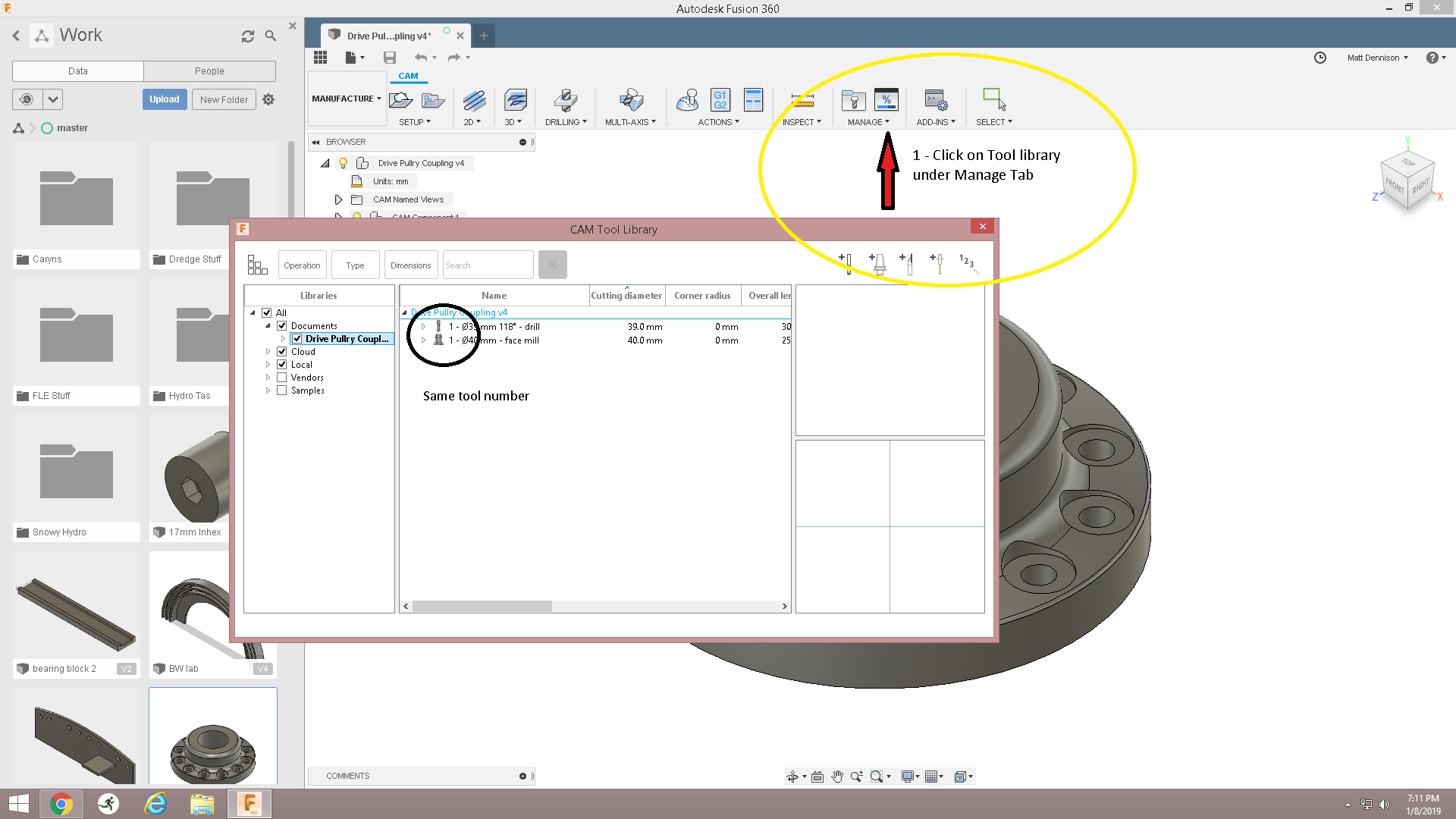
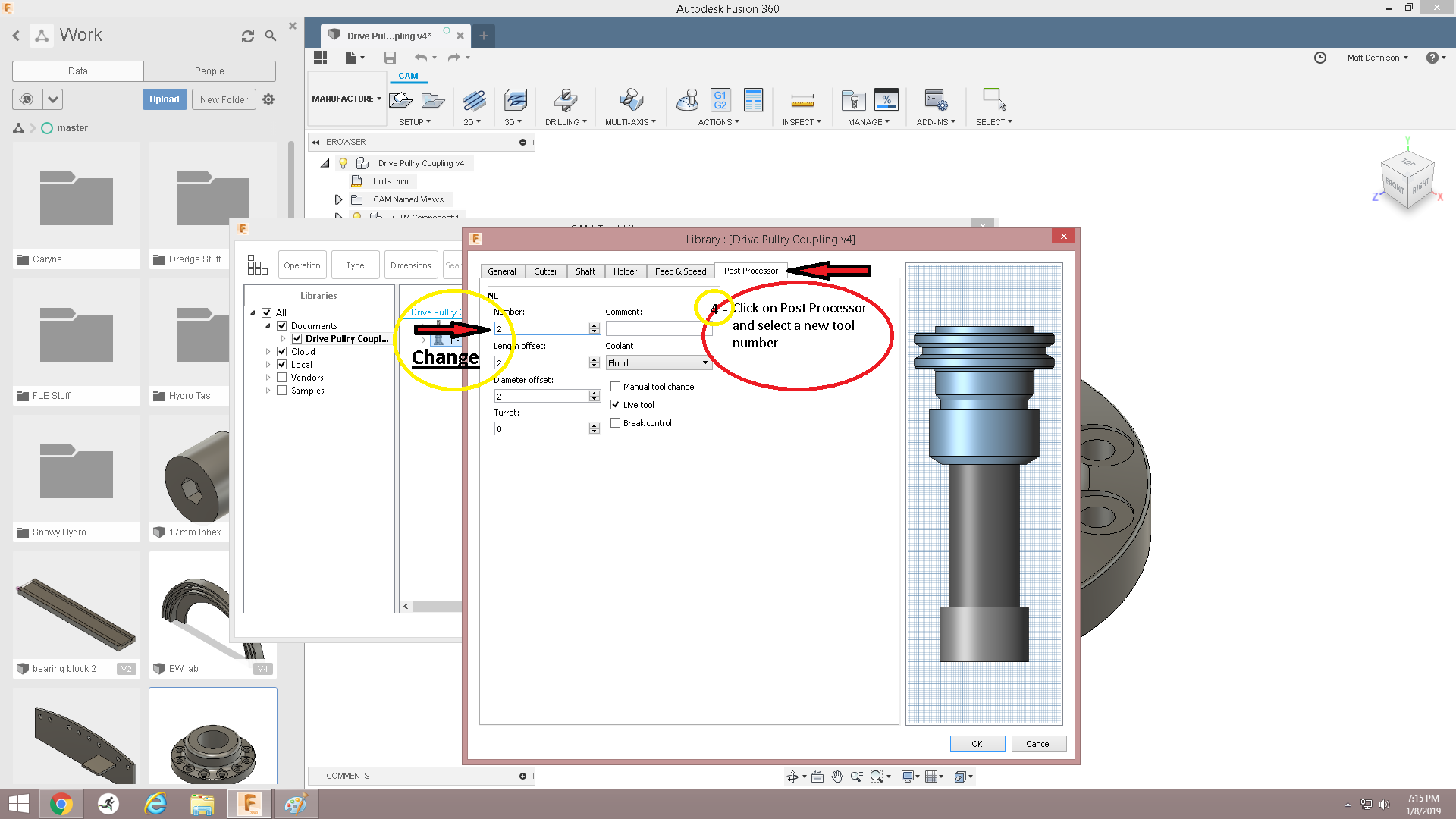
Will give you a quick run down if your unsure on how to change it (or for anyone else who isn't sure). While using cam workspace, click on Manage, And select "Tool Library". In the Libraries Field (left hand side), click on the document name you are working on. Your tools will be displayed. Right click and select "edit tool" on the tool you want to change number (2nd tool in list). Go to post processor tab and change the tool number in the top box to "2", the numbers under will change automatically. Click Ok, you will want to check your feeds and speeds, as you can choose to override the previous data or not. After you check your feeds and speeds, you are ready to re-post the G-code and start machining.Hopefully i havnt forgotten anything. Hope this helps. Cheers Matt
The following user(s) said Thank You: gzcwnk

Please Log in or Create an account to join the conversation.

More
7 years 9 months ago #123765 by snoozer77
Got the pics in the wrong order. The circles have numbers to follow in the pics. You mat already know this, but i thought it might help anyone who doesnt.
The following user(s) said Thank You: gzcwnk

Please Log in or Create an account to join the conversation.

More
7 years 9 months ago #123814 by gzcwnk
Ok so this fixed the problem, I can now change the tool OK, and the second part runs, thanks.

However I have no control over the axis(es) so I cant zero the second tool's Z and since its shorter it just ran in mid air.

I cant seem to find anything that allows me to zero Z to allow for the different lengths of the tools, how is that done?

Googling suggests I run different processes as different files?

Please Log in or Create an account to join the conversation.

More
7 years 9 months ago #123817 by tommylight
Or you can use the tool table in Linunxcnc and set the Z offset there, for each tool separately.

Please Log in or Create an account to join the conversation.
More
7 years 9 months ago #123820 by Hakan
I would think that to use one file with several tools requires the tools to be already measured and in the tool table.
The following user(s) said Thank You: gzcwnk

Please Log in or Create an account to join the conversation.
More
7 years 9 months ago #123836 by andypugh

Hakan wrote: I would think that to use one file with several tools requires the tools to be already measured and in the tool table.


It is possible to configure LinuxCNC such that the M6 command performs an automated tool length measurement.

But, typically, it is simpler to run each tool as a separate file, after manually changing the tool and setting the tool length, if the machine does not have repeatable-length tooling.
The following user(s) said Thank You: gzcwnk

Please Log in or Create an account to join the conversation.

Time to create page: 0.304 seconds
Powered by Kunena Forum
