Gcode Works in Sim, Arc Radius Error in Live

More
10 years 5 months ago - 10 years 5 months ago #74158 by apt403
I've got a strange problem. I have a 2.7.4 install driving a gantry router, along with a second box in the office running a vanilla install of Ubuntu 10.4 with the sim package. On the simulation machine, Gcode runs fine, but on the production machine, most of the time I get an arc radius error.

Here's a snippet, error is called on line 16, with the CCW arc. This always seem to happen on G2/G3 moves.
Code:
(T1 D=0.125 CR=0. - ZMIN=-0.375 - FLAT END MILL) N10 G90 G94 G17 G91.1 N15 G20 N20 G53 G0 Z0. (2D ADAPTIVE1) N25 M9 N30 T1 M6 N35 S1000 M3 N40 G54 N45 M8 N55 G0 X0.7935 Y1.7053 N60 G43 Z0.6 H1 N65 G0 Z0.2 N70 Z0.1325 N75 G1 Z0.12 F30. N80 G3 X0.7065 Y1.7861 Z0.1135 I-0.0435 J0.0404 N85 X0.7935 Y1.7053 Z0.107 I0.0435 J-0.0404 N90 X0.7065 Y1.7861 Z0.1005 I-0.0435 J0.0404 N95 X0.7935 Y1.7053 Z0.0939 I0.0435 J-0.0404 N100 X0.7065 Y1.7861 Z0.0874 I-0.0435 J0.0404 N105 X0.7935 Y1.7053 Z0.0809 I0.0435 J-0.0404
Last edit: 10 years 5 months ago by apt403.

Please Log in or Create an account to join the conversation.

More
10 years 5 months ago #74174 by Todd Zuercher
Are both the sim and real machines running the same versions of Linuxcnc on the same distro?

Usually this is caused by an arc tolerance setting in your CAM program that is too loose causing the end point of the G2/3 command not falling on the arc specified by the I/J words (a rounding error). Linuxcnc can be a little pickier about this than some other controls.

Please Log in or Create an account to join the conversation.
More
10 years 5 months ago #74184 by apt403
Thanks for taking the time to reply - I know the arc radius problem has been covered extensively in the past.

The sim machine is running Ubuntu 10.04 with the LinuxCNC sim package (2.5.1) installed per:

www.gano.name/shawn/CNC/files/8ce259b0ce...d251dc32859d-13.html

The live machine is running the 2.7.4 .iso image available on the main site, updated to the latest LinuxCNC version in the repos. I believe it's 2.8. I'll get the exact version number when I've got access to the box later today.

Is there any obvious reason that the program would load fine in the sim, while being rejected by the live machine?

CAM package is Autodesk HSM with the generic EMC2 (you'd think they would update the file name) milling post, btw.

Please Log in or Create an account to join the conversation.

More
10 years 5 months ago #74185 by Todd Zuercher
Yes there is. I believe that there was some fiddling done with the arc tolerances between linuxcnc 2.5 and 2.7. But I thought that they were actually loosened, so I would have thought that your v2.5 sim machine would have been less forgiving. That could have all gone out the window with the introduction of the new tool planner in v2.7.

Verson 2.8 is not yet released and is the unstable experimental version. So unless you've switched to Master, you are most likely running the latest stable version 2.7.4.
The following user(s) said Thank You: apt403

Please Log in or Create an account to join the conversation.

More
10 years 5 months ago #74192 by apt403
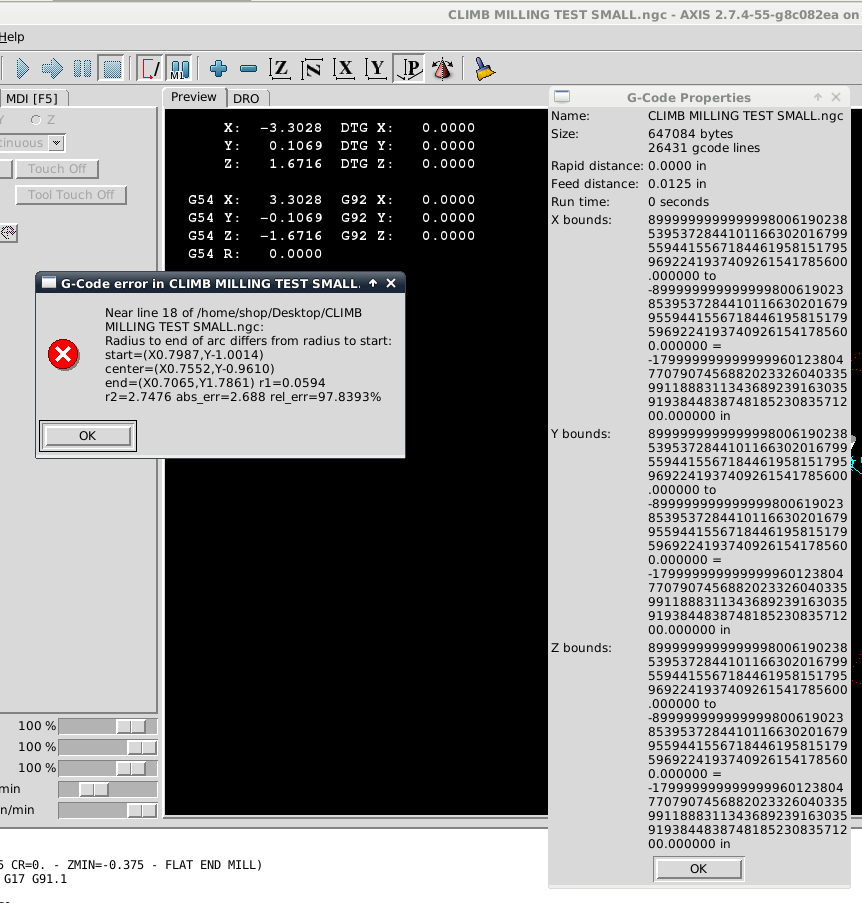
You were right - I did have the Master branch selected. LinuxCNC v2.8.0-pre-1578-gb1fb19c. I downgraded to 2.7.4.55, but the problem persists. Attached is the full .ngc as a .txt (different file, same problem), and a screenshot (note the crazy XYZ boundaries) of loading same.

Re: loosened tolerances. Are you referring to this thread?

Arc Tolerance

I'm not sure if the patch made it through to 2.8 or 2.7. I attempted to apply the TOLERANCE_INCH, TOLERANCE_MM settings in my .ini file last week, but it didn't seem to have an effect.

I'm considering attempting to install the 2.5.1 release on my live machine, but would much rather stick with a more recent version if possible.

File Attachment:

File Name: CLIMBMILLI...MALL.txt
File Size:631.92 KB


Please Log in or Create an account to join the conversation.

More
10 years 5 months ago - 10 years 5 months ago #74196 by Todd Zuercher
There is something fishy going on. The line where the error is occurring N80 is G3 X0.7065 Y1.7861 Z0.1135 I-0.0435 J0.0404. The X and Y of that line corrispond to the end point of the arc (see your error message). What I'm trying to grasp is where the beginning point is coming from. That is the real source of your problem. That should be from N55 G0 X0.7935 Y1.7053, which should be right and wouldn't give an error. But there seems to be some offset sneeking in somewhere throwing everything off (X0.7987 Y-01.0014). Do you have X or Y coordinates specified for T1 in your tool table?
Last edit: 10 years 5 months ago by Todd Zuercher.
The following user(s) said Thank You: apt403

Please Log in or Create an account to join the conversation.

Time to create page: 0.061 seconds
Powered by Kunena Forum
