

Converting .jpg to .ngc

More
2 years 9 months ago #292026 by tommylight
Replied by tommylight on topic Converting .jpg to .ngc
No idea what is wrong now, but seems to be using some deprecated stuff, probably Python has not been switched from 2.n to 3.n.
Did you try opening the image from LinuxCNC?
Images can be opened directly from LinuxCNC and a new window is presented with lots of settings, when finished it also automatically sends gcode to LinuxCNC.
The following user(s) said Thank You: ckuecker

Please Log in or Create an account to join the conversation.
More
2 years 9 months ago #292087 by ckuecker
Replied by ckuecker on topic Converting .jpg to .ngc
Opening the image in LinuxCNC resulted in a file with over 135,000 lines of G-code. It took quite a while to crunch through.
But it appears to be a usable file for engraving the image.
Thanks for the help!
The following user(s) said Thank You: tommylight

Please Log in or Create an account to join the conversation.

More
2 years 9 months ago #292143 by ckuecker
Replied by ckuecker on topic Converting .jpg to .ngc
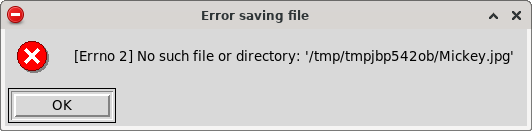
One remaining issue - I can't save the generated G-code. The save file option gives an error that the input file does not exist.

Please Log in or Create an account to join the conversation.

More
2 years 9 months ago #292146 by tommylight
Replied by tommylight on topic Converting .jpg to .ngc
What folder are you trying to save to?
Make sure the folder has write permissions for your user.

Please Log in or Create an account to join the conversation.

More
2 years 8 months ago #292229 by ckuecker
Replied by ckuecker on topic Converting .jpg to .ngc
Here's the error: 

Please Log in or Create an account to join the conversation.

More
2 years 8 months ago #292231 by ckuecker
Replied by ckuecker on topic Converting .jpg to .ngc
I was trying to save to the nc_files directory as "Mickey.ngc".

Please Log in or Create an account to join the conversation.

Time to create page: 0.153 seconds
Powered by Kunena Forum