rotary axis queston

More
1 year 6 months ago #326000 by acourtjester
HI
I am wanting to add an optional rotary function to my table, to have a tubing cutter.  With another controller and software I just switched the Y axis control output cable to the rotary axis motor.  This is also the way it is done with my desktop laser to use its rotary optional drive assembly.
On my table I and using LinuxCNC software with a Mesa 7I76E card and QTPlasmaC GUI.  I have tried to leave out the Y home/limit entry in the pncconf setup, but it will not enable the Y axis.  I understand the need to do the homing operation so the software knows where it is for running a G-code.  After the homing I can position any axis to a location and then zero out the DRO and use that as a start position for the G-code. 
What I want is the Y axis not needing to home to be active.  This would allow me to home X and Z and position the Y to a zero position manually.
Thanks for your time
Tom V 

Please Log in or Create an account to join the conversation.

More
1 year 6 months ago #326006 by tommylight
Replied by tommylight on topic rotary axis queston
Usually omitting or deleting lines with HOME_...._velocity in the ini file and editing the homing and limit lines in hal is all it takes, but first:
-is the Y axis single drive/motor or tandem?
-is the Y axis the right choice for your use case? I usually do X axis as rotary.
-upload the hal and ini file so we can have a look.
The following user(s) said Thank You: acourtjester

Please Log in or Create an account to join the conversation.

More
1 year 6 months ago #326069 by andypugh
Replied by andypugh on topic rotary axis queston

Usually omitting or deleting lines with HOME_...._velocity in the ini file and editing the homing and limit lines in hal is all it takes,

It's usual to retain the lines, but set the two velocities to zero. Omitting probably works too (they will default to zero) but actively setting to zero looks less like a mistake. 
 
The following user(s) said Thank You: tommylight

Please Log in or Create an account to join the conversation.
More
1 year 6 months ago - 1 year 6 months ago #326494 by acourtjester
Replied by acourtjester on topic rotary axis queston
thanks for the reply I did not get a notice you had replied sorry for the delay in my reply.
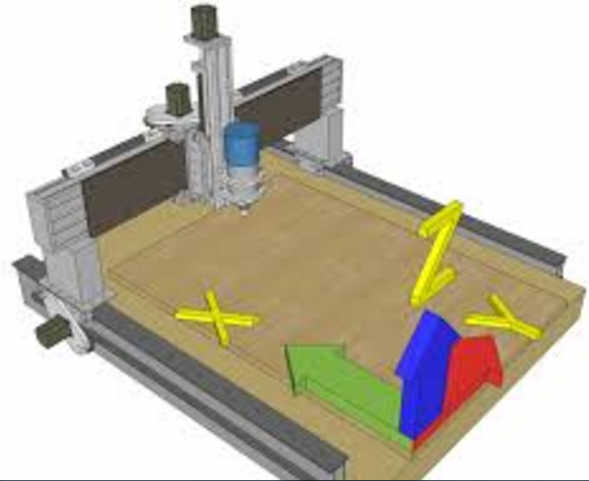
I will give that a try in the morning. I am using all single motors for the axis. My table config is that the Y is for the across table motion, which is used by some but others use that direction as the X. (: (:  Not having the Y to home will make it so I will not need a home/limit switch for the rotary and I can jut switch the motor signal cable from the controller to the Y or rotary servo.  (:  (: image missing /media/kunena/emoticons/tongue.png 
 
Last edit: 1 year 6 months ago by acourtjester. Reason: added info

Please Log in or Create an account to join the conversation.

More
1 year 6 months ago #326497 by tommylight
Replied by tommylight on topic rotary axis queston
If there is no particular and very strong reason for it, i would avoid using the pictured axis designations, it will cause constant headaches with any CAM software you might use.

Please Log in or Create an account to join the conversation.

More
1 year 6 months ago - 1 year 6 months ago #326541 by acourtjester
Replied by acourtjester on topic rotary axis queston
Ok here are the 2 files you requested,  I could not find the line you said to delete (Home_'''_ velocity).With the choice of the Axis configuration, has not caused any problem with any of the CAD software I use.(SheetCam, Estlcam, and Lightburn)  this sort of shows how it is image missing /media/kunena/emoticons/silly.png


File Attachment:

File Name: new_Y_no_home.ini
File Size:4.65 KB


File Attachment:

File Name: new_Y_no_home.hal
File Size:9.06 KB

 
Last edit: 1 year 6 months ago by acourtjester.
The following user(s) said Thank You: tommylight

Please Log in or Create an account to join the conversation.

Time to create page: 0.408 seconds
Powered by Kunena Forum
