
Ucięty widok AXIS
- jarcysgru
- Offline
- Premium Member
-

Less
More
- Posts: 104
- Thank you received: 6
14 Jun 2026 10:41 #347066
by jarcysgru
Ucięty widok AXIS was created by jarcysgru
Tak jak w temacie mam uciety widok AXIS , brak napisu narzędzia jak to naprawić w linuxcnc 2.9..8.
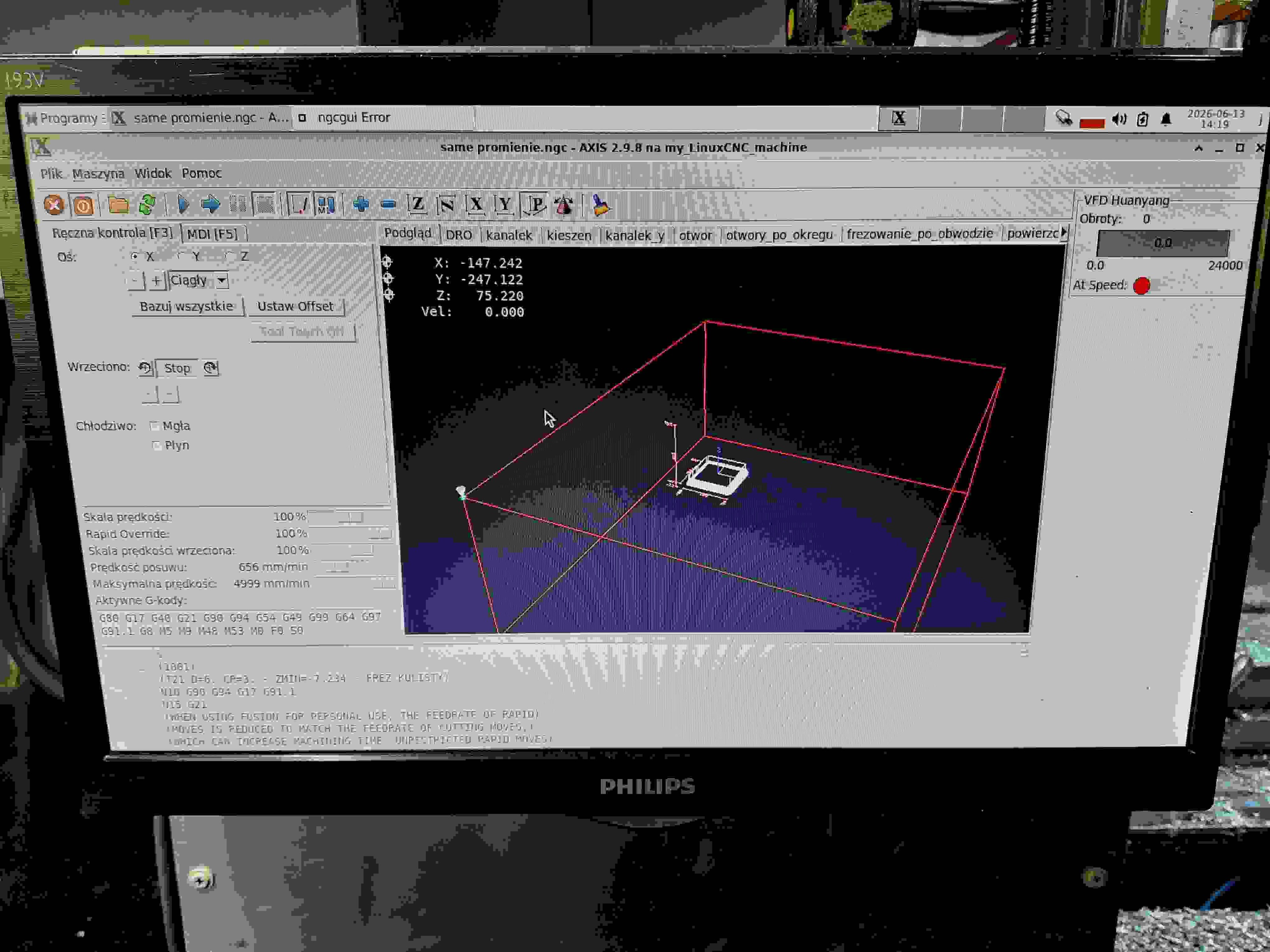
Attachments:
Please Log in or Create an account to join the conversation.
- tommylight
-

- Offline
- Moderator
-

Less
More
- Posts: 21959
- Thank you received: 7478
14 Jun 2026 11:21 #347068
by tommylight
Replied by tommylight on topic Ucięty widok AXIS
More info?
Please Log in or Create an account to join the conversation.
- jarcysgru
- Offline
- Premium Member
-
Less
More
- Posts: 104
- Thank you received: 6
14 Jun 2026 15:21 #347071
by jarcysgru
Replied by jarcysgru on topic Ucięty widok AXIS
Co mam podać ?
Please Log in or Create an account to join the conversation.
- tommylight
-
- Offline
- Moderator
-
Less
More
- Posts: 21959
- Thank you received: 7478
15 Jun 2026 14:10 #347092
by tommylight
Replied by tommylight on topic Ucięty widok AXIS
Anything and everything, the original post does not translate to anything useful.
Please Log in or Create an account to join the conversation.
- jarcysgru
- Offline
- Premium Member
-
Less
More
- Posts: 104
- Thank you received: 6
15 Jun 2026 16:22 - 15 Jun 2026 16:26 #347095
by jarcysgru
Replied by jarcysgru on topic Ucięty widok AXIS
Aktualizacja sytuacji: Okno GUI AXIS jest odcięte ZARÓWNO na dole, jak i po prawej stronie.
Rozdzielczość mojego ekranu to 1366x768 (LinuxCNC 2.9.8 na Debianie). Ponieważ 1366px powinno być wystarczająco szerokie dla standardowego AXIS, wydaje się, że zintegrowany panel boczny (jak PyVCP czy GladeVCP) wypycha główne okno poza widoczny obszar ekranu.
Czy mógłbyś mi powiedzieć, jak poprawnie przeskalować okno lub zmienić pozycję panelu, żeby wszystko zmieściło się na monitorze 1366x768? Czy powinienem szukać linii PYVCP lub GLADEVCP w moim pliku .ini?
Rozdzielczość mojego ekranu to 1366x768 (LinuxCNC 2.9.8 na Debianie). Ponieważ 1366px powinno być wystarczająco szerokie dla standardowego AXIS, wydaje się, że zintegrowany panel boczny (jak PyVCP czy GladeVCP) wypycha główne okno poza widoczny obszar ekranu.
Czy mógłbyś mi powiedzieć, jak poprawnie przeskalować okno lub zmienić pozycję panelu, żeby wszystko zmieściło się na monitorze 1366x768? Czy powinienem szukać linii PYVCP lub GLADEVCP w moim pliku .ini?
Last edit: 15 Jun 2026 16:26 by jarcysgru.
Please Log in or Create an account to join the conversation.
- jarcysgru
- Offline
- Premium Member
-
Less
More
- Posts: 104
- Thank you received: 6
15 Jun 2026 17:27 #347096
by jarcysgru
Replied by jarcysgru on topic Ucięty widok AXIS
Czy to jest podobne
forum.linuxcnc.org/21-axis/49685-2-9-axis-with-1366x768
forum.linuxcnc.org/21-axis/49685-2-9-axis-with-1366x768
Please Log in or Create an account to join the conversation.
- jarcysgru
- Offline
- Premium Member
-
Less
More
- Posts: 104
- Thank you received: 6
15 Jun 2026 19:13 - 15 Jun 2026 19:15 #347098
by jarcysgru
Replied by jarcysgru on topic Ucięty widok AXIS
The problem is finally solved! It wasn't an issue with the .ini file directly, but rather with the automatic configuration generated by PNCconf inside the ukryty `~/.axisrc` file.
For my 1366x768 screen resolution, PNCconf had automatically created a `~/.axisrc` file with a hardcoded window geometry of 1366x640:
root_window.tk.call("wm", "geometry", ".", "1366x640+0+0")
Because I am running a complex setup with a PyVCP side panel and 11 NGCGUI tabs, forcing a vertical size of only 640 pixels caused the Tkinter engine to run out of space. As a result, the bottom bars (tool info, positions) and the right side of the GUI were completely cut off.
To fix it, I edited `~/.axisrc` and updated the geometry to utilize the full height of my screen (leaving a small margin for the hidden OS panel):
root_window.tk.call("wm", "geometry", ".", "1366x740+0+0")
root_window.tk.call("wm", "resizable", ".", "1", "1")
I also set my Debian top desktop panel to "Always hide". Now, the AXIS interface starts in the correct size, scales beautifully, and absolutely nothing is cut off anymore. Thank you everyone for the guidance!
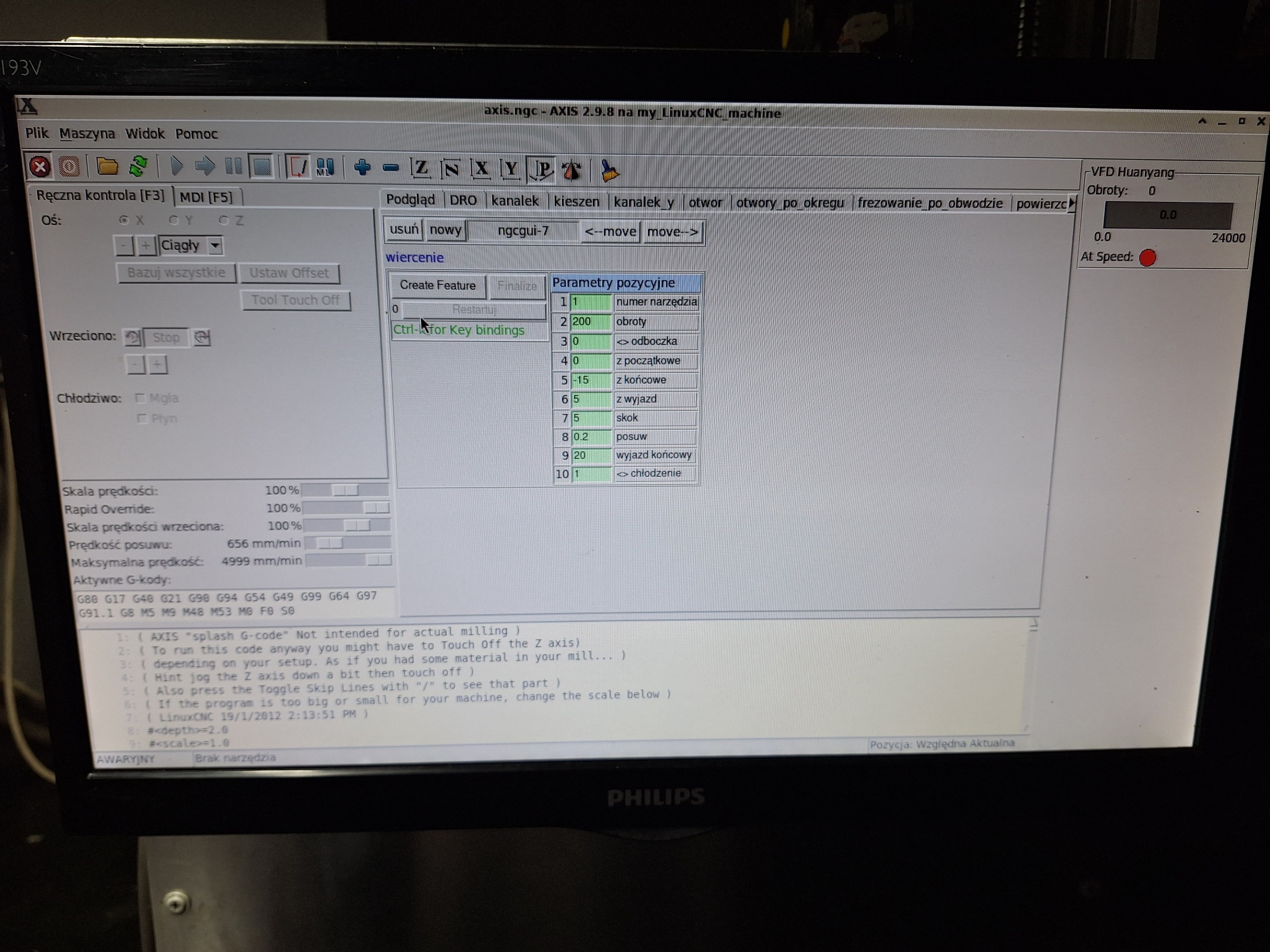
For my 1366x768 screen resolution, PNCconf had automatically created a `~/.axisrc` file with a hardcoded window geometry of 1366x640:
root_window.tk.call("wm", "geometry", ".", "1366x640+0+0")
Because I am running a complex setup with a PyVCP side panel and 11 NGCGUI tabs, forcing a vertical size of only 640 pixels caused the Tkinter engine to run out of space. As a result, the bottom bars (tool info, positions) and the right side of the GUI were completely cut off.
To fix it, I edited `~/.axisrc` and updated the geometry to utilize the full height of my screen (leaving a small margin for the hidden OS panel):
root_window.tk.call("wm", "geometry", ".", "1366x740+0+0")
root_window.tk.call("wm", "resizable", ".", "1", "1")
I also set my Debian top desktop panel to "Always hide". Now, the AXIS interface starts in the correct size, scales beautifully, and absolutely nothing is cut off anymore. Thank you everyone for the guidance!
Attachments:
Last edit: 15 Jun 2026 19:15 by jarcysgru.
The following user(s) said Thank You: tommylight
Please Log in or Create an account to join the conversation.
Time to create page: 0.950 seconds