
- Posts: 121
- Thank you received: 12
Is there any idiots guide to GUIs?
- mwc
- Topic Author
- Offline
- Premium Member
-

Less
More
2 months 5 days ago #349081
by mwc
Is there any idiots guide to GUIs? was created by mwc
Now that I've solved the issues with getting EtherCAT drives to work, I'm looking at GUI options, however I'm wondering if there's any kind of guide as to pros/cons of each GUI option?
First machine I'd like to try this on is a plasma table, but potentially also re-retrofitting a mill, and I'd like some kind of commonality between them, but I'm kind of stuck in not knowing what to go for.
I know there's QtPlasmaC and QtDragon, but also the MonoKrom option.
First machine I'd like to try this on is a plasma table, but potentially also re-retrofitting a mill, and I'd like some kind of commonality between them, but I'm kind of stuck in not knowing what to go for.
I know there's QtPlasmaC and QtDragon, but also the MonoKrom option.
Please Log in or Create an account to join the conversation.
- tuxcnc
- Offline
- Elite Member
-

Less
More
- Posts: 299
- Thank you received: 57
2 months 5 days ago #349082
by tuxcnc
Replied by tuxcnc on topic Is there any idiots guide to GUIs?
Different GUIs are created to meet the specific needs of some users. There are no overall better or worse ones, they are better or worse for a given operator or a given machine. For example, I have vision problems, so Axis has too small a font, and QtDragon turns me off just by looking at it. But other people use it and praise it, but they don't even want to hear about Gmoccapy, which is a great choice for me...
Please Log in or Create an account to join the conversation.
- mwc
- Topic Author
- Offline
- Premium Member
-
Less
More
- Posts: 121
- Thank you received: 12
2 months 5 days ago #349095
by mwc
Replied by mwc on topic Is there any idiots guide to GUIs?
I'm more interested in the inner workings of the different GUIs, like why I'd choose Qtvcp vs QtPyVcp vs GladeVCP, as the looks/layout can always be changed.
From somebody who's just started to look at LinuxCNC in detail, it just seems to be a variety of options with no clear reason why you'd pick a certain one.
From somebody who's just started to look at LinuxCNC in detail, it just seems to be a variety of options with no clear reason why you'd pick a certain one.
Please Log in or Create an account to join the conversation.
- rodw
-

- Offline
- Platinum Member
-

2 months 5 days ago #349101
by rodw
Replied by rodw on topic Is there any idiots guide to GUIs?
It mostly comes down to personal preference.
Glade is old school, been around a long time
QT is a modern GUI development environment, commercial but available for use for free
There are two frameworks to implementing QT in LinuxCNC
QTVCP - part of the LinuxCNC core, used by QTplasmac and QTDragon
QTPYVCP - A separate project used by ProbeBasic and MonoKrom
With plasma you have 2 choices, both use the plasmac.comp component.
QTplasmac or Monokrom.
QTPYVCP is a pretty cool environment but in my view hampered by recent changes to Python that mandates use of virtual environments to use it.
Its also not as well documented.
In my view, there is not much difference between probe basic and qtdragon, so ease of installation sent me to qtdragon when it was evolving. And I could not install Probe Basic on Debian Bullseye. Both require a 1080p monitor.
MonoKrom is an interesting beast. I've had a lot to do with the early development and am good friends with James the developer. Its far more capable than qtplasmac, including high-def style hole processing and workflow features. I also think its more touch screen friendly.
James has recently (in the last few days) developed a Post processor for Freecad for Monokrom and qtplasmac so watch for that in future freecad releases
Glade is old school, been around a long time
QT is a modern GUI development environment, commercial but available for use for free
There are two frameworks to implementing QT in LinuxCNC
QTVCP - part of the LinuxCNC core, used by QTplasmac and QTDragon
QTPYVCP - A separate project used by ProbeBasic and MonoKrom
With plasma you have 2 choices, both use the plasmac.comp component.
QTplasmac or Monokrom.
QTPYVCP is a pretty cool environment but in my view hampered by recent changes to Python that mandates use of virtual environments to use it.
Its also not as well documented.
In my view, there is not much difference between probe basic and qtdragon, so ease of installation sent me to qtdragon when it was evolving. And I could not install Probe Basic on Debian Bullseye. Both require a 1080p monitor.
MonoKrom is an interesting beast. I've had a lot to do with the early development and am good friends with James the developer. Its far more capable than qtplasmac, including high-def style hole processing and workflow features. I also think its more touch screen friendly.
James has recently (in the last few days) developed a Post processor for Freecad for Monokrom and qtplasmac so watch for that in future freecad releases
The following user(s) said Thank You: mwc
Please Log in or Create an account to join the conversation.
- mwc
- Topic Author
- Offline
- Premium Member
-
Less
More
- Posts: 121
- Thank you received: 12
2 months 5 days ago #349104
by mwc
Replied by mwc on topic Is there any idiots guide to GUIs?
Thanks for that.
it was that kind of general overview I was looking for, as the look/colours can always be changed.
MonoKrom looks interesting, but I spent a bit time today playing with Qtplasmac, as it comes installed.
Even if I don't use it, it's given me some insight into background configuration, as I managed to get my EtherCAT drives configured into it fairly easily.
I might attempt to install it over the next few days, and see how it compares.
it was that kind of general overview I was looking for, as the look/colours can always be changed.
MonoKrom looks interesting, but I spent a bit time today playing with Qtplasmac, as it comes installed.
Even if I don't use it, it's given me some insight into background configuration, as I managed to get my EtherCAT drives configured into it fairly easily.
I might attempt to install it over the next few days, and see how it compares.
Please Log in or Create an account to join the conversation.
- tuxcnc
- Offline
- Elite Member
-
Less
More
- Posts: 299
- Thank you received: 57
1 month 1 week ago #349900
by tuxcnc
Replied by tuxcnc on topic Is there any idiots guide to GUIs?
Today a question was asked on the forum: why so many gui in linuxcnc?
I always thought that it shouldn't bother anyone because at worst they don't have to use it.
But today I started wondering if this garbage can makes any sense.
Well, I have always been curious what this Qtdragon is and whether it can be useful for something.
Since I always compile linuxcnc from source, I never managed to get this GUI to work.
Recently RuntimeError: module compiled against ABI version 0x1000009 but this version of numpy is 0x2000000...
I can't downgrade numpy to version 1, because I need version 2 for other programs, and besides, apt, together with numpy, wants me to uninstall a dozen or so other packages because they have dependencies.
I downloaded qtdragon from github.com/persei802/QtDragon_hd .
The repository looks fresh, but it's not and it want the old numpy...
Today curiosity got the better of me and I launched Qtdragon with linuxcnc_2.9.10-amd64.hybrid.iso.
Here Qtdragon started up, but my worst suspicions came true.
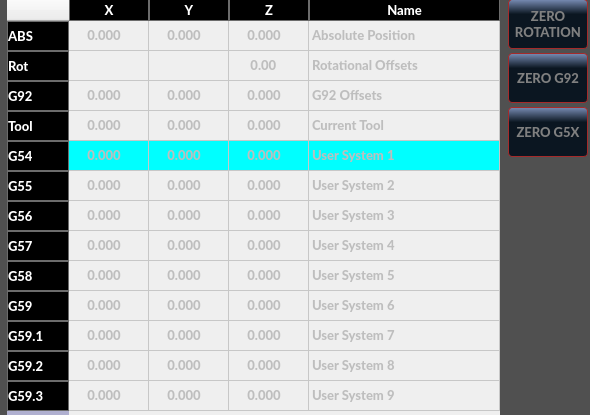
I simply have the mind of an engineer and I hate "artists" who spoil formally good designs to make them bad but nice...
What's the point of a small gray font on a gray background?
LinuxCNC is not a game that you can run in a dark room and then a dark interface actually makes sense.
LinuxCNC is a machine control that can be dangerous and there is no room for anything "nice".
It is no accident that the e-stop button has a different shape and color than the start button, so as not to look for it and not to confuse it with another one when the machine starts to live its own life...
I know that someone will soon start explaining to me that the authors do it for free and I should be grateful to them.
No, that's not true.
If something works badly or doesn't work at all, there is no reason to be grateful, because why should it?
The rule is simple - if you do something, do it well, and then people will be grateful to you, even if they have to pay for your work...
I always thought that it shouldn't bother anyone because at worst they don't have to use it.
But today I started wondering if this garbage can makes any sense.
Well, I have always been curious what this Qtdragon is and whether it can be useful for something.
Since I always compile linuxcnc from source, I never managed to get this GUI to work.
Recently RuntimeError: module compiled against ABI version 0x1000009 but this version of numpy is 0x2000000...
I can't downgrade numpy to version 1, because I need version 2 for other programs, and besides, apt, together with numpy, wants me to uninstall a dozen or so other packages because they have dependencies.
I downloaded qtdragon from github.com/persei802/QtDragon_hd .
The repository looks fresh, but it's not and it want the old numpy...
Today curiosity got the better of me and I launched Qtdragon with linuxcnc_2.9.10-amd64.hybrid.iso.
Here Qtdragon started up, but my worst suspicions came true.
I simply have the mind of an engineer and I hate "artists" who spoil formally good designs to make them bad but nice...
What's the point of a small gray font on a gray background?
LinuxCNC is not a game that you can run in a dark room and then a dark interface actually makes sense.
LinuxCNC is a machine control that can be dangerous and there is no room for anything "nice".
It is no accident that the e-stop button has a different shape and color than the start button, so as not to look for it and not to confuse it with another one when the machine starts to live its own life...
I know that someone will soon start explaining to me that the authors do it for free and I should be grateful to them.
No, that's not true.
If something works badly or doesn't work at all, there is no reason to be grateful, because why should it?
The rule is simple - if you do something, do it well, and then people will be grateful to you, even if they have to pay for your work...
Please Log in or Create an account to join the conversation.
- tommylight
-

- Away
- Moderator
-

1 month 1 week ago #349904
by tommylight
-
Seeing as you are quite good at this, i wonder, would it have taken less time to change the colors instead of this?
I would really like to know, and i do not mean the time it took to make it work for you, i am aware that can be tricky sometimes with versions and stuff, and i had my fair share of numpy issues.
Thank you.
Replied by tommylight on topic Is there any idiots guide to GUIs?
All valid points, except the "nice" part, see new Mazak controls, they look like form a space ship. Did not use it yet, so no idea how usable it is.I simply have the mind of an engineer and I hate "artists" who spoil formally good designs to make them bad but nice...
What's the point of a small gray font on a gray background?
LinuxCNC is not a game that you can run in a dark room and then a dark interface actually makes sense.
LinuxCNC is a machine control that can be dangerous and there is no room for anything "nice".
It is no accident that the e-stop button has a different shape and color than the start button, so as not to look for it and not to confuse it with another one when the machine starts to live its own life...
OK, it is open source so you can modify it to however you like it, see bellowI know that someone will soon start explaining to me that the authors do it for free and I should be grateful to them.
"Do it well" for them might not always be well for you or me, and i am fine with it, as i can modify as i see fit, and be thankful i did not have to do the whole thing from 0.The rule is simple - if you do something, do it well, and then people will be grateful to you, even if they have to pay for your work...
-
Seeing as you are quite good at this, i wonder, would it have taken less time to change the colors instead of this?
I would really like to know, and i do not mean the time it took to make it work for you, i am aware that can be tricky sometimes with versions and stuff, and i had my fair share of numpy issues.
Thank you.
Please Log in or Create an account to join the conversation.
- rodw
-
- Offline
- Platinum Member
-
1 month 1 week ago #349913
by rodw
Replied by rodw on topic Is there any idiots guide to GUIs?
If you have the mind of an engineer, why don't you test the software's functionality instead of complaining you don't like the colour?
Its very comprehensive and the probing is first class.
Its very comprehensive and the probing is first class.
Please Log in or Create an account to join the conversation.
- cmorley
- Offline
- Moderator
-
Less
More
- Posts: 6803
- Thank you received: 2181
1 month 5 days ago #349942
by cmorley
Replied by cmorley on topic Is there any idiots guide to GUIs?
Always interested in contructive feedback good or bad - really am.
But stuff like this makes me shake my head a bit.
Compiling problems aren't usually QtDragons fault - you didn't mention what system you are compiling in so no one could help or evaluate the problem.
I'm sorry Qtdragon didn't suit you out of the box, but there is quite alot you could change.
For instance based on your pic, you could turn on the machine and home it, then the colors change from disabled to enabled and look like this:
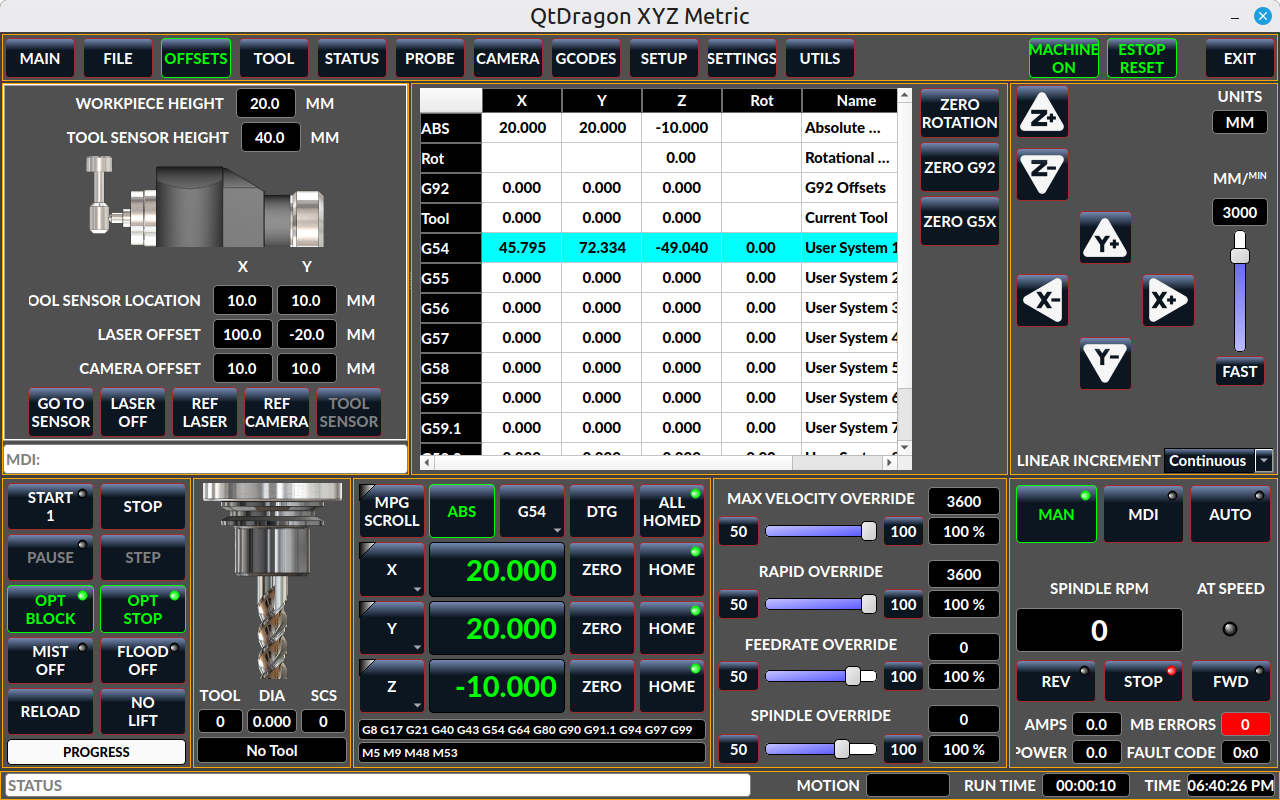
Qtdragon has optional stylesheets to easily change colors, there are several built in.
If fonts are a problem you can change them too.
linuxcnc.org/docs/stable/html/gui/qtdragon.html#_stylesheets
If you asked nice I bet someone would have even helped you get something that works better for your eyes.
Or don't use it at all. Choice is yours.
But stuff like this makes me shake my head a bit.
Compiling problems aren't usually QtDragons fault - you didn't mention what system you are compiling in so no one could help or evaluate the problem.
I'm sorry Qtdragon didn't suit you out of the box, but there is quite alot you could change.
For instance based on your pic, you could turn on the machine and home it, then the colors change from disabled to enabled and look like this:
Qtdragon has optional stylesheets to easily change colors, there are several built in.
If fonts are a problem you can change them too.
linuxcnc.org/docs/stable/html/gui/qtdragon.html#_stylesheets
If you asked nice I bet someone would have even helped you get something that works better for your eyes.
Or don't use it at all. Choice is yours.
The following user(s) said Thank You: tommylight, rodw, besriworld
Please Log in or Create an account to join the conversation.
- tuxcnc
- Offline
- Elite Member
-
Less
More
- Posts: 299
- Thank you received: 57
1 month 5 days ago #349956
by tuxcnc
My system is Debian 13.7 and the LinuxCNC sources are from the Git repository, main branch, i.e. version 2.10.
There is some misunderstanding here, because when LinuxCNC is compiled, the Python scripts are not compiled, but only copied to the right place. This means that if the scripts author screws up, it's his fault, because compilation itself doesn't change anything.
So we have the following flower:
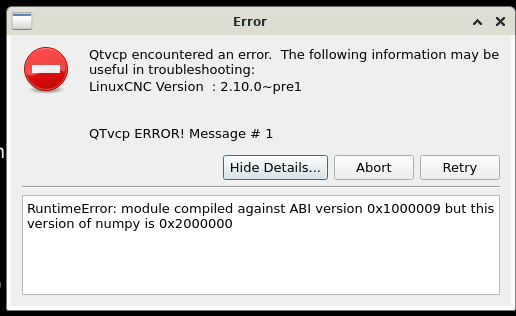
This is what happens after compiling LinuxCNC yourself.
However, there are two live images that I ran.
1. linuxcnc_2.9.10-amd64.hybrid.iso
2. linuxcnc_2.10.pre1-amd64.hybrid.iso
Qtdragon starts in both, but neither suits my system.
In linuxcnc_2.9.10-amd64.hybrid.iso there is numpy 2.2.4 but LinuxCNC is 2.9.
In linuxcnc_2.10.pre1-amd64.hybrid.iso there is LinuxCNC 2.10, but Debian 12 with numpy 1.24.2.
Someone's sources have obviously gone wrong...
As for these "gray on grey" numbers, I wrote that I ran Qtdragon for the first time in my life and just took a look. I opened the tab called "offsets", so I thought there were offsets there and it didn't occur to me that it would only work after homing, because offsets have nothing to do with homing the machine.
Well, now I noticed that someone stuffed a machine position into the offsets, for unknown reason, because they can be seen much more conveniently in the window below. I started to wonder what else the authors of Qtdragon would surprise me with, but I think I'm less and less curious about it.
Replied by tuxcnc on topic Is there any idiots guide to GUIs?
First, about compilation issues.Compiling problems aren't usually QtDragons fault - you didn't mention what system you are compiling in so no one could help or evaluate the problem.
I'm sorry Qtdragon didn't suit you out of the box, but there is quite alot you could change.
For instance based on your pic, you could turn on the machine and home it, then the colors change from disabled to enabled and look like this:
My system is Debian 13.7 and the LinuxCNC sources are from the Git repository, main branch, i.e. version 2.10.
There is some misunderstanding here, because when LinuxCNC is compiled, the Python scripts are not compiled, but only copied to the right place. This means that if the scripts author screws up, it's his fault, because compilation itself doesn't change anything.
So we have the following flower:
This is what happens after compiling LinuxCNC yourself.
However, there are two live images that I ran.
1. linuxcnc_2.9.10-amd64.hybrid.iso
2. linuxcnc_2.10.pre1-amd64.hybrid.iso
Qtdragon starts in both, but neither suits my system.
In linuxcnc_2.9.10-amd64.hybrid.iso there is numpy 2.2.4 but LinuxCNC is 2.9.
In linuxcnc_2.10.pre1-amd64.hybrid.iso there is LinuxCNC 2.10, but Debian 12 with numpy 1.24.2.
Someone's sources have obviously gone wrong...
As for these "gray on grey" numbers, I wrote that I ran Qtdragon for the first time in my life and just took a look. I opened the tab called "offsets", so I thought there were offsets there and it didn't occur to me that it would only work after homing, because offsets have nothing to do with homing the machine.
Well, now I noticed that someone stuffed a machine position into the offsets, for unknown reason, because they can be seen much more conveniently in the window below. I started to wonder what else the authors of Qtdragon would surprise me with, but I think I'm less and less curious about it.
Please Log in or Create an account to join the conversation.
Time to create page: 0.087 seconds