
- LinuxCNC
- General LinuxCNC Questions
- Standalone LinuxCNC machine simulator using the Stepper-Ninja HAL interface
Standalone LinuxCNC machine simulator using the Stepper-Ninja HAL interface
- fmueller
- Offline
- New Member
-

Less
More
- Posts: 5
- Thank you received: 5
03 Oct 2026 12:54 - 03 Oct 2026 13:27 #350079
by fmueller
Standalone LinuxCNC machine simulator using the Stepper-Ninja HAL interface was created by fmueller
Hi,
I've been working on a standalone CNC machine simulator for LinuxCNC and have now published the first experimental version.
The main idea is that the simulator does NOT interpret G-code itself.
LinuxCNC remains responsible for G-code interpretation, trajectory planning, coordinate systems, offsets and compensation. The simulator sits behind LinuxCNC where real motion hardware would normally be connected.
Currently I use the original Stepper-Ninja HAL driver and its UDP protocol as the interface:
The important part of this approach is that the simulator sees the motion that LinuxCNC actually sends to the virtual hardware instead of trying to reproduce LinuxCNC's trajectory planner.
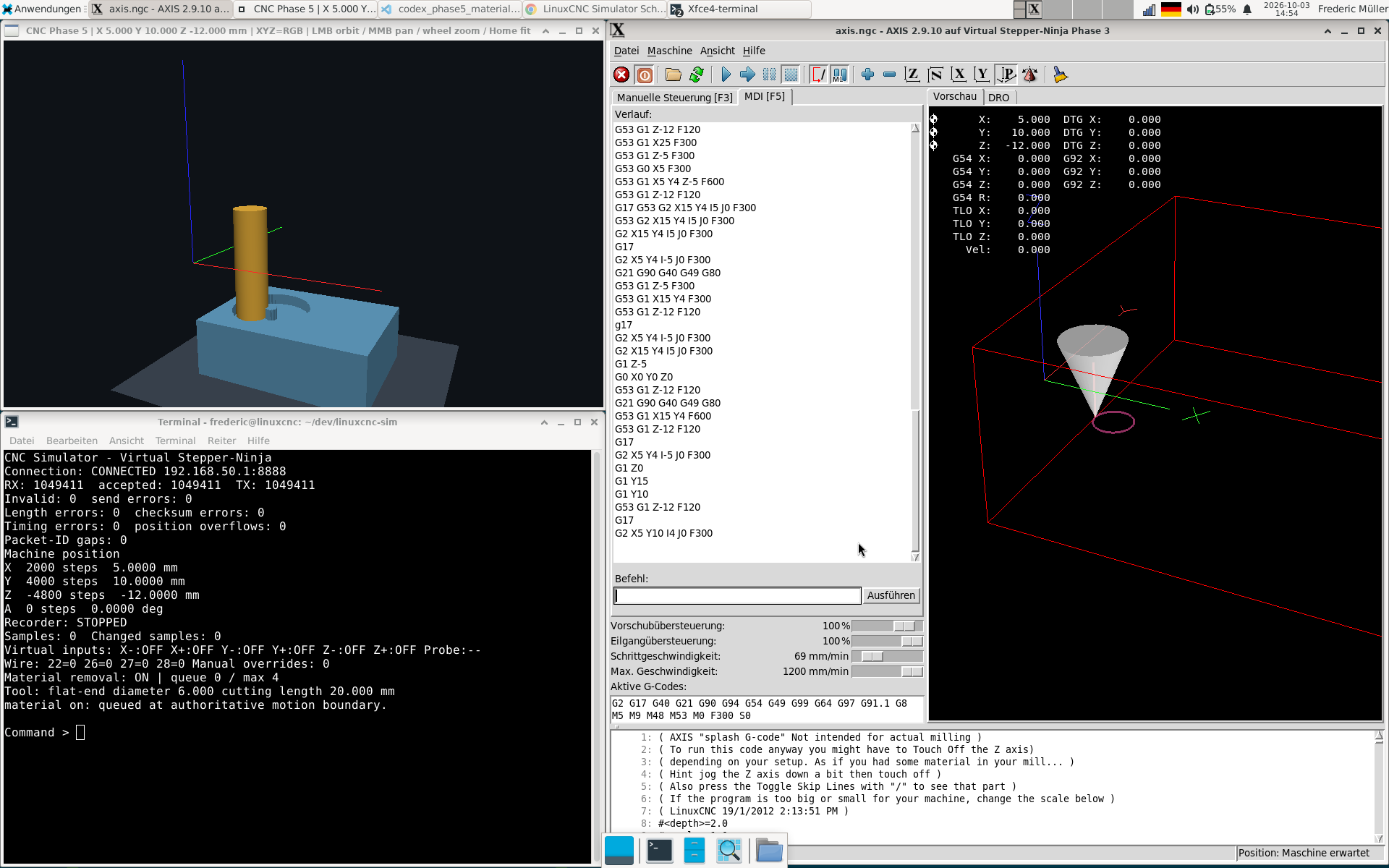
Communication is bidirectional. The simulator can also send virtual machine inputs back to LinuxCNC. I can already use this for limit switches, homing and a simple configurable probe plane.
The current version also contains a sparse voxel workpiece and persistent material removal. Tool movement is processed as continuous swept volumes rather than just removing material at individual sampled positions.
One interesting problem was performance during curved motion. LinuxCNC can generate many small motion segments. Instead of approximating those segments with a larger chord, I batch the actual swept segments for a short time window and calculate the union of their removal volumes. This keeps the resulting voxel state identical while greatly reducing repeated work.
At the moment the simulation is still quite limited:
- flat-end cutter only
- no geometric stock probing yet
- no toolsetter yet
- no spindle/holder model
- no general collision detection
- no rotary material transform
The next area I would like to work on is geometric contact detection. My idea is to use the same contact system later for workpiece probing, a machine-fixed toolsetter and eventually collision detection.
Stepper-Ninja is currently just the interface between LinuxCNC and the simulator. A physical machine does not need to use Stepper-Ninja hardware. I chose it because an existing LinuxCNC HAL driver and a small bidirectional protocol already existed, so I did not have to invent another LinuxCNC hardware interface.
This is my first public release and I consider it experimental development software, not a machine safety system.
Source and v0.1.0:
github.com/FredericM88/linuxcnc-sim
I would be particularly interested in feedback about the architecture. Does placing the simulator behind LinuxCNC at the hardware interface make sense to you? Are there LinuxCNC behaviours or use cases that would be especially useful to test with this approach?
Frederic
I've been working on a standalone CNC machine simulator for LinuxCNC and have now published the first experimental version.
The main idea is that the simulator does NOT interpret G-code itself.
LinuxCNC remains responsible for G-code interpretation, trajectory planning, coordinate systems, offsets and compensation. The simulator sits behind LinuxCNC where real motion hardware would normally be connected.
Currently I use the original Stepper-Ninja HAL driver and its UDP protocol as the interface:
G-code
|
v
LinuxCNC
|
v
Trajectory planner / compensation
|
v
Original Stepper-Ninja HAL driver
|
| UDP
v
linuxcnc-sim
|
+-- virtual machine motion
+-- virtual digital inputs
+-- limit switches
+-- probe input
+-- OpenGL visualization
+-- voxel workpiece
+-- material removal
The important part of this approach is that the simulator sees the motion that LinuxCNC actually sends to the virtual hardware instead of trying to reproduce LinuxCNC's trajectory planner.
Communication is bidirectional. The simulator can also send virtual machine inputs back to LinuxCNC. I can already use this for limit switches, homing and a simple configurable probe plane.
The current version also contains a sparse voxel workpiece and persistent material removal. Tool movement is processed as continuous swept volumes rather than just removing material at individual sampled positions.
One interesting problem was performance during curved motion. LinuxCNC can generate many small motion segments. Instead of approximating those segments with a larger chord, I batch the actual swept segments for a short time window and calculate the union of their removal volumes. This keeps the resulting voxel state identical while greatly reducing repeated work.
At the moment the simulation is still quite limited:
- flat-end cutter only
- no geometric stock probing yet
- no toolsetter yet
- no spindle/holder model
- no general collision detection
- no rotary material transform
The next area I would like to work on is geometric contact detection. My idea is to use the same contact system later for workpiece probing, a machine-fixed toolsetter and eventually collision detection.
Stepper-Ninja is currently just the interface between LinuxCNC and the simulator. A physical machine does not need to use Stepper-Ninja hardware. I chose it because an existing LinuxCNC HAL driver and a small bidirectional protocol already existed, so I did not have to invent another LinuxCNC hardware interface.
This is my first public release and I consider it experimental development software, not a machine safety system.
Source and v0.1.0:
github.com/FredericM88/linuxcnc-sim
I would be particularly interested in feedback about the architecture. Does placing the simulator behind LinuxCNC at the hardware interface make sense to you? Are there LinuxCNC behaviours or use cases that would be especially useful to test with this approach?
Frederic
Attachments:
Last edit: 03 Oct 2026 13:27 by fmueller.
The following user(s) said Thank You: meister, COFHAL
Please Log in or Create an account to join the conversation.
- tuxcnc
- Offline
- Elite Member
-

Less
More
- Posts: 276
- Thank you received: 52
03 Oct 2026 14:32 #350080
by tuxcnc
Replied by tuxcnc on topic Standalone LinuxCNC machine simulator using the Stepper-Ninja HAL interface
Can't compile ninja hal driver for LinuxCNC 2.10, so your hard work is useless for me.
Building LinuxCNC HAL module stepgen-ninja
/usr/src/stepper-ninja-hal/hal-driver/stepgen-ninja.c:34:13: note: ‘#pragma message: Ethernet version’
   34 |     #pragma message "Ethernet version"
      |             ^~~~~~~
/usr/src/stepper-ninja-hal/hal-driver/stepgen-ninja.c:99:5: error: unknown type name ‘hal_float_t’; did you mean ‘hal_port_t’?
   99 |     hal_float_t *command[stepgens];
      |     ^~~~~~~~~~~
      |     hal_port_t
/usr/src/stepper-ninja-hal/hal-driver/stepgen-ninja.c:100:5: error: unknown type name ‘hal_float_t’; did you mean ‘hal_port_t’?
  100 |     hal_float_t *feedback[stepgens];
      |     ^~~~~~~~~~~
      |     hal_port_t
/usr/src/stepper-ninja-hal/hal-driver/stepgen-ninja.c:101:5: error: unknown type name ‘hal_float_t’; did you mean ‘hal_port_t’?
  101 |     hal_float_t *scale[stepgens];
      |     ^~~~~~~~~~~
      |     hal_port_t
/usr/src/stepper-ninja-hal/hal-driver/stepgen-ninja.c:102:5: error: unknown type name ‘hal_bit_t’; did you mean ‘hal_uint_t’?
  102 |     hal_bit_t *mode[stepgens];
      |     ^~~~~~~~~
      |     hal_uint_t
/usr/src/stepper-ninja-hal/hal-driver/stepgen-ninja.c:103:5: error: unknown type name ‘hal_bit_t’; did you mean ‘hal_uint_t’?
  103 |     hal_bit_t *enable[stepgens];
      |     ^~~~~~~~~
      |     hal_uint_t
/usr/src/stepper-ninja-hal/hal-driver/stepgen-ninja.c:104:5: error: unknown type name ‘hal_u32_t’; did you mean ‘hal_uint_t’?
  104 |     hal_u32_t *pulse_width;
      |     ^~~~~~~~~
      |     hal_uint_t
/usr/src/stepper-ninja-hal/hal-driver/stepgen-ninja.c:107:5: error: unknown type name ‘hal_s32_t’; did you mean ‘hal_sint_t’?
  107 |     hal_s32_t *raw_count[encoders];
      |     ^~~~~~~~~
      |     hal_sint_t
/usr/src/stepper-ninja-hal/hal-driver/stepgen-ninja.c:108:5: error: unknown type name ‘hal_float_t’; did you mean ‘hal_port_t’?
  108 |     hal_float_t *enc_scale[encoders];
      |     ^~~~~~~~~~~
      |     hal_port_t
/usr/src/stepper-ninja-hal/hal-driver/stepgen-ninja.c:109:5: error: unknown type name ‘hal_float_t’; did you mean ‘hal_port_t’?
  109 |     hal_float_t *enc_position[encoders];
      |     ^~~~~~~~~~~
      |     hal_port_t
/usr/src/stepper-ninja-hal/hal-driver/stepgen-ninja.c:110:5: error: unknown type name ‘hal_float_t’; did you mean ‘hal_port_t’?
  110 |     hal_float_t *enc_velocity[encoders];
      |     ^~~~~~~~~~~
      |     hal_port_t
/usr/src/stepper-ninja-hal/hal-driver/stepgen-ninja.c:111:5: error: unknown type name ‘hal_bit_t’; did you mean ‘hal_uint_t’?
  111 |     hal_bit_t *enc_index[encoders];
      |     ^~~~~~~~~
      |     hal_uint_t
/usr/src/stepper-ninja-hal/hal-driver/stepgen-ninja.c:112:5: error: unknown type name ‘hal_bit_t’; did you mean ‘hal_uint_t’?
  112 |     hal_bit_t *enc_reset[encoders];
      |     ^~~~~~~~~
      |     hal_uint_t
/usr/src/stepper-ninja-hal/hal-driver/stepgen-ninja.c:113:5: error: unknown type name ‘hal_float_t’; did you mean ‘hal_port_t’?
  113 |     hal_float_t *enc_rpm[encoders];
      |     ^~~~~~~~~~~
      |     hal_port_t
/usr/src/stepper-ninja-hal/hal-driver/stepgen-ninja.c:131:5: error: unknown type name ‘hal_s32_t’; did you mean ‘hal_sint_t’?
  131 |     hal_s32_t *jitter;
      |     ^~~~~~~~~
      |     hal_sint_t
/usr/src/stepper-ninja-hal/hal-driver/stepgen-ninja.c:132:5: error: unknown type name ‘hal_u32_t’; did you mean ‘hal_uint_t’?
  132 |     hal_u32_t *step_ring_fill;
      |     ^~~~~~~~~
      |     hal_uint_t
/usr/src/stepper-ninja-hal/hal-driver/stepgen-ninja.c:133:5: error: unknown type name ‘hal_bit_t’; did you mean ‘hal_uint_t’?
  133 |     hal_bit_t *step_ring_active;
      |     ^~~~~~~~~
      |     hal_uint_t
/usr/src/stepper-ninja-hal/hal-driver/stepgen-ninja.c:134:5: error: unknown type name ‘hal_bit_t’; did you mean ‘hal_uint_t’?
  134 |     hal_bit_t *step_ring_underflow;
      |     ^~~~~~~~~
      |     hal_uint_t
/usr/src/stepper-ninja-hal/hal-driver/stepgen-ninja.c:135:5: error: unknown type name ‘hal_bit_t’; did you mean ‘hal_uint_t’?
  135 |     hal_bit_t *step_ring_overflow;
      |     ^~~~~~~~~
      |     hal_uint_t
/usr/src/stepper-ninja-hal/hal-driver/stepgen-ninja.c:136:5: error: unknown type name ‘hal_bit_t’; did you mean ‘hal_uint_t’?
  136 |     hal_bit_t *input[96];
      |     ^~~~~~~~~
      |     hal_uint_t
/usr/src/stepper-ninja-hal/hal-driver/stepgen-ninja.c:137:5: error: unknown type name ‘hal_bit_t’; did you mean ‘hal_uint_t’?
  137 |     hal_bit_t *input_not[96];
      |     ^~~~~~~~~
      |     hal_uint_t
/usr/src/stepper-ninja-hal/hal-driver/stepgen-ninja.c:138:5: error: unknown type name ‘hal_bit_t’; did you mean ‘hal_uint_t’?
  138 |     hal_bit_t *rpi_input[32];
      |     ^~~~~~~~~
      |     hal_uint_t
/usr/src/stepper-ninja-hal/hal-driver/stepgen-ninja.c:139:5: error: unknown type name ‘hal_bit_t’; did you mean ‘hal_uint_t’?
  139 |     hal_bit_t *rpi_input_not[32];
      |     ^~~~~~~~~
      |     hal_uint_t
/usr/src/stepper-ninja-hal/hal-driver/stepgen-ninja.c:141:5: error: unknown type name ‘hal_bit_t’; did you mean ‘hal_uint_t’?
  141 |     hal_bit_t *output[64];
      |     ^~~~~~~~~
      |     hal_uint_t
/usr/src/stepper-ninja-hal/hal-driver/stepgen-ninja.c:142:5: error: unknown type name ‘hal_bit_t’; did you mean ‘hal_uint_t’?
  142 |     hal_bit_t *rpi_output[32];
      |     ^~~~~~~~~
      |     hal_uint_t
/usr/src/stepper-ninja-hal/hal-driver/stepgen-ninja.c:157:5: error: unknown type name ‘hal_float_t’; did you mean ‘hal_port_t’?
  157 |     hal_float_t *debug_freq;
      |     ^~~~~~~~~~~
      |     hal_port_t
/usr/src/stepper-ninja-hal/hal-driver/stepgen-ninja.c:158:5: error: unknown type name ‘hal_s32_t’; did you mean ‘hal_sint_t’?
  158 |     hal_s32_t *debug_steps[stepgens];
      |     ^~~~~~~~~
      |     hal_sint_t
/usr/src/stepper-ninja-hal/hal-driver/stepgen-ninja.c:159:5: error: unknown type name ‘hal_bit_t’; did you mean ‘hal_uint_t’?
  159 |     hal_bit_t *debug_steps_reset;
      |     ^~~~~~~~~
      |     hal_uint_t
/usr/src/stepper-ninja-hal/hal-driver/stepgen-ninja.c:161:5: error: unknown type name ‘hal_u32_t’; did you mean ‘hal_uint_t’?
  161 |     hal_u32_t *period;
      |     ^~~~~~~~~
      |     hal_uint_t
/usr/src/stepper-ninja-hal/hal-driver/stepgen-ninja.c:162:5: error: unknown type name ‘hal_bit_t’; did you mean ‘hal_uint_t’?
  162 |     hal_bit_t *connected;
      |     ^~~~~~~~~
      |     hal_uint_t
/usr/src/stepper-ninja-hal/hal-driver/stepgen-ninja.c:163:5: error: unknown type name ‘hal_bit_t’; did you mean ‘hal_uint_t’?
  163 |     hal_bit_t *io_ready_in;
      |     ^~~~~~~~~
      |     hal_uint_t
/usr/src/stepper-ninja-hal/hal-driver/stepgen-ninja.c:164:5: error: unknown type name ‘hal_bit_t’; did you mean ‘hal_uint_t’?
  164 |     hal_bit_t *io_ready_out;
      |     ^~~~~~~~~
      |     hal_uint_t
/usr/src/stepper-ninja-hal/hal-driver/stepgen-ninja.c: In function ‘watchdog_process’:
/usr/src/stepper-ninja-hal/hal-driver/stepgen-ninja.c:367:39: warning: unused parameter ‘period’ [-Wunused-parameter]
  367 | void watchdog_process(void *arg, long period)
      |                                  ~~~~~^~~~~~
In file included from /usr/src/stepper-ninja-hal/hal-driver/stepgen-ninja.c:441:
/usr/src/stepper-ninja-hal/hal-driver/modules/breakoutboard_hal_0.c: In function ‘bb_hal_setup_pins’:
/usr/src/stepper-ninja-hal/hal-driver/modules/breakoutboard_hal_0.c:23:13: error: implicit declaration of function ‘hal_pin_bit_newf’ [-Wimplicit-function-declaration]
   23 |         r = hal_pin_bit_newf(HAL_OUT, &d->input[i], comp_id, name, j);
      |             ^~~~~~~~~~~~~~~~
/usr/src/stepper-ninja-hal/hal-driver/stepgen-ninja.c: In function ‘_receive’:
/usr/src/stepper-ninja-hal/hal-driver/stepgen-ninja.c:445:27: warning: unused parameter ‘arg’ [-Wunused-parameter]
  445 | static int _receive(void *arg)
      |                     ~~~~~~^~~
/usr/src/stepper-ninja-hal/hal-driver/stepgen-ninja.c: In function ‘udp_io_process_recv’:
/usr/src/stepper-ninja-hal/hal-driver/stepgen-ninja.c:480:42: warning: unused parameter ‘period’ [-Wunused-parameter]
  480 | void udp_io_process_recv(void *arg, long period)
      |                                     ~~~~~^~~~~~
/usr/src/stepper-ninja-hal/hal-driver/stepgen-ninja.c: In function ‘udp_io_process_send’:
/usr/src/stepper-ninja-hal/hal-driver/stepgen-ninja.c:630:29: warning: comparison of integer expressions of different signedness: ‘uint32_t’ {aka ‘unsigned int’} and ‘int’ [-Wsign-compare]
  630 |         if (old_pulse_width != *d->pulse_width) {
      |                             ^~
In file included from /usr/src/stepper-ninja-hal/hal-driver/stepgen-ninja.c:49:
/usr/src/stepper-ninja-hal/hal-driver/stepgen-ninja.c: In function ‘rtapi_app_main’:
/usr/src/stepper-ninja-hal/hal-driver/hal_pin_macros.h:65:13: error: implicit declaration of function ‘hal_pin_u32_newf’ [-Wimplicit-function-declaration]
   65 |         r = hal_pin_u32_newf(dir, ptr, comp_id, name, j); \
      |             ^~~~~~~~~~~~~~~~
/usr/src/stepper-ninja-hal/hal-driver/stepgen-ninja.c:882:9: note: in expansion of macro ‘PIN_U32_INIT’
  882 |         PIN_U32_INIT(&hal_data[j].pulse_width, HAL_IN, default_pulse_width, module_name ".%d.stepgen.pulse-width", j);
      |         ^~~~~~~~~~~~
/usr/src/stepper-ninja-hal/hal-driver/hal_pin_macros.h:77:13: error: implicit declaration of function ‘hal_pin_float_newf’ [-Wimplicit-function-declaration]
   77 |         r = hal_pin_float_newf(dir, ptr, comp_id, name, j); \
      |             ^~~~~~~~~~~~~~~~~~
/usr/src/stepper-ninja-hal/hal-driver/stepgen-ninja.c:885:13: note: in expansion of macro ‘PIN_FLOAT’
  885 |             PIN_FLOAT(&hal_data[j].debug_freq, HAL_OUT, module_name ".%d.stepgen.max-freq-khz", j);
      |             ^~~~~~~~~
/usr/src/stepper-ninja-hal/hal-driver/hal_pin_macros.h:31:13: error: implicit declaration of function ‘hal_pin_s32_newf’ [-Wimplicit-function-declaration]
   31 |         r = hal_pin_s32_newf(dir, ptr, comp_id, name, j); \
      |             ^~~~~~~~~~~~~~~~
/usr/src/stepper-ninja-hal/hal-driver/stepgen-ninja.c:890:9: note: in expansion of macro ‘PIN_S32’
  890 |         PIN_S32(&hal_data[j].jitter, HAL_OUT, module_name ".%d.jitter", j);
      |         ^~~~~~~
/usr/src/stepper-ninja-hal/hal-driver/stepgen-ninja.c:980:17: note: ‘#pragma message: Adding export functions. (watchdog)’
  980 |         #pragma message "Adding export functions. (watchdog)"
      |                 ^~~~~~~
/usr/src/stepper-ninja-hal/hal-driver/stepgen-ninja.c:984:13: error: too many arguments to function ‘hal_export_funct’
  984 |         r = hal_export_funct(watchdog_name, watchdog_process, &hal_data[j], 1, 1, comp_id);
      |             ^~~~~~~~~~~~~~~~
In file included from /usr/src/stepper-ninja-hal/hal-driver/stepgen-ninja.c:4:
/usr/include/linuxcnc/hal.h:807:5: note: declared here
  807 | int hal_export_funct(const char *name, void (*funct) (void *, long),
      |     ^~~~~~~~~~~~~~~~
/usr/src/stepper-ninja-hal/hal-driver/stepgen-ninja.c:992:17: note: ‘#pragma message: Adding export functions. (process-send)’
  992 |         #pragma message "Adding export functions. (process-send)"
      |                 ^~~~~~~
/usr/src/stepper-ninja-hal/hal-driver/stepgen-ninja.c:996:13: error: too many arguments to function ‘hal_export_funct’
  996 |         r = hal_export_funct(process_send, udp_io_process_send, &hal_data[j], 1, 1, comp_id);
      |             ^~~~~~~~~~~~~~~~
/usr/include/linuxcnc/hal.h:807:5: note: declared here
  807 | int hal_export_funct(const char *name, void (*funct) (void *, long),
      |     ^~~~~~~~~~~~~~~~
/usr/src/stepper-ninja-hal/hal-driver/stepgen-ninja.c:1004:17: note: ‘#pragma message: Adding export functions. (process-recv)’
 1004 |         #pragma message "Adding export functions. (process-recv)"
      |                 ^~~~~~~
/usr/src/stepper-ninja-hal/hal-driver/stepgen-ninja.c:1008:13: error: too many arguments to function ‘hal_export_funct’
 1008 |         r = hal_export_funct(process_recv, udp_io_process_recv, &hal_data[j], 1, 1, comp_id);
      |             ^~~~~~~~~~~~~~~~
/usr/include/linuxcnc/hal.h:807:5: note: declared here
  807 | int hal_export_funct(const char *name, void (*funct) (void *, long),
      |     ^~~~~~~~~~~~~~~~
/usr/src/stepper-ninja-hal/hal-driver/stepgen-ninja.c: At top level:
/usr/src/stepper-ninja-hal/hal-driver/stepgen-ninja.c:445:12: warning: ‘_receive’ defined but not used [-Wunused-function]
  445 | static int _receive(void *arg)
      |            ^~~~~~~~
/usr/src/stepper-ninja-hal/hal-driver/stepgen-ninja.c:203:17: warning: ‘counter’ defined but not used [-Wunused-variable]
  203 | static uint32_t counter = 0;
      |                 ^~~~~~~
In file included from /usr/src/stepper-ninja-hal/hal-driver/config.h:83,
                 from /usr/src/stepper-ninja-hal/hal-driver/transmission.h:5,
                 from /usr/src/stepper-ninja-hal/hal-driver/stepgen-ninja.c:13:
/usr/src/stepper-ninja-hal/hal-driver/kbmatrix.h:12:14: warning: ‘key_names’ defined but not used [-Wunused-variable]
   12 | static char *key_names[] = {"softkey-00",  // column 0 - row 0
      |              ^~~~~~~~~
gmake[4]: *** [/usr/src/stepper-ninja-hal/hal-driver/build-cmake/stepgen-ninja/Makefile:9: stepgen-ninja.o] Błąd 1
gmake[3]: *** [CMakeFiles/stepgen-ninja.dir/build.make:109: stepgen-ninja/stepgen-ninja.so] Błąd 2
gmake[2]: *** [CMakeFiles/Makefile2:91: CMakeFiles/stepgen-ninja.dir/all] Błąd 2
gmake[1]: *** [CMakeFiles/Makefile2:98: CMakeFiles/stepgen-ninja.dir/rule] Błąd 2
gmake: *** [Makefile:170: stepgen-ninja] Błąd 2
Please Log in or Create an account to join the conversation.
- fmueller
- Offline
- New Member
-
Less
More
- Posts: 5
- Thank you received: 5
03 Oct 2026 17:20 - 03 Oct 2026 17:32 #350081
by fmueller
Replied by fmueller on topic Standalone LinuxCNC machine simulator using the Stepper-Ninja HAL interface
Thanks for testing it and for posting the compiler output.
Your report exposed an incompatibility between the original Stepper-Ninja HAL driver and the new HAL API used by LinuxCNC 2.10. I have now added a compatibility layer that supports both the LinuxCNC 2.9 HAL API and the new 2.10 HAL API.
I released the fix as v0.1.1:
github.com/FredericM88/linuxcnc-sim/releases/tag/v0.1.1
I did not want to publish the fix based on compilation alone, so I also built LinuxCNC 2.10.0~pre2 as a Run-In-Place installation and tested the driver with HAL API 1.
The 2.10 tests included:
- loading and unloading the Stepper-Ninja HAL module
- the expected HAL pins and data types
- bidirectional UDP communication with the simulator
- homing using the simulated inputs
- XYZ motion
- G38.2 probing using the virtual probe input
- persistent material removal, including curved motion
I also added support for building the HAL module directly against a configured LinuxCNC Run-In-Place tree. The build system still supports installed LinuxCNC development files and keeps the source-only compile-check mode.
For an installed LinuxCNC development environment, the compatibility driver can be built with:
The simulator itself and the Stepper-Ninja UDP protocol were not changed for this fix.
If you have a chance to try v0.1.1 on your LinuxCNC 2.10 installation, I would be very interested in whether it now builds and loads correctly there as well. That would also give me an independent 2.10 test outside my development system.
Thanks again for trying the project so quickly and for providing the error log.
Your report exposed an incompatibility between the original Stepper-Ninja HAL driver and the new HAL API used by LinuxCNC 2.10. I have now added a compatibility layer that supports both the LinuxCNC 2.9 HAL API and the new 2.10 HAL API.
I released the fix as v0.1.1:
github.com/FredericM88/linuxcnc-sim/releases/tag/v0.1.1
I did not want to publish the fix based on compilation alone, so I also built LinuxCNC 2.10.0~pre2 as a Run-In-Place installation and tested the driver with HAL API 1.
The 2.10 tests included:
- loading and unloading the Stepper-Ninja HAL module
- the expected HAL pins and data types
- bidirectional UDP communication with the simulator
- homing using the simulated inputs
- XYZ motion
- G38.2 probing using the virtual probe input
- persistent material removal, including curved motion
I also added support for building the HAL module directly against a configured LinuxCNC Run-In-Place tree. The build system still supports installed LinuxCNC development files and keeps the source-only compile-check mode.
For an installed LinuxCNC development environment, the compatibility driver can be built with:
git clone https://github.com/FredericM88/linuxcnc-sim.git
cd linuxcnc-sim
git checkout v0.1.1

git clone https://github.com/atrex66/stepper-ninja.git ../stepper-ninja-hal
git -C ../stepper-ninja-hal checkout --detach eb7e5dfa2e76477e606a47038b07cca5e8a4b424

cmake -S compat/stepper-ninja -B build/compat-hal \
-DSTEPPER_NINJA_SOURCE="$PWD/../stepper-ninja-hal"

cmake --build build/compat-hal -j"$(nproc)"
ctest --test-dir build/compat-hal --output-on-failure

# Result:
build/compat-hal/stepgen-ninja.so
The simulator itself and the Stepper-Ninja UDP protocol were not changed for this fix.
If you have a chance to try v0.1.1 on your LinuxCNC 2.10 installation, I would be very interested in whether it now builds and loads correctly there as well. That would also give me an independent 2.10 test outside my development system.
Thanks again for trying the project so quickly and for providing the error log.
Last edit: 03 Oct 2026 17:32 by fmueller.
The following user(s) said Thank You: tuxcnc, tommylight, COFHAL
Please Log in or Create an account to join the conversation.
- tuxcnc
- Offline
- Elite Member
-
Less
More
- Posts: 276
- Thank you received: 52
03 Oct 2026 19:54 #350084
by tuxcnc
Replied by tuxcnc on topic Standalone LinuxCNC machine simulator using the Stepper-Ninja HAL interface
Seems works.
Please Log in or Create an account to join the conversation.
- tuxcnc
- Offline
- Elite Member
-
Less
More
- Posts: 276
- Thank you received: 52
04 Oct 2026 08:45 #350093
by tuxcnc
Replied by tuxcnc on topic Standalone LinuxCNC machine simulator using the Stepper-Ninja HAL interface
First, a gift - a script that launches both windows with one click.Everything seems to be working, but I found some errors in the settings.
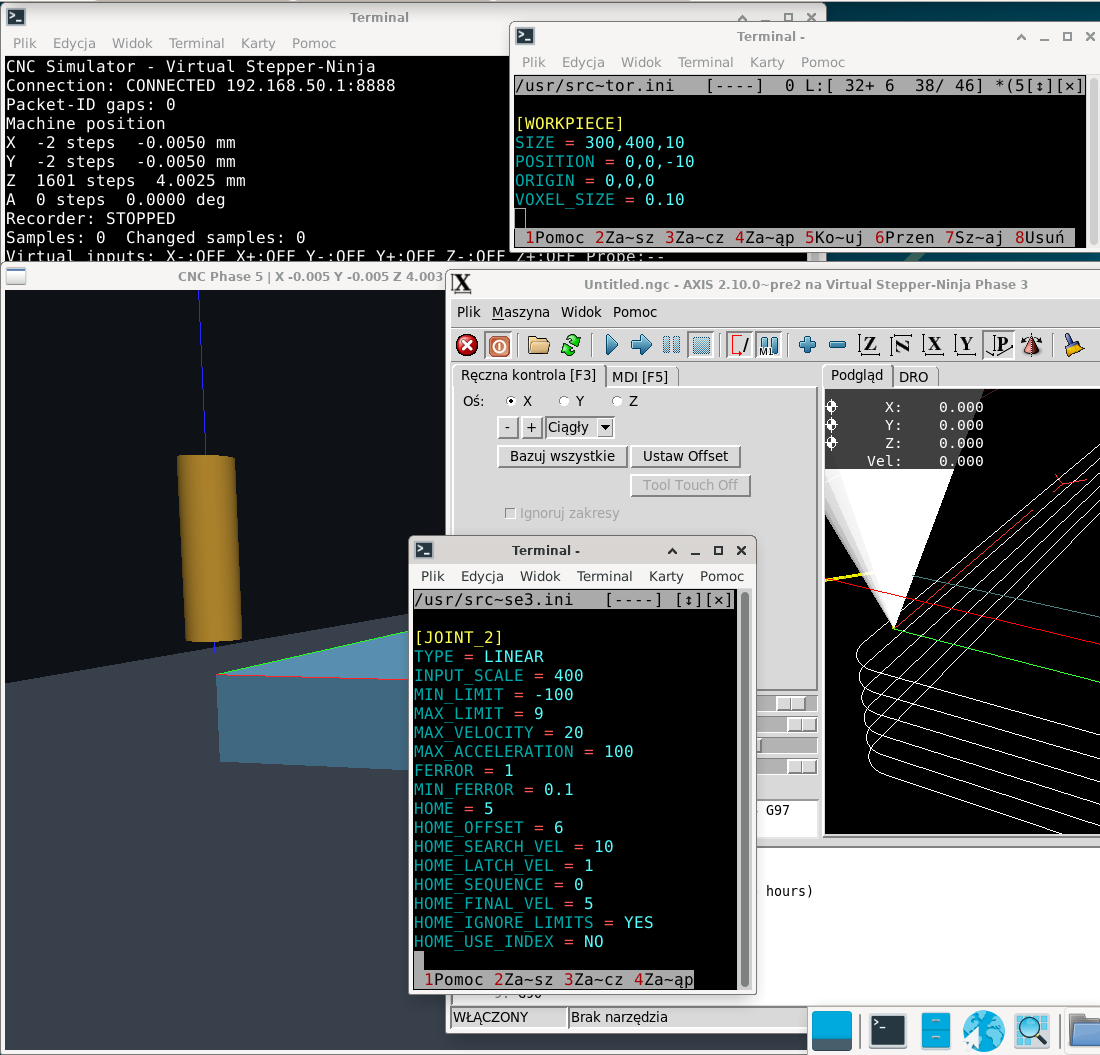
Usually the Z axis looks for the limit switch at the top, here it goes down... You need to change the sign of the HOME_SEARCH_VELOCITY value to the opposite.
The work area is set to extremely small, it is unlikely that the real work will fit. When changing the field, you also need to set virtual limits.
And the worst thing is that I have an offset of several millimeters in the Z axis between Axis and the simulator. I don't know where this comes from. Of course, you can add some value in the material settings, but this is not very elegant.
#!/bin/bash
# change path in next line if needs
cd /usr/src/linuxcnc-sim
./scripts/setup-veth.sh
bash -c 'xfce4-terminal -x ip netns exec cnc-sim-ns   runuser -u "$USER" -- env   DISPLAY="$DISPLAY"   XAUTHORITY="${XAUTHORITY:-$HOME/.Xauthority}"   XDG_RUNTIME_DIR="${XDG_RUNTIME_DIR:-/run/user/$(id -u)}"   ./build/cnc-sim --config examples/mill/simulator.ini'
linuxcnc examples/phase3/phase3.iniUsually the Z axis looks for the limit switch at the top, here it goes down... You need to change the sign of the HOME_SEARCH_VELOCITY value to the opposite.
The work area is set to extremely small, it is unlikely that the real work will fit. When changing the field, you also need to set virtual limits.
And the worst thing is that I have an offset of several millimeters in the Z axis between Axis and the simulator. I don't know where this comes from. Of course, you can add some value in the material settings, but this is not very elegant.
The following user(s) said Thank You: fmueller
Please Log in or Create an account to join the conversation.
- fmueller
- Offline
- New Member
-
Less
More
- Posts: 5
- Thank you received: 5
04 Oct 2026 18:22 #350106
by fmueller
Replied by fmueller on topic Standalone LinuxCNC machine simulator using the Stepper-Ninja HAL interface
Thanks for the detailed feedback and also for the launcher script!
We haven't had the opportunity to test your script yet, but we will definitely take a closer look at it. Starting LinuxCNC and the simulator together with a single command is a very useful idea.
I went through the three points you mentioned and used them to update the Phase 3 example.
Working area
You were right that the previous working area was much too small for a realistic milling machine example.
The Phase 3 machine now uses:
The virtual limit switches were updated accordingly and are located 1 mm outside the normal working area.
Z homing
I also changed the Z homing as you suggested.
X and Y still home toward their minimum switches, but Z now homes upward toward the maximum/home switch. The Z switch is therefore approached from below with a positive HOME_SEARCH_VEL.
Z offset between AXIS and the simulator
This was the point I was most interested in, so I tried to reproduce it deliberately.
For the test I placed the physical Z home switch at +1 mm and configured:
This means that the physical switch position is intentionally different from the final G53 Z0 position.
I tested the complete homing sequence with LinuxCNC 2.10.0-pre2.
Z approaches the upper switch from below, backs off, performs the slow latch approach and finally moves back to G53 Z0.
After homing, both AXIS and the simulator showed exactly Z0.
I then commanded:
AXIS showed:
and the simulator showed exactly:
at 400 steps/mm.
I also checked the simulator's min/max switch implementation and added an explicit automated test for approaching the Z maximum switch from below, including its hysteresis behavior.
So far I have not been able to reproduce the several-millimeter Z offset you are seeing.
These changes are now included in v0.1.2:
linuxcnc-sim v0.1.2
The complete simulator test suite also passes with the new configuration: 91/91 tests passed.
Could you try v0.1.2 with the new Phase 3 configuration and see whether the Z offset still occurs on your system?
If the offset is still there, could you send me your LinuxCNC .ini and .hal files, and your virtual-io.conf if you changed it?
Then I can reproduce your exact configuration instead of guessing where the difference comes from.
Thanks again for testing the simulator. Your feedback already resulted in several improvements to the example configuration.
We haven't had the opportunity to test your script yet, but we will definitely take a closer look at it. Starting LinuxCNC and the simulator together with a single command is a very useful idea.
I went through the three points you mentioned and used them to update the Phase 3 example.
Working area
You were right that the previous working area was much too small for a realistic milling machine example.
The Phase 3 machine now uses:
X:    0 .. 600 mm
Y:    0 .. 400 mm
Z: -200 ..   0 mm
The virtual limit switches were updated accordingly and are located 1 mm outside the normal working area.
Z homing
I also changed the Z homing as you suggested.
X and Y still home toward their minimum switches, but Z now homes upward toward the maximum/home switch. The Z switch is therefore approached from below with a positive HOME_SEARCH_VEL.
Z offset between AXIS and the simulator
This was the point I was most interested in, so I tried to reproduce it deliberately.
For the test I placed the physical Z home switch at +1 mm and configured:
HOME = 0
HOME_OFFSET = 1
HOME_SEARCH_VEL = 2
HOME_LATCH_VEL = 0.2
This means that the physical switch position is intentionally different from the final G53 Z0 position.
I tested the complete homing sequence with LinuxCNC 2.10.0-pre2.
Z approaches the upper switch from below, backs off, performs the slow latch approach and finally moves back to G53 Z0.
After homing, both AXIS and the simulator showed exactly Z0.
I then commanded:
G53 G0 X10 Y10 Z-5AXIS showed:
X = 10.000
Y = 10.000
Z = -5.000
and the simulator showed exactly:
X =  4000 steps = 10.000 mm
Y =  4000 steps = 10.000 mm
Z = -2000 steps = -5.000 mm
at 400 steps/mm.
I also checked the simulator's min/max switch implementation and added an explicit automated test for approaching the Z maximum switch from below, including its hysteresis behavior.
So far I have not been able to reproduce the several-millimeter Z offset you are seeing.
These changes are now included in v0.1.2:
linuxcnc-sim v0.1.2
The complete simulator test suite also passes with the new configuration: 91/91 tests passed.
Could you try v0.1.2 with the new Phase 3 configuration and see whether the Z offset still occurs on your system?
If the offset is still there, could you send me your LinuxCNC .ini and .hal files, and your virtual-io.conf if you changed it?
Then I can reproduce your exact configuration instead of guessing where the difference comes from.
Thanks again for testing the simulator. Your feedback already resulted in several improvements to the example configuration.
Please Log in or Create an account to join the conversation.
- tuxcnc
- Offline
- Elite Member
-
Less
More
- Posts: 276
- Thank you received: 52
04 Oct 2026 19:14 #350107
by tuxcnc
Bellow is what was and I described above.
Replied by tuxcnc on topic Standalone LinuxCNC machine simulator using the Stepper-Ninja HAL interface
It's late, so I do test v0.1.2 rather tomorrow.
[/code][/code][/code][/b][/code][/b][b][b][code][code][code][code][b][url=https://github.com/FredericM88/linuxcnc-sim/releases/tag/v0.1.2][b]Could you try v0.1.2 with the new Phase 3 configuration and see whether the Z offset still occurs on your system?[/b][/url][/b]
Bellow is what was and I described above.
Attachments:
Please Log in or Create an account to join the conversation.
- tuxcnc
- Offline
- Elite Member
-
Less
More
- Posts: 276
- Thank you received: 52
04 Oct 2026 19:56 #350108
by tuxcnc
Replied by tuxcnc on topic Standalone LinuxCNC machine simulator using the Stepper-Ninja HAL interface
I haven't tested 0.1.2, but I think I found the reason for the zeros moving apart.
In a normal machine, zero is counted from the point where the limit switch is actuated, but here the position of the limit switch is apparently set as relative to zero...
In my settings HOME_OFFSET = 6, so limits set Z max must be 2400 and not 4000 as it was.
After this change, the zeros in both windows are in place.
So there's nothing to fix, but some comment in the virtual-io.conf file would be helpful.
In a normal machine, zero is counted from the point where the limit switch is actuated, but here the position of the limit switch is apparently set as relative to zero...
In my settings HOME_OFFSET = 6, so limits set Z max must be 2400 and not 4000 as it was.
After this change, the zeros in both windows are in place.
So there's nothing to fix, but some comment in the virtual-io.conf file would be helpful.
The following user(s) said Thank You: fmueller
Please Log in or Create an account to join the conversation.
- fmueller
- Offline
- New Member
-
Less
More
- Posts: 5
- Thank you received: 5
04 Oct 2026 20:38 #350111
by fmueller
Replied by fmueller on topic Standalone LinuxCNC machine simulator using the Stepper-Ninja HAL interface
Thank you very much for investigating this further and for explaining what you found.
You are absolutely right.
With 400 steps/mm and HOME_OFFSET = 6, the corresponding physical home-switch position in the simulator is:
With the previous switch position at 4000 steps (10 mm), the difference is:
which explains almost exactly the offset you observed between AXIS and the simulator.
So this is not a problem in the switch implementation. The important point is that the positions in virtual-io.conf describe physical switch positions in the simulator's step coordinate system, while HOME_OFFSET tells LinuxCNC which machine coordinate corresponds to the home-switch position.
I agree completely that this is not explained clearly enough at the moment. A user should not have to discover this relationship by trial and error.
I will add a clear explanation and an example directly to virtual-io.conf and also make sure the documentation describes the relationship between the virtual switch position, steps/mm and HOME_OFFSET.
Thank you for taking the time to investigate this instead of simply reporting that something was wrong. Your observation identified a real weakness in the documentation, and your explanation makes the intended behavior much clearer.
This kind of feedback is extremely valuable for the project. Thank you.
You are absolutely right.
With 400 steps/mm and HOME_OFFSET = 6, the corresponding physical home-switch position in the simulator is:
6 mm × 400 steps/mm = 2400 stepsWith the previous switch position at 4000 steps (10 mm), the difference is:
10 mm - 6 mm = 4 mmwhich explains almost exactly the offset you observed between AXIS and the simulator.
So this is not a problem in the switch implementation. The important point is that the positions in virtual-io.conf describe physical switch positions in the simulator's step coordinate system, while HOME_OFFSET tells LinuxCNC which machine coordinate corresponds to the home-switch position.
I agree completely that this is not explained clearly enough at the moment. A user should not have to discover this relationship by trial and error.
I will add a clear explanation and an example directly to virtual-io.conf and also make sure the documentation describes the relationship between the virtual switch position, steps/mm and HOME_OFFSET.
Thank you for taking the time to investigate this instead of simply reporting that something was wrong. Your observation identified a real weakness in the documentation, and your explanation makes the intended behavior much clearer.
This kind of feedback is extremely valuable for the project. Thank you.
Please Log in or Create an account to join the conversation.
- tuxcnc
- Offline
- Elite Member
-
Less
More
- Posts: 276
- Thank you received: 52
11 Oct 2026 06:48 #350192
by tuxcnc
Replied by tuxcnc on topic Standalone LinuxCNC machine simulator using the Stepper-Ninja HAL interface
This is a great project that may beat all others in the future because it supports all LinuxCNC g-codes, including those that will be added in the future. I'm not kidding, the simulator will show all the movements that will be sent to the virtual controller, no matter how they are generated.
Unfortunately, the project also has many drawbacks, which is not surprising at this stage of development, but makes its use in practice very difficult.
What I miss most at the moment is tool changing.
Of course, LinuxCNC will replace the tool, but the simulator will use only one, configured in its own ini file...
Honestly, I don't really have an idea how to solve this problem.
I thought about REMAP M6 in an ini file that could run any program, so also one that would inform the simulator about a tool change. But what will happen when the user wants to use his own REMAP M6 and see its operation in the simulator?
By the way, simulating tool measurement would also be useful...
Unfortunately, the project also has many drawbacks, which is not surprising at this stage of development, but makes its use in practice very difficult.
What I miss most at the moment is tool changing.
Of course, LinuxCNC will replace the tool, but the simulator will use only one, configured in its own ini file...
Honestly, I don't really have an idea how to solve this problem.
I thought about REMAP M6 in an ini file that could run any program, so also one that would inform the simulator about a tool change. But what will happen when the user wants to use his own REMAP M6 and see its operation in the simulator?
By the way, simulating tool measurement would also be useful...
Please Log in or Create an account to join the conversation.
- LinuxCNC
- General LinuxCNC Questions
- Standalone LinuxCNC machine simulator using the Stepper-Ninja HAL interface
Time to create page: 0.158 seconds