
plasmaweb - a browser-based QtPlasmaC screen for LinuxCNC
- Rhubarb
- Away
- New Member
-

Less
More
- Posts: 1
- Thank you received: 1
28 Oct 2026 23:18 - 29 Oct 2026 04:26 #350522
by Rhubarb
plasmaweb - a browser-based QtPlasmaC screen for LinuxCNC was created by Rhubarb
Hi everyone!
This is my first post here, so a quick introduction. I'm Ruben, a web developer from Melbourne, Australia, who loves building CNC machines. I've been reading this forum for a while as I plan and build my first plasma table. Along the way, I wanted to drive the machine from a touchscreen, a laptop or my phone rather than a screen bolted to the controller. So I built a web interface for QtPlasmaC, and I'd like to share it.
Important: this has not been tested in production yet. My table is still being built, so plasmaweb has only been run against a virtual LinuxCNC machine — the QtPlasmaC simulator config on LinuxCNC 2.9.4, running in a VM — not on a real machine cutting real metal. Please treat it as untested on hardware, try it on a sim config first, and keep a working QtPlasmaC config to go back to (switching back is one INI line, see below). Bug reports and feedback are very welcome.
What it is
plasmaweb replaces the QtPlasmaC screen, not your config. It runs as the LinuxCNC [DISPLAY] program: a Python backend on the controller serves a touch-friendly web UI, and you open it in a browser on the controller itself or on any other machine on your network.It is designed as a drop-in:
Features
Plasma screens (mirroring QtPlasmaC's tabs)
Installing
No Node.js needed on the controller. Download the latest release tarball from GitHub and run the installer:
Releases: github.com/RubenAhlhaus/plasmaweb/releases
Source: github.com/RubenAhlhaus/plasmaweb (GPL-3.0-or-later)
Credits
This project stands on the work of others, and I want to credit them properly:
Feedback
If you try it on a sim, or are brave enough to try it on a real table, I'd love to hear how it goes. Please report issues on GitHub or reply here. Since I can't test on hardware yet, reports from people with working tables are especially valuable.Thanks for reading, and thanks to this community for everything I've learned here.
This is my first post here, so a quick introduction. I'm Ruben, a web developer from Melbourne, Australia, who loves building CNC machines. I've been reading this forum for a while as I plan and build my first plasma table. Along the way, I wanted to drive the machine from a touchscreen, a laptop or my phone rather than a screen bolted to the controller. So I built a web interface for QtPlasmaC, and I'd like to share it.
Important: this has not been tested in production yet. My table is still being built, so plasmaweb has only been run against a virtual LinuxCNC machine — the QtPlasmaC simulator config on LinuxCNC 2.9.4, running in a VM — not on a real machine cutting real metal. Please treat it as untested on hardware, try it on a sim config first, and keep a working QtPlasmaC config to go back to (switching back is one INI line, see below). Bug reports and feedback are very welcome.
What it is
plasmaweb replaces the QtPlasmaC screen, not your config. It runs as the LinuxCNC [DISPLAY] program: a Python backend on the controller serves a touch-friendly web UI, and you open it in a browser on the controller itself or on any other machine on your network.It is designed as a drop-in:
- It registers the same qtplasmac HAL component (same 91 pins) that QtPlasmaC does, so your existing postgui HAL files connect unchanged.
- It reads and writes the same files: <machine>.prefs, <machine>_material.cfg and the [QTPLASMAC] INI section.
- Switching over is one line in the INI (DISPLAY = plasmaweb). Setting it back to qtvcp qtplasmac returns the machine to QtPlasmaC.
Features
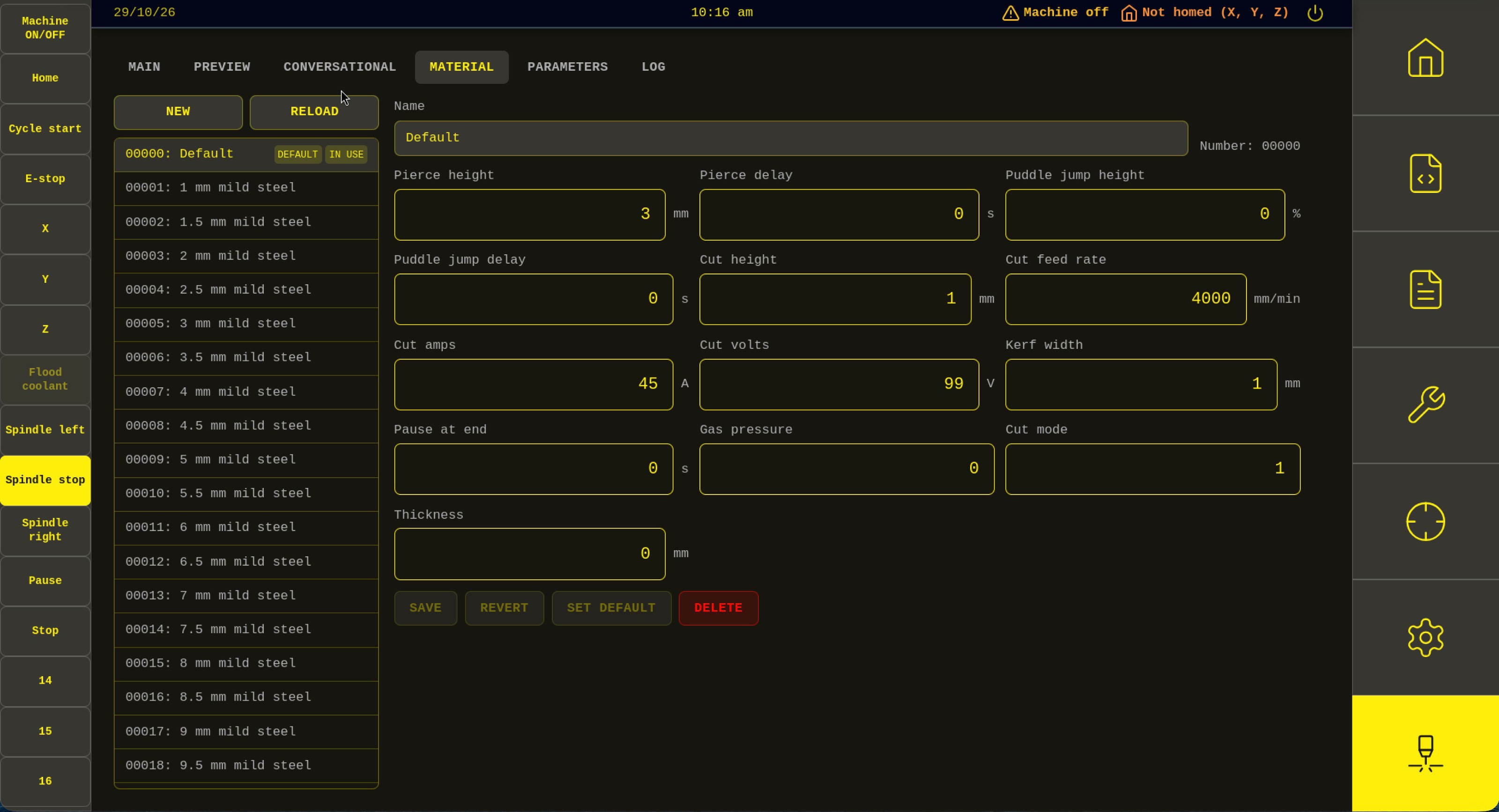
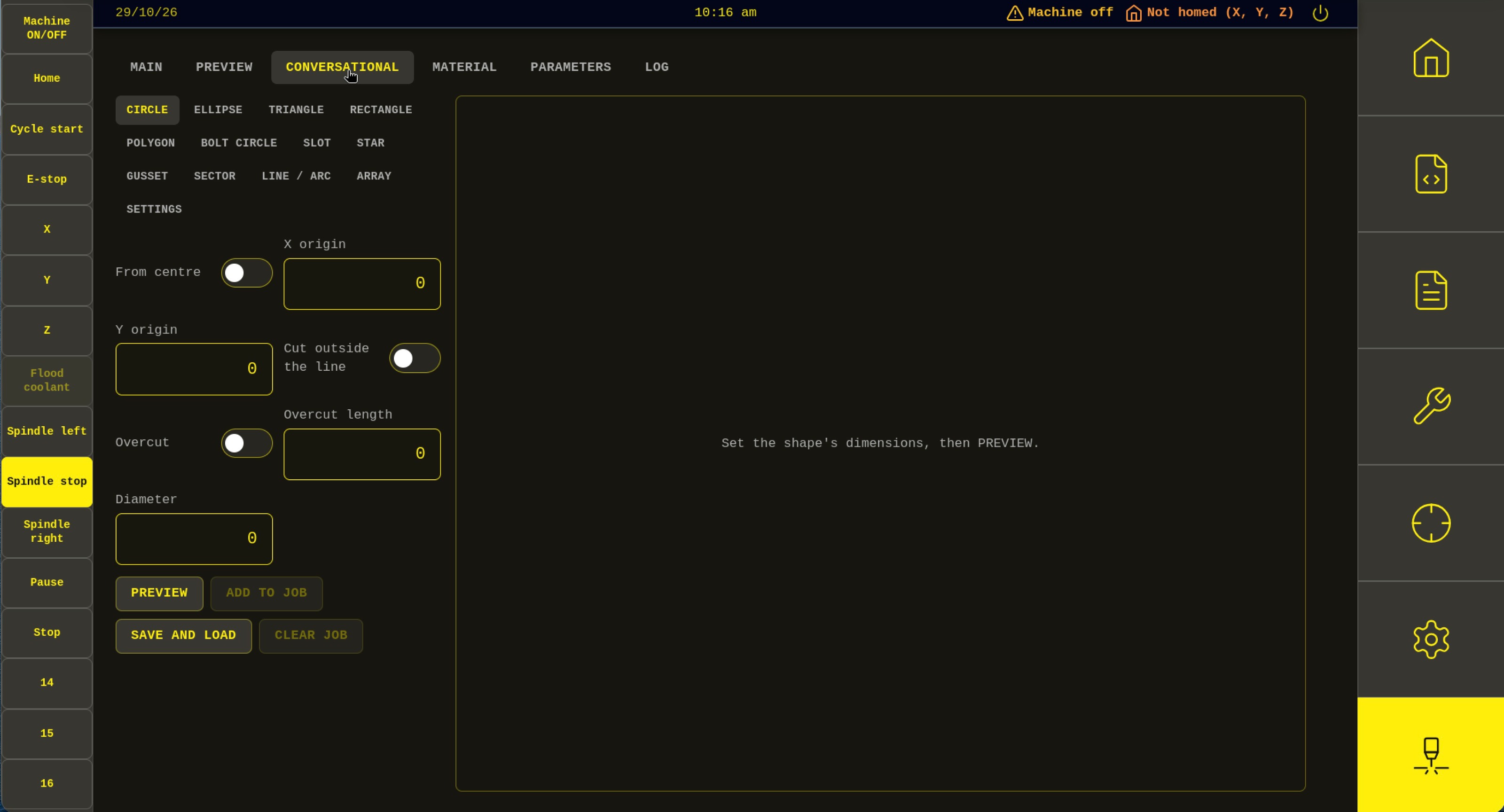
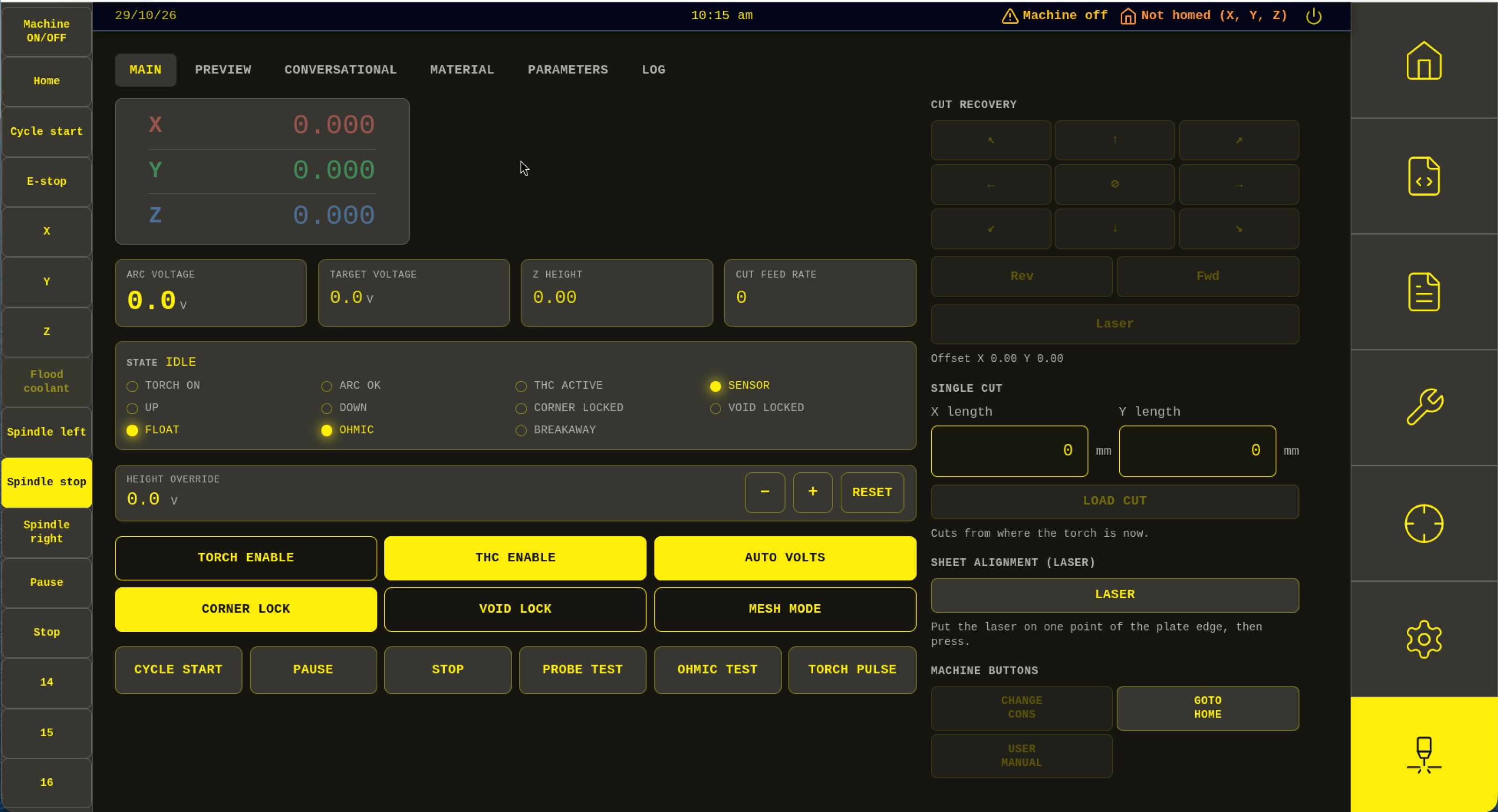
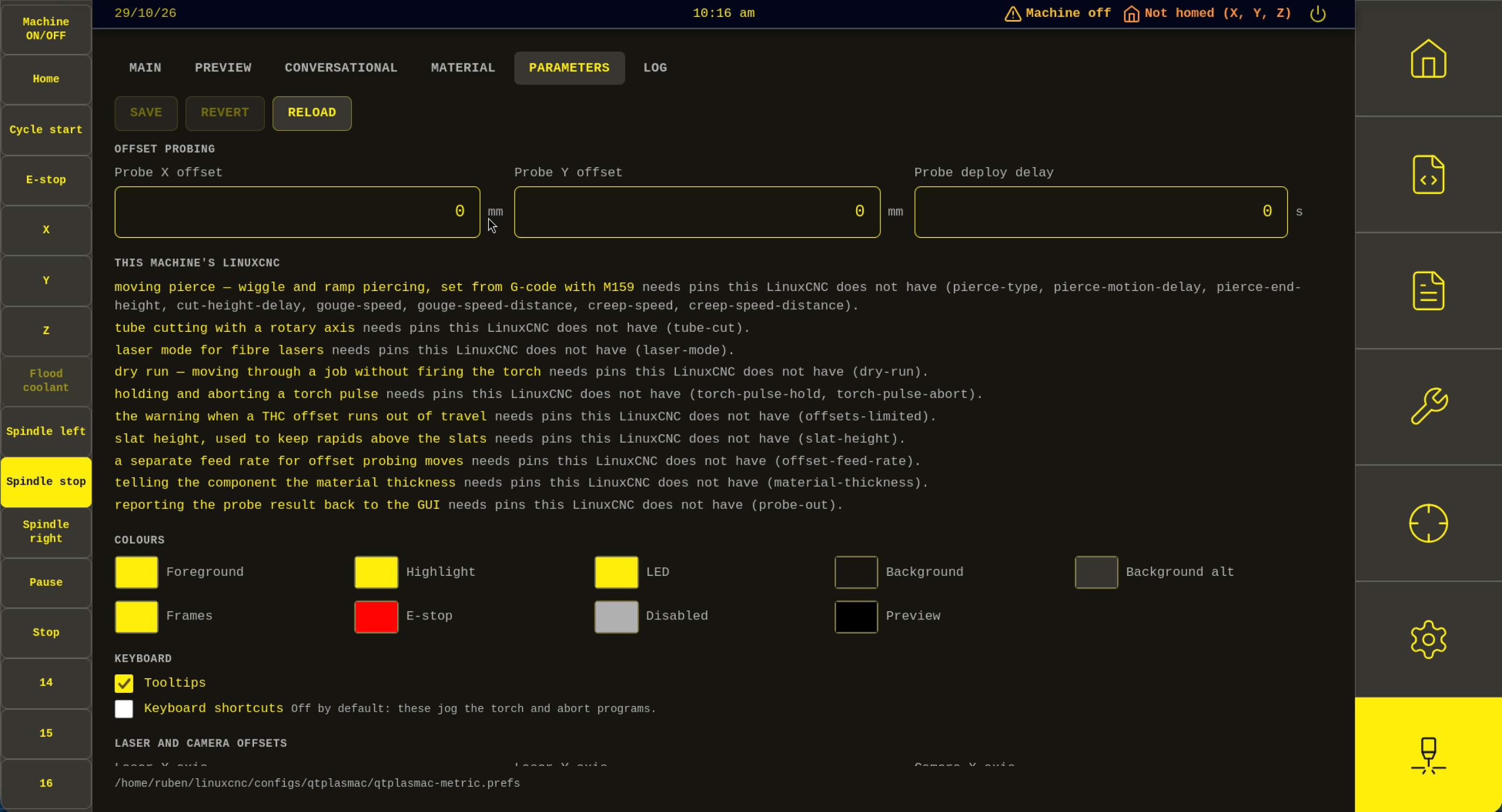
Plasma screens (mirroring QtPlasmaC's tabs)
- MAIN — live dashboard: arc voltage, THC state, status LEDs, cut recovery, torch pulse, height override, single cut
- PARAMETERS — the QtPlasmaC parameters, saved back to your .prefs file, with QtPlasmaC's own tooltips
- MATERIAL — materials from your _material.cfg, including the M190 material-change handshake
- CONVERSATIONAL — LinuxCNC's own plasmac shape modules, driven from a web form
- PREVIEW — toolpath preview and run-from-line
- STATISTICS — cut counts, arc time and consumable stats
- Jogging, homing, MDI, program load/run and the tool table
- Macros, HAL softkeys and external panel inputs
- Uses your machine's own QtPlasmaC colours and keyboard shortcuts from the prefs file
- Layouts for 16:9, 4:3 and portrait (9:16) screens
- English and German UI
- Open the UI from a laptop, tablet or phone on your network. Settings shows the address to type in.
- There is no authentication: anyone who can reach the port can jog the machine and fire the torch. Only use it on a network you trust, or set PLASMAWEB_HOST=127.0.0.1 to restrict it to the controller's own screen.
- When the UI loads, it checks GitHub for a new release and offers Update now / Later / Skip this version. Settings → Updates shows the installed version and has a "Check for updates" button.
- Updates are downloaded over HTTPS and checksum-verified, and are refused while a program is running. Restart LinuxCNC afterwards to use the new version.
Installing
No Node.js needed on the controller. Download the latest release tarball from GitHub and run the installer:
Then in your machine INI:tar xzf plasmaweb-<version>-linux.tar.gz
cd plasmaweb-<version>-linux
sudo ./install.sh
Full guide: installation.md[DISPLAY]
DISPLAY = plasmaweb
Releases: github.com/RubenAhlhaus/plasmaweb/releases
Source: github.com/RubenAhlhaus/plasmaweb (GPL-3.0-or-later)
Credits
This project stands on the work of others, and I want to credit them properly:
- lcncgui ( github.com/salomom/lcncgui ) — the web application plasmaweb is built on. The backend, the WebSocket layer, and the jog, DRO, MDI, program and tool-table screens all come from lcncgui. plasmaweb adds the plasma layer on top. Huge thanks to its author.
- LinuxCNC and QtPlasmaC / plasmac — the realtime plasmac component does the actual work of running a plasma table, and plasmaweb reuses QtPlasmaC's conversational shape modules, run-from-line logic and G-code handling directly from LinuxCNC rather than reimplementing them. The whole design copies QtPlasmaC's files and HAL interface so that both screens stay interchangeable. Many thanks to Phillip Carter, Gregory Carl and everyone who has contributed to QtPlasmaC and LinuxCNC.
Feedback
If you try it on a sim, or are brave enough to try it on a real table, I'd love to hear how it goes. Please report issues on GitHub or reply here. Since I can't test on hardware yet, reports from people with working tables are especially valuable.Thanks for reading, and thanks to this community for everything I've learned here.
Last edit: 29 Oct 2026 04:26 by Rhubarb.
The following user(s) said Thank You: tommylight
Please Log in or Create an account to join the conversation.
Time to create page: 0.470 seconds