Zwei Netzwerke einrichten (Mesa / Internet)

More
3 years 4 months ago #273074 by chris@cnc
Letzte Zeile…
are you root?

sudo apt-get install network-manager network-manager-gnome

Please Log in or Create an account to join the conversation.
More
3 years 4 months ago - 3 years 4 months ago #273078 by Muecke

ip a
Im terminal.
Code:
cnc@debian:~$ ip a 1: lo: <LOOPBACK,UP,LOWER_UP> mtu 65536 qdisc noqueue state UNKNOWN group default qlen 1000 link/loopback 00:00:00:00:00:00 brd 00:00:00:00:00:00 inet 127.0.0.1/8 scope host lo valid_lft forever preferred_lft forever inet6 ::1/128 scope host valid_lft forever preferred_lft forever 2: enp1s0: <NO-CARRIER,BROADCAST,MULTICAST,UP> mtu 1500 qdisc pfifo_fast state DOWN group default qlen 1000 link/ether 90:1b:0e:c4:87:3a brd ff:ff:ff:ff:ff:ff 3: enp2s0: <BROADCAST,MULTICAST,UP,LOWER_UP> mtu 1500 qdisc pfifo_fast state UP group default qlen 1000 link/ether 08:be:ac:22:81:a7 brd ff:ff:ff:ff:ff:ff inet 192.168.178.39/24 brd 192.168.178.255 scope global dynamic noprefixroute enp2s0 valid_lft 863438sec preferred_lft 863438sec inet6 2003:c6:372c:a100:f0c5:d649:4eb0:a702/64 scope global temporary dynamic valid_lft 7180sec preferred_lft 938sec inet6 2003:c6:372c:a100:abe:acff:fe22:81a7/64 scope global dynamic mngtmpaddr noprefixroute valid_lft 7180sec preferred_lft 938sec inet6 fe80::abe:acff:fe22:81a7/64 scope link noprefixroute valid_lft forever preferred_lft forever cnc@debian:~$
Was sagt mir das?

[code]Die network menager ist shon instaliert beim die officielle ISO, geh weiter.
Die var/lock ist, du hab die synaptics oder software sources offen. Close synaptics and skip network-manager stuff.
Das verstehe ich nicht.
Last edit: 3 years 4 months ago by Muecke.

Please Log in or Create an account to join the conversation.

More
3 years 4 months ago #273079 by Muecke

Letzte Zeile…
are you root?
Soll bedeutet?

sudo apt-get install network-manager network-manager-gnome
 
Code:
cnc@debian:~$ sudo apt-get install network-manager network-manager-gnome [sudo] Passwort für cnc: Paketlisten werden gelesen... Fertig Abhängigkeitsbaum wird aufgebaut. Statusinformationen werden eingelesen.... Fertig network-manager ist schon die neueste Version (1.14.6-2+deb10u1). network-manager-gnome ist schon die neueste Version (1.8.20-1.1). network-manager-gnome wurde als manuell installiert festgelegt. Die folgenden Pakete wurden automatisch installiert und werden nicht mehr benötigt: acl .... uno-libs3 update-inetd ure xbrlapi xsane xsane-common Verwenden Sie »sudo apt autoremove«, um sie zu entfernen. 0 aktualisiert, 0 neu installiert, 0 zu entfernen und 200 nicht aktualisiert. cnc@debian:~$
[/code]

Please Log in or Create an account to join the conversation.

More
3 years 4 months ago #273088 by Muecke
bei mir wird nur eine Karte angezeigt. image missing /media/kunena/emoticons/sad.png


Please Log in or Create an account to join the conversation.

More
3 years 4 months ago #273094 by tommylight
When you left click on the network manager icon on top left of the screen, does it show 2 wired networks?
Sorry but that can not be screenshot.
From your ip a report:
2 is the first network, it has no connection
3 is the second network, connected, with IP address 192.168.178.39
connect both networks where they should be and do another ip a
The following user(s) said Thank You: Muecke

Please Log in or Create an account to join the conversation.

More
3 years 4 months ago #273096 by chris@cnc
1. Um etwas zu installieren musst du user root sein oder mit sudo das recht anfordern. Deshalb schlug der erste apt install versuch fehl.
2. die Ip -a ausgabe zeigt das du zwei karten hast erste namens enp1s0 und die ist nicht konfiguriert zweite enp2s0 die vermutlich mit deinem heimnetz verbunden ist.
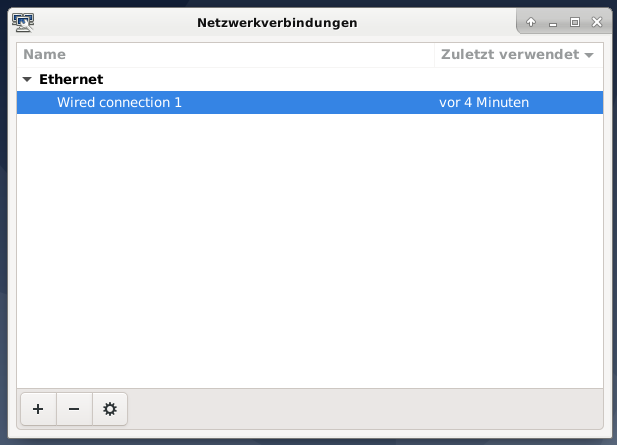
 in dem letzten Bild gibt es links unten ein + - und ein Zahnrad. Mit dem Zahnrad kannst du eine neue Verbindung konfigurieren und als Gerät enp1s0 auswählen.
dann sollte es gehen

 
The following user(s) said Thank You: Muecke

Please Log in or Create an account to join the conversation.

Moderators: Muecke
Time to create page: 0.218 seconds
Powered by Kunena Forum
