Noobie Friendly Wiring Schematic Program

More
4 years 9 months ago - 4 years 9 months ago #233621 by pippin88
I use simple text files - a spreadsheet is probably a much better idea.

It is VERY worthwhile documenting whilst building.

You might remember well during the build, but suddenly it's five years later and trying to double shoot is a nightmare. That scrap of paper you threw out or photo somewhere on an old phone in a draw is not much help.

I haven't looked in a couple of years. Last time I looked I couldn't find a really easy way to do quick wiring diagrams.
I don't need / care about proper symbols. Just want text labels and ability to snap wires to a connector block and colour them and route them vaguely 
Last edit: 4 years 9 months ago by pippin88.
The following user(s) said Thank You: my1987toyota

Please Log in or Create an account to join the conversation.

More
4 years 9 months ago #233635 by spumco

I don't need / care about proper symbols. Just want text labels and ability to snap wires to a connector block and colour them and route them vaguely 


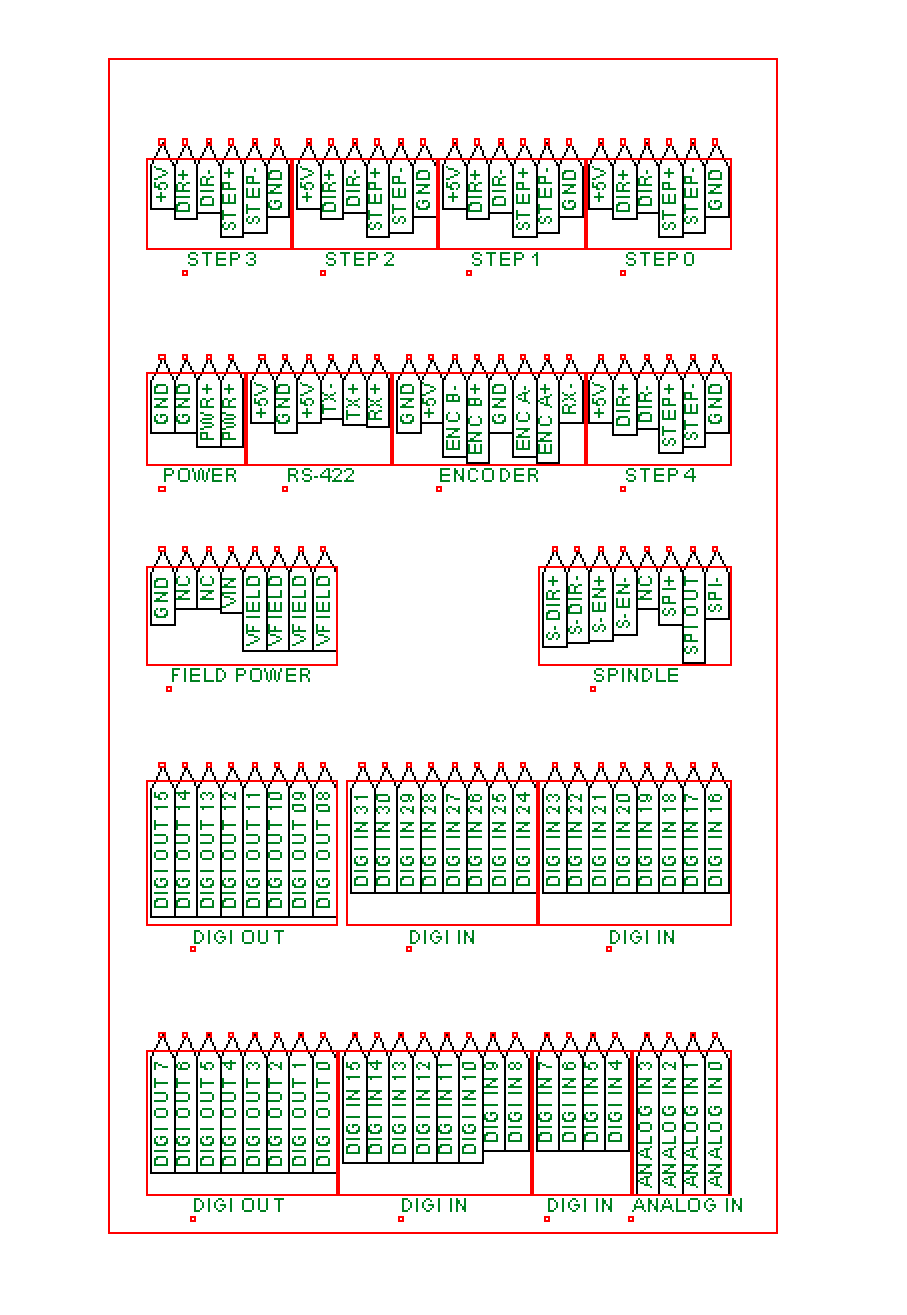
QElectroTech looks like a really nice 'proper' diagram program and I've been fiddling with it since @arvidb mentioned it a couple weeks ago.  But for something to do what I think of as a schematic - i.e. how to wire the system up - TinyCAD has been my go-to for a number of years.

Wires snap to pins on any symbol you want, color-coded, line thickness to indicate wire gauge, etc.  It's not 'smart' like QElectroTech to span pages, but you can make the drawing as large as you want.  Multiple pages are also possible.

I've even got a number of symbols cooked up for Mesa cards in my home-built symbol library.

I put an example in the other thread @ardvidb linked, but here's another one of my current mill project with a 7i76ED and a 7i84D:

 
The following user(s) said Thank You: my1987toyota

Please Log in or Create an account to join the conversation.
More
4 years 9 months ago #233755 by my1987toyota


You might remember well during the build, but suddenly it's five years later and trying to double shoot is a nightmare. That scrap of paper you threw out or photo somewhere on an old phone in a draw is not much help.

 
That has happened to me more times then I care to admit. LOL

Please Log in or Create an account to join the conversation.
More
4 years 3 months ago - 4 years 3 months ago #247695 by Beef
Any chance of sharing the home-built library or .dsn file for that Spumco? Your Mesa Board looks light years ahead of what I've got started in TinyCAD, and all of your other components have a similar level of awesomeness that I don't think I'm going to be able to reach.


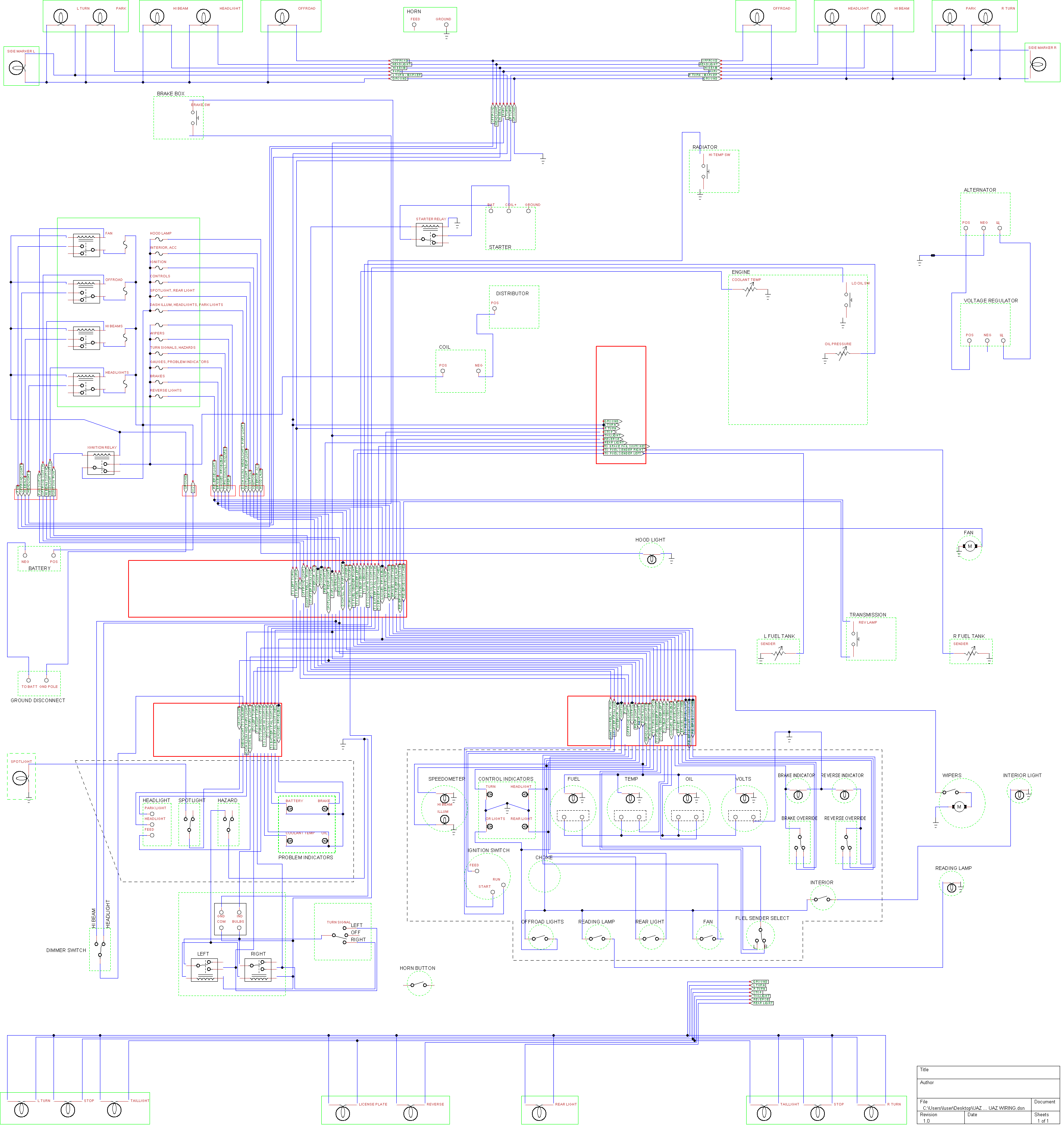
Either way, TinyCAD has been my go-to for wiring schematics, since it's very easy to get started in and has a fair number of QOL features such as auto-incrementing, keeping the label box open as you add multiple of a component, etc. Here's a draft of some car wiring I did for an old UAZ - although I reduced the wiring redundancy a little bit in the final version I don't have an image handy. I was able to print it on several sheets of A4 and tape them together, allowing me to handily reference the diagram when restoring it.

 
Last edit: 4 years 3 months ago by Beef. Reason: Images didn't work ...

Please Log in or Create an account to join the conversation.

More
4 years 3 months ago #247730 by spumco
Your wish, as they say...

Pushbuttons/switches are set up so you can have multiple sets of stacked NO/NC contacts with separate colored actuators.

Same thing with terminal blocks.  Stack them up, and note that some of the doubles are connected internally (like the real ones).

Some VFD's & drives in there too.

I've tried really hard to make sure all pins line up with the grid, but don't hate me if I've overlooked a few.  Some of the high-density symbols work way better if you use "fine" grid spacing.

If you come up with a better way to draw relay coils so they don't take up so much room, I'm happy to steal back from youimage missing /media/kunena/emoticons/smile.png

-Ralph
The following user(s) said Thank You: strahlensauger, christos

Please Log in or Create an account to join the conversation.

More
4 years 3 months ago #247750 by strahlensauger
Thank you spumco, that is great!
By the way, tinycad is also available in a browser (only chrome), so all linux users can use it as well

Please Log in or Create an account to join the conversation.

Time to create page: 0.168 seconds
Powered by Kunena Forum
