
- LinuxCNC
- Installing LinuxCNC
- Need to install newest Linux Debian Bookworm with the newest Linuxcnc preempt-rt
Need to install newest Linux Debian Bookworm with the newest Linuxcnc preempt-rt
- DerKlotz
- Offline
- Premium Member
-

Less
More
- Posts: 104
- Thank you received: 7
08 Feb 2026 17:00 #342658
by DerKlotz
Need to install newest Linux Debian Bookworm with the newest Linuxcnc preempt-rt was created by DerKlotz
Hello,
I've been trying unsuccessfully all weekend to get the latest Debian Bookworm with the latest Linuxcnc preempt-rt up and running. Since I have little experience with Linux, I'm reaching my limits.
I downloaded and installed Debian Bookworm 12.13. Now I wanted to follow these instructions linuxcnc.org/docs/html/getting-started/g...th_preempt_rt_kernel , point 7 (with preempt-RT kernel). Would that be correct so far?
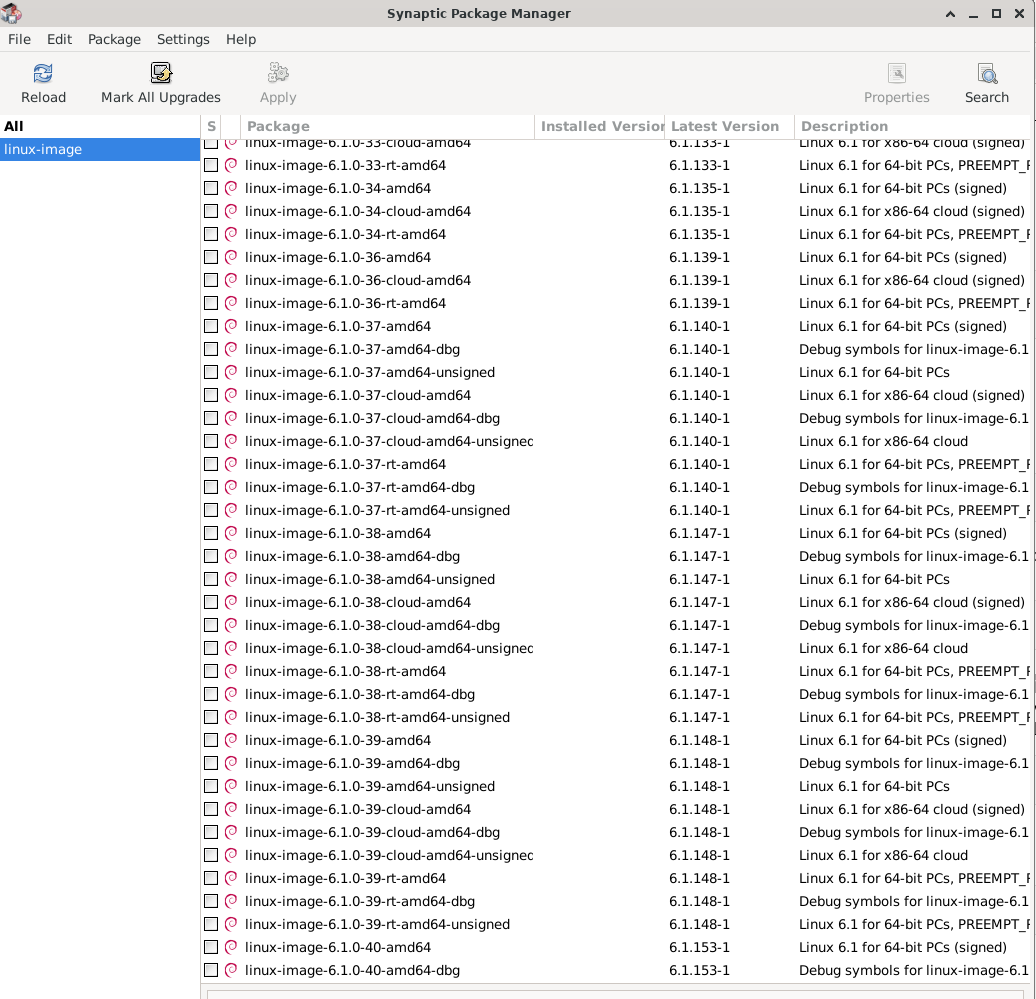
At point 3, Open Applications Menu > System > Synaptic Package Manager, search for linux-image, right-click on the original non-rt, and select Mark for Complete Removal, I don't know which original non-rt I have to select. I have attached a screenshot.
Otherwise, please attach Linux terminal commands so I can quickly achieve my goal.
Greetings from Germany and many thanks.
Translated with DeepL.com (free version)
I've been trying unsuccessfully all weekend to get the latest Debian Bookworm with the latest Linuxcnc preempt-rt up and running. Since I have little experience with Linux, I'm reaching my limits.
I downloaded and installed Debian Bookworm 12.13. Now I wanted to follow these instructions linuxcnc.org/docs/html/getting-started/g...th_preempt_rt_kernel , point 7 (with preempt-RT kernel). Would that be correct so far?
At point 3, Open Applications Menu > System > Synaptic Package Manager, search for linux-image, right-click on the original non-rt, and select Mark for Complete Removal, I don't know which original non-rt I have to select. I have attached a screenshot.
Otherwise, please attach Linux terminal commands so I can quickly achieve my goal.
Greetings from Germany and many thanks.
Translated with DeepL.com (free version)
Please Log in or Create an account to join the conversation.
- andypugh
-

- Offline
- Moderator
-

Less
More
- Posts: 19898
- Thank you received: 4655
08 Feb 2026 18:32 #342662
by andypugh
Replied by andypugh on topic Need to install newest Linux Debian Bookworm with the newest Linuxcnc preempt-rt
1) Why Bookworm and not Trixie?
2) Why not just install from the ISO image?
It looks like the automatic updater has not updated the manual page to reflect anything since 2.9.4.
You can see what the page is meant to currently say here:
github.com/LinuxCNC/linuxcnc/blob/master...etting-linuxcnc.adoc
2) Why not just install from the ISO image?
It looks like the automatic updater has not updated the manual page to reflect anything since 2.9.4.
You can see what the page is meant to currently say here:
github.com/LinuxCNC/linuxcnc/blob/master...etting-linuxcnc.adoc
Please Log in or Create an account to join the conversation.
- DerKlotz
- Offline
- Premium Member
-
Less
More
- Posts: 104
- Thank you received: 7
08 Feb 2026 19:20 #342668
by DerKlotz
Replied by DerKlotz on topic Need to install newest Linux Debian Bookworm with the newest Linuxcnc preempt-rt
I want to install Probe_Basic. I already had Trixie installed but i couldn't get Probe_Basic to work. Than i got the hint from a community member that Probe_Basic needs Debian Bookworm as the homepage mentions.
Please Log in or Create an account to join the conversation.
- andypugh
-
- Offline
- Moderator
-
Less
More
- Posts: 19898
- Thank you received: 4655
26 Feb 2026 12:46 #343529
by andypugh
Replied by andypugh on topic Need to install newest Linux Debian Bookworm with the newest Linuxcnc preempt-rt
You should be able to install a previous Bookworm ISO, then update the LinuxCNC version (this should actually be automatic).
The 2.9.4 ISO will definitely be Bookworm as it precedes the Trixie release.
www.linuxcnc.org/iso/
Then use the Synapric package manager to update LinuxCNC.
The 2.9.4 ISO will definitely be Bookworm as it precedes the Trixie release.
www.linuxcnc.org/iso/
Then use the Synapric package manager to update LinuxCNC.
Please Log in or Create an account to join the conversation.
- DerKlotz
- Offline
- Premium Member
-
Less
More
- Posts: 104
- Thank you received: 7
26 Feb 2026 17:04 - 26 Feb 2026 17:57 #343545
by DerKlotz
Replied by DerKlotz on topic Need to install newest Linux Debian Bookworm with the newest Linuxcnc preempt-rt
This worked pretty good for me
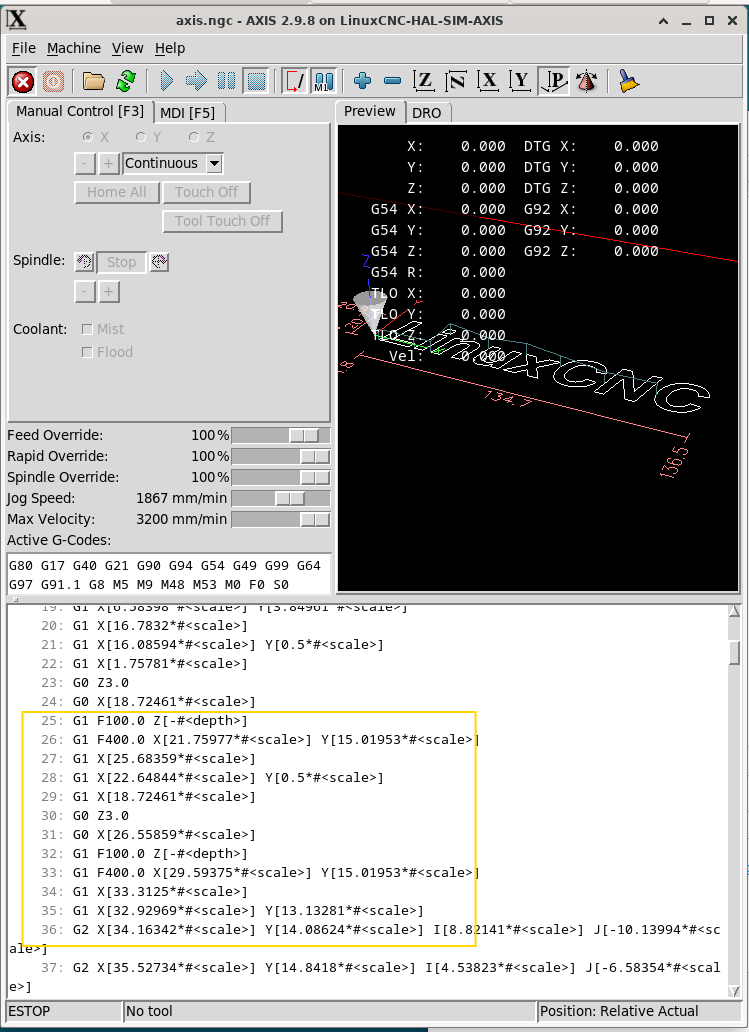
There i still a but... if you have a look at the attached photo why do i have no mm after my coordinates or depth? Ist the axis_mm from the sim
There i still a but... if you have a look at the attached photo why do i have no mm after my coordinates or depth? Ist the axis_mm from the sim
Last edit: 26 Feb 2026 17:57 by DerKlotz.
Please Log in or Create an account to join the conversation.
- tommylight
-

- Away
- Moderator
-
Less
More
- Posts: 21985
- Thank you received: 7484
26 Feb 2026 18:34 #343555
by tommylight
Replied by tommylight on topic Need to install newest Linux Debian Bookworm with the newest Linuxcnc preempt-rt
Parametric gcode, numbers are at the top.
Please Log in or Create an account to join the conversation.
- DerKlotz
- Offline
- Premium Member
-
Less
More
- Posts: 104
- Thank you received: 7
26 Feb 2026 20:09 #343562
by DerKlotz
Replied by DerKlotz on topic Need to install newest Linux Debian Bookworm with the newest Linuxcnc preempt-rt
So is it normal? As i remember from my old PC there were mm shown... and G21 is mm, right?
Please Log in or Create an account to join the conversation.
- tommylight
-
- Away
- Moderator
-
Less
More
- Posts: 21985
- Thank you received: 7484
26 Feb 2026 21:50 #343569
by tommylight
Replied by tommylight on topic Need to install newest Linux Debian Bookworm with the newest Linuxcnc preempt-rt
Normal gcode-
Parametric gcode
G17 G90 G64 P0.001 M3
G21
G0 Z0.1000
F5000.0000
F5000.0000
G0 X115.8525 Y150.0000
F5000.0000
G1 Z-10.0000
 X111.6756
 X109.9170 Z-9.5877
 X109.6238 Z-9.2348
 X109.3307 Z-9.1373
 X108.5979 Z-9.3725
 X105.9599 Z-9.6471
 X105.6668 Z-9.9799
 X105.3737 Z-10.0000
X80.9722Parametric gcode
#<xscale> = 1.0
#<yscale> = 1.0
#<zscale> = 1.0
#<fscale> = 10000.0
#<toolno> = 1
#<rpm>    = 1600

N30 G21
N40G90
G64P.1
N50T#<toolno>M6
N60M8
N70S#<rpm>M3
N90G0Z[#<zscale>*10.]
N80G0X[#<xscale>*53.]Y[#<yscale>*-56.128]
N100G1Z[#<zscale>*-25.372]F[#<fscale>*100]
N110G1Z[#<zscale>*-27.372]F[#<fscale>*225]
N120Y[#<yscale>*-56.12]Z[#<zscale>*-27.725]
N130Y[#<yscale>*-56.105]Z[#<zscale>*-27.894]
N140Y[#<yscale>*-56.06]Z[#<zscale>*-28.152]
N150Y[#<yscale>*-56.051]Z[#<zscale>*-28.184]
N160Y[#<yscale>*-55.992]Z[#<zscale>*-28.405]
N170Y[#<yscale>*-55.902]Z[#<zscale>*-28.651]
N180Y[#<yscale>*-55.792]Z[#<zscale>*-28.888]
N190Y[#<yscale>*-55.661]Z[#<zscale>*-29.115]
N200Y[#<yscale>*-55.511]Z[#<zscale>*-29.329]
N210Y[#<yscale>*-55.343]Z[#<zscale>*-29.53]
Please Log in or Create an account to join the conversation.
- LinuxCNC
- Installing LinuxCNC
- Need to install newest Linux Debian Bookworm with the newest Linuxcnc preempt-rt
Time to create page: 0.129 seconds