
Trouble with XFCE (trixie) timed logouts
- currinh
-
 Topic Author
- Offline
- Senior Member
-

Less
More
- Posts: 70
- Thank you received: 3
16 Mar 2026 04:23 #344344
by currinh
Trouble with XFCE (trixie) timed logouts was created by currinh
Every few years I upgrade something on my stepper controlled knee-mill. I usually get sucked into upgrading linuxcnc at the same time. I just upgraded the stepper motors and put a new controller on. The new controller is using Mesa 5i25 and 7i76 cards with Gecko drivers. I was running linuxcnc 2.9.4 and decided to upgrade to 2.9.8. Rather than upgrade I did a new install with 2.9.8 (Debian trixie).
After install, and working though several problems, I have linuxcnc 2.9.8 working well with a Pncconf configuration. But, I am having great trouble with the computer logging out every 30-60 minutes. A very bad thing for a machine controller. I suspect this is in the XFCE environment but can not find a solution via Internet searching.
I did find, through searching, and have implemented the following changes:
I changed /etc/ligntdm/ligntdm.conf to implement auto login by un-commenting
autologin-user-[my user name : hugh]
autologin-user-timeout = 0
In the XFCE settings I disabled Lock Screen [disable "Lock screen when idle"] and disabled Screen Saver.
To prevent logout from /etc/syslogout I put an empty file as "$HOME/.nosyslogout"
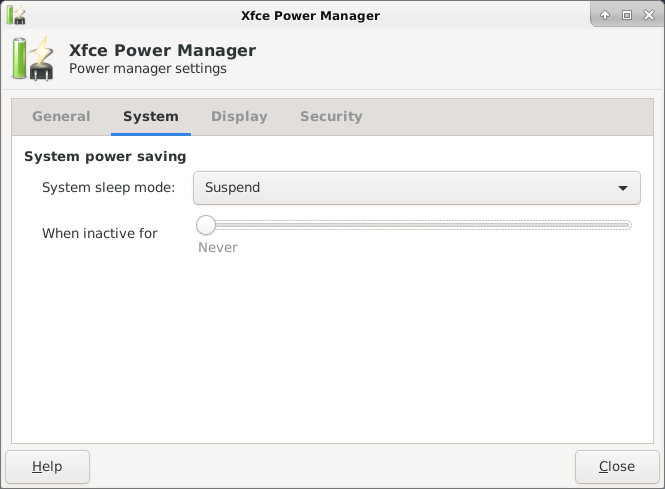
In XFCE setting, under Power Management, assured the "Suspend When Inactive for" was set to never.
I did try, I believe, disabling the Display Power Management toggle in the setting menu. This caused a broken system. When a login was done the machine thought awhile then returned to the login screen. I could not figure out how to fix this via the terminal so had to re-install linuxcnc. I re-installed once without re-formatting the /home directory but the login loop was still present. Another re-install with re-formatting all partitions brought me back to zero. I'm trying to not repeat this error.
The computer now starts up without requiring a login, that's fine. It works for 30-60 minutes and then logs me out. The result of the logout was a new login screen (user: & password). After the above changes, auto login, it automatically logs me back in. But for both of these, any running applications, like linuxcnc, are killed with the logout/login.
What am I missing? Is there a simple fix or should I step back to linuxcnc 2.9.4 and see if it still works?
I am surprised by this problem. I'd think a linuxcnc ISO should be set up for no screen saver and certainly no timed logout. This seems like death to a machine controller where a complicated program could run for a couple of hours. This tends to convince me I've done something wrong with this new clean install.
Thank you for any help you can provide.
After install, and working though several problems, I have linuxcnc 2.9.8 working well with a Pncconf configuration. But, I am having great trouble with the computer logging out every 30-60 minutes. A very bad thing for a machine controller. I suspect this is in the XFCE environment but can not find a solution via Internet searching.
I did find, through searching, and have implemented the following changes:
I changed /etc/ligntdm/ligntdm.conf to implement auto login by un-commenting
autologin-user-[my user name : hugh]
autologin-user-timeout = 0
In the XFCE settings I disabled Lock Screen [disable "Lock screen when idle"] and disabled Screen Saver.
To prevent logout from /etc/syslogout I put an empty file as "$HOME/.nosyslogout"
In XFCE setting, under Power Management, assured the "Suspend When Inactive for" was set to never.
I did try, I believe, disabling the Display Power Management toggle in the setting menu. This caused a broken system. When a login was done the machine thought awhile then returned to the login screen. I could not figure out how to fix this via the terminal so had to re-install linuxcnc. I re-installed once without re-formatting the /home directory but the login loop was still present. Another re-install with re-formatting all partitions brought me back to zero. I'm trying to not repeat this error.
The computer now starts up without requiring a login, that's fine. It works for 30-60 minutes and then logs me out. The result of the logout was a new login screen (user: & password). After the above changes, auto login, it automatically logs me back in. But for both of these, any running applications, like linuxcnc, are killed with the logout/login.
What am I missing? Is there a simple fix or should I step back to linuxcnc 2.9.4 and see if it still works?
I am surprised by this problem. I'd think a linuxcnc ISO should be set up for no screen saver and certainly no timed logout. This seems like death to a machine controller where a complicated program could run for a couple of hours. This tends to convince me I've done something wrong with this new clean install.
Thank you for any help you can provide.
Please Log in or Create an account to join the conversation.
- rodw
-

- Offline
- Platinum Member
-

Less
More
- Posts: 12156
- Thank you received: 4149
16 Mar 2026 06:19 #344345
by rodw
Replied by rodw on topic Trouble with XFCE (trixie) timed logouts
Its actually very difficult to stop this. Been there done that.
You could try running this script with sudo. It creates some system settings that have been working for me.
You could try running this script with sudo. It creates some system settings that have been working for me.
#!/bin/bash

set -e

# 1. GLOBAL XFCE SETTINGS (XDG)
# This overrides defaults for ALL users (Live user and installed users)
mkdir -p /etc/xdg/xfce4/xfconf/xfce-perchannel-xml/

# Force Presentation Mode and Disable Sleeping/Blanking
cat <<EOF > /etc/xdg/xfce4/xfconf/xfce-perchannel-xml/xfce4-power-manager.xml
<?xml version="1.0" encoding="UTF-8"?>
<channel name="xfce4-power-manager" version="1.0">
  <property name="xfce4-power-manager" type="empty">
    <property name="presentation-mode" type="bool" value="true"/>
    <property name="lock-screen-suspend-hibernate" type="bool" value="false"/>
    <property name="blank-on-ac" type="int" value="0"/>
    <property name="dpms-on-ac-sleep" type="int" value="0"/>
    <property name="dpms-on-ac-off" type="int" value="0"/>
    <property name="dpms-enabled" type="bool" value="false"/>
  </property>
</channel>
EOF

# Disable Screensaver Globally
cat <<EOF > /etc/xdg/xfce4/xfconf/xfce-perchannel-xml/libxfce4ui.xml
<?xml version="1.0" encoding="UTF-8"?>
<channel name="libxfce4ui" version="1.0">
  <property name="screensaver" type="empty">
    <property name="enabled" type="bool" value="false"/>
  </property>
</channel>
EOF

# 2. BRUTE FORCE X11 DISABLE
# This ensures that even if XFCE isn't running, the X server itself won't blank
mkdir -p /etc/X11/xorg.conf.d/
cat <<EOF > /etc/X11/xorg.conf.d/10-disable-blanking.conf
Section "ServerFlags"
    Option "BlankTime" "0"
    Option "StandbyTime" "0"
    Option "SuspendTime" "0"
    Option "OffTime" "0"
EndSection
EOF

# 3. SYSTEMD MASKING (The Nuclear Option)
# This prevents the OS from sleeping even if a "suspend" command is sent
systemctl mask suspend.target hibernate.target sleep.target hybrid-sleep.target
Please Log in or Create an account to join the conversation.
- currinh
-
Topic Author
- Offline
- Senior Member
-
Less
More
- Posts: 70
- Thank you received: 3
16 Mar 2026 21:06 #344366
by currinh
Replied by currinh on topic Trouble with XFCE (trixie) timed logouts
Rod: Thank you for the quick response and the script. I can only imagine the effort involved in finding all the settings for that script.
However, I ran the script and it didn't solve the problem on my machine. I ran the script and re-booted. When the machine started up I logged in and started linuxcnc. To test I just let it idle, no keyboard or mouse input and no running program in linuxcnc. It idled for just about 30 minutes and then logged out. The result was a user/password screen to re-login. When I login using that new screen I find myself stuck in a loop. I login, the computer thinks awhile, then pops up a new login screen. Same as I had when I pushed the wrong Power Management button before. Again, since I don't know how to revert from here using a terminal, I needed to re-install to get out of this loop.
I took to heart your comment, "Its actually very difficult to stop this". If there's no "standard" solution and you've had problems, I have no hope of fixing it myself. Instead I installed linuxcnc 2.9.4 which uses the older Debian 12 (Bookworm). But it sounds like to main problem is with the XFCE desktop more than the underlying Debian. I don't know the differences in XFCE between 2.9.4 and 2.9.8 but the problems look to be there.
Is this somehow computer dependent? If not a lot of users must be having the same problems. Is there a solution being worked on? If XFCE has gone off the rails, maybe a different desktop for future releases? I'll need to update linuxcnc eventually and sure hope this is addressed.
Thank you very much for the help. I've solved my immediate problem, version 2.9.4 is now working. Again, thank you.
Hugh
However, I ran the script and it didn't solve the problem on my machine. I ran the script and re-booted. When the machine started up I logged in and started linuxcnc. To test I just let it idle, no keyboard or mouse input and no running program in linuxcnc. It idled for just about 30 minutes and then logged out. The result was a user/password screen to re-login. When I login using that new screen I find myself stuck in a loop. I login, the computer thinks awhile, then pops up a new login screen. Same as I had when I pushed the wrong Power Management button before. Again, since I don't know how to revert from here using a terminal, I needed to re-install to get out of this loop.
I took to heart your comment, "Its actually very difficult to stop this". If there's no "standard" solution and you've had problems, I have no hope of fixing it myself. Instead I installed linuxcnc 2.9.4 which uses the older Debian 12 (Bookworm). But it sounds like to main problem is with the XFCE desktop more than the underlying Debian. I don't know the differences in XFCE between 2.9.4 and 2.9.8 but the problems look to be there.
Is this somehow computer dependent? If not a lot of users must be having the same problems. Is there a solution being worked on? If XFCE has gone off the rails, maybe a different desktop for future releases? I'll need to update linuxcnc eventually and sure hope this is addressed.
Thank you very much for the help. I've solved my immediate problem, version 2.9.4 is now working. Again, thank you.
Hugh
The following user(s) said Thank You: rodw
Please Log in or Create an account to join the conversation.
- rodw
-
- Offline
- Platinum Member
-
Less
More
- Posts: 12156
- Thank you received: 4149
17 Mar 2026 00:11 #344381
by rodw
Replied by rodw on topic Trouble with XFCE (trixie) timed logouts
Sorry that did not work for you. Seems odd that settings would force a logout/login. we have not experienced that behaviour
Please note if you log out, its expected you will have to log in again.
Please note if you log out, its expected you will have to log in again.
Please Log in or Create an account to join the conversation.
- currinh
-
Topic Author
- Offline
- Senior Member
-
Less
More
- Posts: 70
- Thank you received: 3
17 Mar 2026 01:14 #344383
by currinh
Replied by currinh on topic Trouble with XFCE (trixie) timed logouts
I think that behaviour was when I had the auto login set up. On power up the computer logged me in without entering user/pw. When it auto logged me out it did come back with a user/pw screen. But I think that timed out and the auto login kicked in.
I am sure, under the configuration changes I made above, that I left the computer logged in with linuxcnc running. When I checked on it later it was running the XFCE desktop but had closed linuxcnc. I'm fairly sure it did a logout/auto login which closed linuxcnc.
I'm also sure running 2.9.8 it logging me out after a set time, between 30-60 minutes. Without auto login it waits with a user/pw screen.
Beyond my comprehension. If you find any insight please let me know. But for now I have 2.9.4 up and running.
Thank you. Hugh
I am sure, under the configuration changes I made above, that I left the computer logged in with linuxcnc running. When I checked on it later it was running the XFCE desktop but had closed linuxcnc. I'm fairly sure it did a logout/auto login which closed linuxcnc.
I'm also sure running 2.9.8 it logging me out after a set time, between 30-60 minutes. Without auto login it waits with a user/pw screen.
Beyond my comprehension. If you find any insight please let me know. But for now I have 2.9.4 up and running.
Thank you. Hugh
Please Log in or Create an account to join the conversation.
- spumco
- Offline
- Platinum Member
-
Less
More
- Posts: 2180
- Thank you received: 905
17 Mar 2026 14:37 #344413
by spumco
Replied by spumco on topic Trouble with XFCE (trixie) timed logouts
This may not work for you, but I discovered that I had to leave all Power Management stuff ON, but set times to zero. If I turned off Power Management I still got screen blanks, auto-logouts, and all the other nonsense.
Please Log in or Create an account to join the conversation.
- currinh
-
Topic Author
- Offline
- Senior Member
-
Less
More
- Posts: 70
- Thank you received: 3
18 Mar 2026 15:27 #344465
by currinh
Replied by currinh on topic Trouble with XFCE (trixie) timed logouts
I have it running well with linuxcnc 2.9.4. Don't really want to over write that. But, I'll put a different hard drive in and load up 2.9.8 to see if this works.
I tried turning off Power Management in the settings menu which gave the original problem, auto login/logout loop. Where do you "set times to zero"? Is that in the window just below the Power Management slider/button? If via setting parameters in a config file or via terminal command where and how?
I don't see anything I recognize as power management in Rod's script.
Thank you. Hugh
I tried turning off Power Management in the settings menu which gave the original problem, auto login/logout loop. Where do you "set times to zero"? Is that in the window just below the Power Management slider/button? If via setting parameters in a config file or via terminal command where and how?
I don't see anything I recognize as power management in Rod's script.
Thank you. Hugh
Please Log in or Create an account to join the conversation.
- spumco
- Offline
- Platinum Member
-
Less
More
- Posts: 2180
- Thank you received: 905
19 Mar 2026 10:42 #344512
by spumco
Replied by spumco on topic Trouble with XFCE (trixie) timed logouts
I just open power management under 'settings' menu and set all timing sliders to zero.
Please Log in or Create an account to join the conversation.
Time to create page: 1.148 seconds