Advanced Search

Search Results (Searched for: XHC)

  • marcelovx23
  • marcelovx23
09 Oct 2025 17:31
Replied by marcelovx23 on topic XHC-WHB04B-04 Got it working

XHC-WHB04B-04 Got it working

Category: Advanced Configuration

First of all, thank you so much for your effort and for sharing your files—without them I never would have gotten mine working.
I learned the hard way that it’s not practical to have one machine serve as both a router and a plasma cutter, so I developed a very affordable “plasma router” that works perfectly, and now I keep the two machines separate.
I’m leaving a video so you can see it running in case it helps, and a link where you can download the 3D model and wiring diagrams. I’m sharing it as open-hardware to give back a little of the much that the community—and generous acts like yours—have given me.


3D model and wiring files here
opencnc.mx/wordpress/index.php/elementor-420/
  • Hendrixx
  • Hendrixx
09 Oct 2025 16:20
Replied by Hendrixx on topic XHC-WHB04B-04 Got it working

XHC-WHB04B-04 Got it working

Category: Advanced Configuration

I don't use the pendant anymore and rely on a touch screen and wireless keyboard because my machine is a dual-use plasma /router, and I couldn't get plasmac.comp to play nice with the pendant. But once I get the table put back together, I will revisit and see if the berry is worth the squeeze.
  • marcelovx23
  • marcelovx23
09 Oct 2025 03:02
Replied by marcelovx23 on topic XHC-WHB04B-04 Got it working

XHC-WHB04B-04 Got it working

Category: Advanced Configuration

[SOLVED] XHC-WHB04B-6 on LinuxCNC 2.9.6 (QtDragonHD + 7i96S) — Beginner notes
(I am sharing the exact steps I followed, written simply. Many threads assume advanced users; I am a beginner.)My machine / system
  • Gantry router XYYZ (dual Y motors), work area approx. 1300 x 1210 mm
  • Controller: Mesa 7i96S (Ethernet, step/dir)
  • Spindle: 2.2 kW, 24,000 RPM
  • UI: QtVCP / QtDragon_HD
  • OS: Raspberry Pi 5, Debian 12 (Bookworm)
  • LinuxCNC 2.9.6
What actually fixed it (short version)
  1. Load the pendant HAL file as a HALFILE (before the post-GUI), same as the donor machine.
  2. Add MDI_COMMAND lines under [HALUI] so pins halui.mdi-command-XX exist.
  3. Keep qtvcp_postgui.hal clean (only GUI signals, no pendant driver).
  4. In my case, moving the WHB USB dongle to another port made the wheel/jog and DRO updates work.
STEP 1 — Copy the pendant HAL file
Place xhc-whb04b-6.hal in your config folder (the same folder that has your .ini and main .hal), e.g.:
~/linuxcnc/configs/YOUR-MACHINE/xhc-whb04b-6.hal
STEP 2 — Load the pendant before the post-GUI
Open your .ini and in the [HAL] section add this line and keep this exact order:
[HAL]
HALUI = halui
HALFILE = CNC-CARPINTERA.hal
HALFILE = custom.hal
HALFILE = xhc-whb04b-6.hal ; <<< NEW: load the pendant here
POSTGUI_HALFILE = qtvcp_postgui.hal ; keep this AFTER
SHUTDOWN = shutdown.hal
Important: do not load the WHB driver inside qtvcp_postgui.hal.STEP 3 — Create MDI pins under [HALUI]
In the same .ini, find (or create) the [HALUI] section and paste this block right under it:
[HALUI]
MDI_COMMAND = (DEBUG,<1>) ; <<< NEW (good for testing macros)
MDI_COMMAND = G10 L20 P0 X[#<_x>/2.0] ; <<< NEW (zero X at part center)
MDI_COMMAND = G10 L20 P0 Y[#<_y>/2.0] ; <<< NEW (zero Y at part center)
MDI_COMMAND = (DEBUG,<4>) ; <<< NEW
MDI_COMMAND = (DEBUG,<5>) ; <<< NEW
MDI_COMMAND = G10 L20 P0 X0 ; <<< NEW (Zero X)
MDI_COMMAND = G10 L20 P0 Y0 ; <<< NEW (Zero Y)
MDI_COMMAND = G10 L20 P0 Z0 ; <<< NEW (Zero Z)
This creates halui.mdi-command-00..07 (indexes follow the order above).
Add more MDI_COMMAND lines if your xhc-whb04b-6.hal uses higher indices.Notes so jogging actually works
  • E-STOP released, Machine ON
  • Manual mode
  • Fully homed (for XYYZ: X, Y1, Y2, Z)
  • On the pendant, use Continuous, or Step + Step size
  • If the wheel does nothing or DRO does not update: try a different USB port/dongle (this was the final fix for me)
Thanks and request
Many thanks to the original thread’s author for sharing files and guidance.
If possible, could you post a short summary of the final button mapping (what each macro-N does, Continuous/Step, ABS/REL, etc.)? That would help beginners keep their configs consistent.If anyone needs it, I can share my final .ini, xhc-whb04b-6.hal, and a minimal qtvcp_postgui.hal exactly as they ended up.
  • Aciera
  • Aciera's Avatar
04 Oct 2025 17:50

Axis configuration not fully working on 2.9.6

Category: AXIS

So I don't have to worry about the pins not being created?


No. Hal connections are created on startup when the hal files are read. If a hal pin used in any of your hal files was missing the config would not start at all. So your problem is not because of 'signals not being connected correctly'.
One thing to do is start your config from the terminal and check the output in the terminal. Another is to check the XHC WHB04B hal component using the halshow tool to confirm button press events are actually reaching your hal connections.
  • Fabse
  • Fabse
04 Oct 2025 16:49

Axis configuration not fully working on 2.9.6

Category: AXIS

Hey guys,
my config works as i want it on linuxcnc 2.9.4. After updating to 2.9.5 (or 2.9.6) it does not anymore. It mainly is the pendant that is not working as before. I use a china pendant (XHC WHB04B). Most buttons don't work anymore. For example when staring my machine, I hit the "reset" button. With version 2.9.4 I can home my machine after that. With 2.9.6 nothing happens. Control via GUI seems to work just fine.
I think the problem must be related to one of these, or maybe both points in the changelog:
  • halui: on startup, set the first configured axis as ‘is-selected’ instead of X
  • halui: Don’t create ‘halui.axis.’- pins for unconfigured axes
I looked at all created HAL pins under 2.9.4 and 2.9.6. I compared the output and found some missing pins under 2.9.6. I don't see why i would need these pins, but I figured it maybe where my error is? See the atteched pic for the missing pins.
I hope someone of the pros on this forum can help me. I don't know how to solve this on my own.
 
  • st2s
  • st2s
04 Oct 2025 09:16

XHC-WHB04B-6 установка для LINUXCNC

Category: Russian

Добрый день.
Подключил пульт, в виртуальном станке axis все работает, но реальный постоянно отваливается при попытке передвигать маховиком с ошибкой joint 0 following error при движении осью Х и остальными соответственно.
Управление клавишами при этом происходит штатно.
В чем может быть проблема?
  • Gautham
  • Gautham
23 Sep 2025 04:53 - 23 Sep 2025 09:21

Setting up kinematics for my Ballscrew articulated B-axis

Category: Basic Configuration
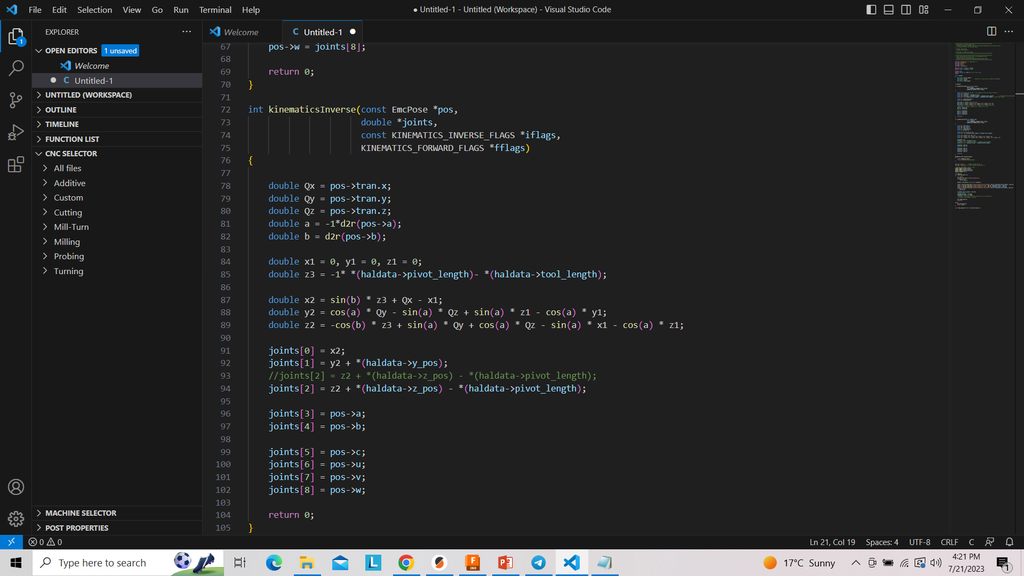
Ok, sorry for the images. Anyway, I performed all the math on Google Sheets, so you can enter the B-axis position on the ball screw, and it will provide you with the spindle angle, the tooltip x-offset, and the tooltip z-offset. The range of travel for the B-axis is 0 to 305mm. You can enter this in cell Y11, and it will spit out the results. I have also illustrated the drawings better here so that hopefully you can understand. Here is the link . I have looked at the Kinematics tutorial on the website, but I just learn better if I can see someone do a working example. After hours of reading that with Gemini helping with some of the explanations, I don't know how to start writing the code. Anyway, from the tutorial I posted earlier, there is an image of this person's kinematicsInverse function, which I will insert below.

File Attachment:


From what I've understood, the job of this function is to understand the required tool tip movement and spit out the number of steps each axis motor needs to make, correct? If that is correct, I should be able to modify the trigonometry here to accommodate my ballscrew articulated B-axis and get this going, hopefully. Because his setup also has an XYZAB setup similar to mine.
Displaying 196 - 202 out of 202 results.
Time to create page: 1.160 seconds
Powered by Kunena Forum