
- Posts: 1931
- Thank you received: 394
gmoccapy file update problem
- newbynobi
- Offline
- Moderator
-

Less
More
9 years 11 months ago #82978
by newbynobi
Replied by newbynobi on topic gmoccapy file update problem
I have seen the matchbox keyboard problem only on mate systems, not on XFCE, could you check with XFCE please.
Norbert
Norbert
Please Log in or Create an account to join the conversation.
- auto-mation-assist
- Offline
- Platinum Member
-

Less
More
- Posts: 425
- Thank you received: 81
9 years 11 months ago - 9 years 11 months ago #82981
by auto-mation-assist
Replied by auto-mation-assist on topic gmoccapy file update problem
I had XFCE installed on several computers and it had the same problems with matchbox-keyboard showing and then disappearing. I'm confused on directories being used by different uninstallable versions of matchbox-keyboard found on the internet for download. Some use /usr/share/ while others use /usr/local/share/ for the keyboard files.
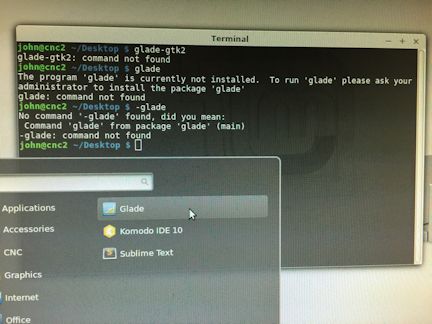
In regards to glade 3.8.5 install. I installed glade 3.8.5 from the source you listed after all dependencies were satisfied, and copied gladevcp files to the two directories you mentioned earlier. It shows the HAL Python and VCP Actions tabs in glade. However the computer system reports that no version of glade is installed. The glade icon in the menu program tab will staer glade but the icon itself when selected for uninstall states that it is not associated with any states that it is not associated with any package. Glade will not run from a terminal. When trying to run it from a terminal it just reports that glade is not installed, but yet I can get it to run from the main menu. Since it is reported as not being installed it can not be removed by normal methods, not even apt-get remove. I will post a few pictures of what glade looks like when running. shortly. During the install of glade 3.8.5 the following configuration was used. Only version 3.18 is shown as being available for install in synaptic. Picture attached.
john@cnc2 ~/Downloads/glade3-3.8.5 $ ./configure --prefix=/usr --enable-gtk-doc --enable-dependency-tracking
Configuration:
Source code location: .
Compiler: gcc
GTK+ UNIX Print Widgets: yes
GNOME UI Widgets: yes
PYTHON Widgets support: yes
Build Reference Manual: yes
Build User Manual: yes
john@cnc2 ~/Downloads/glade3-3.8.5 $
In regards to glade 3.8.5 install. I installed glade 3.8.5 from the source you listed after all dependencies were satisfied, and copied gladevcp files to the two directories you mentioned earlier. It shows the HAL Python and VCP Actions tabs in glade. However the computer system reports that no version of glade is installed. The glade icon in the menu program tab will staer glade but the icon itself when selected for uninstall states that it is not associated with any states that it is not associated with any package. Glade will not run from a terminal. When trying to run it from a terminal it just reports that glade is not installed, but yet I can get it to run from the main menu. Since it is reported as not being installed it can not be removed by normal methods, not even apt-get remove. I will post a few pictures of what glade looks like when running. shortly. During the install of glade 3.8.5 the following configuration was used. Only version 3.18 is shown as being available for install in synaptic. Picture attached.
john@cnc2 ~/Downloads/glade3-3.8.5 $ ./configure --prefix=/usr --enable-gtk-doc --enable-dependency-tracking
Configuration:
Source code location: .
Compiler: gcc
GTK+ UNIX Print Widgets: yes
GNOME UI Widgets: yes
PYTHON Widgets support: yes
Build Reference Manual: yes
Build User Manual: yes
john@cnc2 ~/Downloads/glade3-3.8.5 $
Last edit: 9 years 11 months ago by auto-mation-assist.
Please Log in or Create an account to join the conversation.
- auto-mation-assist
- Offline
- Platinum Member
-
Less
More
- Posts: 425
- Thank you received: 81
9 years 11 months ago - 9 years 11 months ago #82982
by auto-mation-assist
Replied by auto-mation-assist on topic gmoccapy file update problem
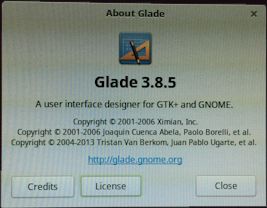
Here is a picture of gmocappy.glade in glade 3.8.5 on my computer. It shows many problems and the preview screen is full of the tabbed items that are on the right side of the screen. Linux reports it is not installed so there are likely underlying issues. Added second picture.

Last edit: 9 years 11 months ago by auto-mation-assist.
Please Log in or Create an account to join the conversation.
- newbynobi
- Offline
- Moderator
-
Less
More
- Posts: 1931
- Thank you received: 394
9 years 11 months ago #82984
by newbynobi
Replied by newbynobi on topic gmoccapy file update problem
You need to start glade with glade-gtk2 from a terminal, or make a new starter for that.
The displying proble is known for such big files as gmoccapy.
But edditing should work. Just test on a smaller glade file to get used
Norbert
The displying proble is known for such big files as gmoccapy.
But edditing should work. Just test on a smaller glade file to get used
Norbert
Please Log in or Create an account to join the conversation.
- auto-mation-assist
- Offline
- Platinum Member
-
Less
More
- Posts: 425
- Thank you received: 81
9 years 11 months ago #83186
by auto-mation-assist
Replied by auto-mation-assist on topic gmoccapy file update problem
Unfortunately right now entering glade-gtk2 in a terminal as both a regular user and as sudo only gives: "command not found". I can only guess that that there are differences in my and your installed software versions and dependencies that cause this command not to be valid. I will try to find out if there are missing gtk2 items.
Please Log in or Create an account to join the conversation.
- andypugh
- Offline
- Moderator
-
Less
More
- Posts: 19899
- Thank you received: 4655
9 years 11 months ago #83221
by andypugh
Replied by andypugh on topic gmoccapy file update problem
See if it is to be found in the "developer" menu.
Please Log in or Create an account to join the conversation.
Moderators: newbynobi, HansU
Time to create page: 0.440 seconds