
- User Interfaces
- Gmoccapy
- Adding a GO/RUN physical button to run the MDI command typed in the command line
Adding a GO/RUN physical button to run the MDI command typed in the command line
- BertaA
- Offline
- New Member
-

Less
More
- Posts: 1
- Thank you received: 0
30 Jan 2026 12:57 - 30 Jan 2026 17:46 #342205
by BertaA
Adding a GO/RUN physical button to run the MDI command typed in the command line was created by BertaA
Hello,
I'm new to Linuxcnc, I've been studying it for a month and I'm very happy with it.
I'm retrofitting a Cortini mill (a very small industrial-grade italian cnc mill) and thanks to this forum I could get a Ethercat system working with Beckhoff hardware and I could add a lot of external hardware buttons to my system.
For example I can have a program run, pause physical button in auto mode.
I cannot have a physical button for the go/run mdi command line.
Please note: this has nothing to do with custom MDI macro buttons.
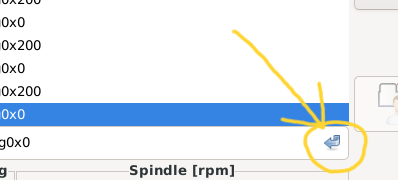
To be clear: I put the system in MDI mode, type "G0X10" then I must use the mouse to have it run.
The keyboard enter button is not the same becouse if i recall a previous mdi command from the list touching it on a touchscreen (or selecting with the mouse) the Enter key doesn't work.
I could not find a halui connection to this go button.
The goal would be to connect it to the start program physical button that is already working in auto mode but this could be a further step. It would just be great to connect it to a new physical button.
Is this in any way possible?
I hope to have been clear despite my bad english.
Many thanks
Alberto
I'm new to Linuxcnc, I've been studying it for a month and I'm very happy with it.
I'm retrofitting a Cortini mill (a very small industrial-grade italian cnc mill) and thanks to this forum I could get a Ethercat system working with Beckhoff hardware and I could add a lot of external hardware buttons to my system.
For example I can have a program run, pause physical button in auto mode.
I cannot have a physical button for the go/run mdi command line.
Please note: this has nothing to do with custom MDI macro buttons.
To be clear: I put the system in MDI mode, type "G0X10" then I must use the mouse to have it run.
The keyboard enter button is not the same becouse if i recall a previous mdi command from the list touching it on a touchscreen (or selecting with the mouse) the Enter key doesn't work.
I could not find a halui connection to this go button.
The goal would be to connect it to the start program physical button that is already working in auto mode but this could be a further step. It would just be great to connect it to a new physical button.
Is this in any way possible?
I hope to have been clear despite my bad english.
Many thanks
Alberto
Attachments:
Last edit: 30 Jan 2026 17:46 by BertaA.
Please Log in or Create an account to join the conversation.
- zz912
-

- Offline
- Platinum Member
-

Less
More
- Posts: 596
- Thank you received: 98
30 Jan 2026 14:53 #342214
by zz912
Replied by zz912 on topic Adding a GO/RUN physical button to run the MDI command typed in the command line
I would like the same functionality.
I would like the setup page in gmoccapy to toggle the execution of MDI commands either by enter key, double click, button (like now) or by HAL signal.
But I did not have time yet.
This functionality cannot be simply implemented using the HAL pin in HALUI, because the EMC_MDIHistory widget is in Gmoccapy. So a new gmoccapy HAL pin should be created.
EMC_MDIHistory widget is here:
github.com/LinuxCNC/linuxcnc/blob/master...cp/hal_mdihistory.py
The function to confirm the command is here:
github.com/LinuxCNC/linuxcnc/blob/bf71ba...history.py#L151-L200
In gmoccapy.py:
github.com/LinuxCNC/linuxcnc/blob/bf71ba...py/gmoccapy.py#L3444
You can create new HAL pin in Gmoccapy for self.widgets.hal_mdihistory.submit()
linuxcnc.org/docs/devel/html/config/python-hal-interface.html
I would like the setup page in gmoccapy to toggle the execution of MDI commands either by enter key, double click, button (like now) or by HAL signal.
But I did not have time yet.
This functionality cannot be simply implemented using the HAL pin in HALUI, because the EMC_MDIHistory widget is in Gmoccapy. So a new gmoccapy HAL pin should be created.
EMC_MDIHistory widget is here:
github.com/LinuxCNC/linuxcnc/blob/master...cp/hal_mdihistory.py
The function to confirm the command is here:
github.com/LinuxCNC/linuxcnc/blob/bf71ba...history.py#L151-L200
In gmoccapy.py:
github.com/LinuxCNC/linuxcnc/blob/bf71ba...py/gmoccapy.py#L3444
You can create new HAL pin in Gmoccapy for self.widgets.hal_mdihistory.submit()
linuxcnc.org/docs/devel/html/config/python-hal-interface.html
The following user(s) said Thank You: BertaA
Please Log in or Create an account to join the conversation.
- HansU
-

- Offline
- Moderator
-

Less
More
- Posts: 725
- Thank you received: 217
24 Feb 2026 20:34 - 24 Feb 2026 20:34 #343428
by HansU
Replied by HansU on topic Adding a GO/RUN physical button to run the MDI command typed in the command line
I don't know what's wrong with your enter button, but normally it should work with the enter button:
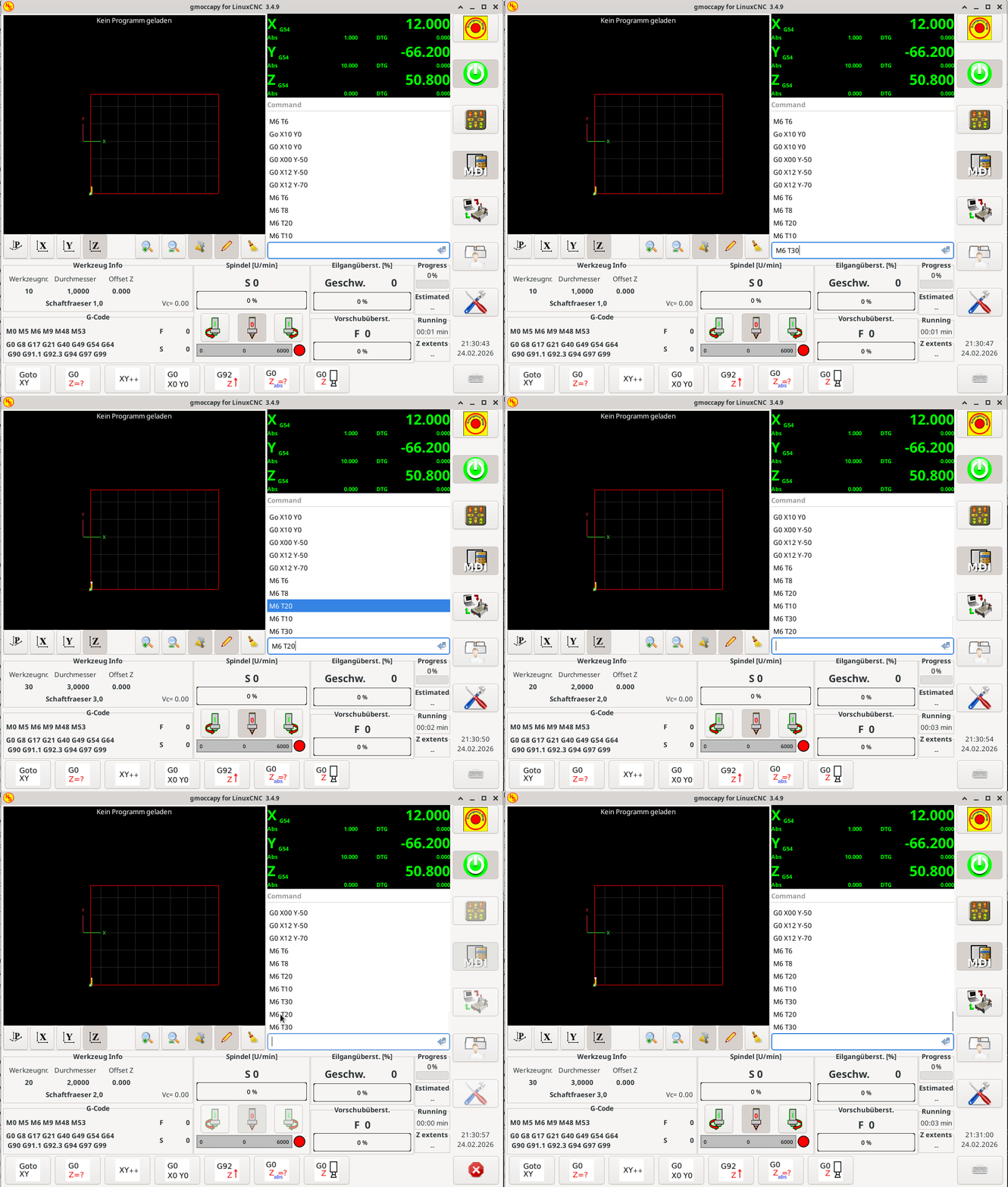
And so IMHO it does not really make sense to have a hardware button to send MDI commands which you need to type with the keyboard.
How is the behaviour on your machine different from that I have shown?
And so IMHO it does not really make sense to have a hardware button to send MDI commands which you need to type with the keyboard.
How is the behaviour on your machine different from that I have shown?
Attachments:
Last edit: 24 Feb 2026 20:34 by HansU.
Please Log in or Create an account to join the conversation.
- zz912
-
- Offline
- Platinum Member
-
Less
More
- Posts: 596
- Thank you received: 98
24 Feb 2026 23:16 #343440
by zz912
It makes sense. But the reason is not the one described by BertaA.
My dream is to build a CNC machine, controlled by LinuxCNC, that will meet all the requirements (standards and laws) for a CNC machine that the European Union requires. I think that it is possible to compete with brands like Heidenhain, Siemens, Fanuc ... in a certain category of machines.
When I studied the safety standards for CNC machines, I found a requirement there:
MDI commands or sequence commands must be executable only with a physical button. I think that the standard even described what the button should look like. I don't remember exactly because it's been a long time since I read it.
Therefore, it would not be bad to make a configuration that would ensure the execution of MDI commands only with a HAL signal.
Replied by zz912 on topic Adding a GO/RUN physical button to run the MDI command typed in the command line
And so IMHO it does not really make sense to have a hardware button to send MDI commands which you need to type with the keyboard.
It makes sense. But the reason is not the one described by BertaA.
My dream is to build a CNC machine, controlled by LinuxCNC, that will meet all the requirements (standards and laws) for a CNC machine that the European Union requires. I think that it is possible to compete with brands like Heidenhain, Siemens, Fanuc ... in a certain category of machines.
When I studied the safety standards for CNC machines, I found a requirement there:
MDI commands or sequence commands must be executable only with a physical button. I think that the standard even described what the button should look like. I don't remember exactly because it's been a long time since I read it.
Therefore, it would not be bad to make a configuration that would ensure the execution of MDI commands only with a HAL signal.
Please Log in or Create an account to join the conversation.
- newbynobi
-
- Offline
- Moderator
-
Less
More
- Posts: 1931
- Thank you received: 394
25 Feb 2026 07:29 - 25 Feb 2026 07:31 #343446
by newbynobi
Replied by newbynobi on topic Adding a GO/RUN physical button to run the MDI command typed in the command line
@ZZ912
Implementing the Hal signal for the execute button ist possible like you described. But if you want to forbit the Keyboard Enter Key to submit the MDI command, you need to modify also the MDI History widget to ignore the enter signal. If you do that, I am sure many users will ask you to implement the old behavior again. As it concerns to me, I use the Enter key to submit the MDI commands.
The only possibility I see, is to leave the default as it is and implement a setting parameter to change that behavior.
I am not sure, but if I remeber well, the Heidenhain control does allow the execution of entered commands with the Enter key.
Norbert
Implementing the Hal signal for the execute button ist possible like you described. But if you want to forbit the Keyboard Enter Key to submit the MDI command, you need to modify also the MDI History widget to ignore the enter signal. If you do that, I am sure many users will ask you to implement the old behavior again. As it concerns to me, I use the Enter key to submit the MDI commands.
The only possibility I see, is to leave the default as it is and implement a setting parameter to change that behavior.
I am not sure, but if I remeber well, the Heidenhain control does allow the execution of entered commands with the Enter key.
Norbert
Last edit: 25 Feb 2026 07:31 by newbynobi. Reason: typos
Please Log in or Create an account to join the conversation.
- zz912
-
- Offline
- Platinum Member
-
Less
More
- Posts: 596
- Thank you received: 98
25 Feb 2026 08:35 #343447
by zz912
Replied by zz912 on topic Adding a GO/RUN physical button to run the MDI command typed in the command line
To Norbert:
I agree with you. It MUST be configurable.
I agree with you. It MUST be configurable.
Please Log in or Create an account to join the conversation.
- HansU
-
- Offline
- Moderator
-
Less
More
- Posts: 725
- Thank you received: 217
25 Feb 2026 08:43 #343449
by HansU
Replied by HansU on topic Adding a GO/RUN physical button to run the MDI command typed in the command line
What I found in a Heidenhain manual is that MDI is there meant as small programs which you can run. And for those you need the start button:
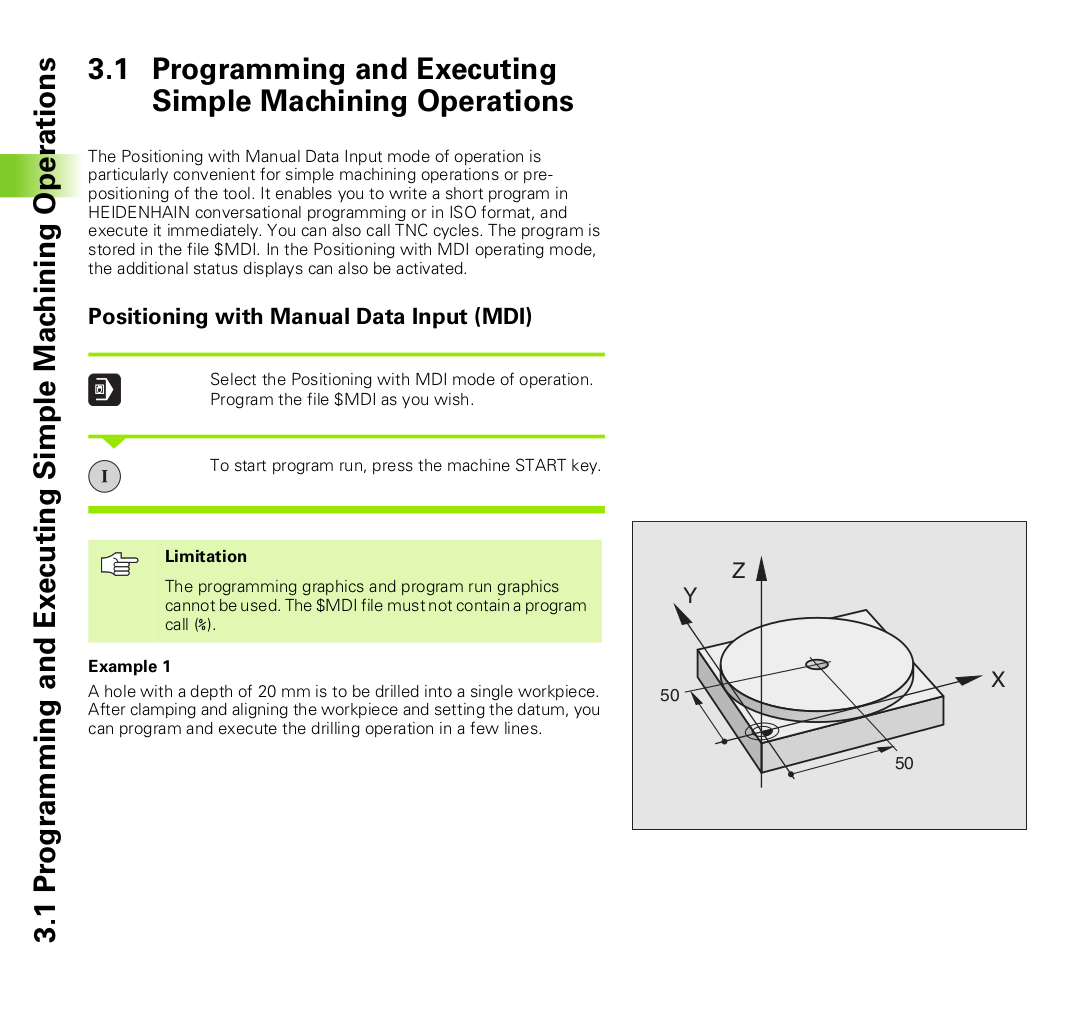
[content.heidenhain.de/doku/tnc_guide/pdf...01/en/533_188-20.pdf]
Maybe there are other options which I don't know. I never used a Haidenhain control.
[content.heidenhain.de/doku/tnc_guide/pdf...01/en/533_188-20.pdf]
Maybe there are other options which I don't know. I never used a Haidenhain control.
Attachments:
Please Log in or Create an account to join the conversation.
- Aciera
-

- Offline
- Administrator
-

Less
More
- Posts: 4818
- Thank you received: 2176
27 Feb 2026 08:14 - 27 Feb 2026 08:19 #343585
by Aciera
Replied by Aciera on topic Adding a GO/RUN physical button to run the MDI command typed in the command line
It is relatively easy to have a halpin execute the current mdi command in gmoccapy.py:
create the pin:
Create the handler:
As mentioned above, you would want to remove all other events in 'hal_mdihistory.py' that currently execute the 'submit()' function (eg. double clicking on an entry):
github.com/LinuxCNC/linuxcnc/blob/master...l_mdihistory.py#L151
GUI development in LinuxCNC has, generally speaking, not been driven by industry standards but by what is convenient and the easiest way forward, which is also what most lower end users want.
Personally I would welcome a GUI that could at least be configured to only allow initiation of physical machine movement through hal pins. This would also remove the possibility to start a tool change by mouse click from the GUI.
create the pin:
pin = self.halcomp.newpin("mdi_execute", hal.HAL_BIT, hal.HAL_IN)
hal_glib.GPin(pin).connect("value_changed", self._mdi_execute)
Create the handler:
def _mdi_execute(self, pin):
if pin.get() and self.widgets.ntb_button.get_current_page() == _BB_MDI:
mdi_entry = self.widgets.hal_mdihistory.submit()
As mentioned above, you would want to remove all other events in 'hal_mdihistory.py' that currently execute the 'submit()' function (eg. double clicking on an entry):
github.com/LinuxCNC/linuxcnc/blob/master...l_mdihistory.py#L151
GUI development in LinuxCNC has, generally speaking, not been driven by industry standards but by what is convenient and the easiest way forward, which is also what most lower end users want.
Personally I would welcome a GUI that could at least be configured to only allow initiation of physical machine movement through hal pins. This would also remove the possibility to start a tool change by mouse click from the GUI.
Last edit: 27 Feb 2026 08:19 by Aciera.
The following user(s) said Thank You: maxi177
Please Log in or Create an account to join the conversation.
Moderators: newbynobi, HansU
- User Interfaces
- Gmoccapy
- Adding a GO/RUN physical button to run the MDI command typed in the command line
Time to create page: 0.142 seconds