
- Posts: 4819
- Thank you received: 2177
New component for keyboards and panels.
- Aciera
- Offline
- Administrator
-

Less
More
2 years 5 months ago #300722
by Aciera
Replied by Aciera on topic New component for keyboards and panels.
Just a shot in the dark, have you tried the suggested
$ chmod 666 /dev/uinput
$ chmod 666 /dev/uinput
The following user(s) said Thank You: abdulasis12
Please Log in or Create an account to join the conversation.
- tommylight
- Away
- Moderator
-

Less
More
- Posts: 22011
- Thank you received: 7491
2 years 5 months ago #300726
by tommylight
Replied by tommylight on topic New component for keyboards and panels.
Should be
sudo chmod 666 /dev/uinput
sudo chmod 666 /dev/uinput
The following user(s) said Thank You: abdulasis12
Please Log in or Create an account to join the conversation.
- abdulasis12
- Offline
- Premium Member
-

Less
More
- Posts: 133
- Thank you received: 8
2 years 5 months ago #300730
by abdulasis12
Replied by abdulasis12 on topic New component for keyboards and panels.
Hi
Thank you for fast respond ! , MR.Aciera and MR.tommylight
sudo chmod 666 /dev/uinput
WORK !!
Now ls -l /dev/uinput result chang to : crw-crw-crw
Then I try reboot my PC
after reboot open terminal and recheck
ls -l /dev/uinput
but it's will change back to crw
I must type again : sudo chmod 666 /dev/uinput
Then I try open linux from terminal and try keycode 2 button it's Awsome I can "G" and "1" in MDI
At last .......
How to remember after reboot permission onfile uinput ?
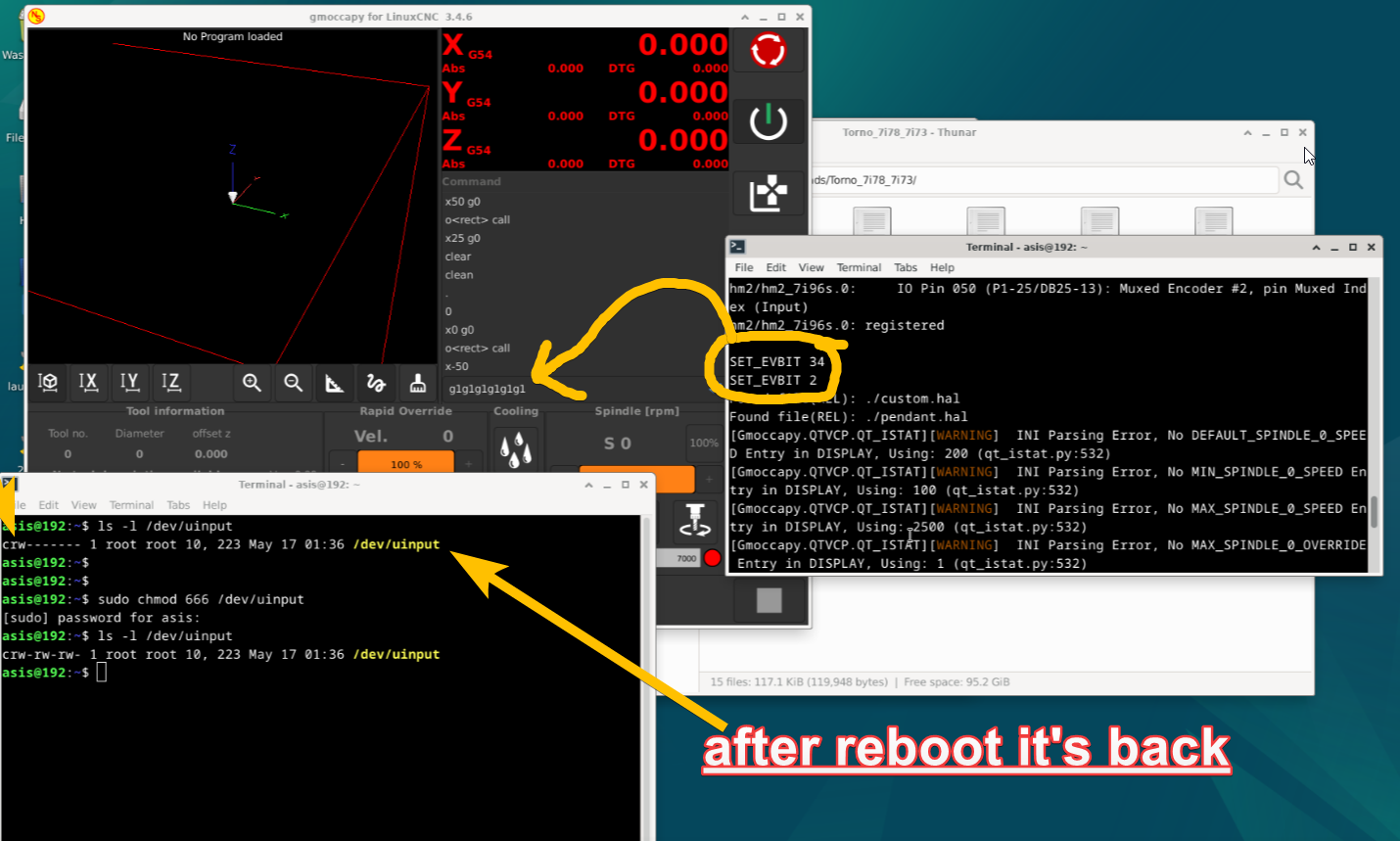
Thank you for fast respond ! , MR.Aciera and MR.tommylight
sudo chmod 666 /dev/uinput
WORK !!
Now ls -l /dev/uinput result chang to : crw-crw-crw
Then I try reboot my PC
after reboot open terminal and recheck
ls -l /dev/uinput
but it's will change back to crw
I must type again : sudo chmod 666 /dev/uinput
Then I try open linux from terminal and try keycode 2 button it's Awsome I can "G" and "1" in MDI
At last .......
How to remember after reboot permission onfile uinput ?
Please Log in or Create an account to join the conversation.
- tommylight
- Away
- Moderator
-
Less
More
- Posts: 22011
- Thank you received: 7491
2 years 5 months ago #300732
by tommylight
Replied by tommylight on topic New component for keyboards and panels.
Well, that might be since the uinput is accessed during boot time, so something must be changing the permissions.
You can make a shortcut to start LinuxCNC and set permissions before running it as a bash script, butnit would still require entering the sudo password.
You can make a shortcut to start LinuxCNC and set permissions before running it as a bash script, butnit would still require entering the sudo password.
Please Log in or Create an account to join the conversation.
- Aciera
- Offline
- Administrator
-
Less
More
- Posts: 4819
- Thank you received: 2177
2 years 5 months ago #300744
by Aciera
Replied by Aciera on topic New component for keyboards and panels.
Isn't there a section in the document you posted a screenshot of that explains how to modify the .rules file so the permission is permanently set?
Please Log in or Create an account to join the conversation.
- Aciera
- Offline
- Administrator
-
Less
More
- Posts: 4819
- Thank you received: 2177
2 years 5 months ago #300749
by Aciera
Replied by Aciera on topic New component for keyboards and panels.
I really have no experience writing udev rules but I wonder if 'MODE:="0666"' is correct. Looking at this:
www.reactivated.net/writing_udev_rules.html
I only see (note the missing colon)
MODE="0666"
Might be worth a try.
And also you may want to check if that rules file is actually created with the correct content.
www.reactivated.net/writing_udev_rules.html
I only see (note the missing colon)
MODE="0666"
Might be worth a try.
And also you may want to check if that rules file is actually created with the correct content.
Please Log in or Create an account to join the conversation.
Time to create page: 0.293 seconds