
Step Sale and Velocity

More
6 years 10 months ago #152235 by tommylight
Replied by tommylight on topic Step Sale and Velocity
That is latency error on servo thread ! That is a bit tricky to pinpoint, but in most cases it is a failing hard drive causing it at random, failing memory module on boards with onboard graphic.
On the other side, Dell laptops do that a lot due to power saving stuff, but Dell desktops never do that.

Please Log in or Create an account to join the conversation.

More
6 years 10 months ago #152271 by PCW
Replied by PCW on topic Step Sale and Velocity
Pinging the 7I76E might yield some clues
(run for a couple minutes and post the last 20 or so lines here including the statistics)

Please Log in or Create an account to join the conversation.

More
6 years 10 months ago - 6 years 10 months ago #152542 by little_sparky

tommylight wrote: That is latency error on servo thread ! That is a bit tricky to pinpoint, but in most cases it is a failing hard drive causing it at random, failing memory module on boards with onboard graphic.
On the other side, Dell laptops do that a lot due to power saving stuff, but Dell desktops never do that.


It is a refurbished laptop from ebay, I wonder if therefore parts have been used in it that are just not up to scratch or even missing.


Replying o PCW

Code:
Ping 10.10.10.10
gave me this
Code:
64 bytes from 10.10.10.10: icmp_seq=103 ttl=64 time=0.385 ms 64 bytes from 10.10.10.10: icmp_seq=104 ttl=64 time=0.398 ms 64 bytes from 10.10.10.10: icmp_seq=105 ttl=64 time=0.384 ms 64 bytes from 10.10.10.10: icmp_seq=106 ttl=64 time=0.397 ms 64 bytes from 10.10.10.10: icmp_seq=107 ttl=64 time=0.384 ms 64 bytes from 10.10.10.10: icmp_seq=108 ttl=64 time=0.398 ms 64 bytes from 10.10.10.10: icmp_seq=109 ttl=64 time=0.385 ms 64 bytes from 10.10.10.10: icmp_seq=110 ttl=64 time=0.398 ms 64 bytes from 10.10.10.10: icmp_seq=111 ttl=64 time=0.384 ms 64 bytes from 10.10.10.10: icmp_seq=112 ttl=64 time=0.389 ms 64 bytes from 10.10.10.10: icmp_seq=113 ttl=64 time=0.383 ms 64 bytes from 10.10.10.10: icmp_seq=114 ttl=64 time=0.397 ms 64 bytes from 10.10.10.10: icmp_seq=115 ttl=64 time=0.385 ms 64 bytes from 10.10.10.10: icmp_seq=116 ttl=64 time=0.392 ms 64 bytes from 10.10.10.10: icmp_seq=117 ttl=64 time=0.383 ms 64 bytes from 10.10.10.10: icmp_seq=118 ttl=64 time=0.391 ms 64 bytes from 10.10.10.10: icmp_seq=119 ttl=64 time=0.385 ms 64 bytes from 10.10.10.10: icmp_seq=120 ttl=64 time=0.396 ms 64 bytes from 10.10.10.10: icmp_seq=121 ttl=64 time=0.387 ms 64 bytes from 10.10.10.10: icmp_seq=122 ttl=64 time=0.400 ms 64 bytes from 10.10.10.10: icmp_seq=123 ttl=64 time=0.384 ms ^C--- 10.10.10.10 ping statistics --- 124 packets transmitted, 124 packets received, 0% packet loss round-trip min/avg/max/stddev = 0.124/0.348/0.438/0.092 ms

(i can run more packets later if requested I was in a bit of a rush)

also tried to see if there was an ethernet chip using commands I found that PCW suggested from another post which gave the following.
Code:
dmesg | grep -i ether jonty@jonty:~$ ispci | gtrp -i ether bash: gtrp: command not found bash: ispci: command not found

I also played around with different watchdog.timeout_ns numbers but had no real success, if anything making the number higher than 5000000 made it worse.

So when the error came up I ran the the command
Code:
halcmd show param *tmax*

which returned the following the first time.
Code:
jonty@jonty:~$ halcmd show param *tmax* Parameters: Owner Type Dir Value Name 26 s32 RW 0 hm2_7i76e.0.read-request.tmax 26 bit RO FALSE hm2_7i76e.0.read-request.tmax-increased 26 s32 RW 154076120 hm2_7i76e.0.read.tmax 26 bit RO FALSE hm2_7i76e.0.read.tmax-increased 26 s32 RW 349876 hm2_7i76e.0.write.tmax 26 bit RO FALSE hm2_7i76e.0.write.tmax-increased 19 s32 RW 29004 motion-command-handler.tmax 19 bit RO FALSE motion-command-handler.tmax-increased 19 s32 RW 63304 motion-controller.tmax 19 bit RO FALSE motion-controller.tmax-increased 29 s32 RW 2584 pid.s.do-pid-calcs.tmax 29 bit RO FALSE pid.s.do-pid-calcs.tmax-increased 29 s32 RW 8532 pid.x.do-pid-calcs.tmax 29 bit RO FALSE pid.x.do-pid-calcs.tmax-increased 29 s32 RW 2116 pid.y.do-pid-calcs.tmax 29 bit RO FALSE pid.y.do-pid-calcs.tmax-increased 29 s32 RW 2332 pid.y2.do-pid-calcs.tmax 29 bit RO FALSE pid.y2.do-pid-calcs.tmax-increased 29 s32 RW 2904 pid.z.do-pid-calcs.tmax 29 bit RO FALSE pid.z.do-pid-calcs.tmax-increased 20 s32 RW 154150000 servo-thread.tmax

and then this the second time
Code:
jonty@jonty:~$ halcmd show param *tmax* Parameters: Owner Type Dir Value Name 26 s32 RW 0 hm2_7i76e.0.read-request.tmax 26 bit RO FALSE hm2_7i76e.0.read-request.tmax-increased 26 s32 RW 10313740 hm2_7i76e.0.read.tmax 26 bit RO FALSE hm2_7i76e.0.read.tmax-increased 26 s32 RW 159202976 hm2_7i76e.0.write.tmax 26 bit RO FALSE hm2_7i76e.0.write.tmax-increased 19 s32 RW 33452 motion-command-handler.tmax 19 bit RO FALSE motion-command-handler.tmax-increased 19 s32 RW 37892 motion-controller.tmax 19 bit RO FALSE motion-controller.tmax-increased 29 s32 RW 2100 pid.s.do-pid-calcs.tmax 29 bit RO FALSE pid.s.do-pid-calcs.tmax-increased 29 s32 RW 5080 pid.x.do-pid-calcs.tmax 29 bit RO FALSE pid.x.do-pid-calcs.tmax-increased 29 s32 RW 5188 pid.y.do-pid-calcs.tmax 29 bit RO FALSE pid.y.do-pid-calcs.tmax-increased 29 s32 RW 2688 pid.y2.do-pid-calcs.tmax 29 bit RO FALSE pid.y2.do-pid-calcs.tmax-increased 29 s32 RW 2212 pid.z.do-pid-calcs.tmax 29 bit RO FALSE pid.z.do-pid-calcs.tmax-increased 20 s32 RW 160023120 servo-thread.tmax

computer speed is 3.1 GHz
Last edit: 6 years 10 months ago by little_sparky.

Please Log in or Create an account to join the conversation.

More
6 years 10 months ago #152573 by PCW
Replied by PCW on topic Step Sale and Velocity
26 s32 RW 159202976 hm2_7i76e.0.write.tmax

So your Laptop could not send a packet for ~5 ms

Not sure if this due to is a network interface power saving setting
or just generic real time issues with laptops

In general laptops are not good for real time, desktops are usually much
better, for example, an inexpensive HP 8300 USDT) has a maximum
servo thread time with an Ethernet card of about 170 usec if you turn
off AMT

Please Log in or Create an account to join the conversation.

More
6 years 10 months ago #152578 by little_sparky

PCW wrote: 26 s32 RW 159202976 hm2_7i76e.0.write.tmax

So your Laptop could not send a packet for ~5 ms

Not sure if this due to is a network interface power saving setting
or just generic real time issues with laptops

In general laptops are not good for real time, desktops are usually much
better, for example, an inexpensive HP 8300 USDT) has a maximum
servo thread time with an Ethernet card of about 170 usec if you turn
off AMT


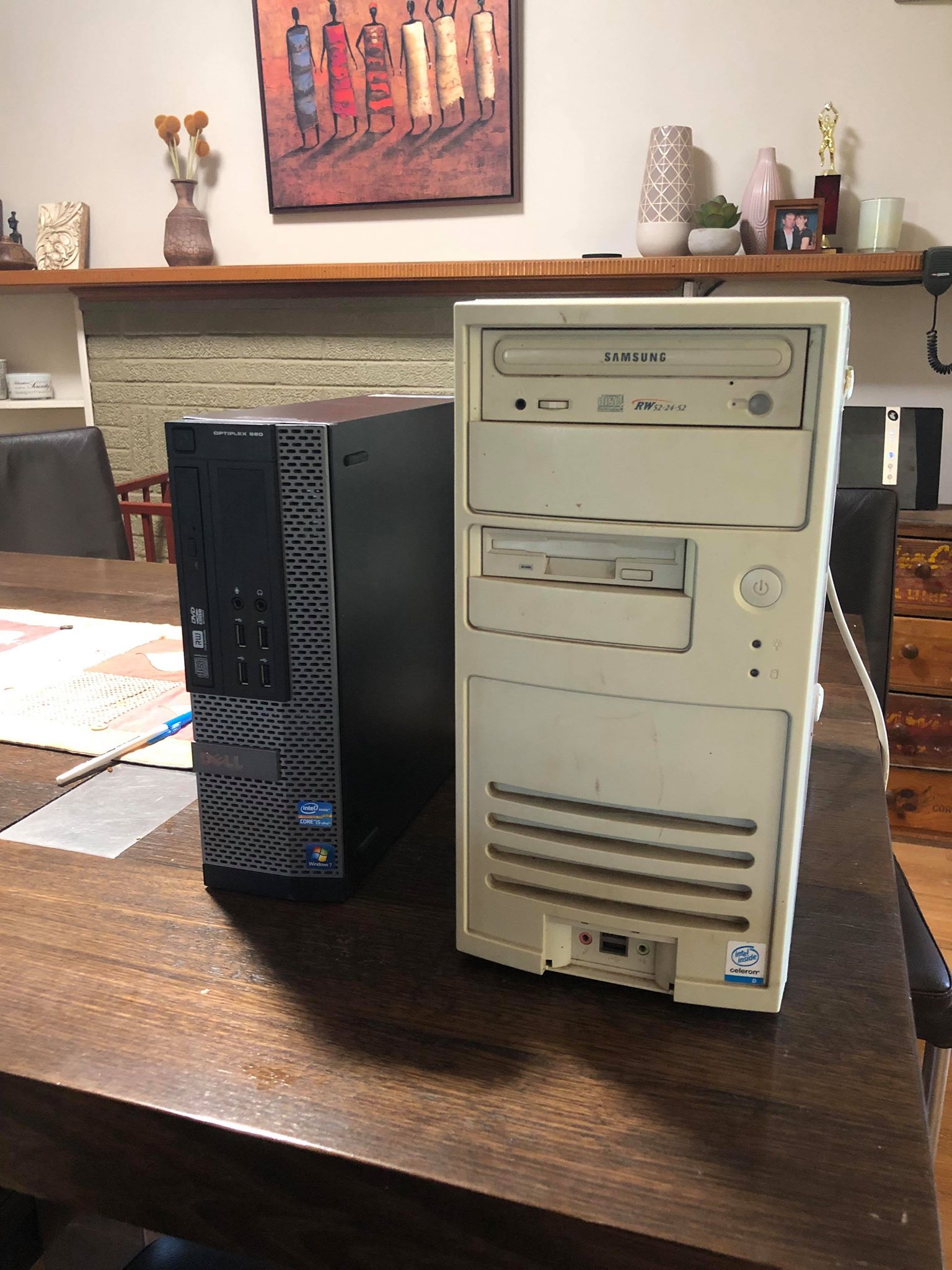
I am using a desktop computer. Refurbished Dell Optiplex 990

Computer to my right is the old 32 bit i had trouble with and left is the optiplex.
Please Log in or Create an account to join the conversation.

More
6 years 10 months ago #152580 by PCW
Replied by PCW on topic Step Sale and Velocity
If it takes 5 ms to send a packet something is really broken with networking on that box

You might look at your BIOS to see if there are any network hardware settings

also determining the Ethernet hardware might help:

dmesg | grep -i eth

should list the Ethernet hardware

Please Log in or Create an account to join the conversation.

Time to create page: 0.378 seconds
Powered by Kunena Forum
