

- Posts: 17533
- Thank you received: 5334
Need some assistance understanding my Latency Test result
4 years 3 months ago #248452
by PCW
Replied by PCW on topic Need some assistance understanding my Latency Test result
1. I would test with just a servo thread since with external hardware,
the base thread will not be used. (use the --nobase latency-histogram option)
2. You should enable all cores
3. I still suspect there is some power saving option enabled (whether or not
it can be disabled in the BIOS is an open question however)
the base thread will not be used. (use the --nobase latency-histogram option)
2. You should enable all cores
3. I still suspect there is some power saving option enabled (whether or not
it can be disabled in the BIOS is an open question however)
The following user(s) said Thank You: Sray69
Please Log in or Create an account to join the conversation.

4 years 3 months ago #248461
by Sray69
Replied by Sray69 on topic Need some assistance understanding my Latency Test result
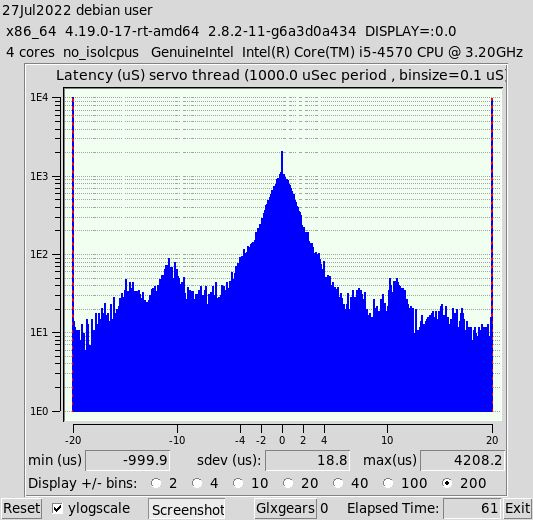
Here are two more histograms. One is nobase. The other has both. This time I enabled all cores and I found a few other things (PCI-E/SATA/etc management) to turn off in the bios. The latency test looks pretty much the same as before, right 10M jitter.

Please Log in or Create an account to join the conversation.
4 years 3 months ago #248462
by Sray69
Replied by Sray69 on topic Need some assistance understanding my Latency Test result
I noticed the servo thread histograms look quite different from each other. The only difference is the nobase one I had a browser open with gmail where I did not with the other one.
Please Log in or Create an account to join the conversation.
- Todd Zuercher
- Offline
- Platinum Member
-

Less
More
- Posts: 4737
- Thank you received: 1480
4 years 3 months ago #248463
by Todd Zuercher
No I was trying to ask if you were trying to run this in a VM because your latency results are that bad, and that your results are worse than I see in a VM. But A VM will never have good enough latency to run a machine. (No you should not try it. VMs are only good for simulations.)
Like Peter said there must be some power saving feature (such as C states) or some other latency destroying feature enabled in your bios that needs to be turned off.
Replied by Todd Zuercher on topic Need some assistance understanding my Latency Test result
So are you saying I should run it in a virtual machine and that it will not run on this PC otherwise? Can you explain a little more as to why? Is it just the MB configuration is bad?
I will turn the cores back on. Thanks for clearing that up for me.
You say "I think it may need to say rt-preempt or something". So my kernel says "SMP PREEMPT RT Debian 4.19.194-2". This is somehow different? I guess I am not understanding.
Thanks
No I was trying to ask if you were trying to run this in a VM because your latency results are that bad, and that your results are worse than I see in a VM. But A VM will never have good enough latency to run a machine. (No you should not try it. VMs are only good for simulations.)
Like Peter said there must be some power saving feature (such as C states) or some other latency destroying feature enabled in your bios that needs to be turned off.
The following user(s) said Thank You: Sray69
Please Log in or Create an account to join the conversation.
4 years 3 months ago #248465
by Sray69
Replied by Sray69 on topic Need some assistance understanding my Latency Test result
Oh OK. I was hoping not to use a VM. Thanks for explaining.
Yeah the BIOS is fairly limited. I will dig through it again and see what I can find.
I did think of a couple things that may contribute to my problem.
Yeah the BIOS is fairly limited. I will dig through it again and see what I can find.
I did think of a couple things that may contribute to my problem.
- The memory in this PC are not matched. In fact 2 sticks are 4GB each and the other two sticks are 8GB each (completely different brands), but I cannot get the 8GB sticks to register as 8GB. They only show up as 4GB each. BTW, this also happens when I only have the two 8GB sticks in by themselves. Not sure why this happens. So I decided to just throw the other two in with them (since this MB allows for mismatched memory) to get to 16GB.
- I am using a BT mouse on this PC.
Please Log in or Create an account to join the conversation.
4 years 3 months ago #248472
by arvidb
Or was this not displayed on 2.8?
Replied by arvidb on topic Need some assistance understanding my Latency Test result
If he's running preempt-rt, shouldn't it say "Note: Using POSIX realtime"? Mine does:Also from the terminal while histogram was running:
"msg=can't use non-numeric floating-point value as operand of "*" (variance=-2116125128)"
Code:
$ latency-histogram --nobase
Note: Using POSIX realtime
$ uname -a
Linux lathe 5.10.0-11-rt-amd64 #1 SMP PREEMPT_RT Debian 5.10.92-1 (2022-01-18) x86_64 GNU/Linux
The following user(s) said Thank You: Sray69
Please Log in or Create an account to join the conversation.
Time to create page: 0.300 seconds