
- Posts: 22010
- Thank you received: 3
QtPlasmaC release.
- tommylight
-

- Offline
- Administrator
-

Less
More
5 years 6 months ago #205873
by tommylight
Yes you can use mint 19.x.
Replied by tommylight on topic QtPlasmaC release.
Clive S wrote:
Q.1 So do I have to install Buster (that I don't like) or can I still use mint updated to 2.9 ?
Yes you can use mint 19.x.
Yes they can be changed to whatever, but i have yet to find something that looks better than default.Clive S wrote: Q.2 Is there a different GUI colour other than yellow ?
Please Log in to join the conversation.
- tommylight
-
- Offline
- Administrator
-
Less
More
- Posts: 22010
- Thank you received: 3
5 years 6 months ago #205874
by tommylight
Replied by tommylight on topic QtPlasmaC release.
Phill, sorry to bother, but:
Press F9, jog manually right, press F9 while still holding the jog button, release the jog button = machine continues to move right till it hits the limits ... or gets out of the shop !
Pressing the arrow key stops it.
Latest master, as usual.
Off to the shop, soon ....
Press F9, jog manually right, press F9 while still holding the jog button, release the jog button = machine continues to move right till it hits the limits ... or gets out of the shop !
Pressing the arrow key stops it.
Latest master, as usual.
Off to the shop, soon ....
Please Log in to join the conversation.
5 years 6 months ago #205875
by phillc54
That is GUI jog button Tom?
Replied by phillc54 on topic QtPlasmaC release.
And here was I thinking I would spend tomorrow sitting in the sun reading my Kindle...tommylight wrote: Phill, sorry to bother, but:
Press F9, jog manually right, press F9 while still holding the jog button, release the jog button = machine continues to move right till it hits the limits ... or gets out of the shop !
Pressing the arrow key stops it.
Latest master, as usual.
Off to the shop, soon ....
That is GUI jog button Tom?
Please Log in to join the conversation.
- snowgoer540
- Offline
- Platinum Member
-

Less
More
- Posts: 2580
- Thank you received: 0
5 years 6 months ago #205876
by snowgoer540
I was going to ask if you were on the latest version that uses the autorepeat disable. But you answered that
Back when we did the isAutoRepeat() work around, sometimes the axis would forget that we released a jog key on the keyboard. :laugh: I would have suspected this was a byproduct of that work around, but if you are on the latest version then it must be something else.
Phill: Reading anything good on the Kindle??
If anyone wants a good book recommendation, highly recommend "The Martian" by Andy Weir... even if you've seen the movie (which pales by comparison) it's still worth the read.
Replied by snowgoer540 on topic QtPlasmaC release.
tommylight wrote: Phill, sorry to bother, but:
Press F9, jog manually right, press F9 while still holding the jog button, release the jog button = machine continues to move right till it hits the limits ... or gets out of the shop !
Pressing the arrow key stops it.
Latest master, as usual.
Off to the shop, soon ....
I was going to ask if you were on the latest version that uses the autorepeat disable. But you answered that
Back when we did the isAutoRepeat() work around, sometimes the axis would forget that we released a jog key on the keyboard. :laugh: I would have suspected this was a byproduct of that work around, but if you are on the latest version then it must be something else.
Phill: Reading anything good on the Kindle??
If anyone wants a good book recommendation, highly recommend "The Martian" by Andy Weir... even if you've seen the movie (which pales by comparison) it's still worth the read.
Please Log in to join the conversation.
- tommylight
-
- Offline
- Administrator
-
Less
More
- Posts: 22010
- Thank you received: 3
5 years 6 months ago #205879
by tommylight
Replied by tommylight on topic QtPlasmaC release.
Nope, keyboard, still old school here, it just feels good to have something to beat on !phillc54 wrote:
That is GUI jog button Tom?
Please Log in to join the conversation.
5 years 6 months ago #205905
by AgentWD40
Replied by AgentWD40 on topic QtPlasmaC release.
First, I apologize in advance if I'm asking this question in the wrong place.
I'm going through the qtplasmac docs and can't find anything that talks about the line on the very bottom of the gui.
1. Are the g-codes and m-codes just a listing for reference or does it serve another purpose?
2. In the example image below from the docs, bottom left corner, "Job the Z axis down". Where does message this come from? Can I set this message from my gcode files?
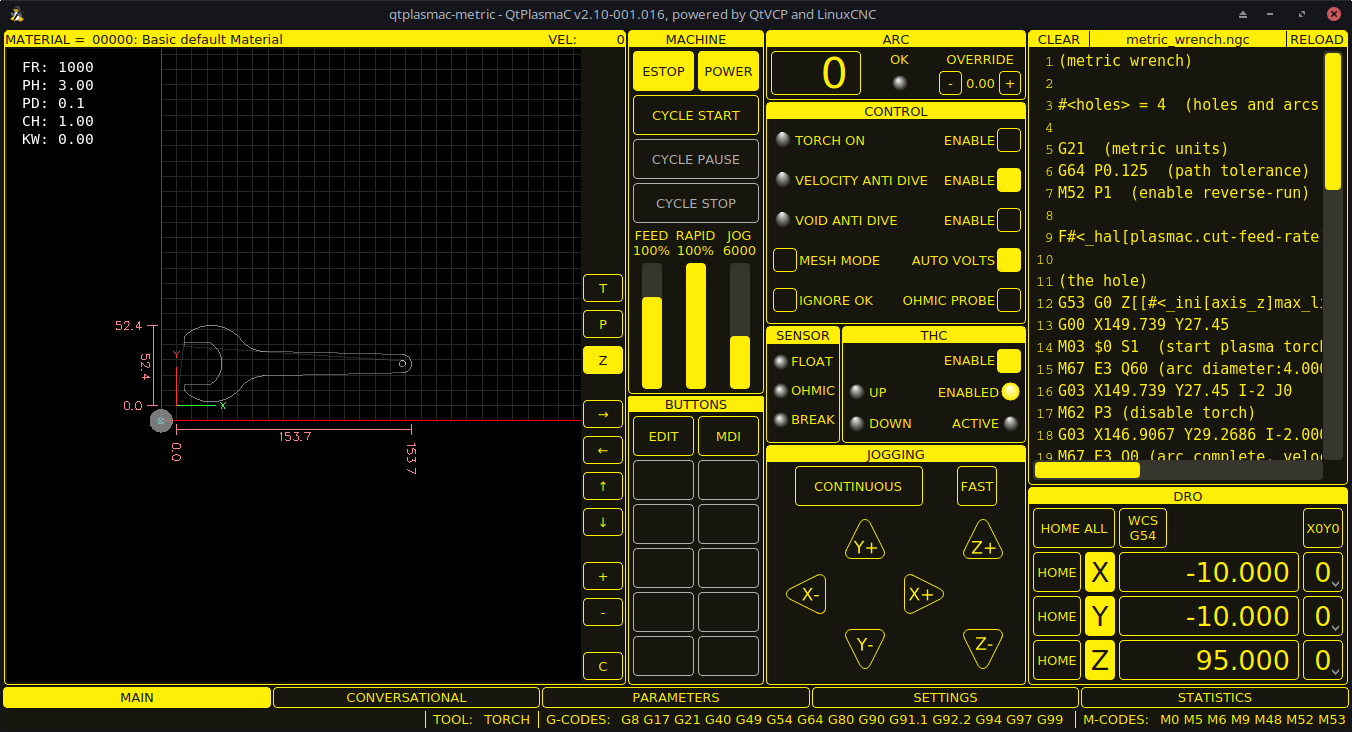
I'm going through the qtplasmac docs and can't find anything that talks about the line on the very bottom of the gui.
1. Are the g-codes and m-codes just a listing for reference or does it serve another purpose?
2. In the example image below from the docs, bottom left corner, "Job the Z axis down". Where does message this come from? Can I set this message from my gcode files?
Please Log in to join the conversation.
- snowgoer540
- Offline
- Platinum Member
-
Less
More
- Posts: 2580
- Thank you received: 0
5 years 6 months ago #205907
by snowgoer540
I should probably document that somehow...
1. They are the currently active G and M codes.
2. Likely when the screen shot was taken the mouse was hovering over the Z- GUI jog button. That area displays the GUI hints/tooltips/etc. I think error messages display there for a short time as well (in addition to the error popup). I dont think you can display messages there voluntarily.
What are you looking to do exactly?
Replied by snowgoer540 on topic QtPlasmaC release.
AgentWD40 wrote: First, I apologize in advance if I'm asking this question in the wrong place.
I'm going through the qtplasmac docs and can't find anything that talks about the line on the very bottom of the gui.
1. Are the g-codes and m-codes just a listing for reference or does it serve another purpose?
2. In the example image below from the docs, bottom left corner, "Job the Z axis down". Where does message this come from? Can I set this message from my gcode files?
I should probably document that somehow...
1. They are the currently active G and M codes.
2. Likely when the screen shot was taken the mouse was hovering over the Z- GUI jog button. That area displays the GUI hints/tooltips/etc. I think error messages display there for a short time as well (in addition to the error popup). I dont think you can display messages there voluntarily.
What are you looking to do exactly?
Please Log in to join the conversation.
5 years 6 months ago #205911
by AgentWD40
I'm running a hypertherm without a RS485 port. I'd like to be able to somehow send a message to instruct the operator to manually set the amps when necessary (e.g. between center spotting and cutting operations)
Replied by AgentWD40 on topic QtPlasmaC release.
snowgoer540 wrote: What are you looking to do exactly?
I'm running a hypertherm without a RS485 port. I'd like to be able to somehow send a message to instruct the operator to manually set the amps when necessary (e.g. between center spotting and cutting operations)
Please Log in to join the conversation.
- snowgoer540
- Offline
- Platinum Member
-
Less
More
- Posts: 2580
- Thank you received: 0
5 years 6 months ago #205914
by snowgoer540
AFAIK QtPlasmaC does not support that natively (but not to say it couldn't). Phill can correct me if it's secretly in there and I've missed it all this time :laugh:
Chris could also chime in if there's a native way to do this in qtVCP, but I'd guess it takes a custom M code (at least that would be one way to do it).
In the meantime two things:
1. I highly recommend RS485. I'd guess the end user only has to forget a few times and ruin a sheet of ...whatever to make the cost worth it. Once you get your tool table set up, it's literally set it and forget it. I never worry about changing the amperage, ever. I honestly don't even think about it anymore.
2. Maybe in the meantime you can get something out of this: www.forum.linuxcnc.org/38-general-linuxc...messages-my-solution Admittedly, lunch is over, so I didnt search too hard to see if there's better options.
Replied by snowgoer540 on topic QtPlasmaC release.
AgentWD40 wrote:
snowgoer540 wrote: What are you looking to do exactly?
I'm running a hypertherm without a RS485 port. I'd like to be able to somehow send a message to instruct the operator to manually set the amps when necessary (e.g. between center spotting and cutting operations)
AFAIK QtPlasmaC does not support that natively (but not to say it couldn't). Phill can correct me if it's secretly in there and I've missed it all this time :laugh:
Chris could also chime in if there's a native way to do this in qtVCP, but I'd guess it takes a custom M code (at least that would be one way to do it).
In the meantime two things:
1. I highly recommend RS485. I'd guess the end user only has to forget a few times and ruin a sheet of ...whatever to make the cost worth it. Once you get your tool table set up, it's literally set it and forget it. I never worry about changing the amperage, ever. I honestly don't even think about it anymore.
2. Maybe in the meantime you can get something out of this: www.forum.linuxcnc.org/38-general-linuxc...messages-my-solution Admittedly, lunch is over, so I didnt search too hard to see if there's better options.
Please Log in to join the conversation.
5 years 6 months ago #205978
by phillc54
Replied by phillc54 on topic QtPlasmaC release.
I have added the use of axis B, giving a total of five available axes and LinuxCNC doesn't appear to have any keyboard keys assigned for keyboard jogging of the B axis.
I am thinking of using the "<," key for negative and the ">." key for positive. Does anyone have any complaints/suggestions???
I am thinking of using the "<," key for negative and the ">." key for positive. Does anyone have any complaints/suggestions???
Please Log in to join the conversation.
Time to create page: 0.206 seconds