Playing around with Pathpilot GUI

More
9 years 9 months ago #85890 by smgvbest
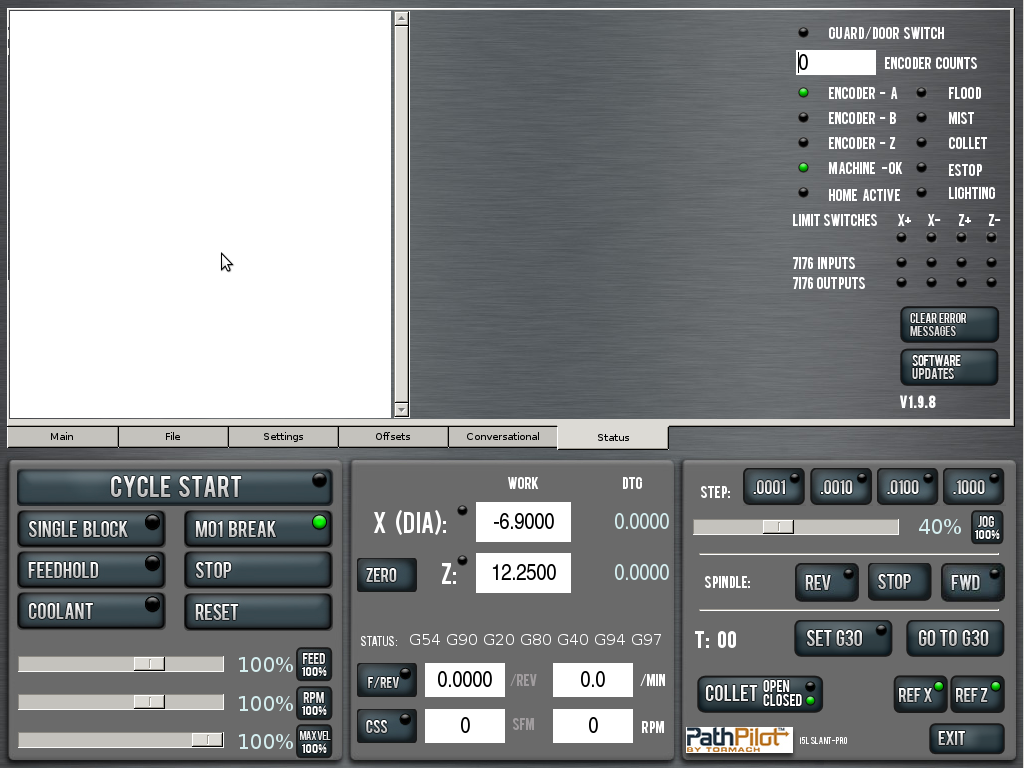
Spent some time learning how the gui works and I am getting a better idea so I made some minor changes to it

I changed the led for the Door, I'm color blind and can not tell the difference between the yellow and green led so I made it green and black, That was first change.
I added a second colum for Flood, Mist, Collet, estop and external lighting. (flood is working)
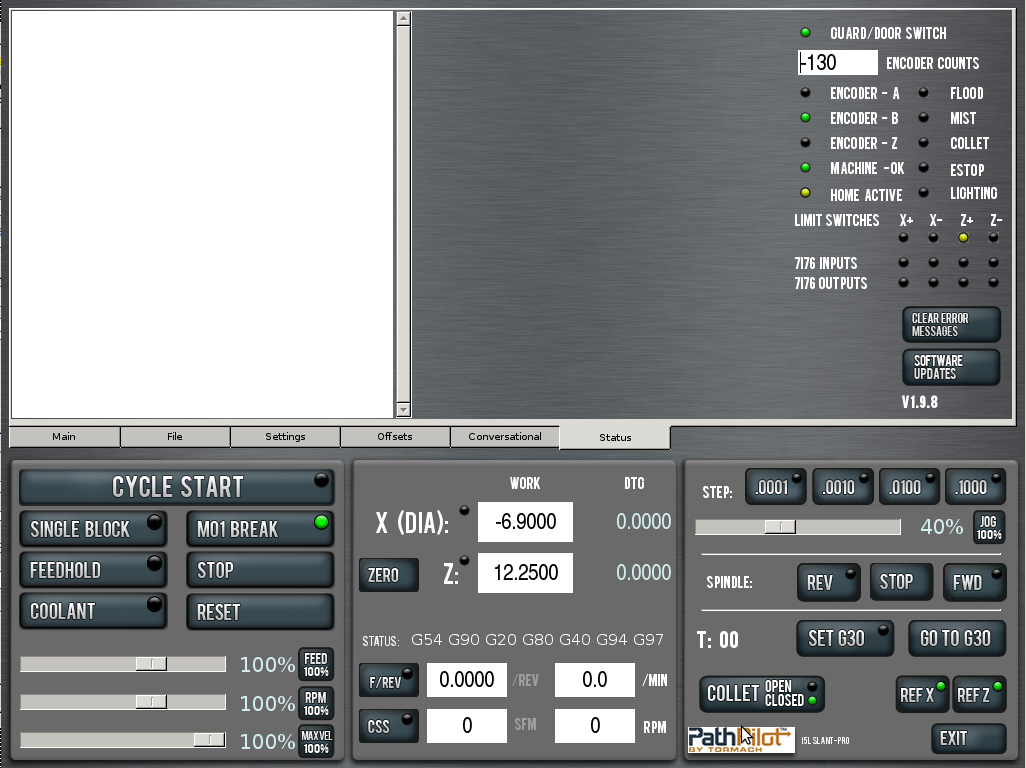
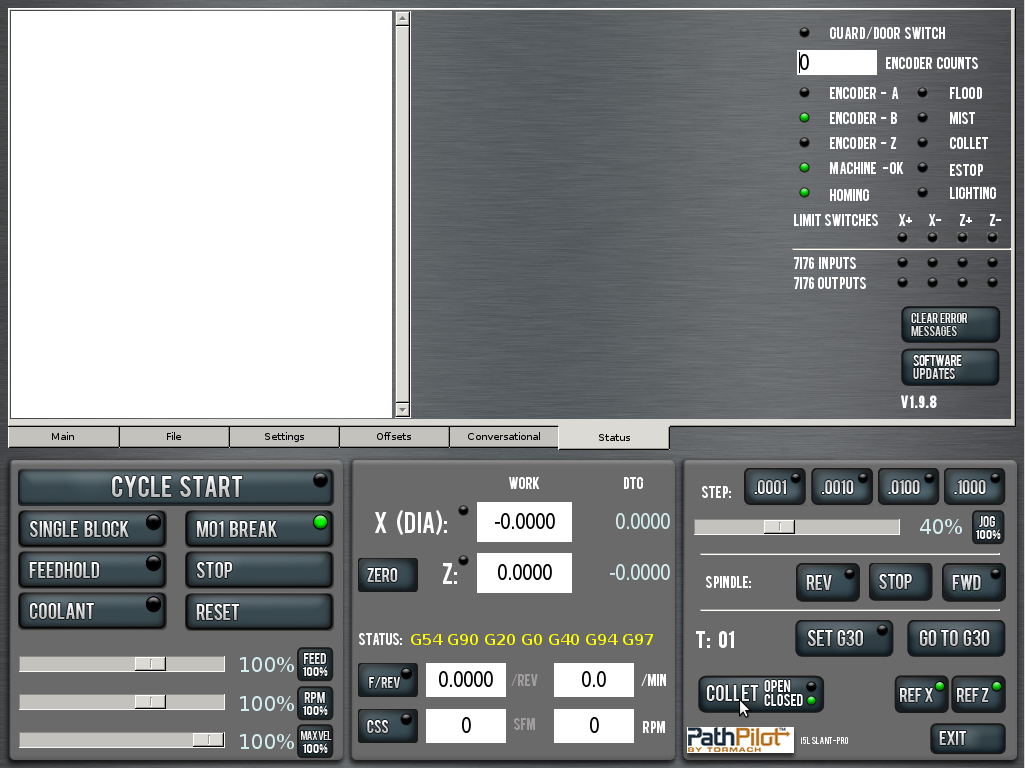
I also change the label on the HOME to indicate when it is homing and added individual leds for X+/- and z+/- also working
so when HOMING the HOME LED comes on, then when it trips the limit switching the one that is hit is lit up.
Finally changed USBIO labels to 7i76 since thats my source of I/Os
oh, and made the version number a bit larger and i'm doing this to the V1.9.8 Version
I have more work to do but it's fun learning the gui and python

I want to add a Lighting Button on the main page but there really isn't room for one. I could add it to the Settings page but that makes no sense really.


Anyway, thought I would share my adventure in GUI editing.

Oh, since technically pathpilot is opensource, I should be able to share when done, I'm leaving comments in the code so mark what i've changed

also, i had to move the limit switch stuff to the postgui because I couldn't figure out how to use a signal inside the GUI. does anyone know if you can use a signal inside the gui or are you limited to HAL PINS?

Please Log in or Create an account to join the conversation.

More
9 years 9 months ago #85896 by racedirector
Nice, well done! I have been dying to make the offset number more visible, switching from G54 to G55 etc has caught me out a few too many times.

Might be time to get this onto my other machine and have a play with the gui and code.....

Please Log in or Create an account to join the conversation.

More
9 years 9 months ago #85994 by Jedi
Nice! :)

Please Log in or Create an account to join the conversation.

More
9 years 9 months ago - 9 years 9 months ago #86209 by smgvbest
@racedirector
is this that you mean for the G54?
Last edit: 9 years 9 months ago by smgvbest.

Please Log in or Create an account to join the conversation.

More
9 years 9 months ago #86230 by racedirector
Sort of, I was thinking more of having a seperate line for the current offset. Probable easier said than done but I haven't had a chance to play with it. Your solution is better than the original though. Space on the lower screen is an issue when you have a router using X,Y,Z and A though

Please Log in or Create an account to join the conversation.

More
9 years 9 months ago #86370 by smgvbest
Yeh, space is a bit constrained there
I tried like putting a OFFET just above Status, it worked but I needed to figure out how to remove the current offset from the Status line otherwise it really looks redundant

Here's some of my latest playing around
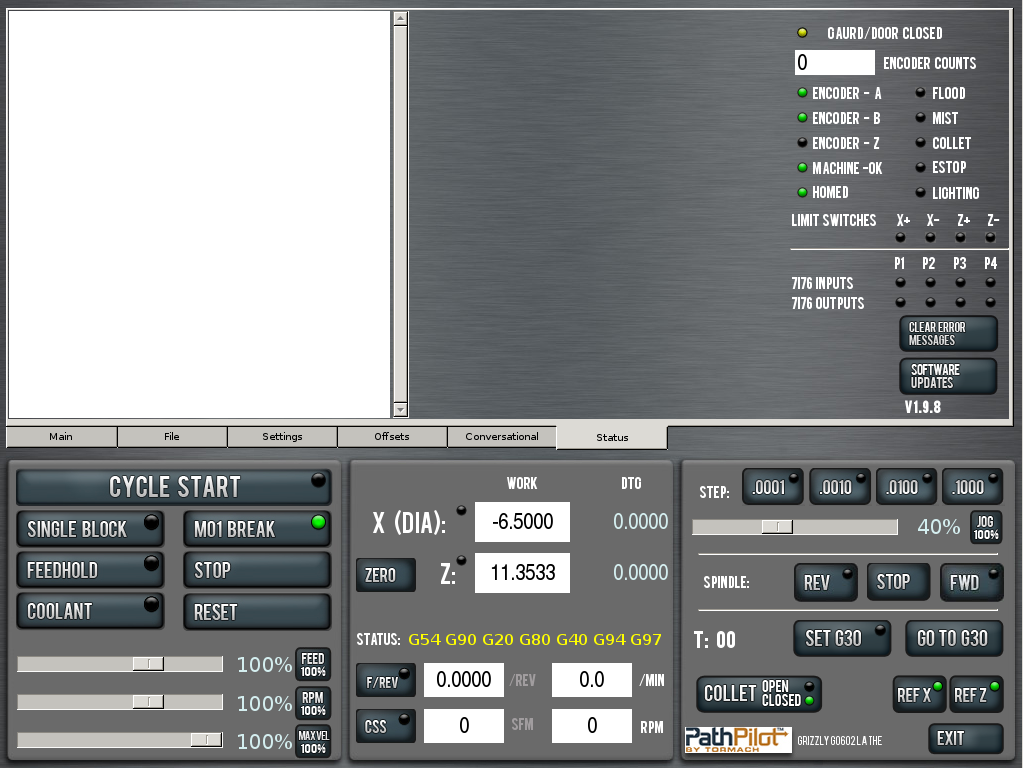
Modified the Gaurd/Door Label to turn RED when it is Open, Makes the unsafe condition clearer
Modified the Home Switch to Say Homing while it's Homing with a Yellow LED, When Both X/Y are Homed the LED is Green and the Label Says HOMED.
Modified MACHINE OK to also Go RED and Say MACHINE NOT OK when the Machine Check is in error
Added a [CUSTOM] to the INI
with a way to change the Labels for the Machine Name and USBIO Label
[CUSTOM]
MACHINE_LABEL=Grizzly G0602 Lathe
MACHINE_IO_LABEL=7i76

you can see both on the screen shots, if they are not in the INI it will use the defaults in pathpilot
Shifted things around a bit to put labels above the IO LED for P1-P4 just so there's no confusion with the X+/- and Y+/- labels
Flood and Collet LEDS working
Not sure yet how to hook up the Mist LED
Need to tie into the ESTOP logic
Need to Add a Lighting Button Somewhere which would turn on/off the lighting inside the enclosure (or any lighting you hooked up)


This is mostly a learning experience for me on Glade, Python and Pathpilots UI
Really does help understand it.

One thing I would like to work out is having a Spindle Orientation DRO show 0 - 360 degrees of rotation,
Curious of anyone else thinks that would be useful?

The following user(s) said Thank You: racedirector

Please Log in or Create an account to join the conversation.

Time to create page: 0.236 seconds
Powered by Kunena Forum