Set work Offsets

More
6 years 8 months ago - 6 years 8 months ago #158836 by Blume
Set work Offsets was created by Blume
Hi,
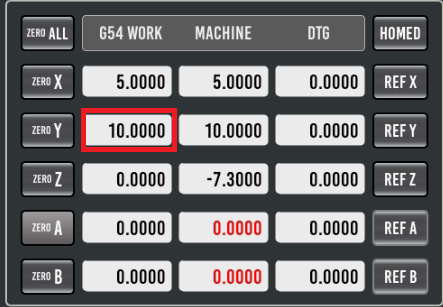
I use the Probe_basic screen. At the moment i use "Machine -> Set work Offsets" very often.
I want to know if its possible to change the screen and insert this window in my main screen. Or make the market box changeable .

regards
Stefan
Last edit: 6 years 8 months ago by Blume.

Please Log in or Create an account to join the conversation.
More
6 years 7 months ago #159126 by andypugh
Replied by andypugh on topic Set work Offsets
I assume you want a GUI way? It is possible to set G54 offsets directly through MDI commands using the G10 command. But I suspect that is not what you are asking?

Please Log in or Create an account to join the conversation.

More
6 years 7 months ago #159134 by Lcvette
Replied by Lcvette on topic Set work Offsets

Blume wrote: Hi,
I use the Probe_basic screen. At the moment i use "Machine -> Set work Offsets" very often.
I want to know if its possible to change the screen and insert this window in my main screen. Or make the market box changeable .

regards
Stefan


im not sure i follow your work flow description can you elaborate on it? on the right side of the screen at the bottom of the jog direction buttons is a tab named custom that has all of the work offset buttons, you can quickly change between work offsets by selecting the offset you desire. to set a work offset you simply hit the zero buttons with the machine in position and the offset you want selected.

and it is truly designed to make quick work of it by using a touch probe which auto sets the work offset to whatever geometry you selected from the probing operations, ie corners, boss centers pocket centers etc..

but the answer is you can change probe basic any way you would like but it will take some learning to understand how everything is connected. it is a more robust gui and therefore has alot of connections and formatting which can quickly come undone if not careful when editing.

im not sure what you refer to as market box in your statement either, but perhaps clarifying some of those things would help provide better feedback!

Chris

Please Log in or Create an account to join the conversation.

More
6 years 6 months ago #162689 by Leon82
Replied by Leon82 on topic Set work Offsets

Blume wrote: Hi,
I use the Probe_basic screen. At the moment i use "Machine -> Set work Offsets" very often.
I want to know if its possible to change the screen and insert this window in my main screen. Or make the market box changeable .

regards
Stefan


A work offset table will allow you to type in your desired value and use a button and slot to save

Please Log in or Create an account to join the conversation.

More
2 years 6 months ago #297636 by Frogmate
Replied by Frogmate on topic Set work Offsets
I have a question regarding work and tool offsets.

I recently finished my CNC after many years and I am having an issue with figuring out how to set work and tool offsets on Probe_Basic.

I have a mechanical 50mm z height tool setter and a Hamier 3d probe.

How would I go about setting the work and tool offsets manually?

I know this question is probably super annoying, but I literally don't know anything about CNC machining.

Kind regards,
Frogmate

Please Log in or Create an account to join the conversation.

More
2 years 6 months ago #297685 by Lcvette
Replied by Lcvette on topic Set work Offsets
this question requires additional information from you. what type of tools do you use? repeatable holders or non repeatable holders etc. if using repeatable holders such as cat/bt/tts/iso etc, then you can use the spindle nose as the gauge line with which to measure tool lengths against. the spindle nose will be 0.0000 offset and all tools will be the distance from the spindle nose to the tip of the tool.

to measure this with a height setter gauge what i do is place the gauge on the table somewhere solid and flat, bring the spindle nose down until it reads 0.000 on the gauge, then i set the z work offset to zero.

now load a tool in the spindle and bring it down until the gauge reads zero.

the number in the z axis dro will now be the length from the spindle nose to that tool tip. you will enter the absolute value of that dro reading as the tool length offset in the tool table.

load the next tool and repeat the process.


if you are using non repeatable holders or an er type spindle then no tool length offset is required and you typically will set the work offset zero for each tool you loaded at the time of loading, this can be done with the gauge if you know the height and it fits on your work piece, or you can use the paper method described numberous places on youtube and google.

hope this helps!

Please Log in or Create an account to join the conversation.

Moderators: KCJ, Lcvette
Time to create page: 0.063 seconds
Powered by Kunena Forum
