
- Posts: 1682
- Thank you received: 784
Qtpyvcp - Widget Rules guidance?
- Lcvette
- Offline
- Moderator
-

Less
More
3 years 7 months ago #266361
by Lcvette
Replied by Lcvette on topic Qtpyvcp - Widget Rules guidance?
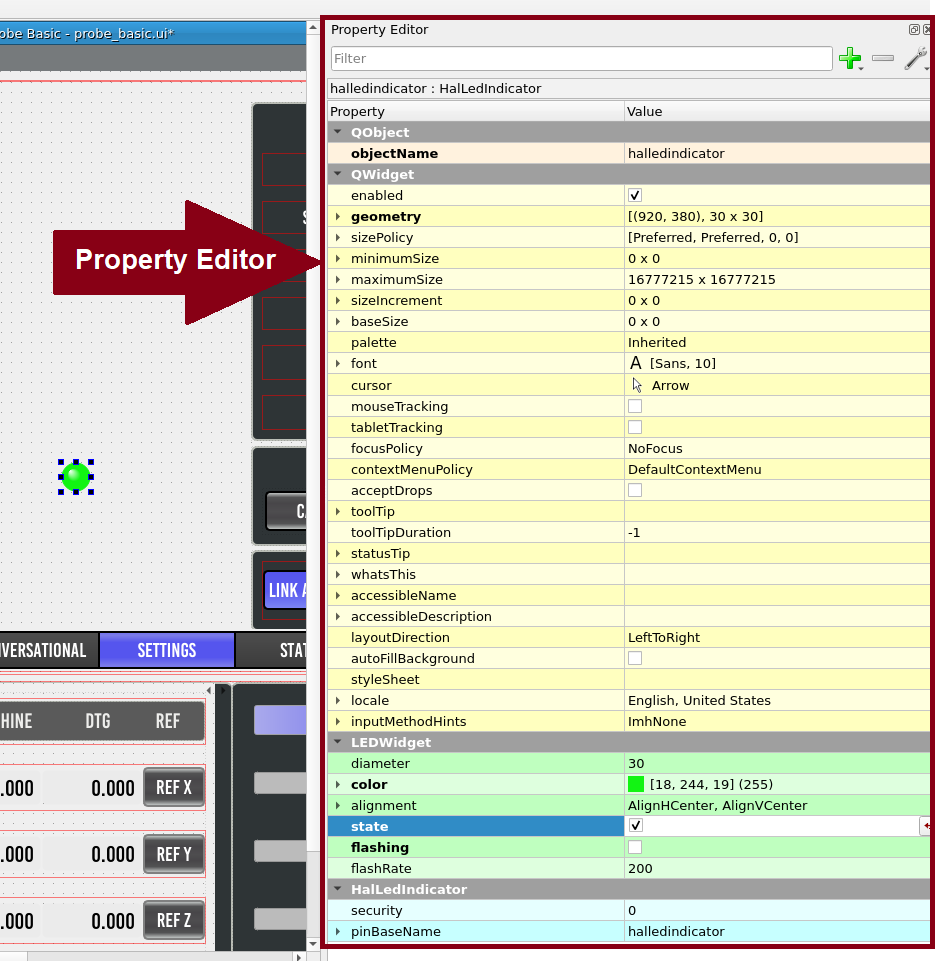
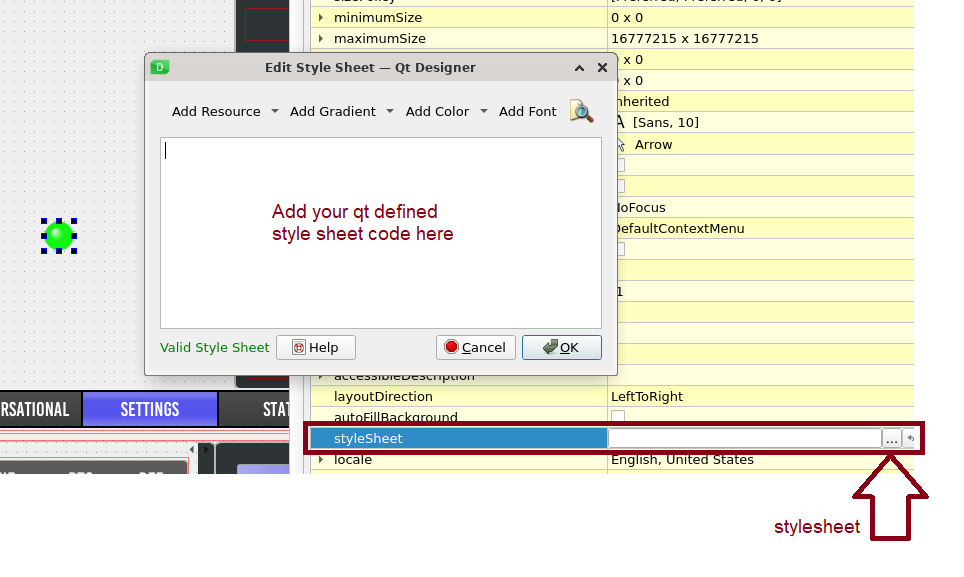
here is an easier explanation maybe as i find it hard to converse with text when there may be naming discrepencies and it can make it more confusing..lol
Please Log in or Create an account to join the conversation.
- spumco
- Offline
- Platinum Member
-

Less
More
- Posts: 2180
- Thank you received: 905
3 years 7 months ago #266365
by spumco
Replied by spumco on topic Qtpyvcp - Widget Rules guidance?
I think I found the underlying issue.
The qtpyvcp halledindicator depends on the base widget 'ledindicator.'
The base widget has no definition (or whatever the jargon is) for 'off-color'.
Part of my confusion was that I recalled fiddling with qtvcp (not qtPYvcp) and seeing the 'off-color' settings for an LED hal widget.
Opening both the qtpyvcp and qtvcp led_widget.py files shows that my memory wasn't completely gone:


The qtpyvcp halledindicator depends on the base widget 'ledindicator.'
The base widget has no definition (or whatever the jargon is) for 'off-color'.
Part of my confusion was that I recalled fiddling with qtvcp (not qtPYvcp) and seeing the 'off-color' settings for an LED hal widget.
Opening both the qtpyvcp and qtvcp led_widget.py files shows that my memory wasn't completely gone:
- qtvcp led_widget has a definition for off-state color
- qtpyvcp led_widget defaults to black, but doesn't appear to expose that definition in the Properties window.
Please Log in or Create an account to join the conversation.
- Lcvette
- Offline
- Moderator
-
Less
More
- Posts: 1682
- Thank you received: 784
3 years 7 months ago #266368
by Lcvette
Replied by Lcvette on topic Qtpyvcp - Widget Rules guidance?
sure, should just be able to copy the relevant bits, can also try just adding the off color to the style sheet. but if you want to add the off section to the widget's py file and get it working just let me know and i can add to the main branch so any updates won't conflict in the future. if there are any discrepancies in the py code, convert formatting to the existing qtpyvcp code used to avoid any issues.
Please Log in or Create an account to join the conversation.
- spumco
- Offline
- Platinum Member
-
Less
More
- Posts: 2180
- Thank you received: 905
3 years 7 months ago #266374
by spumco
Replied by spumco on topic Qtpyvcp - Widget Rules guidance?
I was about to throw tantrum because I know noting about editing .py files, but I decided to brute-force it.
I think I managed to get it without breaking anything serious.
If you d/l the file and substitute it for the original led_widget.py it should work. Note that this is in the base widgets folder and not the hal_widgets.
The file is a bit of a mess, but that should help see what I was fooling with.
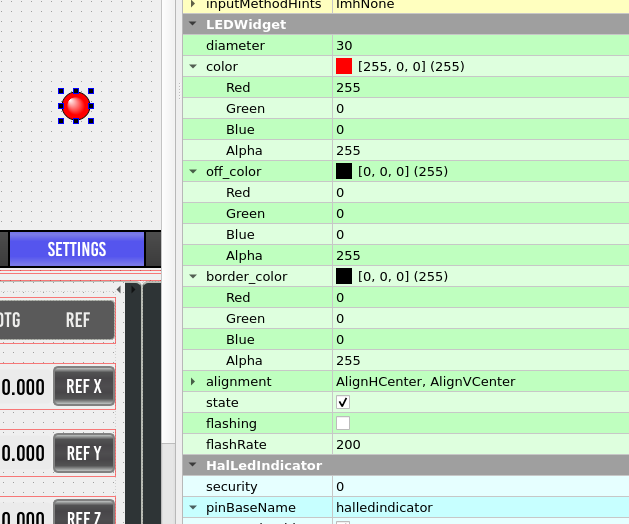
Off Color and Border Color now show up in the Properties Editor window.
In my particular case, I can set
On = red
Off = green
Border = black
and then connect my input-not to the qtpyvcp.led-something.flash pin. If my air pressure sensor is low (no air), it flashes red/green, and once the air is good the led changes to steady-green.
Someone more clever might be able to figure out how to do a 3-color arrangement: color1 + color2 (flash), and color 3 (on or off). That way it could flash red/black, then change to green. Right now it looks a little silly alternating between red & green.
If you test & like it, please feel free to clean up the file (de-idiot, in other words) and incorporate in the mainline as you see fit.
I think I managed to get it without breaking anything serious.
If you d/l the file and substitute it for the original led_widget.py it should work. Note that this is in the base widgets folder and not the hal_widgets.
The file is a bit of a mess, but that should help see what I was fooling with.
Off Color and Border Color now show up in the Properties Editor window.
In my particular case, I can set
On = red
Off = green
Border = black
and then connect my input-not to the qtpyvcp.led-something.flash pin. If my air pressure sensor is low (no air), it flashes red/green, and once the air is good the led changes to steady-green.
Someone more clever might be able to figure out how to do a 3-color arrangement: color1 + color2 (flash), and color 3 (on or off). That way it could flash red/black, then change to green. Right now it looks a little silly alternating between red & green.
If you test & like it, please feel free to clean up the file (de-idiot, in other words) and incorporate in the mainline as you see fit.
Please Log in or Create an account to join the conversation.
- Lcvette
- Offline
- Moderator
-
Less
More
- Posts: 1682
- Thank you received: 784
3 years 7 months ago #266380
by Lcvette
Replied by Lcvette on topic Qtpyvcp - Widget Rules guidance?
im not sure i understand exactly what you are trying to accomplish. you want 3 colors?
On = Green/Black Flash
Off = Red no flash
??
On = Green/Black Flash
Off = Red no flash
??
Please Log in or Create an account to join the conversation.
- spumco
- Offline
- Platinum Member
-
Less
More
- Posts: 2180
- Thank you received: 905
3 years 7 months ago #266405
by spumco
Replied by spumco on topic Qtpyvcp - Widget Rules guidance?
Off = red/black flash
On = solid green
Or the reverse, doesnt matter.
Right now you can pick an on color and an off color. Which means when it flashes it alternates between the two colors. Resulting in a silly looking LED if one of the two colors isnt black.
Again, not a show stopper feature.
On = solid green
Or the reverse, doesnt matter.
Right now you can pick an on color and an off color. Which means when it flashes it alternates between the two colors. Resulting in a silly looking LED if one of the two colors isnt black.
Again, not a show stopper feature.
Please Log in or Create an account to join the conversation.
Moderators: KCJ, Lcvette
Time to create page: 2.719 seconds