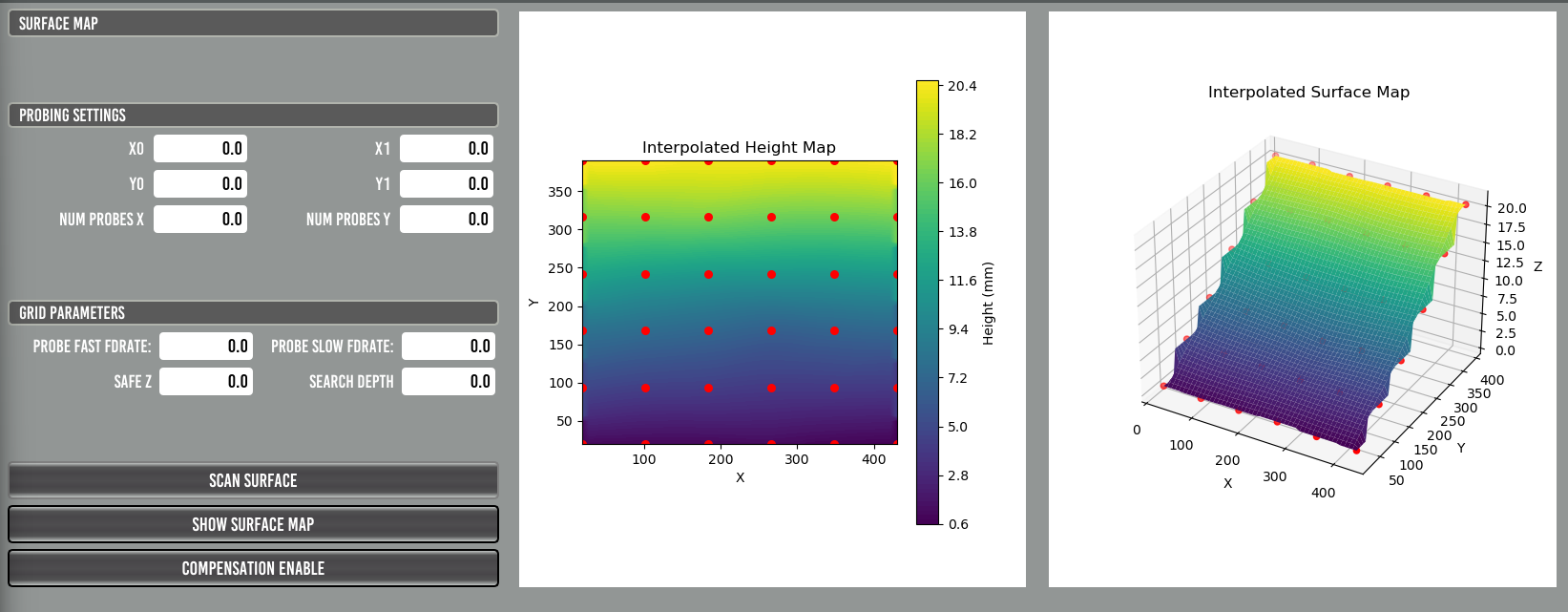
Surfacemap Z compensation with Probe Basic

More
1 year 2 months ago #332840 by Lcvette
lol...that will not be in my todo list..lol that is an external offering. you could spend a couple hours and get it working. it is just a matter of editing the surface map ui file, subroutine update file, custom_config.yml, and getting all the widgets and what not in synch with expectation, once that is done it should work as expected. its a fairly simple setup regarding what is in probe basic. it is all usertab based so you do not need a dev install to perform the edits. everything is externally accessible via the existing qtdesigner stock installation (from terminal run: editvcp probe_basic, then select open and point at the surface map usertab directory and find the surface map ui file), a decent text editor such as vscode or sublime etc for the subroutines and yaml file updates. I have not looked at how it connected to the graphical portion, but i would imagine once the names all are correct it should work great. if you plan on using it you would have a much better grasp on how it is used than me as i have never used it before and haven't mentally imagined using it so the process flow is lost on me.


Please Log in or Create an account to join the conversation.

More
10 months 3 weeks ago #339938 by xenith
I saw this thread and went down a similar road trying to get a user tab set up for surface compensation. The linked repo was indeed incomplete, but I was able to use it as a starting point and get this working with some trial, error, and LLM assistance.

Hopefully someone will find this useful: github.com/Blair-Johnson/surfacemap_usertab
The following user(s) said Thank You: Sandro, --Matt--

Please Log in or Create an account to join the conversation.

More
10 months 1 week ago - 10 months 1 week ago #340499 by Sandro
Really nice work thank you.

I’ve modified the interface so that the scanned surface can be visualized with a button press. The next step is to make the probing settings persistent across LinuxCNC sessions. These settings are stored in the .var file, but I’m not sure how to load them at startup and update the Qt widgets accordingly.

 
Last edit: 10 months 1 week ago by Sandro.
The following user(s) said Thank You: --Matt--, ChrisB_II, xenith

Please Log in or Create an account to join the conversation.

More
10 months 1 day ago #340782 by Lcvette
I am working on a new var widget that writes the var value to the widget at startup and monitors and updates the var for any changes without the need for running a subroutine. still in testing and will be released in the next major update hopefully!
The following user(s) said Thank You: tommylight, COFHAL, Sandro, --Matt--

Please Log in or Create an account to join the conversation.

More
9 months 4 weeks ago - 9 months 4 weeks ago #340873 by Sandro
Here is a version, which creates a surfacemap.yml so the parameters persist throughout sessions. The variables like probe fast feed rate are still independent from the standard PB probing parameters. Maybe this can be aligned in a future version of this interface.
Last edit: 9 months 4 weeks ago by Sandro.
The following user(s) said Thank You: --Matt--, ChrisB_II

Please Log in or Create an account to join the conversation.

More
9 months 4 weeks ago #340972 by Lcvette
nice! I think the more uniform future solution will be the suite of var file widgets i have been testing, but this will work for now and is similar to how i store, save and update var file parameters. its just a pain in the butt to have to custom code things in like that.

the new var widgets will handle all of the heavy lifting for saving, storing, loading, updating etc. so all you would need to do is drop the desired widget in your ui and assign it a variable number and it will just work as expected from that point forward. I also have made some changes so that the precision will not be lost when storing/loading between the var file and the qt interface where previously after a store/save occurred the values were getting truncated at the displayed decimal place formatting. the new widgets will have an option to check for high precision storage so that the full value untruncated is retained even with a truncated display. should make things more robust!
The following user(s) said Thank You: JohnnyCNC

Please Log in or Create an account to join the conversation.

Moderators: KCJ, Lcvette
Time to create page: 0.475 seconds
Powered by Kunena Forum