
Probe Basic Tool Setter touch off pos Y not set
- decor82
- Offline
- New Member
-

Less
More
- Posts: 12
- Thank you received: 5
14 Feb 2026 15:59 #342944
by decor82
Probe Basic Tool Setter touch off pos Y not set was created by decor82
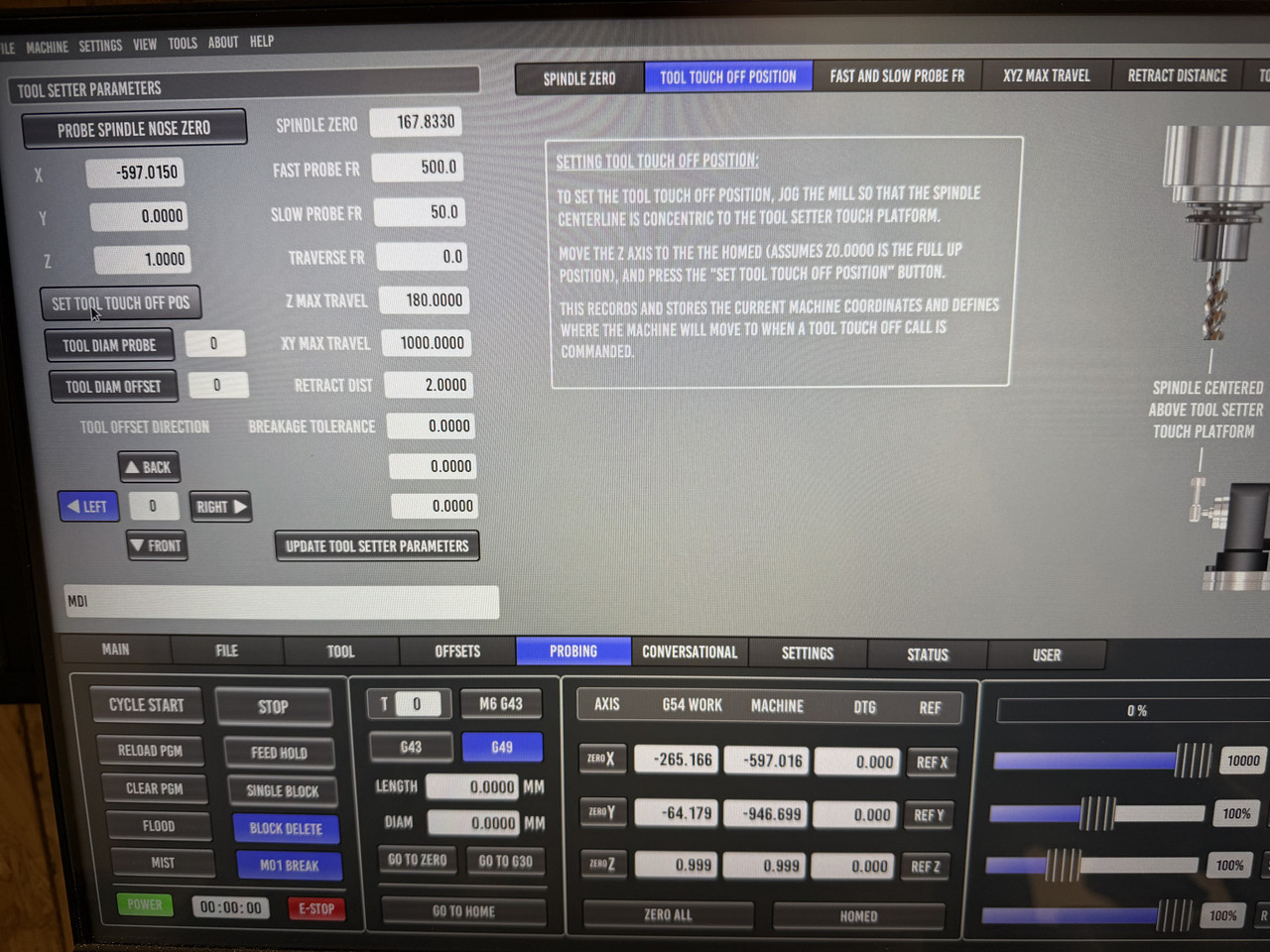
Hello, i updatet my LinuxCNC and Probe Basic to the latest Version and edited my config and copied the files and folders to my config folder. Everything works fine expect of the tool setter settings.When i jog to the tool setter position and click on "SET TOOL TOUCH OFF POS" the X value will be set but the Y value is 0. What can be the problem here?
Please Log in or Create an account to join the conversation.
- Lcvette
-

- Offline
- Moderator
-

Less
More
- Posts: 1682
- Thank you received: 784
14 Feb 2026 18:17 #342955
by Lcvette
Replied by Lcvette on topic Probe Basic Tool Setter touch off pos Y not set
Whats the version? I saw this in a recent update and fixed it. The most recent should be resolved of that issue.
Please Log in or Create an account to join the conversation.
- decor82
- Offline
- New Member
-
Less
More
- Posts: 12
- Thank you received: 5
14 Feb 2026 19:37 - 14 Feb 2026 19:38 #342958
by decor82
Replied by decor82 on topic Probe Basic Tool Setter touch off pos Y not set
LinuxCNC 2.9.8, QtPyVCP 5.0.6, Qt 5.15.8 and Probe Basic 0.6.2
Updated everything like a week ago. Went with the stable release of Probe Basic because my linuxcnc computer is not connected to the internet and I have to unmount it and take it to a place where i have Internet to update it. So I do not update it that often and wanted the most stable version.
Should I update to the dev version?
Updated everything like a week ago. Went with the stable release of Probe Basic because my linuxcnc computer is not connected to the internet and I have to unmount it and take it to a place where i have Internet to update it. So I do not update it that often and wanted the most stable version.
Should I update to the dev version?
Last edit: 14 Feb 2026 19:38 by decor82.
Please Log in or Create an account to join the conversation.
- Lcvette
-
- Offline
- Moderator
-
Less
More
- Posts: 1682
- Thank you received: 784
15 Feb 2026 03:01 #342976
by Lcvette
Replied by Lcvette on topic Probe Basic Tool Setter touch off pos Y not set
Run another update i think your on the faulty commit. Should be resolved now, stable is now 0.6.5
Please Log in or Create an account to join the conversation.
- Lcvette
-
- Offline
- Moderator
-
Less
More
- Posts: 1682
- Thank you received: 784
15 Feb 2026 03:03 #342977
by Lcvette
Replied by Lcvette on topic Probe Basic Tool Setter touch off pos Y not set
If you have usb, you can update with Deb files
Please Log in or Create an account to join the conversation.
- decor82
- Offline
- New Member
-
Less
More
- Posts: 12
- Thank you received: 5
15 Feb 2026 21:25 #343027
by decor82
Replied by decor82 on topic Probe Basic Tool Setter touch off pos Y not set
Thanks for your support! I updated everything again today and now probe basic 0.6.5 ist installed and in the sim the toolsetter position is now there for X and Y. Will test with my router and real config next week.
The following user(s) said Thank You: Lcvette
Please Log in or Create an account to join the conversation.
- Lcvette
-
- Offline
- Moderator
-
Less
More
- Posts: 1682
- Thank you received: 784
16 Feb 2026 00:27 #343033
by Lcvette
Replied by Lcvette on topic Probe Basic Tool Setter touch off pos Y not set
glad you got it sorted out!
Please Log in or Create an account to join the conversation.
Moderators: KCJ, Lcvette
Time to create page: 0.101 seconds