
- Posts: 129
- Thank you received: 8
Spacebar as a pause button not working
- turbostew
- Offline
- Premium Member
-

Less
More
3 years 11 months ago #256732
by turbostew
Replied by turbostew on topic Spacebar as a pause button not working
I have a local copy of handler that my config uses. I grabbed latest from 2.9 install when I first installed master a few days ago then modded it for a coup of small things. I can make changes and see them (mostly python syntax errors...doh). Space key never works. Funny thing is sometimes pause button doesn't work either, sometime it does....
Please Log in or Create an account to join the conversation.
- cmorley
- Offline
- Moderator
-

Less
More
- Posts: 7368
- Thank you received: 2181
3 years 11 months ago #256747
by cmorley
Replied by cmorley on topic Spacebar as a pause button not working
can you set the ini to:
DISPLAY = qtvcp -d qtdragon
Then run linuxcnc from a terminal.
after qtdragon loads, press estop to get the focus on wtdragon then press the space bar.
You should see some debug output in the terminal.
please post what its says about the 'key_any'
also just after loading you should see something like this in the terminal:
[QTvcp.QTVCP.QT_PSTAT][DEBUG] Checking for handler file in: /home/chris/emc/configs/sim/qtdragon/qtdragon/qtdragon_handler.py (qt_pstat.py:96)
[QTvcp.QTVCP.QT_PSTAT][DEBUG] Checking for default handler file in: /home/chris/emc/share/qtvcp/screens/qtdragon/qtdragon_handler.py (qt_pstat.py:102)
[QTvcp.QTVCP.QT_PSTAT][INFO] Using DEFAULT handler file path: /home/chris/emc/share/qtvcp/screens/qtdragon/qtdragon_handler.py (qt_pstat.py:105)
please post that too.
DISPLAY = qtvcp -d qtdragon
Then run linuxcnc from a terminal.
after qtdragon loads, press estop to get the focus on wtdragon then press the space bar.
You should see some debug output in the terminal.
please post what its says about the 'key_any'
also just after loading you should see something like this in the terminal:
[QTvcp.QTVCP.QT_PSTAT][DEBUG] Checking for handler file in: /home/chris/emc/configs/sim/qtdragon/qtdragon/qtdragon_handler.py (qt_pstat.py:96)
[QTvcp.QTVCP.QT_PSTAT][DEBUG] Checking for default handler file in: /home/chris/emc/share/qtvcp/screens/qtdragon/qtdragon_handler.py (qt_pstat.py:102)
[QTvcp.QTVCP.QT_PSTAT][INFO] Using DEFAULT handler file path: /home/chris/emc/share/qtvcp/screens/qtdragon/qtdragon_handler.py (qt_pstat.py:105)
please post that too.
Please Log in or Create an account to join the conversation.
- turbostew
- Offline
- Premium Member
-
Less
More
- Posts: 129
- Thank you received: 8
3 years 11 months ago - 3 years 11 months ago #257006
by turbostew
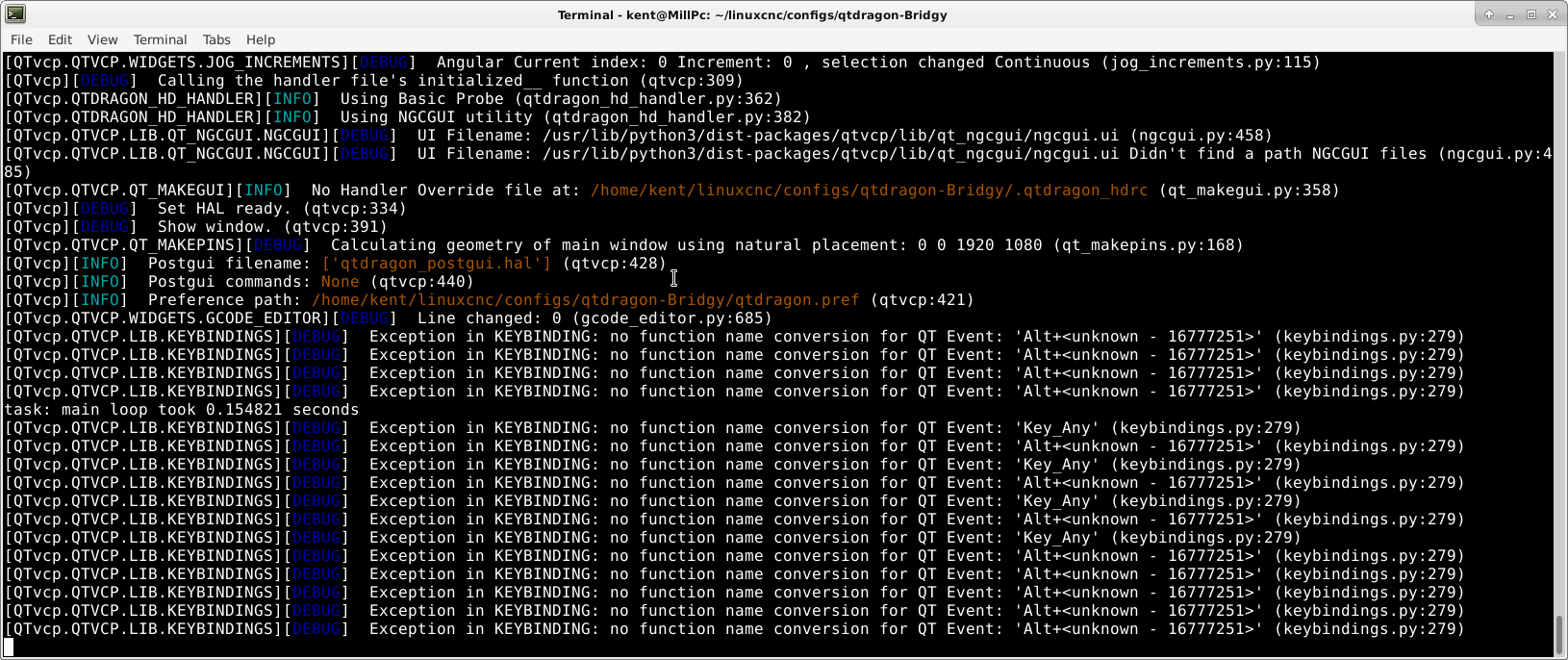
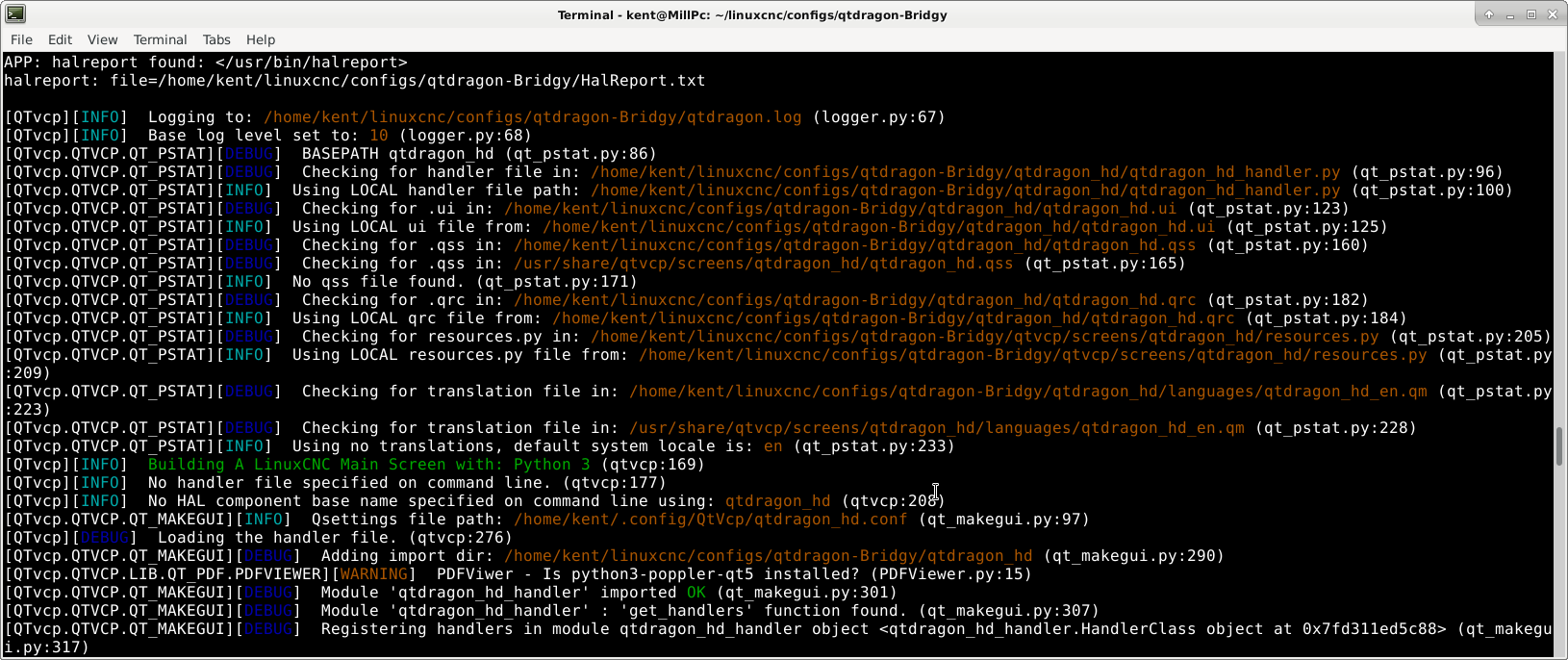
The unkown key is the pause button....
Replied by turbostew on topic Spacebar as a pause button not working
The unkown key is the pause button....
Last edit: 3 years 11 months ago by turbostew.
Please Log in or Create an account to join the conversation.
- cmorley
- Offline
- Moderator
-
Less
More
- Posts: 7368
- Thank you received: 2181
3 years 11 months ago #257054
by cmorley
Replied by cmorley on topic Spacebar as a pause button not working
In qtdragon_hd, the function name uses capitals:
KEYBIND.add_call('Key_Any', 'on_keycall_PAUSE')
I bet thats the problem.
Again I fixed these problems in 2.9, thanks for the report/questions
KEYBIND.add_call('Key_Any', 'on_keycall_PAUSE')
I bet thats the problem.
Again I fixed these problems in 2.9, thanks for the report/questions
Please Log in or Create an account to join the conversation.
- turbostew
- Offline
- Premium Member
-
Less
More
- Posts: 129
- Thank you received: 8
3 years 11 months ago #257065
by turbostew
Replied by turbostew on topic Spacebar as a pause button not working
Not sure i follow. the name in the keybind is "on_keycall_PAUSE" but so is the function name..... I do see that non-HD is a lower case "pause" for both bind and func name.... Why would this matter?
Please Log in or Create an account to join the conversation.
- cmorley
- Offline
- Moderator
-
Less
More
- Posts: 7368
- Thank you received: 2181
3 years 11 months ago #257068
by cmorley
Replied by cmorley on topic Spacebar as a pause button not working
on_key_pause and
on_key_PAUSE
are different function calls. The code must match what is in the handler file.
qtdragon uses the lower case one, qtdragon_hd uses the upper case one.
Since I can't see your handler file to confirm, I am guessing this is the problem.
Can you confirm they are the same case and/or post the handlerfile you are using.
on_key_PAUSE
are different function calls. The code must match what is in the handler file.
qtdragon uses the lower case one, qtdragon_hd uses the upper case one.
Since I can't see your handler file to confirm, I am guessing this is the problem.
Can you confirm they are the same case and/or post the handlerfile you are using.
Please Log in or Create an account to join the conversation.
Moderators: cmorley
Time to create page: 1.387 seconds