QtDragonHD tool sensor help for a maker space

More
2 years 10 months ago #289348 by cmorley
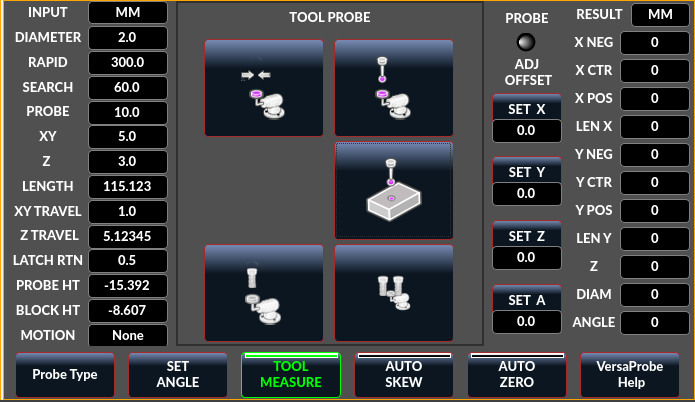
This is the tab on versa that does tool probing.
The top left moves to the tool setter center.
Top right uses a probe to probe the tool setter height and will enter that.
Right middle will probe the work height and enter it
This is all similar process to auto tool measuring.

The bottom two are disabled - they will be for tool height entry into a tooltable (the right button is to offset the radius of tool)
They will still need some work.
probes are expensive, so I want to be pretty cautious about this.

obviously the docs are also only just a starting point to where I'd like to be.

Chris

Please Log in or Create an account to join the conversation.

More
2 years 10 months ago #289352 by warwickben
Stoped by the space on my way home
From work, The issue with versa probe is files not being in the right place . will need to fix that later if I have to use versa probe Over basic probe .

The send tool to sensor and tool sensor buttons that are in the lower left area of the main screen in the same group of button as camera and laser are those the same as the stuff in the versa probe window?


I was worried you had todo the tool setting like it’s explained in the doc using the table to top of work distance and table to top of tool sensor distance . It’s really not how it’s done in the industry since it add more steps then needed and possibly more error, and less chance of human input error since your not manually entering values .

Really the order of operations should be put the probe in the spindle as tool 99 or what ever your last tool pocket is if you have a auto tool changer.
Send the probe to the tool setter to record the g53 Z value for tool length (H99 vaule) . Then you probe the material and set your wcs. If you have a non repeatable spindle (router/er collet spindle) you have it go to the tool setter during tool changes .

When you have a tool change . T01 M06 H1
It reads the value of H1 (tool 1 height) which is just the g53z location that tripped the tool setter and dose the math to figure out the difference between H1 value and H99 then shifts wcs z0 up or down as needed. .
Second tool compare the H2 value to H1 and adjust the g54 z location relative again.
Or the probe T99 h99 g53 z vaule stays and the difference between h99 vaule and tool being use H vaule is treated as a comp value. Not sure how it’s exactly handled with typical industrial machines but figure it’s more or less one or the other way being done in the back ground. .

You could also do it with out a probe and use the touch plate setter with your first tool after setting the tool length.

Please Log in or Create an account to join the conversation.

More
2 years 10 months ago #289414 by cmorley
Most hobbyist only had manual tool changes with non repeatable holders.
Now most probing solutions cater to that process.

Now I would like to explore probing for toollength for the tooltable.
I just have no experience using a CNC mill in industry. I used an old CNC lathe.

Please Log in or Create an account to join the conversation.

More
2 years 10 months ago #289443 by warwickben
I understand that. I wasn’t sure if you could have it setup like the way they are normally do it in the industry or it’s the back end that handles the comps/offset won’t work. Cause I’ve seen some CNC machines retrofitted with Linuxcnc that work with probes .

Any questions I can answer from a machinist background let me know, since I program 3-5 axis mills and few different lathes and mill turn.

Please Log in or Create an account to join the conversation.

More
2 years 10 months ago #289445 by cmorley
Last night I tried the disabled tool probing and it works but I dare say it doesn't set the tool table properly - the number seems way too high.

I was looking for examples to go by eg:
www.cnctrainingcentre.com/training/cnc-h...tool-length-offsets/

Seems it common to reference from spindle face or from tool end.
Spindle face seems better.
I would guess then that one would need to know the distance in g53 for the spindle face to toolsetter - toolsetter height.
Then the difference between that and the touch off with a tool would be tool length.

roughly this is what I got (there is code before this to offset by radius for large tools)
Code:
            cmdList.append('G91 ')             # should start spindle in proper direction/speed here..             cmdList.append('G1 X{}'.format(Xoffset))             cmdList.append('G38.2 Z-{} F{}'.format(self.data_ts_max,self.data_search_vel))             cmdList.append('G1 Z{} F{}'.format(self.data_latch_return_dist, self.data_rapid_vel))             cmdList.append('F{}'.format(self.data_probe_vel))             cmdList.append('G38.2 Z-{}'.format(self.data_latch_return_dist*1.2))             cmdList.append('G1 Z{} F{}'.format(self.data_z_clearance, self.data_rapid_vel))             cmdList.append('G1 X{}'.format(-Xoffset))             cmdList.append('G90')             cmdList.append('#<touch_result> = #5063')             cmdList.append('G10 L1 P{}  Z[#<touch_result> -{}]'.format(                     self.data_tool_number,self.data_tool_probe_height+self.data_tool_block_height))             cmdList.append('G43')
Z[#<touch_result> - tool_probe_height + tool_block_height doesn't seem right.

Comments?

Please Log in or Create an account to join the conversation.

More
2 years 10 months ago #289448 by warwickben
Yeah normally you set it to tool zero probe the spindle on the tool setter .

Then every other tool comp is based off the location the spindle tripped g53 z ….. since your spindle and tool setter should never move .

So when you take the probe tool 99 and set it length on the tool sensor , the probe the work z it’s using tool length comp comparing back to the tool zero since ever number based on the tool spindle will be a bigger number . So when you load a tool the machine cord is that vaule is that much higher to have wcs z .


So say you tool set the spindle and it’s g53 z -10 .
T99 (probe) probed at g53 z-12.00 since it’s sticking out two inch more .
T1 probes out at -13.00

When you probe (t99) your work z , say it’s g53 z7.00 It records it as g53z5.00 since your probe is sticking out 2 inches more .

You start your program and you load tool one it uses tool length comp, references the spindle values sees t1 is 3 inches longer so the spindle now runs 3 inches higher.


The idea is to remove human error. Since you set spindle and tool setter once . And ever thing else is automated

Please Log in or Create an account to join the conversation.

Moderators: cmorley
Time to create page: 0.499 seconds
Powered by Kunena Forum