LatheEasyStep – experimental QtVCP macro for step-by-step lathe programming

More
10 months 1 week ago #340339 by aDm1N
I'm still working on it. At the moment it is only partially useable. At the moment I am working on ensuring that the contour is implemented correctly. Especially with regard to circular arches. Thread already looks good. The goal is that 100% can be done on the machine. After I have implemented this with the contour, the goal is that a correction is included, depending on which tool is chosen. Means that the cutting geometry is included in the movement depending on which tool is chosen. If possible, the information should come from the Tool.db. In addition, a warning if the chipping with the tool is not possible. I can't say how quickly I can do it, but I'll try until I have a working solution. Anyone who has ever worked on Siemens controllers should certainly get along with the panel, because my experience with the machines certainly shows similarities.
The following user(s) said Thank You: Surmetall

Please Log in or Create an account to join the conversation.

More
10 months 1 week ago #340344 by Surmetall
Awesome, I’m really looking forward to your tool, and I think if this works out it’ll be an absolute game changer for lathes!I find all of this really interesting feel free to keep the camera running while testing and upload it somewhere. I’m pretty sure I’m not the only one watching this with excitement.A very cool project to make use of the time between the holidays.

Please Log in or Create an account to join the conversation.

More
10 months 1 week ago - 10 months 1 week ago #340401 by aDm1N
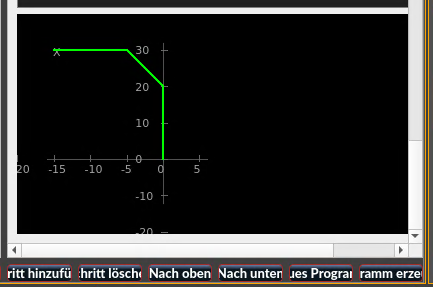
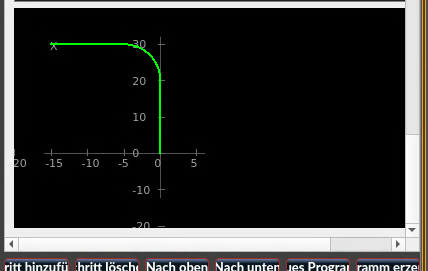
So, it seems I've managed to get the contour pretty well right. It's coming along slowly. It took me quite a while to get it to this point.
Code:
{   "op_type": "contour",   "params": {     "start_x": 0.0,     "start_z": 0.0,     "coord_mode": 0.0,     "segments": [       {         "mode": "xz",         "x": 15.0,         "z": 0.0,         "x_empty": false,         "z_empty": false,         "edge": "radius",         "edge_size": 5.0,         "arc_side": "auto",         "arc_side_raw": ""       },       {         "mode": "xz",         "x": 15.0,         "z": -15.0,         "x_empty": false,         "z_empty": false,         "edge": "none",         "edge_size": 0.0,         "arc_side": "auto",         "arc_side_raw": ""       }     ],     "name": "radius"   },   "primitives": [     {       "type": "line",       "p1": [         0.0,         0.0       ],       "p2": [         10.0,         0.0       ]     },     {       "type": "arc",       "p1": [         10.0,         0.0       ],       "p2": [         15.0,         -4.999999999999999       ],       "c": [         10.0,         -5.0       ],       "ccw": false     },     {       "type": "line",       "p1": [         15.0,         -4.999999999999999       ],       "p2": [         15.0,         -15.0       ]     }   ] }
Code:
{   "op_type": "contour",   "params": {     "start_x": 0.0,     "start_z": 0.0,     "coord_mode": 0.0,     "segments": [       {         "mode": "xz",         "x": 15.0,         "z": 0.0,         "x_empty": false,         "z_empty": false,         "edge": "chamfer",         "edge_size": 5.0,         "arc_side": "auto",         "arc_side_raw": ""       },       {         "mode": "xz",         "x": 15.0,         "z": -15.0,         "x_empty": false,         "z_empty": false,         "edge": "none",         "edge_size": 0.0,         "arc_side": "auto",         "arc_side_raw": ""       }     ],     "name": "Fase"   },   "primitives": [     {       "type": "line",       "p1": [         0.0,         0.0       ],       "p2": [         10.0,         0.0       ]     },     {       "type": "line",       "p1": [         10.0,         0.0       ],       "p2": [         15.0,         -5.0       ]     },     {       "type": "line",       "p1": [         15.0,         -5.0       ],       "p2": [         15.0,         -15.0       ]     }   ] }
Last edit: 10 months 1 week ago by aDm1N.
The following user(s) said Thank You: Surmetall

Please Log in or Create an account to join the conversation.

More
10 months 6 days ago - 10 months 6 days ago #340532 by RotarySMP
Do you already know Andy's lathe macros?
forum.linuxcnc.org/41-guis/26550-lathe-macros
The graphical interface is fantastic.

Rather than reinventing the wheel, have you considered what it is which you are adding with you macros? Maybe you can coordinate with Andy to make them even more awesome.
Cheers,
Mark
Last edit: 10 months 6 days ago by RotarySMP.
The following user(s) said Thank You: tommylight

Please Log in or Create an account to join the conversation.

More
10 months 6 days ago #340541 by aDm1N
I know the macros, and I think they are useful. But my goal is something more holistic, closer to the way I’m used to working.I want to create a program, work through it step by step, and be able to go back at any time to change something or reuse individual steps. That’s how I’ve always worked on industrial machines. At work, I actually always wanted to use Heidenhain controls, but in reality I mostly ended up with Siemens. Both are good systems, but they offer a structured, process-oriented way of programming that goes beyond single, isolated macros.As far as I know, LinuxCNC doesn’t really offer something like this out of the box. That’s why I started writing it myself, and I will continue developing it until it reaches a level where I’m satisfied with the result – no matter how long that takes.The existing macros are good, but they usually solve only one small task at a time. For me, that’s not enough. I’m looking for a workflow-oriented solution, not just individual helpers.I’m primarily writing this for myself, because I plan to actually work with it later. I do think other people could benefit from it as well, but that’s just my personal opinion. For that reason, I’ve already made the current state partially functional and public. It is clearly not finished.If there is a better, complete solution available, I’m happy to look at it. If not, I will carry this project through to the end, because in the end I need a tool that fits my way of working.If you know of existing concepts, examples, or similar approaches, feel free to point them out. I’m always open to ideas.
The following user(s) said Thank You: besriworld

Please Log in or Create an account to join the conversation.

More
10 months 5 days ago #340551 by Surmetall
@Mark

Andys Marcos are great, but i think its something different. you only can do one task at a time as far as i know, right?

@aDm1N
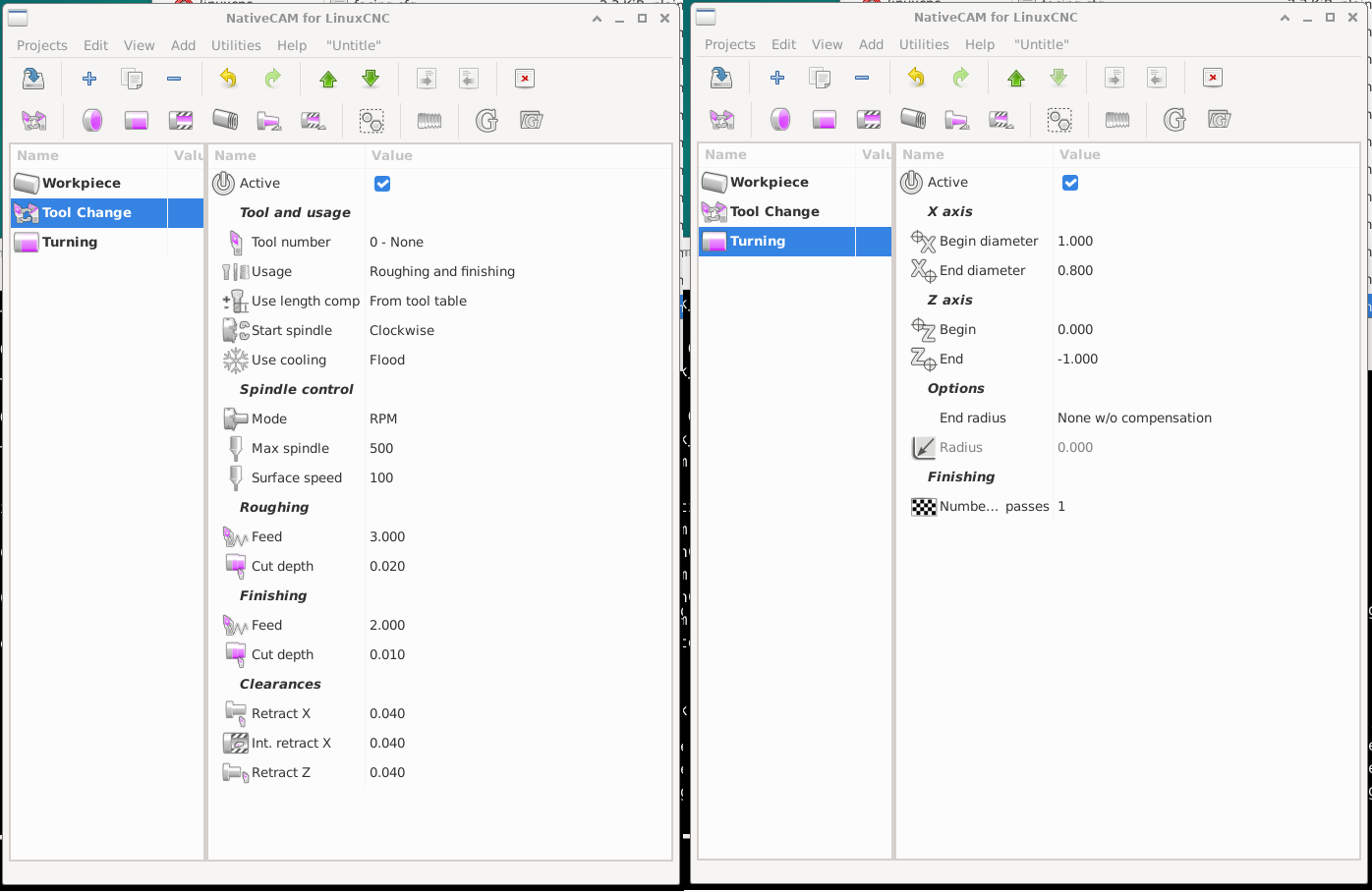
You said in your last post "as far as I know, LinuxCNC doesn’t really offer something like this out of the box." That confuses me, because I already wrote about NativeCAM on the previous page. You didn’t respond to it specifically, but I simply assumed that you were already familiar with it. It’s possible that you overlooked it or that you just don’t like the tool. both are perfectly fine. However, if you simply missed it:NativeCAM does exactly what SIEMENS ShopTurn does. You write your program directly on the machine, editable and with a preview.The only thing is that the contour function was never fully completed back then and would need to be added by someone who can program. It’s called “Polyline” and already exists in milling, where it works perfectly. It just hasn’t been implemented for turning yet: 


Please Log in or Create an account to join the conversation.

Moderators: cmorley
Time to create page: 0.445 seconds
Powered by Kunena Forum