
Problem with PROBE tab after running a program
- RoberCNC
- Offline
- Elite Member
-

Less
More
- Posts: 230
- Thank you received: 25
10 Jul 2026 10:13 #347654
by RoberCNC
Problem with PROBE tab after running a program was created by RoberCNC
Hi all!
I came having problems when trying to run a new probe routine after running a program in QtDragon, a "cannot switch pages while in AUTO mode" message appears but only affects to te PROBE tab all the rest seems to work fine.
I try to solve ending programs with M30, pushing STOP button, switching to MDI before MANUAL mode but no way.
I´m running linux uspace 2.9.0~pre1, kernel 6.1.0-28-rt-amd64 in LMDE 6 Faye (Cinnamon 6.4.8) and using BasicProbe
Can it been fixed easyly or it would be better to upgrade to a new fresh realese?
I came having problems when trying to run a new probe routine after running a program in QtDragon, a "cannot switch pages while in AUTO mode" message appears but only affects to te PROBE tab all the rest seems to work fine.
I try to solve ending programs with M30, pushing STOP button, switching to MDI before MANUAL mode but no way.
I´m running linux uspace 2.9.0~pre1, kernel 6.1.0-28-rt-amd64 in LMDE 6 Faye (Cinnamon 6.4.8) and using BasicProbe
Can it been fixed easyly or it would be better to upgrade to a new fresh realese?
Please Log in or Create an account to join the conversation.
- cmorley
- Offline
- Moderator
-

Less
More
- Posts: 7368
- Thank you received: 2181
12 Jul 2026 00:59 #347699
by cmorley
Replied by cmorley on topic Problem with PROBE tab after running a program
It would be normal to select MDI mode to use the probe after running a program.
You probably can't select tools, offsets or file in auto mode too.
let me know if I've misunderstood the problem.
Chris
You probably can't select tools, offsets or file in auto mode too.
let me know if I've misunderstood the problem.
Chris
Please Log in or Create an account to join the conversation.
- RoberCNC
- Offline
- Elite Member
-
Less
More
- Posts: 230
- Thank you received: 25
12 Jul 2026 10:46 #347704
by RoberCNC
Replied by RoberCNC on topic Problem with PROBE tab after running a program
Hi Chris.
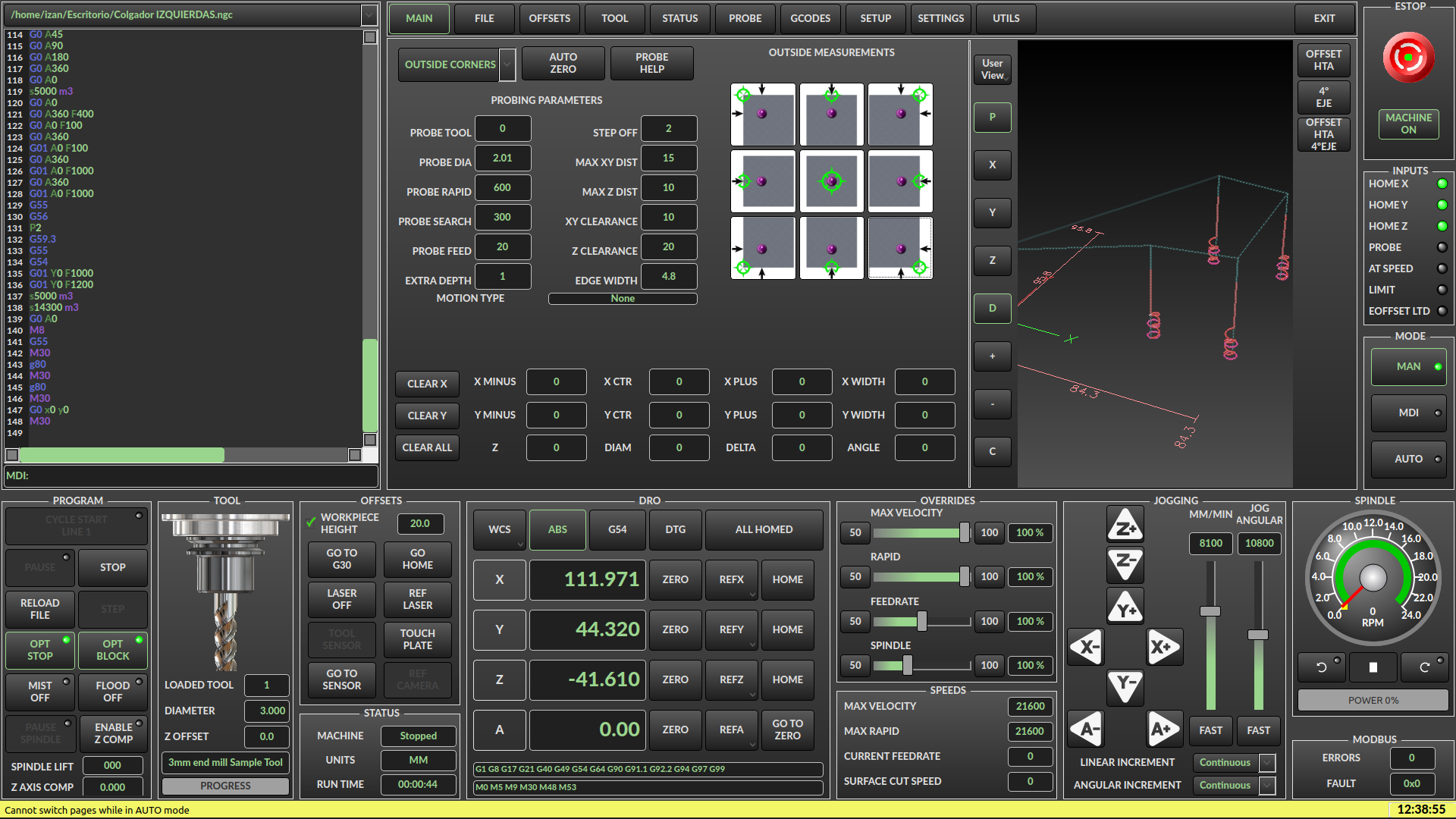
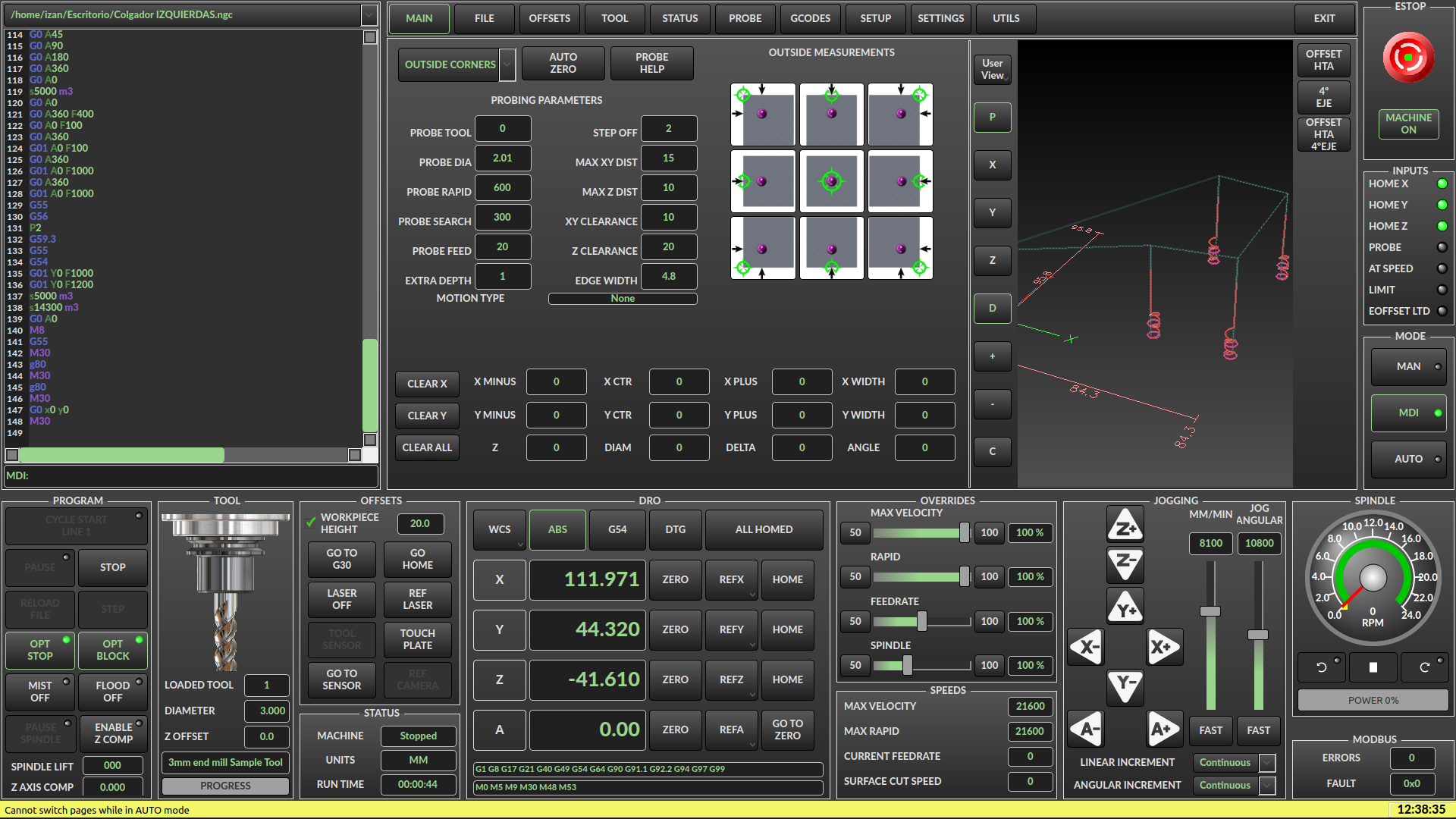
I tried creating a Probe routine in MDI mode, just in case I was doing it manually and it was my mistake. I'm getting the same problem in both MDI and MAN modes. I've attached screenshots from both modes.
Thanks a lot.
I tried creating a Probe routine in MDI mode, just in case I was doing it manually and it was my mistake. I'm getting the same problem in both MDI and MAN modes. I've attached screenshots from both modes.
Thanks a lot.
Please Log in or Create an account to join the conversation.
- cmorley
- Offline
- Moderator
-
Less
More
- Posts: 7368
- Thank you received: 2181
12 Jul 2026 16:02 #347709
by cmorley
Replied by cmorley on topic Problem with PROBE tab after running a program
Ok I see the probe screen is showing but the tab selected is main.
I also see that problem is master branch. I'll investigate.
I also see that problem is master branch. I'll investigate.
Please Log in or Create an account to join the conversation.
- RoberCNC
- Offline
- Elite Member
-
Less
More
- Posts: 230
- Thank you received: 25
12 Jul 2026 16:16 #347711
by RoberCNC
Replied by RoberCNC on topic Problem with PROBE tab after running a program
That´s it. Thank you very musch Crhis!!!
So I won´t resolve the problem updating anything, it´not a version issue.I also see that problem is master branch.
Please Log in or Create an account to join the conversation.
- RoberCNC
- Offline
- Elite Member
-
Less
More
- Posts: 230
- Thank you received: 25
12 Jul 2026 17:54 #347713
by RoberCNC
Replied by RoberCNC on topic Problem with PROBE tab after running a program
I try in the while a fresh 2.9.8 installation and the problem persist but it returns an a error window with this messagge:
"Traceback (most recent call last):
File "/usr/lib/python3/dist-packages/qtvcp/widgets/basic_probe.py", line 261, in probe_btn_clicked
self.start_probe(cmd)
~~~~~~~~~~~~~~~~^^^^^
File "/usr/lib/python3/dist-packages/qtvcp/widgets/basic_probe.py", line 183, in start_probe
if int(self.lineEdit_probe_tool.text()) != STATUS.get_current_tool():
~~~^^^^^^^^^^^^^^^^^^^^^^^^^^^^^^^^^
ValueError: invalid literal for int() with base 10: '' "
And the attached report once I close the window.
"Traceback (most recent call last):
File "/usr/lib/python3/dist-packages/qtvcp/widgets/basic_probe.py", line 261, in probe_btn_clicked
self.start_probe(cmd)
~~~~~~~~~~~~~~~~^^^^^
File "/usr/lib/python3/dist-packages/qtvcp/widgets/basic_probe.py", line 183, in start_probe
if int(self.lineEdit_probe_tool.text()) != STATUS.get_current_tool():
~~~^^^^^^^^^^^^^^^^^^^^^^^^^^^^^^^^^
ValueError: invalid literal for int() with base 10: '' "
And the attached report once I close the window.
Please Log in or Create an account to join the conversation.
- cmorley
- Offline
- Moderator
-
Less
More
- Posts: 7368
- Thank you received: 2181
12 Jul 2026 19:35 #347715
by cmorley
Replied by cmorley on topic Problem with PROBE tab after running a program
Ok the fix was pretty simple and i have pushed it to 2.9 and master.
i don't know when a new release of 2.9 will be as there was just one done.
it is possible to add a customization to your current system to fix if you are interested or you can edit a file on your system to fix it.
i don't know when a new release of 2.9 will be as there was just one done.
it is possible to add a customization to your current system to fix if you are interested or you can edit a file on your system to fix it.
The following user(s) said Thank You: RoberCNC
Please Log in or Create an account to join the conversation.
- RoberCNC
- Offline
- Elite Member
-
Less
More
- Posts: 230
- Thank you received: 25
12 Jul 2026 19:46 #347717
by RoberCNC
Replied by RoberCNC on topic Problem with PROBE tab after running a program
Great!
Yes, I would be interested to fix it, if you would be so kindly to guide me on how to do it.
Thank you very much Crhis!
Yes, I would be interested to fix it, if you would be so kindly to guide me on how to do it.
Thank you very much Crhis!
Please Log in or Create an account to join the conversation.
- cmorley
- Offline
- Moderator
-
Less
More
- Posts: 7368
- Thank you received: 2181
12 Jul 2026 22:11 - 13 Jul 2026 22:56 #347720
by cmorley
Replied by cmorley on topic Problem with PROBE tab after running a program
I assume you are using qtdragon_hd:
Ok in your config folder there should be a folder: qtvcp/screens/qtdragon_hd
In that folder add the file included here, name it qtdragon_hd_handler.py
Then run as normal.
If any thing goes wrong just remove or rename the file.
Chris
Ok in your config folder there should be a folder: qtvcp/screens/qtdragon_hd
In that folder add the file included here, name it qtdragon_hd_handler.py
Then run as normal.
If any thing goes wrong just remove or rename the file.
Chris
Last edit: 13 Jul 2026 22:56 by cmorley.
Please Log in or Create an account to join the conversation.
- cmorley
- Offline
- Moderator
-
Less
More
- Posts: 7368
- Thank you received: 2181
12 Jul 2026 22:24 #347721
by cmorley
Replied by cmorley on topic Problem with PROBE tab after running a program
hold on I did it for the wrong version of linuxcnc... stay tuned
Please Log in or Create an account to join the conversation.
Moderators: cmorley
Time to create page: 0.172 seconds