
Search Results (Searched for: )
- tuxcnc
25 Oct 2026 15:14 - 25 Oct 2026 15:21
Replied by tuxcnc on topic lcec_conf error (newest lcnc 2.10 and debian 13)
And yet, it still doesn't work...
Versions 1.46 and 1.47 can be installed, but they refuse to run because they fail to detect a library that is, in fact, already installed—and I haven't been able to find a newer version anywhere.
Version 1.45 installs and appears to work, but then it’s impossible to install `cia402` (another round of "congratulations" to the LinuxCNC developers).
I tried using the source code from the repository github.com/rodw-au/cia402_homecomp , which works with the `pre1` release...
I haven't been able to find any newer versions either.
Compillation returns many "lvalue required as left operand of assignment" errors, that say nothing.
Versions 1.46 and 1.47 can be installed, but they refuse to run because they fail to detect a library that is, in fact, already installed—and I haven't been able to find a newer version anywhere.
Version 1.45 installs and appears to work, but then it’s impossible to install `cia402` (another round of "congratulations" to the LinuxCNC developers).
I tried using the source code from the repository github.com/rodw-au/cia402_homecomp , which works with the `pre1` release...
I haven't been able to find any newer versions either.
Compillation returns many "lvalue required as left operand of assignment" errors, that say nothing.
- tuxcnc
25 Oct 2026 14:45
Replied by tuxcnc on topic Rotary axes homing
I tested it on an real machine.
Unfortunately, it didn't work as intended.
That is to say, everything was fine when homing a single axis, but when homing all of them at once, things got really strange...
This sort of thing often happens when you're working with someone else's code. While it’s fairly easy to understand what a given function does, it’s much harder to figure out the order in which those functions are called.
Essentially, the state of the `joint.N.homing-inhibit` pins was being read at the wrong time—or, more specifically, it wasn't being updated.
Running a program with outdated data never ends well...
I took a bit of a shortcut, but I concluded that the `joint.N.homing-inhibit` pins should be ignored when homing all axes simultaneously. This is because the entries in the `.ini` file already define the correct sequence, ensuring that each axis is positioned in a way that allows the next one to be homed.
Everything is working as expected now.
The files in my previous attachment were for LinuxCNC 2.10-pre2, but since that version doesn't support EtherCAT, I’ve prepared a patch for LinuxCNC 2.10-pre1—the version I’ll continue to use.
In principle, the only differences should be in the line numbers (the `homing.c` files differ in length between the two versions). With a little tinkering, it should be possible to apply these changes to even older versions (though you might need to adjust variable types in the declarations).
I’ve also written a HAL file containing the necessary logic. It uses the `near` component to compare the position of the B-axis against a target value within a specified tolerance, and the `and2` component to verify whether the B-axis has been homed—ensuring that the reported position is reliable.
This can also be implemented without modifying LinuxCNC sources; however, instead of `joint.N.homing_inhibit`, you would need to use `motion.homing-inhibit`, which prevents homing for all axes. While not exactly the ideal solution, it is certainly much better than nothing.
Unfortunately, it didn't work as intended.
That is to say, everything was fine when homing a single axis, but when homing all of them at once, things got really strange...
This sort of thing often happens when you're working with someone else's code. While it’s fairly easy to understand what a given function does, it’s much harder to figure out the order in which those functions are called.
Essentially, the state of the `joint.N.homing-inhibit` pins was being read at the wrong time—or, more specifically, it wasn't being updated.
Running a program with outdated data never ends well...
I took a bit of a shortcut, but I concluded that the `joint.N.homing-inhibit` pins should be ignored when homing all axes simultaneously. This is because the entries in the `.ini` file already define the correct sequence, ensuring that each axis is positioned in a way that allows the next one to be homed.
Everything is working as expected now.
The files in my previous attachment were for LinuxCNC 2.10-pre2, but since that version doesn't support EtherCAT, I’ve prepared a patch for LinuxCNC 2.10-pre1—the version I’ll continue to use.
In principle, the only differences should be in the line numbers (the `homing.c` files differ in length between the two versions). With a little tinkering, it should be possible to apply these changes to even older versions (though you might need to adjust variable types in the declarations).
I’ve also written a HAL file containing the necessary logic. It uses the `near` component to compare the position of the B-axis against a target value within a specified tolerance, and the `and2` component to verify whether the B-axis has been homed—ensuring that the reported position is reliable.
This can also be implemented without modifying LinuxCNC sources; however, instead of `joint.N.homing_inhibit`, you would need to use `motion.homing-inhibit`, which prevents homing for all axes. While not exactly the ideal solution, it is certainly much better than nothing.
Code:
loadrt near names=near_rot
loadrt and2 names=and_rot
loadrt not names=not_rot
addf near_rot servo-thread
addf and_rot servo-thread
addf not_rot servo-thread
setp near_rot.difference 1
setp near_rot.in2 90
net :rotary-b near_rot.in1
net near-rot near_rot.out and_rot.in0
net homed_ok joint.4.homed and_rot.in1
net invert and_rot.out not_rot.in
net output not_rot.out joint.3.homing-inhibit
- dberegovoy
25 Oct 2026 11:35
Replied by dberegovoy on topic Lathe Spindle Encoder: What are the options for EtherCAT?
Both machines were put up for sale because the workshop they were in was damaged in a strike. I bought them and I've been slowly rebuilding them since. Here are a few photos from my archive.
As for the specs: Both the lathe and the mill have ballscrews on all axes. The spindles are equipped with monoblock induction motors paired with VFDs (the HS - High Speed version).
On the lathe, I initially wired the spindle via a 0-10V analog signal because I couldn't figure out the RS485 character-based text protocol at the time. However, I finally cracked it this year. Thanks to AI, I managed to write a driver. I used the mill's motor for testing. I’ll be integrating this solution into the lathe a bit later.
So, I’d be glad to hear any advice and look forward to the discussion!
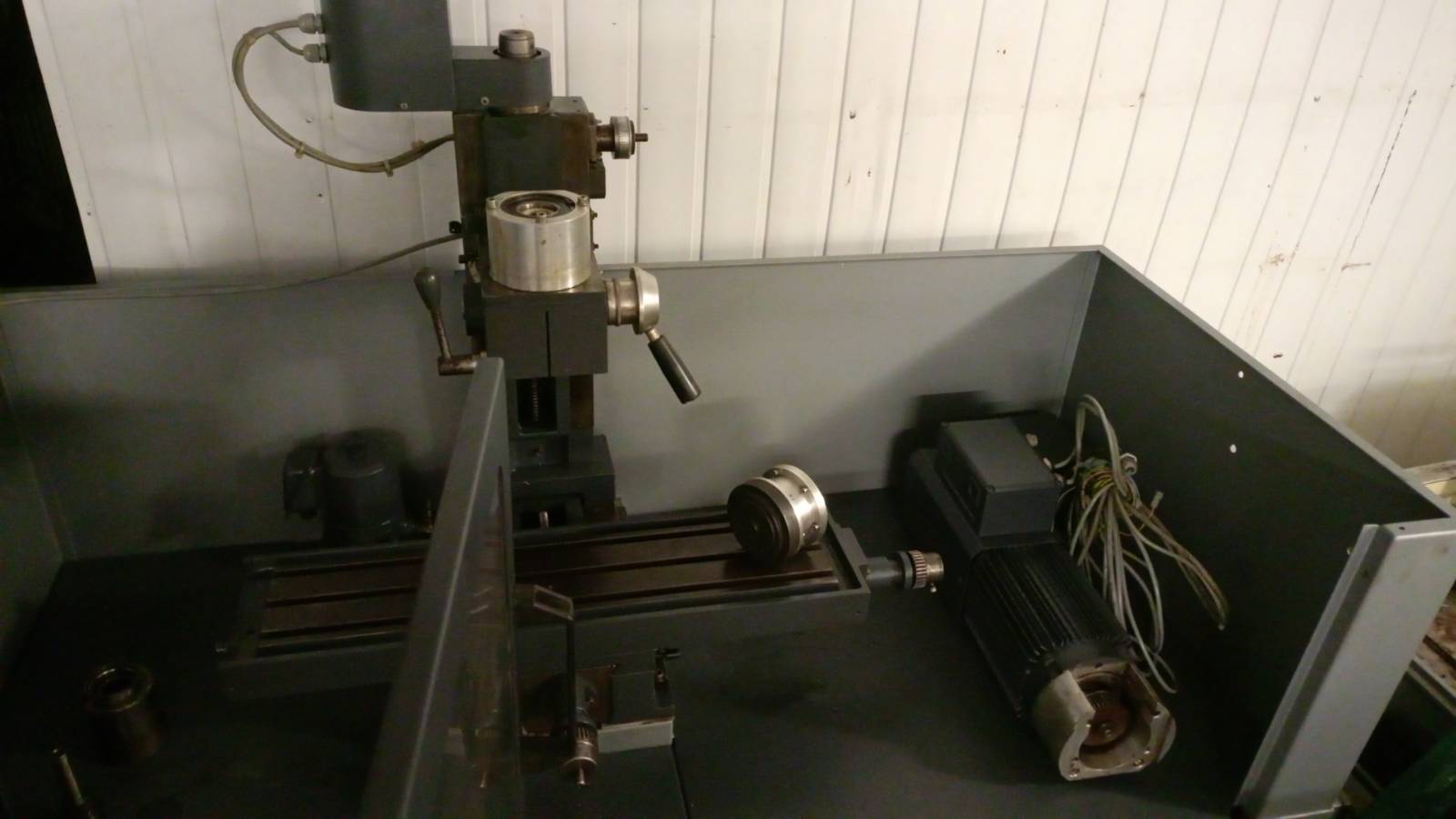
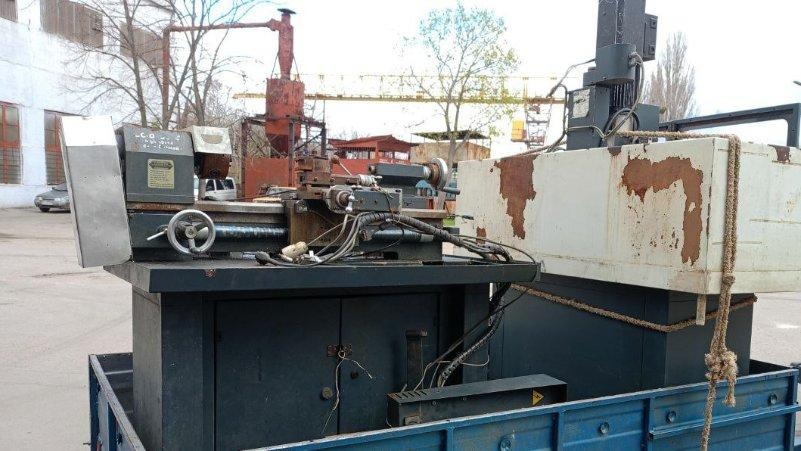
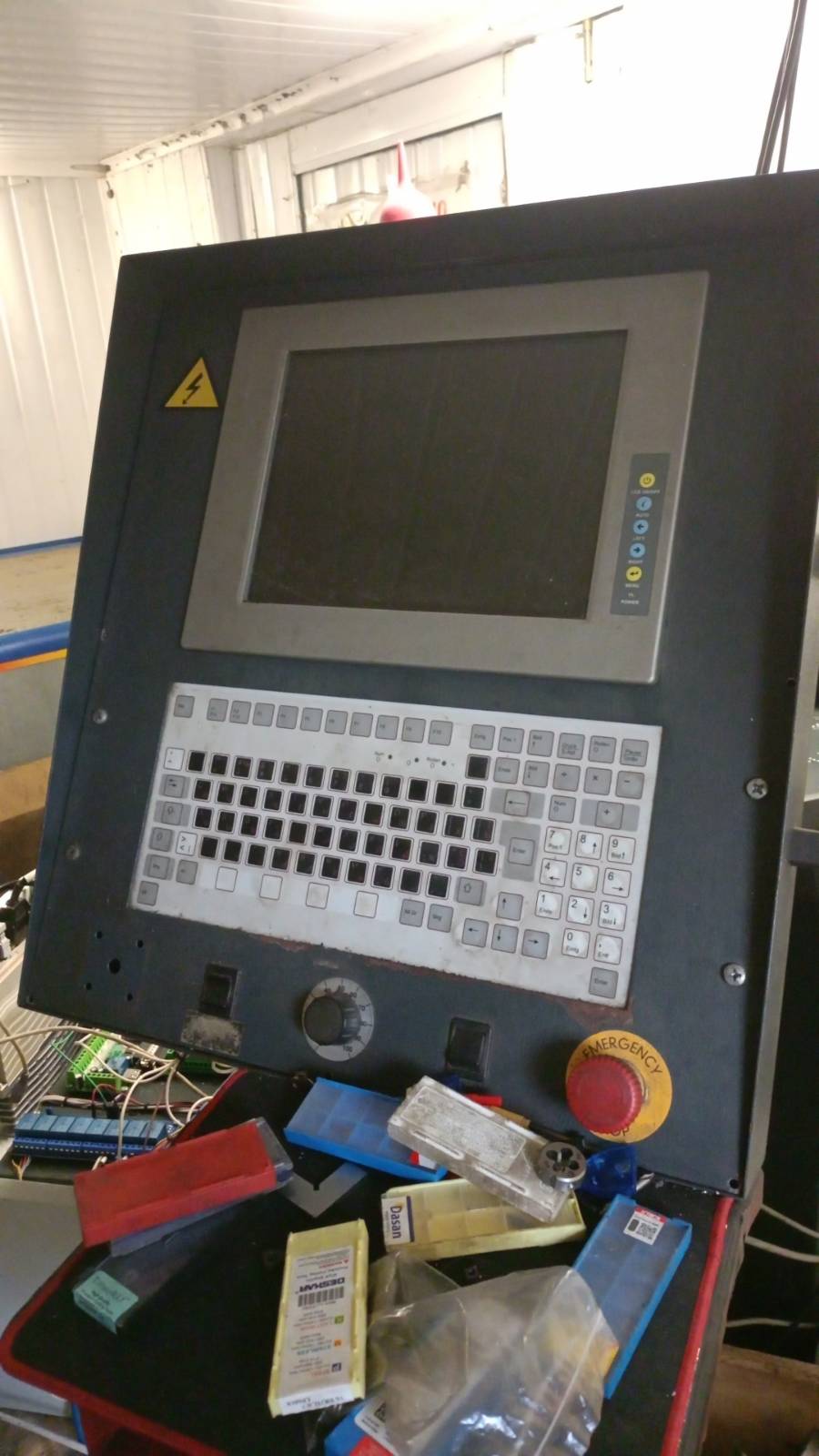
As for the specs: Both the lathe and the mill have ballscrews on all axes. The spindles are equipped with monoblock induction motors paired with VFDs (the HS - High Speed version).
On the lathe, I initially wired the spindle via a 0-10V analog signal because I couldn't figure out the RS485 character-based text protocol at the time. However, I finally cracked it this year. Thanks to AI, I managed to write a driver. I used the mill's motor for testing. I’ll be integrating this solution into the lathe a bit later.
So, I’d be glad to hear any advice and look forward to the discussion!
- dberegovoy
25 Oct 2026 10:50
Replied by dberegovoy on topic Lathe Spindle Encoder: What are the options for EtherCAT?
To put it briefly, I was forced to leave my home workshop behind due to the war. But since I love working with machine tools, I later bought myself a couple of used "baby" CNC machines — a Wabeco lathe and a Wabeco mill. I immediately set the stock control systems aside.
The Wabeco lathe has been up and running for over a year now, powered by LinuxCNC + Mesa 7i92 + Chinese 400W servo motors.
As for the Wabeco mill, I’ve rebuilt it, repainted the enclosure, and so on. Right now, I'm very slowly putting it together using the stock stepper motors and a Chinese XC809D controller (which was a gift). To be honest, it hasn't really impressed me so far, so it might just be a temporary solution.
I don’t have an urgent practical need to switch to EtherCAT.
My main driving force is pure curiosity and a desire to figure it out to the point where I can work with it effortlessly. Naturally, the first question that came up was: what is the most elegant way to handle encoders? As a backup plan, I'm considering installing a second network card and running EtherCAT alongside Mesa simultaneously (using Mesa to handle encoders: one for the spindle + manual pulse generators for each axis).
So, here is what has been done so far:
• Installed the IgH EtherCAT Master (EtherLab) + linuxcnc-ethercat + cia402.
• Ordered a Lichuan LC10E servo kit with a 23-bit absolute encoder from AliExpress (currently in transit).
• Bought locally (and quite cheap) an Omron NX-ECC201 coupler (1 pc), ID5342 digital input modules (3 pcs), and OD5121 digital output modules (2 pcs).
The Omron hardware should arrive in a day or two, so I’ll start experimenting with EtherCAT using that, and then the servo kit will arrive. First, I'll take it step by step to learn the ropes, and later I might convert the lathe to EtherCAT. But the ultimate goal here is self-development and the enjoyment of learning something new. The practical benefits are taking a back seat for now, but they might come in handy for future retrofits. Once everything settles down, I really want to bring a small CNC lathe with live tooling over from Europe.
The Wabeco lathe has been up and running for over a year now, powered by LinuxCNC + Mesa 7i92 + Chinese 400W servo motors.
As for the Wabeco mill, I’ve rebuilt it, repainted the enclosure, and so on. Right now, I'm very slowly putting it together using the stock stepper motors and a Chinese XC809D controller (which was a gift). To be honest, it hasn't really impressed me so far, so it might just be a temporary solution.
I don’t have an urgent practical need to switch to EtherCAT.
My main driving force is pure curiosity and a desire to figure it out to the point where I can work with it effortlessly. Naturally, the first question that came up was: what is the most elegant way to handle encoders? As a backup plan, I'm considering installing a second network card and running EtherCAT alongside Mesa simultaneously (using Mesa to handle encoders: one for the spindle + manual pulse generators for each axis).
So, here is what has been done so far:
• Installed the IgH EtherCAT Master (EtherLab) + linuxcnc-ethercat + cia402.
• Ordered a Lichuan LC10E servo kit with a 23-bit absolute encoder from AliExpress (currently in transit).
• Bought locally (and quite cheap) an Omron NX-ECC201 coupler (1 pc), ID5342 digital input modules (3 pcs), and OD5121 digital output modules (2 pcs).
The Omron hardware should arrive in a day or two, so I’ll start experimenting with EtherCAT using that, and then the servo kit will arrive. First, I'll take it step by step to learn the ropes, and later I might convert the lathe to EtherCAT. But the ultimate goal here is self-development and the enjoyment of learning something new. The practical benefits are taking a back seat for now, but they might come in handy for future retrofits. Once everything settles down, I really want to bring a small CNC lathe with live tooling over from Europe.
- BreadMonkey
25 Oct 2026 10:48
Replied by BreadMonkey on topic New User Lichuan CL3 57E and Stepper Online A6 - Problems
Hi Shu,
Thanks for the info and the servo tuner script. I had to take a break from working on the mill for the moment.
At the moment all the axis are moving and the servo spindle runs (still need to check the config on it). I am working on the lubrication system at the moment. It is making a huge mess so I have to figure that out before I work on the movement more.
Thanks for the help
Thanks for the info and the servo tuner script. I had to take a break from working on the mill for the moment.
At the moment all the axis are moving and the servo spindle runs (still need to check the config on it). I am working on the lubrication system at the moment. It is making a huge mess so I have to figure that out before I work on the movement more.
Thanks for the help
- tommylight
-

24 Oct 2026 19:50
Replied by tommylight on topic Copying boot image to SSD
You are welcomed, always.
- gnavecky
24 Oct 2026 19:48
Replied by gnavecky on topic Copying boot image to SSD
Tommy thanks for your quick reply. I am new to the CNC world, looking to build my own CNC Router Table with LinuxCNC controller.
- tuxcnc
24 Oct 2026 16:43 - 24 Oct 2026 16:50
Replied by tuxcnc on topic Rotary axes homing
The task turned out to be a bit more difficult than I had anticipated.
Although HAL provides the pins and flags necessary for the required configuration, they cannot be easily utilized—for instance, simply by adding entries to an .ini or .hal file.
The developers of LinuxCNC recommend writing and compiling a custom "homecomp" component; however, I concluded that it would be simpler and more effective to modify the `src/emc/motion/homing.c` file.
Firstly, this modification is straightforward and requires only a basic understanding of C programming.
Secondly, the newly created pins are inactive by default; if a user chooses not to employ them, the system continues to function exactly as it did before the changes.
Thirdly, this is a versatile solution that could prove useful for other configurations as well.
Here is how it works:
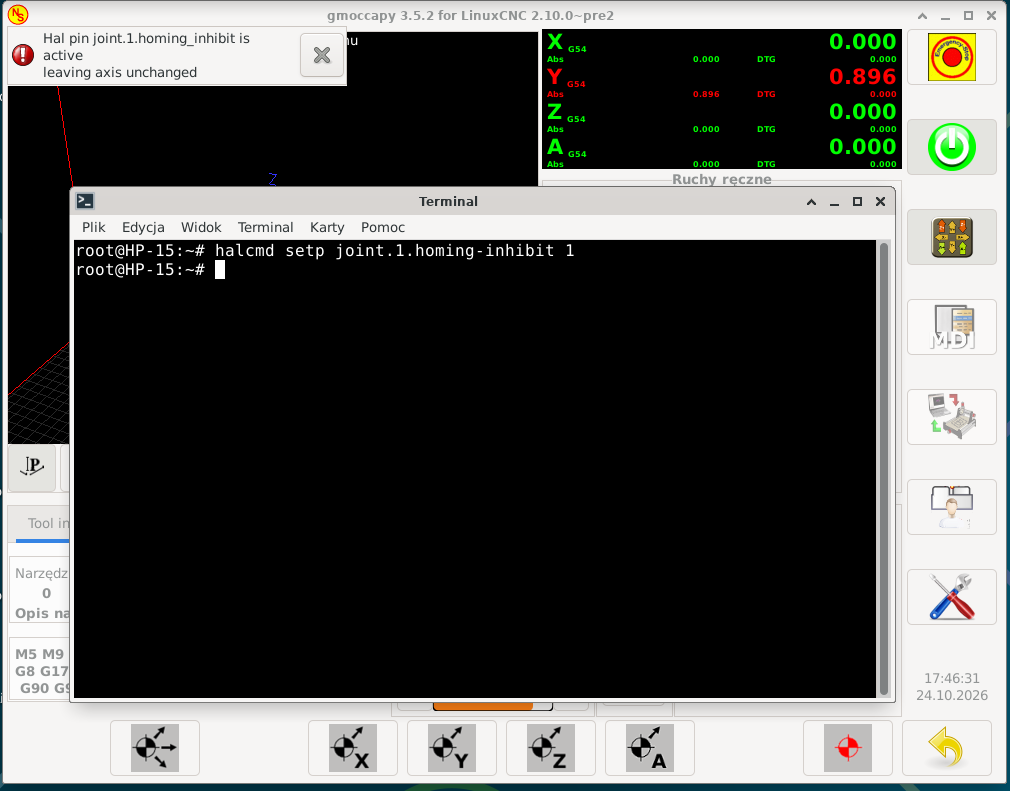
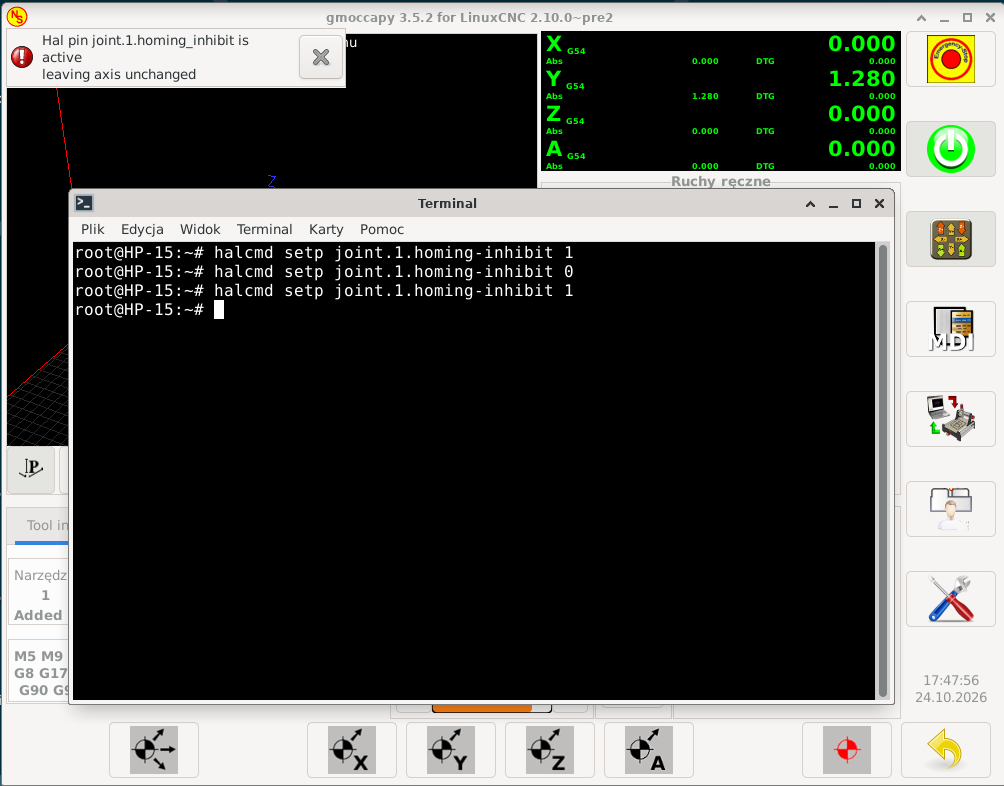
The first image illustrates a scenario that, in principle, should not occur: the homing process for the Y-axis (joint 1) is blocked prior to the initial homing sequence. While this shouldn't happen, it was necessary to test it. As shown, all axes complete their homing process—with the exception of the blocked axis, which remains in its pre-homing state, as intended.
The second image shows the state after unblocking the Y-axis homing, performing a full homing sequence, executing some movements, re-blocking the Y-axis, and then running the homing sequence again. As can be seen, all axes complete their homing and zeroing—except for the blocked axis, which retains its existing homing status and position.
Now, it is possible to configure everything within a .hal file using standard LinuxCNC components. For example, to prevent an axis from being re-homed, you simply need the following line in your HAL file:
As for the modified `homing.c` itself, it works as intended: it blocks the homing of a specific axis and displays a message informing the operator that the outcome of the homing process may differ from what they expected.
I suspect some of the changes might be redundant, which could result in the same message being displayed multiple times. I haven't been able to verify this, but it poses no real risk—it’s merely a minor nuisance. The message itself could also be refined to look better, though that would be a purely cosmetic change.
A brief summary of the changes:
I have added new boolean pins, `joint.N.homing-inhibit`, one for each axis.
By default, these are set to `FALSE`, so if they are left unused, LinuxCNC will behave exactly as it did before.
Setting a pin to `TRUE` will exclude that axis from the homing procedure—leaving it in its current state—and trigger a warning message for the operator. No other actions are taken.
Although HAL provides the pins and flags necessary for the required configuration, they cannot be easily utilized—for instance, simply by adding entries to an .ini or .hal file.
The developers of LinuxCNC recommend writing and compiling a custom "homecomp" component; however, I concluded that it would be simpler and more effective to modify the `src/emc/motion/homing.c` file.
Firstly, this modification is straightforward and requires only a basic understanding of C programming.
Secondly, the newly created pins are inactive by default; if a user chooses not to employ them, the system continues to function exactly as it did before the changes.
Thirdly, this is a versatile solution that could prove useful for other configurations as well.
Here is how it works:
The first image illustrates a scenario that, in principle, should not occur: the homing process for the Y-axis (joint 1) is blocked prior to the initial homing sequence. While this shouldn't happen, it was necessary to test it. As shown, all axes complete their homing process—with the exception of the blocked axis, which remains in its pre-homing state, as intended.
The second image shows the state after unblocking the Y-axis homing, performing a full homing sequence, executing some movements, re-blocking the Y-axis, and then running the homing sequence again. As can be seen, all axes complete their homing and zeroing—except for the blocked axis, which retains its existing homing status and position.
Now, it is possible to configure everything within a .hal file using standard LinuxCNC components. For example, to prevent an axis from being re-homed, you simply need the following line in your HAL file:
Code:
net disable_rehoming_Y joint.1.homed => joint.1.homing-inhibit
I suspect some of the changes might be redundant, which could result in the same message being displayed multiple times. I haven't been able to verify this, but it poses no real risk—it’s merely a minor nuisance. The message itself could also be refined to look better, though that would be a purely cosmetic change.
A brief summary of the changes:
I have added new boolean pins, `joint.N.homing-inhibit`, one for each axis.
By default, these are set to `FALSE`, so if they are left unused, LinuxCNC will behave exactly as it did before.
Setting a pin to `TRUE` will exclude that axis from the homing procedure—leaving it in its current state—and trigger a warning message for the operator. No other actions are taken.
- CNCFred
24 Oct 2026 10:31
finally on 2.9 from 2.8, xbox controller, user button questions. was created by CNCFred
Dear all,
thank you for all the work that has been done in the last years to LINUXCNC.
I upgraded/changed years ago my machine hardware and then the project stopped, version 2.9 came and I missed the upgrade tool.
Now finally I found the time my hardware is ready setup & new qtplasmac is running and still can't get some of my old features.
Thank you for your patience and help.
xbox controller
I was using a xbox controller which I setup now with pncconf, checked the pins and signals in halmeter, they are working.
Checked my hal, seems to be ok, but the thing will not jog , am I missing something (activate in Gui?)
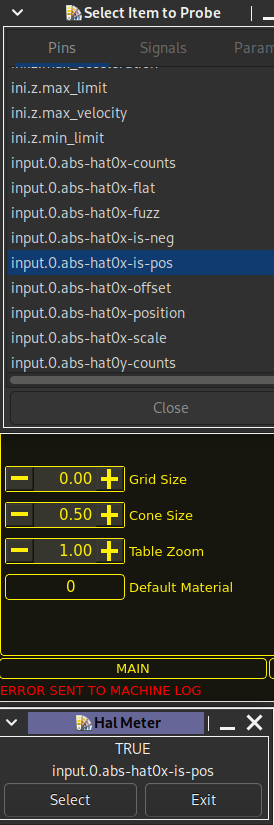
User Button
My crosslaser is connected to the mist I think 06 pin, and it works with offset setting etc.
I wanted to turn it on with a user button M7 on M9 off , did not work, I was not able to find in the documentation which commands are needed or possible in user button setup fields.
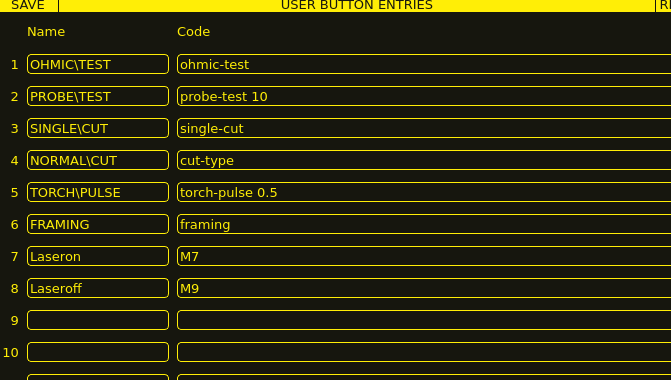
color change
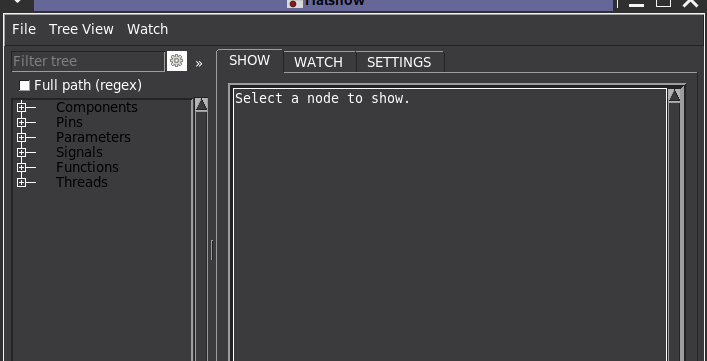
is it possible to change the color of the hallshow?
the tree is so dark , I changed the linux debian theme already but it did not help.
I hadn't played around with the system much due to setting up and configuring .
I was using before for the offset between torch and crosslaser a command as well on the xbox controller with a button
#connect mdi commands to button presses
net xbox-a halui.mdi-command-00
net xbox-b halui.mdi-command-01
net xbox-x halui.mdi-command-02
BUTTON_10_NAME = Laser\ON
BUTTON_10_CODE = M7
BUTTON_10_IMAGE =
BUTTON_11_NAME = Laser\OFF
BUTTON_11_CODE = M9
BUTTON_11_IMAGE =
BUTTON_12_NAME = Move\Reset
BUTTON_12_CODE = o<offsetmove> call
[HALUI]
MDI_COMMAND = M7
MDI_COMMAND = M9
MDI_COMMAND = o<offsetmove> call
so the offset was o<offsetmove> sub
G10 L20 P1 X0 Y0 Z0
G0 X31.787 Y19.331
G10 L20 P1 X0 Y0
o<offsetmove> endsubare these still possible to add to the xbox controller in the same way?? (custom.hal??)
Can the offset be set in the ini ?? manually or do I need to use the GUI so setup?
last question for this time when I run into the end stop, I need to got to settings, enable override limits , go to main power off on maschine then I can override the limits. is this the correct way?
I read that you only have to press the estop and it continues which does not work on my machine.
Big part will be the arc voltage which was on mine to high on torch start and phillc54 made an exception for me to get it running years ago, will test soon
I guess ingore arc ok may help.
thanks a lot,
Roman
thank you for all the work that has been done in the last years to LINUXCNC.
I upgraded/changed years ago my machine hardware and then the project stopped, version 2.9 came and I missed the upgrade tool.
Now finally I found the time my hardware is ready setup & new qtplasmac is running and still can't get some of my old features.
Thank you for your patience and help.
xbox controller
I was using a xbox controller which I setup now with pncconf, checked the pins and signals in halmeter, they are working.
Checked my hal, seems to be ok, but the thing will not jog , am I missing something (activate in Gui?)
User Button
My crosslaser is connected to the mist I think 06 pin, and it works with offset setting etc.
I wanted to turn it on with a user button M7 on M9 off , did not work, I was not able to find in the documentation which commands are needed or possible in user button setup fields.
color change
is it possible to change the color of the hallshow?
the tree is so dark , I changed the linux debian theme already but it did not help.
I hadn't played around with the system much due to setting up and configuring .
I was using before for the offset between torch and crosslaser a command as well on the xbox controller with a button
#connect mdi commands to button presses
net xbox-a halui.mdi-command-00
net xbox-b halui.mdi-command-01
net xbox-x halui.mdi-command-02
BUTTON_10_NAME = Laser\ON
BUTTON_10_CODE = M7
BUTTON_10_IMAGE =
BUTTON_11_NAME = Laser\OFF
BUTTON_11_CODE = M9
BUTTON_11_IMAGE =
BUTTON_12_NAME = Move\Reset
BUTTON_12_CODE = o<offsetmove> call
[HALUI]
MDI_COMMAND = M7
MDI_COMMAND = M9
MDI_COMMAND = o<offsetmove> call
so the offset was o<offsetmove> sub
G10 L20 P1 X0 Y0 Z0
G0 X31.787 Y19.331
G10 L20 P1 X0 Y0
o<offsetmove> endsubare these still possible to add to the xbox controller in the same way?? (custom.hal??)
Can the offset be set in the ini ?? manually or do I need to use the GUI so setup?
last question for this time
when I run into the end stop, I need to got to settings, enable override limits , go to main power off on maschine then I can override the limits. is this the correct way?I read that you only have to press the estop and it continues which does not work on my machine.
Big part will be the arc voltage which was on mine to high on torch start and phillc54 made an exception for me to get it running years ago, will test soon
I guess ingore arc ok may help.
thanks a lot,
Roman
- PedPEx
24 Oct 2026 08:43
Replied by PedPEx on topic Lathe Spindle Encoder: What are the options for EtherCAT?
Hello dberegovoy,
i retrofitted a Maho MH400E and therefore worked with various Beckhoff encoder inputs. Plug and play support is there for pretty much most of their encoder terminals. I tested the EL5021, EL5101, EP5101 and EL5002 terminals. All of them work flawlessly and are available for cheap on ebay, starting at ~50€/piece. If you want to go down the rabbithole of creating yoir own EtherCAT slave, you can certainly do that, but it willl take quite some time and you don't have any support or industrial quality whatsoever.
A list of all supported EtherCAT slaves can be found here:
github.com/linuxcnc-ethercat/linuxcnc-et...mentation/DEVICES.md
Claude also built me drivers for all of my not yet supported terminals:
github.com/PedPEx/linuxcnc-ethercat
Keep us posted with your lathe details
i retrofitted a Maho MH400E and therefore worked with various Beckhoff encoder inputs. Plug and play support is there for pretty much most of their encoder terminals. I tested the EL5021, EL5101, EP5101 and EL5002 terminals. All of them work flawlessly and are available for cheap on ebay, starting at ~50€/piece. If you want to go down the rabbithole of creating yoir own EtherCAT slave, you can certainly do that, but it willl take quite some time and you don't have any support or industrial quality whatsoever.
A list of all supported EtherCAT slaves can be found here:
github.com/linuxcnc-ethercat/linuxcnc-et...mentation/DEVICES.md
Claude also built me drivers for all of my not yet supported terminals:
github.com/PedPEx/linuxcnc-ethercat
Keep us posted with your lathe details
- Toribio1898
24 Oct 2026 03:16
Replied by Toribio1898 on topic LinuxCNC 32 BITS
Hola!. Mi viejita cpu con Linuxcnc 32 bits, trabaja en la prueba de Latencia, unos 33 grados celsius, muy poco. Me gustaría poder configurarla mejor, para sacar mejores resultados. Tiene grasa disipadora nueva, bateria nueva, ssd, y sus 2 módulos de 512 megas ddr de ram, llegando a sus 1024 megas de ram, y la eleg{i por tener su puerto parelelo en su mother. Gracias!...
- NWE
-

23 Oct 2026 21:58
Replied by NWE on topic Eigene lokale KI für LinuxCNC – wäre das möglich?
Ya, es ist möglich fur lokale KI betrieben auf einen PC. Aber ich habe kein experience KI-Modelle trainien. Ich vernemm dasz nimt viel mehr Rechenleistung.
- tommylight
-
23 Oct 2026 16:56
Replied by tommylight on topic Eigene lokale KI für LinuxCNC – wäre das möglich?
I build PC's for running local LLM's, i am using one now (PC, not LLM).
For normal troubleshooting Gemini is the best so far, not always helpful and not always right.
For programming in Python or C/C++ or else, Claude by far is the best.
They are all already trained on everything publicly available on the internet.
-
AI can help in some normal low level troubleshooting and configuration for sure, it can not help with complicated machine stuff, for that it would need to have all the possible machine/electronics/controller/pneumatics/hydraulics/etc etc combinations, and that is never happening.
You can try running some LLM's on your PC, anything about 3-4 year old and with access to 6GB or more of VRAM will work, slowly, but will work fine. Most Ryzen CPU/GPU combos with shared memory work quite nicely with models up to 7B parameters.
Download LM Studio, get some small models, play with it, they can do a lot of stuff pretty damn good, but they can also fail miserably on other stuff.
For normal troubleshooting Gemini is the best so far, not always helpful and not always right.
For programming in Python or C/C++ or else, Claude by far is the best.
They are all already trained on everything publicly available on the internet.
-
AI can help in some normal low level troubleshooting and configuration for sure, it can not help with complicated machine stuff, for that it would need to have all the possible machine/electronics/controller/pneumatics/hydraulics/etc etc combinations, and that is never happening.
You can try running some LLM's on your PC, anything about 3-4 year old and with access to 6GB or more of VRAM will work, slowly, but will work fine. Most Ryzen CPU/GPU combos with shared memory work quite nicely with models up to 7B parameters.
Download LM Studio, get some small models, play with it, they can do a lot of stuff pretty damn good, but they can also fail miserably on other stuff.
- tommylight
-
23 Oct 2026 16:43
Replied by tommylight on topic Copying boot image to SSD
- Muecke
-

23 Oct 2026 15:37 - 23 Oct 2026 15:55
Eigene lokale KI für LinuxCNC – wäre das möglich? was created by Muecke
Hallo miteinander,
haben wir hier jemanden, der sich mit KI auskennt oder vielleicht sogar schon eigene KI-Modelle trainiert hat?
Ich habe mir die Frage gestellt, ob man nicht mithilfe der LinuxCNC-Dokumentation, vorhandener Konfigurationen und Beispiele eine eigene, lokal laufende KI aufbauen könnte.
Die Idee wäre, eine KI zu haben, die speziell auf LinuxCNC ausgerichtet ist und beispielsweise bei Fragen, Problemen, der Konfiguration sowie bei der Erstellung und Fehlersuche in HAL- und INI-Dateien unterstützt.
Interessant wäre auch, wenn solche Modelle durch Erfahrungen und Lösungen der Nutzer immer weiter verbessert werden könnten. Die verbesserten Modelle könnte man anschließend untereinander austauschen, sodass die gesamte Gemeinschaft davon profitiert.
Das Ganze sollte möglichst vollständig lokal und ohne Internetverbindung funktionieren.
Leider kenne ich mich mit dem Trainieren eigener KI-Modelle bisher nicht wirklich aus und habe auch noch kein eigenes Modell eingerichtet.
Deshalb einfach mal die Frage in die Runde:
Wäre so etwas technisch und mit vertretbarem Aufwand umsetzbar? Hat vielleicht schon jemand Erfahrungen damit gesammelt?
Gruß
Mücke
haben wir hier jemanden, der sich mit KI auskennt oder vielleicht sogar schon eigene KI-Modelle trainiert hat?
Ich habe mir die Frage gestellt, ob man nicht mithilfe der LinuxCNC-Dokumentation, vorhandener Konfigurationen und Beispiele eine eigene, lokal laufende KI aufbauen könnte.
Die Idee wäre, eine KI zu haben, die speziell auf LinuxCNC ausgerichtet ist und beispielsweise bei Fragen, Problemen, der Konfiguration sowie bei der Erstellung und Fehlersuche in HAL- und INI-Dateien unterstützt.
Interessant wäre auch, wenn solche Modelle durch Erfahrungen und Lösungen der Nutzer immer weiter verbessert werden könnten. Die verbesserten Modelle könnte man anschließend untereinander austauschen, sodass die gesamte Gemeinschaft davon profitiert.
Das Ganze sollte möglichst vollständig lokal und ohne Internetverbindung funktionieren.
Leider kenne ich mich mit dem Trainieren eigener KI-Modelle bisher nicht wirklich aus und habe auch noch kein eigenes Modell eingerichtet.
Deshalb einfach mal die Frage in die Runde:
Wäre so etwas technisch und mit vertretbarem Aufwand umsetzbar? Hat vielleicht schon jemand Erfahrungen damit gesammelt?
Gruß
Mücke
Time to create page: 0.121 seconds