
Search Results (Searched for: )
- RNJFAB
22 Jun 2026 05:25
Replied by RNJFAB on topic Homemade CNC Plasma - hypertherm, Mesa, gear drives, nema 34.
Couldn't find any spots showing voltage.
Ran new earth wires everywhere, from the gantry, torch holder, x axis motor mount, y axis motor mounts, table, water table.
No change, still getting errors when the torch begins a pierce.
Ran new earth wires everywhere, from the gantry, torch holder, x axis motor mount, y axis motor mounts, table, water table.
No change, still getting errors when the torch begins a pierce.
- rodw
-

22 Jun 2026 05:23
Replied by rodw on topic Ethercat installation from repositories - how to step by step
Spumco, great work. If you have to manually start the service each time. sounds like you overlooked the udev rules in the first post, Sorry about the formatting errors but its an awful post to edit
sudo geany /etc/udev/rules.d/99-ethercat.rules
and the following code block.
sudo geany /etc/udev/rules.d/99-ethercat.rules
and the following code block.
- jazzkramer
22 Jun 2026 04:24
Replied by jazzkramer on topic PM-940TV 7i96s spindle virtual potentiometer config help
Thanks PCW,
I will try this morning
I will try this morning
- PCW
22 Jun 2026 04:19
Replied by PCW on topic PM-940TV 7i96s spindle virtual potentiometer config help
You could use the hal scale component to subtract 50 from the commanded spindle speed,
something like:
loadrt scale
setp scale.0.gain 1
setp scale.0.offset -50
net spindle-vel-cmd-rpm => scale.0.in
net fixed-spindle-rpm scale.0.out [HMOT](CARD0).pwmgen.00.value
addf scale.0 servo thread
something like:
loadrt scale
setp scale.0.gain 1
setp scale.0.offset -50
net spindle-vel-cmd-rpm => scale.0.in
net fixed-spindle-rpm scale.0.out [HMOT](CARD0).pwmgen.00.value
addf scale.0 servo thread
- spumco
22 Jun 2026 04:08
Replied by spumco on topic Ethercat installation from repositories - how to step by step
sudo apt update and upgrade seems to have fixed whatever was wrong.
after reboot:
mill@debian:~$ sudo systemctl start ethercat.service
[sudo] password for mill:
mill@debian:~$ ethercat slaves
0 0:0 INIT E AS715N_sAxis_V0.10
1 0:1 INIT E AS715N_sAxis_V0.10
2 0:2 INIT E AS715N_sAxis_V0.10
3 0:3 INIT E AS715N_sAxis_V0.10
I think I'm in business.
Thanks a ton for the assistance.
after reboot:
mill@debian:~$ sudo systemctl start ethercat.service
[sudo] password for mill:
mill@debian:~$ ethercat slaves
0 0:0 INIT E AS715N_sAxis_V0.10
1 0:1 INIT E AS715N_sAxis_V0.10
2 0:2 INIT E AS715N_sAxis_V0.10
3 0:3 INIT E AS715N_sAxis_V0.10
I think I'm in business.
Thanks a ton for the assistance.
- spumco
22 Jun 2026 03:53
Replied by spumco on topic Ethercat installation from repositories - how to step by step
That seems to have worked, sort of.
I got the following errors while pasting the commands:
Autoinstall of module ethercat/1.6.9 for kernel 6.12.86+deb13-amd64 (x86_64)
Building module(s)...(bad exit status: 2)
Failed command:
./bootstrap && ./configure --with-linux-dir=/lib/modules/6.12.86+deb13-amd64/bui
ld --enable-generic --enable-8139too --enable-e100 --enable-e1000 --enable-e1000
e --enable-r8169 --enable-igb --enable-igc --enable-genet --disable-stmmac-pci -
-disable-dwmac-intel --disable-ccat --disable-eoe --enable-cycles --enable-hrtim
er --disable-rtdm --disable-debug-if --disable-debug-ring --disable-regalias --d
isable-tty --disable-wildcards --enable-sii-assign --enable-rt-syslog && make mo
dules
Error! Bad return status for module build on kernel: 6.12.86+deb13-amd64 (x86_64
)
Consult /var/lib/dkms/ethercat/1.6.9/build/make.log for more information.
Autoinstall on 6.12.86+deb13-amd64 succeeded for module(s) r8125.
Autoinstall on 6.12.86+deb13-amd64 failed for module(s) ethercat(10).
Error! One or more modules failed to install during autoinstall.
Refer to previous errors for more information.
run-parts: /etc/kernel/postinst.d/dkms exited with return code 1
dpkg: error processing package linux-image-6.12.86+deb13-amd64 (--configure):
installed linux-image-6.12.86+deb13-amd64 package post-installation script subp
rocess returned error exit status 1
Setting up pkg-config:amd64 (1.8.1-4) ...
Setting up autoconf (2.72-3.1) ...
dpkg: dependency problems prevent configuration of linux-headers-6.12.86+deb13-a
md64:
linux-headers-6.12.86+deb13-amd64 depends on linux-image-6.12.86+deb13-amd64 (=
6.12.86-1) | linux-image-6.12.86+deb13-amd64-unsigned (= 6.12.86-1); however:
Package linux-image-6.12.86+deb13-amd64 is not configured yet.
Package linux-image-6.12.86+deb13-amd64-unsigned is not installed.
dpkg: error processing package linux-headers-6.12.86+deb13-amd64 (--configure):
dependency problems - leaving unconfigured
Setting up automake (1:1.17-4) ...
update-alternatives: using /usr/bin/automake-1.17 to provide /usr/bin/automake (
automake) in auto mode
Setting up libtool (2.5.4-4) ...
dpkg: dependency problems prevent configuration of linux-headers-amd64:
linux-headers-amd64 depends on linux-headers-6.12.86+deb13-amd64 (= 6.12.86-1);
however:
Package linux-headers-6.12.86+deb13-amd64 is not configured yet.
dpkg: error processing package linux-headers-amd64 (--configure):
dependency problems - leaving unconfigured
Setting up libltdl-dev:amd64 (2.5.4-4) ...
Processing triggers for man-db (2.13.1-1) ...
Errors were encountered while processing:
linux-image-6.12.86+deb13-amd64
linux-headers-6.12.86+deb13-amd64
linux-headers-amd64
Error: Sub-process /usr/bin/dpkg returned an error code (1)
fix-broken install and dkms autoinstall seemed to have worked (no errors)
dkms status | grep ethercat reported "installed"
systemctl status ethercat.service:
mill@debian:~$ sudo systemctl status ethercat.service
● ethercat.service - EtherCAT Master Kernel Modules
Loaded: loaded (/usr/lib/systemd/system/ethercat.service; enabled; preset:>
Active: active (exited) since Sun 2026-06-21 23:43:00 EDT; 40s ago
Invocation: 71389f5f0cfc46638c2ba1a9cbb27890
Process: 20473 ExecStart=/usr/sbin/ethercatctl start (code=exited, status=0>
Main PID: 20473 (code=exited, status=0/SUCCESS)
Mem peak: 2M
CPU: 59ms
Jun 21 23:43:00 debian systemd[1]: Starting ethercat.service - EtherCAT Master >
Jun 21 23:43:00 debian systemd[1]: Finished ethercat.service - EtherCAT Master >
But final commands got an error:
I got the following errors while pasting the commands:
Warning: Spoiler!
Autoinstall of module ethercat/1.6.9 for kernel 6.12.86+deb13-amd64 (x86_64)
Building module(s)...(bad exit status: 2)
Failed command:
./bootstrap && ./configure --with-linux-dir=/lib/modules/6.12.86+deb13-amd64/bui
ld --enable-generic --enable-8139too --enable-e100 --enable-e1000 --enable-e1000
e --enable-r8169 --enable-igb --enable-igc --enable-genet --disable-stmmac-pci -
-disable-dwmac-intel --disable-ccat --disable-eoe --enable-cycles --enable-hrtim
er --disable-rtdm --disable-debug-if --disable-debug-ring --disable-regalias --d
isable-tty --disable-wildcards --enable-sii-assign --enable-rt-syslog && make mo
dules
Error! Bad return status for module build on kernel: 6.12.86+deb13-amd64 (x86_64
)
Consult /var/lib/dkms/ethercat/1.6.9/build/make.log for more information.
Autoinstall on 6.12.86+deb13-amd64 succeeded for module(s) r8125.
Autoinstall on 6.12.86+deb13-amd64 failed for module(s) ethercat(10).
Error! One or more modules failed to install during autoinstall.
Refer to previous errors for more information.
run-parts: /etc/kernel/postinst.d/dkms exited with return code 1
dpkg: error processing package linux-image-6.12.86+deb13-amd64 (--configure):
installed linux-image-6.12.86+deb13-amd64 package post-installation script subp
rocess returned error exit status 1
Setting up pkg-config:amd64 (1.8.1-4) ...
Setting up autoconf (2.72-3.1) ...
dpkg: dependency problems prevent configuration of linux-headers-6.12.86+deb13-a
md64:
linux-headers-6.12.86+deb13-amd64 depends on linux-image-6.12.86+deb13-amd64 (=
6.12.86-1) | linux-image-6.12.86+deb13-amd64-unsigned (= 6.12.86-1); however:
Package linux-image-6.12.86+deb13-amd64 is not configured yet.
Package linux-image-6.12.86+deb13-amd64-unsigned is not installed.
dpkg: error processing package linux-headers-6.12.86+deb13-amd64 (--configure):
dependency problems - leaving unconfigured
Setting up automake (1:1.17-4) ...
update-alternatives: using /usr/bin/automake-1.17 to provide /usr/bin/automake (
automake) in auto mode
Setting up libtool (2.5.4-4) ...
dpkg: dependency problems prevent configuration of linux-headers-amd64:
linux-headers-amd64 depends on linux-headers-6.12.86+deb13-amd64 (= 6.12.86-1);
however:
Package linux-headers-6.12.86+deb13-amd64 is not configured yet.
dpkg: error processing package linux-headers-amd64 (--configure):
dependency problems - leaving unconfigured
Setting up libltdl-dev:amd64 (2.5.4-4) ...
Processing triggers for man-db (2.13.1-1) ...
Errors were encountered while processing:
linux-image-6.12.86+deb13-amd64
linux-headers-6.12.86+deb13-amd64
linux-headers-amd64
Error: Sub-process /usr/bin/dpkg returned an error code (1)
fix-broken install and dkms autoinstall seemed to have worked (no errors)
dkms status | grep ethercat reported "installed"
systemctl status ethercat.service:
Warning: Spoiler!
mill@debian:~$ sudo systemctl status ethercat.service
● ethercat.service - EtherCAT Master Kernel Modules
Loaded: loaded (/usr/lib/systemd/system/ethercat.service; enabled; preset:>
Active: active (exited) since Sun 2026-06-21 23:43:00 EDT; 40s ago
Invocation: 71389f5f0cfc46638c2ba1a9cbb27890
Process: 20473 ExecStart=/usr/sbin/ethercatctl start (code=exited, status=0>
Main PID: 20473 (code=exited, status=0/SUCCESS)
Mem peak: 2M
CPU: 59ms
Jun 21 23:43:00 debian systemd[1]: Starting ethercat.service - EtherCAT Master >
Jun 21 23:43:00 debian systemd[1]: Finished ethercat.service - EtherCAT Master >
But final commands got an error:
Code:
mill@debian:~$ sudo chmod 666 /dev/EtherCAT0
chmod: cannot access '/dev/EtherCAT0': No such file or directory
mill@debian:~$ ethercat slaves
Failed to obtain number of masters: Failed to open master device /dev/EtherCAT0: No such file or directory
I wonder if the "dev" folder is for a RIP install?
- jazzkramer
22 Jun 2026 03:50 - 22 Jun 2026 04:10
Replied by jazzkramer on topic PM-940TV 7i96s spindle virtual potentiometer config help
Ok, Now it's working... I found a post here with this:
# ---PWM Generator signals/setup---
setp [HMOT](CARD0).pwmgen.00.output-type 1
setp [HMOT](CARD0).pwmgen.00.scale [SPINDLE_0]OUTPUT_SCALE
net spindle-vel-cmd-rpm => [HMOT](CARD0).pwmgen.00.value
net spindle-enable => [HMOT](CARD0).pwmgen.00.enable
it's working... I only have some "scale" problems...
the actual speed capabilities goes from 50 to 4000RPM.
BUT wihth S50M3 it goes to 104rpm...
to get it to 50rpm I need to send S1M3.
testing I'm getting:
S1M3 => 50rpm
S3450 => 4000rpm
How can I set this to be:
S50 => 50RPM
S4000 => 4000RPM
?
Thanks.
# ---PWM Generator signals/setup---
setp [HMOT](CARD0).pwmgen.00.output-type 1
setp [HMOT](CARD0).pwmgen.00.scale [SPINDLE_0]OUTPUT_SCALE
net spindle-vel-cmd-rpm => [HMOT](CARD0).pwmgen.00.value
net spindle-enable => [HMOT](CARD0).pwmgen.00.enable
it's working... I only have some "scale" problems...
the actual speed capabilities goes from 50 to 4000RPM.
BUT wihth S50M3 it goes to 104rpm...
to get it to 50rpm I need to send S1M3.
testing I'm getting:
S1M3 => 50rpm
S3450 => 4000rpm
How can I set this to be:
S50 => 50RPM
S4000 => 4000RPM
?
Thanks.
- jazzkramer
22 Jun 2026 02:31 - 22 Jun 2026 02:40
PM-940TV 7i96s spindle virtual potentiometer config help was created by jazzkramer
Hi guys,
I searched/read about this topic but I did not get it to work (I did not understand the matter), so I'm asking here.
I have almost converted my first "big" mill (PM-940TV) to cnc, and I have now to configure to control the spindle speed.
I'm using a 7i96s that has three pins called spind+ cursor spind-
I've replaced the analog potentiometer in the mill head with wires going to these three 7i96s pins.
The mill board has 12V cursor and 0V on that potentiometer, So I've connected the 12V to spind+ the cursor to the cursor and the spind- to the 0V.
The spindle direction is working by two relays connected to two output from the mesa and they work ok.
BUT the speed is not working.
I'm using linuxcnc 2.9.8 adn QTDragon-hd.
Reading the linuxcnc docs I see there are different ways to control the spindle speed... but I did not understand which I should use with this virtual potentiometer...
Could some of you point me in the correct direction please?
At the moment when I switch the spindle on it stays at 50rpm (the minumum speed of my milling machine) even if I send a S1000M3 (see the 1000rpm on the display of qtdragon_hd but the actual spindle speed remains 50rpm).
Max speed of my mill should be 4000rpm
Thanks guys,
have a nice day,
Alberto.
I searched/read about this topic but I did not get it to work (I did not understand the matter), so I'm asking here.
I have almost converted my first "big" mill (PM-940TV) to cnc, and I have now to configure to control the spindle speed.
I'm using a 7i96s that has three pins called spind+ cursor spind-
I've replaced the analog potentiometer in the mill head with wires going to these three 7i96s pins.
The mill board has 12V cursor and 0V on that potentiometer, So I've connected the 12V to spind+ the cursor to the cursor and the spind- to the 0V.
The spindle direction is working by two relays connected to two output from the mesa and they work ok.
BUT the speed is not working.
I'm using linuxcnc 2.9.8 adn QTDragon-hd.
Reading the linuxcnc docs I see there are different ways to control the spindle speed... but I did not understand which I should use with this virtual potentiometer...
Could some of you point me in the correct direction please?
At the moment when I switch the spindle on it stays at 50rpm (the minumum speed of my milling machine) even if I send a S1000M3 (see the 1000rpm on the display of qtdragon_hd but the actual spindle speed remains 50rpm).
Max speed of my mill should be 4000rpm
Thanks guys,
have a nice day,
Alberto.
- grandixximo
-

22 Jun 2026 02:29 - 22 Jun 2026 02:50
Replied by grandixximo on topic Ethercat installation from repositories - how to step by step
try the commands below
This is mostly due to missing dependencies, I will add the additional dependencies to the package, should not happen next time.
Code:
sudo apt install autoconf automake libtool pkg-config linux-headers-$(uname -r)
sudo apt --fix-broken install # clears half-configured linux-image/headers
sudo dkms autoinstall
dkms status | grep ethercat # want "installed", not "added"
sudo modprobe ec_master
sudo systemctl start ethercat.service
This is mostly due to missing dependencies, I will add the additional dependencies to the package, should not happen next time.
- RNJFAB
21 Jun 2026 23:46
Replied by RNJFAB on topic Homemade CNC Plasma - hypertherm, Mesa, gear drives, nema 34.
Thanks Tommy,
Never had the machine grounded. Mostly because all my machines previously have been moveable due to my small shed.
I have installed an earth rod now and connected it to the machine. No change. we did also have rain yesterday so the ground is very moist.
I'll go through and try and check for voltage shortly. Digital Voltage Meter set to 0-20V to see if i can get any readings.
Cheers
Never had the machine grounded. Mostly because all my machines previously have been moveable due to my small shed.
I have installed an earth rod now and connected it to the machine. No change. we did also have rain yesterday so the ground is very moist.
I'll go through and try and check for voltage shortly. Digital Voltage Meter set to 0-20V to see if i can get any readings.
Cheers
- spumco
21 Jun 2026 22:09
If the control is in G90 (absolute) mode you can make an incremental move without switching to G91 by programming a "Gn Un Wn" line.
The G0 G28 U0 W0 the F360 post puts out is Fanuc for 'Go to home position, with no intermediate stops.'
Regarding G43... yes, it omits this. I've modified my post - still in progress TBH - to include a number of changes, including stealing a few ideas from the Tormach lathe post:
- INCLUDE G43 ON SAME LINE AS M6
- ADD M210/M211 AIR THROUGH TOOL
- CHANGE DEFAULT FROM G28 TO G53
- CHANGE DEFAULT RETRACT TO ONLY-Z
- ADD APPROACH SCHEME COPIED FROM TORMACH: X THEN Z
I've attached it in case anyone wants to use it. I'm not sure how successful the LCNC community will be approaching Autodesk in the hopes of getting the standard post fixed.
Replied by spumco on topic Gcode from Postprocessor "LinuxCNC Turning" does not run with linuxcnc ...
G28 U0 W0 is a carry-over from Fanuc dialect. The U and W are not referring to U/W axes, they refer to incremental moves in X & Z.This is rather annoying as G28 U0 is very much not a LinuxCNC style thing.
It's valid G-code but I don't imagine very many LinuxCNC lathes are using the U and W axes.
If the control is in G90 (absolute) mode you can make an incremental move without switching to G91 by programming a "Gn Un Wn" line.
The G0 G28 U0 W0 the F360 post puts out is Fanuc for 'Go to home position, with no intermediate stops.'
Regarding G43... yes, it omits this. I've modified my post - still in progress TBH - to include a number of changes, including stealing a few ideas from the Tormach lathe post:
- INCLUDE G43 ON SAME LINE AS M6
- ADD M210/M211 AIR THROUGH TOOL
- CHANGE DEFAULT FROM G28 TO G53
- CHANGE DEFAULT RETRACT TO ONLY-Z
- ADD APPROACH SCHEME COPIED FROM TORMACH: X THEN Z
I've attached it in case anyone wants to use it. I'm not sure how successful the LCNC community will be approaching Autodesk in the hopes of getting the standard post fixed.
- tommylight
-

21 Jun 2026 21:30
5% brownout due to inadequate wiring in the shop and the subsequent voltage drop when plasma goes from pilot to cut
Since it was OK and lately developed this, first thing to check is shop grounding, earth dries up and does not conduct properly or at all.
-
Had the same issue a few years back at a client, i kept telling him the above, but he did reject that as reasonable so i asked him to wire machine ground to the water line as i recalled he has metal water pipes in the ground, never ever complained again.
The grounding rods are way to close to the surface if this happens to be the issue.
For the 5%, use a DVM with memory and check where does the voltage fall to when plasma triggers.
Might also be the power supply caps are drying up.
For interference, a scope would be nice, but you can use a DVM set to manual AC voltage range and measure between GND points and metal case and/or metal machine parts. If you get any reading above 5-10V, that is not OK so grounding and shielding must be corrected. Although i have seen machines with 60V still working properly, but i would not risk it, ever.
Replied by tommylight on topic Homemade CNC Plasma - hypertherm, Mesa, gear drives, nema 34.
95% interference/shielding/grounding issueYes triggers on pierce.
5% brownout due to inadequate wiring in the shop and the subsequent voltage drop when plasma goes from pilot to cut
Since it was OK and lately developed this, first thing to check is shop grounding, earth dries up and does not conduct properly or at all.
-
Had the same issue a few years back at a client, i kept telling him the above, but he did reject that as reasonable so i asked him to wire machine ground to the water line as i recalled he has metal water pipes in the ground, never ever complained again.
The grounding rods are way to close to the surface if this happens to be the issue.
For the 5%, use a DVM with memory and check where does the voltage fall to when plasma triggers.
Might also be the power supply caps are drying up.
For interference, a scope would be nice, but you can use a DVM set to manual AC voltage range and measure between GND points and metal case and/or metal machine parts. If you get any reading above 5-10V, that is not OK so grounding and shielding must be corrected. Although i have seen machines with 60V still working properly, but i would not risk it, ever.
- RNJFAB
21 Jun 2026 20:45
Replied by RNJFAB on topic Homemade CNC Plasma - hypertherm, Mesa, gear drives, nema 34.
Thanks guys,
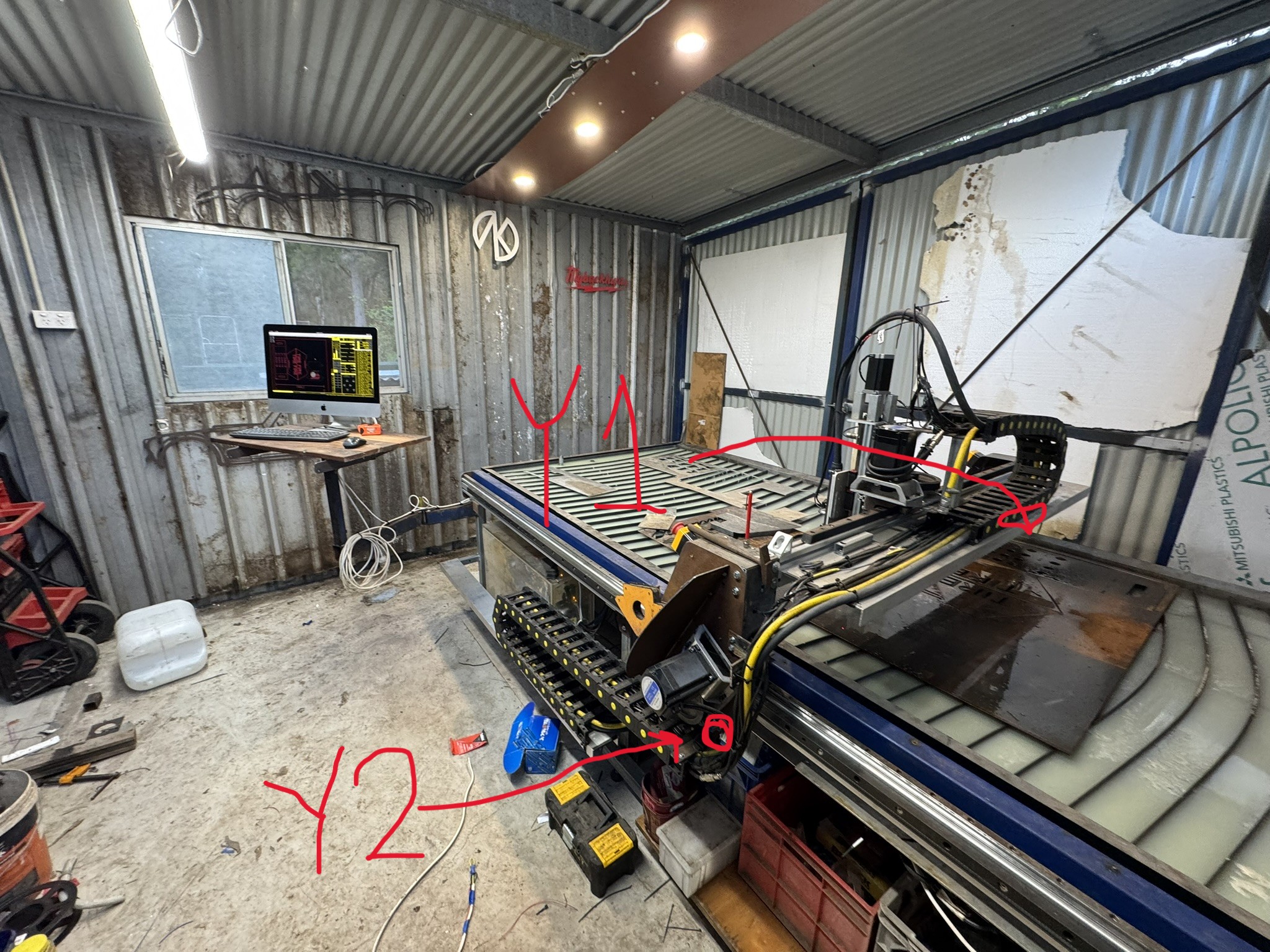
Triggers most when the following criteria are met. move to location-touch off-pierce =ERROR.
Then I can often tell it to start again and it will pierce and continue on its way. However it will ERROR after it cuts a little.
Yes triggers on pierce.
I'm cutting in the middle of the table. The joint 1 sensor is a proximity sensor that is below the left side of the table.
Triggers most when the following criteria are met. move to location-touch off-pierce =ERROR.
Then I can often tell it to start again and it will pierce and continue on its way. However it will ERROR after it cuts a little.
Yes triggers on pierce.
I'm cutting in the middle of the table. The joint 1 sensor is a proximity sensor that is below the left side of the table.
- MaHa
21 Jun 2026 19:13
Replied by MaHa on topic largest NC file
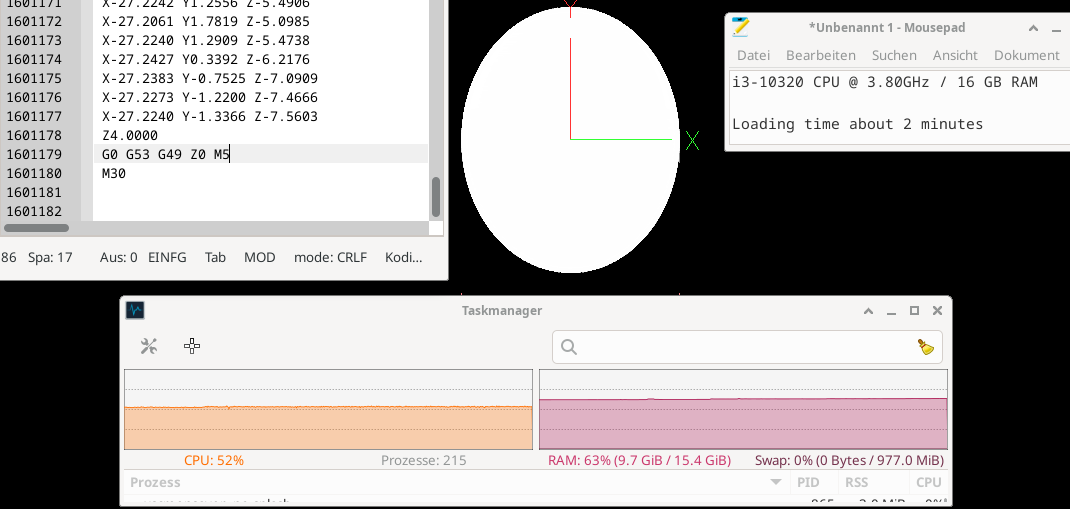
I used the 3D job i was working on today, set xy and z-steps to very low values, in the cam. The resulting file has 1601179 lines / 38.1 MB It took about 2 minutes to load. Then i doubled the file to 3202358 lines. 16 GB Ram and 1 GB swapfile was insufficient, Linuxcnc crashed. It seems, if there is enough memory, very large files can be loaded.
- spumco
21 Jun 2026 18:14
Replied by spumco on topic Ethercat installation from repositories - how to step by step
And the contents of make.log referenced in the "Error!" line in last post:
Code:
DKMS (dkms-3.2.2) make.log for ethercat/1.6.9 for kernel 6.12.86+deb13-amd64 (x86_64)
Sun Jun 21 13:46:11 EDT 2026
Building module(s)
# command: ./bootstrap && ./configure --with-linux-dir=/lib/modules/6.12.86+deb13-amd64/build --enable-generic --enable-8139too --enable-e100 --enable-e1000 --enable-e1000e --enable-r8169 --enable-igb --enable-igc --enable-genet --disable-stmmac-pci --disable-dwmac-intel --disable-ccat --disable-eoe --enable-cycles --enable-hrtimer --disable-rtdm --disable-debug-if --disable-debug-ring --disable-regalias --disable-tty --disable-wildcards --enable-sii-assign --enable-rt-syslog && make modules
+ touch ChangeLog
+ mkdir -p m4
+ autoreconf -i
./bootstrap: line 32: autoreconf: command not found
# exit code: 127
# elapsed time: 00:00:00
Time to create page: 0.218 seconds