Search Results (Searched for: )

  • tommylight
  • tommylight
21 Oct 2026 01:52
There are plenty of GUI's included with LinuxCNC that you can test and run without a machine, even without installing anything, just download the ISO, burn to a USB, boot the PC from it and test as much as you like.
There are also:
-QtPyVCP, a separate project for LinuxCNC for small and big industrial mills with toolchangers and everything, and a lathe version being actively developed
-FlexGUI, a GUI editor/maker for LinuxCNC, very easy to use and very capable as far as i can see/read here on the forum, depending on what you need you can have a working GUI very fast (i would guess under an hour).
There are many other versions of web based or even LabView (i am not sure about the name, but expensive proprietary software that can be made to work with LinuxCNC), etc.
-
My advice, start with FlexGUI:
forum.linuxcnc.org/flex-gui/57726-flex-gui
  • tommylight
21 Oct 2026 01:39

Ease of setup, engraving accuracy, software compatibility, upgrade options, and overall value for money are the main things I’d like to consider.
None of the above!
As stated above by DBtayl, there is no valid reason to buy those, but there is also nothing else in that price range.
Those are hobby machines, and even that is a stretch, but they can be used if you can cope with constantly having to tweak and tune and adjust and...
Search youtube for "aurora's tech" channel, she did test some of those and she does not hold back on bad things, and despite being young, many youtubers should look at her for integrity. She also has a website with all the info and ratings on everything she ever tested, so that would be a nice place to see if any of those would fit your needs.
On the other side of things CNC, i am pretty sure one of the china companies is launching a decent mini CNC, enclosed, with included software, for round 1000$ or thereabouts, but i do not recall what company or when as i am not interested in those.
  • dbtayl
20 Oct 2026 22:59
Both of those claim to use GRBL, not LinuxCNC, so the LinuxCNC knowledge base here is wasted.

I have no experience with either machine. As a low-stakes entry to answer "do I even like CNC as a hobby?", I suspect either will work equally well (or poorly). You'll very quickly run into limitations- Z height, power, and/or rigidity. Slowly cutting soft woods and plastics should be doable, beyond that... best of luck.

If you're in any way mechanically-inclined, assembly is a complete non-issue. Either one is going to be noisy and make a mess once it's cutting anything.

Do note that the price of the machine is only part of the cost of entry, even if you ignore the disease of buying/building bigger machines later. Even the bare minimum setup of tools/collets/workholding could add a very significant fraction to the cost of one of those machines. If you want CAM software, that could also trivially double or triple the cost (though there are free options- FreeCAD is quite good). No way around the learning curve of either writing gcode or using CAD/CAM, regardless of what machine you're using.

Would I do it? No... I'd save the $[x]xxxx I've spent on machines thus far and buy a Speedio :P Sarcasm aside, hobby CNC is a massive chicken and egg problem. You don't know if you like it, but the low-cost-to-entry stuff you'll outgrow quickly and/or will turn you off from the hobby with its maddening limitations. You've got to pick what level you're willing to jump in at, recognizing you can ask all the questions in the world and still not know enough.

All that said, I suspect you'd outgrow either machine very quickly. I personally would suggest trying to start with something with more mass, but I understand budgets/space/etc. are what they are. Might be worth checking on other hobby machining forums to see if anybody has a similar machine they want to get rid of cheap- wouldn't surprise me at all if somebody is a step or two ahead of you on the path and would be happy to let a gently-used machine go for cheap just to get it gone.
  • tommylight
20 Oct 2026 20:40
Replied by tommylight on topic LinuxCNC 32 BITS
forum.linuxcnc.org/27-driver-boards/5366...xcnc?start=10#310352
forum.linuxcnc.org/18-computer/38838-har...pc-s?start=20#171723
Did you try running the machine with it?
Did you try running the included PARPORT/AXIS/AXIS_MM config ? Does this report warnings when running?
Make a config for your machine, set the base period to 100000, everything else at default, try running it and see if it complains about latency.
  • tommylight
20 Oct 2026 17:56
Moved to "CNC machines".
  • Zivio123
20 Oct 2026 17:48
Best TTC3018 Pro CNC Router Machine: Is It a Good Choice for Beginners?

I’m considering a desktop CNC engraving machine for small projects, hobby work, and engraving designs on suitable materials. I’m looking for something compact that can fit on a workbench without taking up too much space. Ease of setup, engraving accuracy, software compatibility, upgrade options, and overall value for money are the main things I’d like to consider. I’d also prefer a machine that is manageable for someone who is still learning CNC machining.

Here are two options I’m considering:
TTC3018 Pro CNC Router Machine, Desktop CNC Engraving Machine

www.amazon.com/CNC-Router-Machine-Engrav...rue&ref_=as_li_ss_tl

TTC3018 CNC Router Machine 3-Axis Engraving Machine Metal Engraver

www.amazon.com/CNC-Router-Engraving-Engr...rue&ref_=as_li_ss_tl

Both options seem worth considering, but I’m unsure which would suit my needs better. I’d appreciate advice from people who have firsthand experience with either machine.

How difficult are they to assemble, configure, and operate for a beginner? Is there a noticeable difference in engraving precision, stability, and noise during normal use? I’m also interested in how well the machines handle different materials, what limitations become apparent with more detailed projects, and whether additional upgrades are necessary.

Are replacement parts and accessories easy to find? If you have used either model, what drawbacks have you encountered, and would you choose it again?

I’m open to other desktop CNC routers in a similar price range if there’s a more practical option for a beginner.
Any recommendations would be appreciated. Thanks in advance!
  • tuxcnc
20 Oct 2026 17:23
Bug in G12.1 was created by tuxcnc
I'm setting up an real milling machine with xyzab_tdr_kins kinematics.
To avoid unnecessary questions, I emphatically declare that everything is correct in my configuration, I made all changes on purpose, it was supposed to be like that, it works well and has no connection with the described below error.

Since this is a real machine, it has real parameters in the ini file.
Code:
[AXIS_Z]          MIN_LIMIT = -10.0          MAX_LIMIT = 100.0       MAX_VELOCITY = 100   MAX_ACCELERATION = 1000.0 [JOINT_2]               TYPE = LINEAR             FERROR = 2         MIN_FERROR = 0.9       MAX_VELOCITY = 100.0   MAX_ACCELERATION = 1000.0          MIN_LIMIT = -10.0          MAX_LIMIT = 100.0               HOME = 100.0        HOME_OFFSET = 100.0    HOME_SEARCH_VEL = 50.0     HOME_LATCH_VEL = -5.0      HOME_SEQUENCE = 0 HOME_IGNORE_LIMITS = YES     HOME_USE_INDEX = NO      VOLATILE_HOME = 1
Unfortunately, the Z-axis travel is only 110 mm, but as it turned out, this was a bigger problem than I expected....
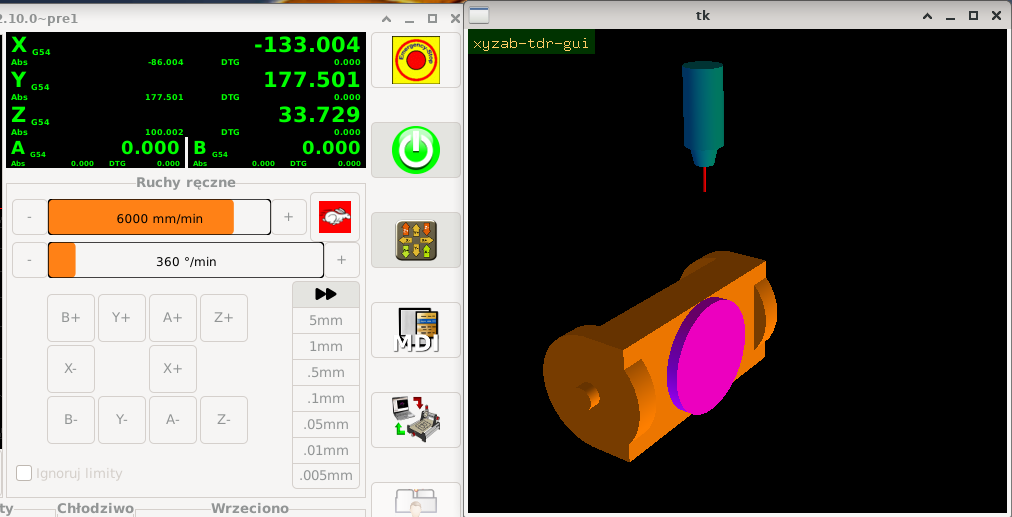
After basing it looks like this:
 
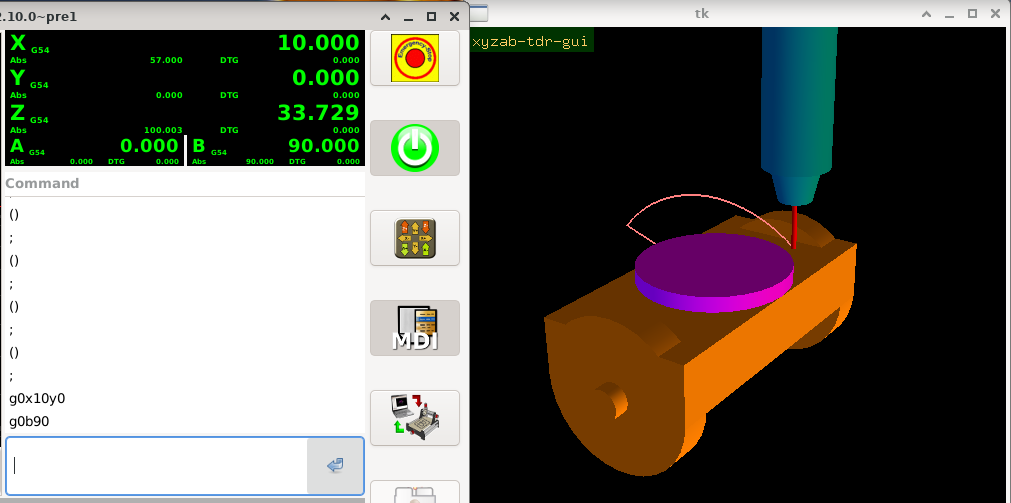
Then I issued some commands, which you can see in the MDI window.
 
So far everything works as it should, but after executing G12.1 miracles happen:
 
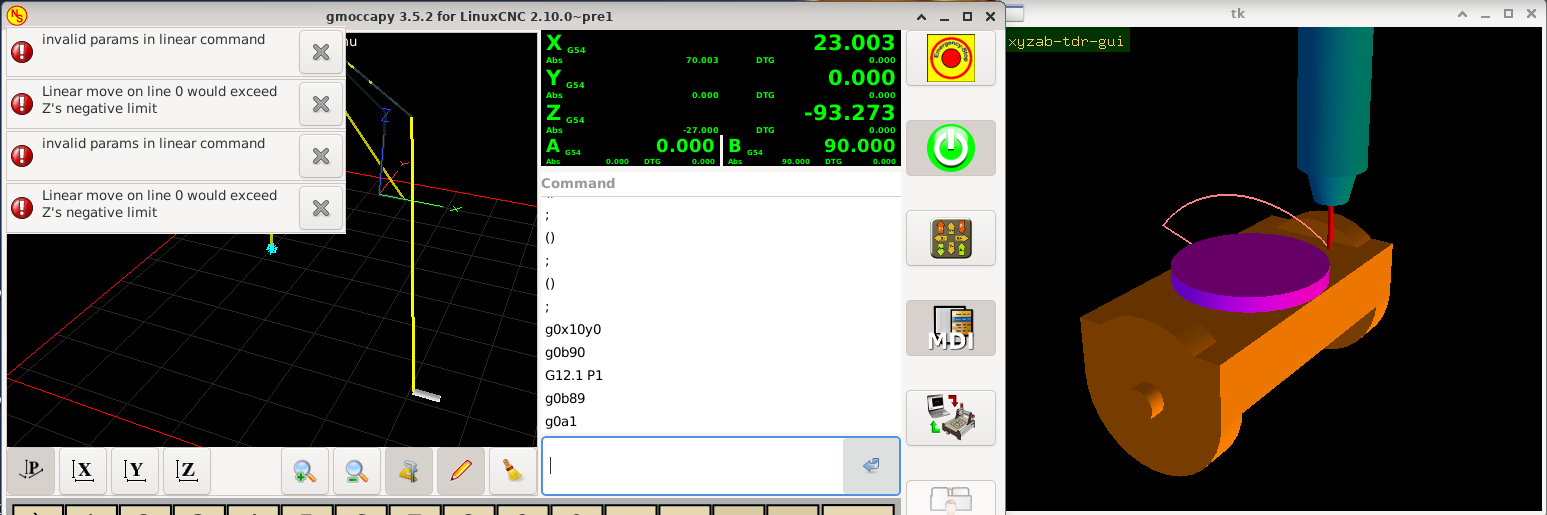
If you look closely at the pictures above, you can find the reason.

The explanation of this phenomenon is extremely simple.
Well, after a 90-degree rotation, G12.1 actually swaps the axes.
This is probably mathematically correct and works correctly in the simulator and on a real machine in JOG mode.
But when I try to use the g-code in MDI or in a program, this converted Z(abs) value is compared to the Z axis soft limits specified in the ini file, which makes absolutely no sense.
As you can see in the pictures, even an attempt to rotate by a very small value (here 1 degree) causes an error, although it is very far from the soft limits of the Z axis. Basically, it's even worse, because G0A1 here is a movement around the Z axis, the spindle is supposed to stay in place, and the error appears...

I only have reference sensors in the machine, I haven't planned any hardware limits and I don't want to install them because there are Ethercat drives that turn off when overloaded and report an error.
I also don't like the abandonment of soft limits, because they effectively prevent movement outside the working area.
Besides, the error is in G12.1 and it is this that needs to be fixed, not around the problem.

G12.1 should, in addition to what it does, disable soft limits (and G13.1 enable them again).

  • tommylight
20 Oct 2026 17:12
Replied by tommylight on topic Benchman machine; the PC board has failed
Stop posting the same thing everywhere
  • Mecproc
20 Oct 2026 17:07
Good morning. I’m new to this.
I need some guidance regarding a Benchman machine; the PC board has failed. Could someone who has already handled this kind of repair please provide some advice?
  • Odessit
20 Oct 2026 15:31
Short update: I made a 3-minute video that goes through all 12 cycles - the form, the 2D preview and the G-code it generates.


Also new: the Windows version is now on the Microsoft Store (no more SmartScreen warnings on the installer). The Linux .deb is on the site as before.

Trial (15 days, no email needed): turngcode.com/en/trial/?utm_source=linux...utm_campaign=3min_en

As always, feedback and bug reports are welcome - especially from anyone running it on a real lathe.
  • MikkelRS
20 Oct 2026 12:48
Replied by MikkelRS on topic SolidCraft
Ive started using this yesterday as well... honestly, im rooting for it to get 90% as good as fusion, and hopefully 80-90% of the Manufacturing tab, that will bring linux into real world CAM finally.
I even was able to connect claudecode to it to design stuff via prompt. Insane how fast stuff is moving.
  • Todd Zuercher
20 Oct 2026 11:13
Replied by Todd Zuercher on topic Jogging a 2nd Spindle
I don't think the Axis user interface has any provisions for multiple spindles. For on screen control of spindles other than the primary one you will either have to settle for using MDI commands or build a VCP to control the other spindles (such as PyVCP, GadeVCP, or QtVCP.)
  • ajanfahri
20 Oct 2026 08:30
Hello everyone,I'm developing a custom CNC controller on Ubuntu Linux with real-time capabilities. The core control system is being written in C, and I'm working on integrating EtherCAT for servo drive communication.I'm now considering the best approach for designing the user interface (HMI).My main questions are:
  • Should I develop the entire application, including the GUI, in C/C++ using a native Linux GUI framework?
  • Would it be better to build a modern web-based interface using React, with a separate backend communicating with the C control core?
  • What architecture would you recommend for a CNC controller that requires reliable real-time motion control, low latency, and a responsive user interface?
  • Are there any existing LinuxCNC components or libraries worth considering for this purpose?
My priority is to keep the real-time control layer independent of the GUI, while making the interface modern, maintainable, and easy to extend.I'd appreciate hearing about your experiences and recommendations.Thank you!
  • PCW
20 Oct 2026 00:01
Unfortunately,  I don't know about Debian, I use Mint
and build kernels from source.
Displaying 181 - 195 out of 11914 results.
Time to create page: 0.102 seconds
Powered by Kunena Forum