Search Results (Searched for: )

  • DerKlotz
21 Feb 2026 12:09 - 21 Feb 2026 12:51
Replied by DerKlotz on topic Add Buttons in Probe Basic
You mean that led at the attached photo? I can´t find a probe section in QT Designer or do i need to be in Probe Basic Development modus instaed of stable?

And can you help me here -> 
However, I don't know how to link the light switch to the output of my Mesa 7i76e. I tried to implement "net light => hm2_7i76e.0.7i76e.0.0.output-02 <= qtpyvcp.light" in my postgui_hal. Unfortunately, that didn't work.

 
  • Marco61
21 Feb 2026 10:10
I all ,
I need help to finish my custom panel in Axis 2.9.8
I'm Under Debian 13 Trixie 
I get the buttons in the side of Axis   Jog Button for X Y Z (+ & - )
Jog Speed and Home Button 
No error messages when i start Axis nut jog button did not work (with Jog speed more than zero)
Home button his working (at least one !)

Can someone have a look in my files ? 
I have been looking on the web for ages now and look like my brain did not see the problem......

Thanks

Marco
  • tcbmetalworks
21 Feb 2026 09:03
Replied by tcbmetalworks on topic QTPLASMAC integrated cad/cam
One of the long term goals of the project, is to integrate it with AI I dont know if I will release this publicly or not as it will be to OP of a tool but If i do make it i will share it by pm to the members here. The idea is to be able to use ai to generate signs shapes parametric modeling, upload a photo and have it turn it into a silhouette, or design a cut file off of a text prompt, potentially a chat bot could also be implemented for diagnosis of the system. This same chat bot could be then implemented into a website and customers could very easily custom design there own signs etc, order them and we make them and ship them out.
  • tcbmetalworks
21 Feb 2026 08:30
Replied by tcbmetalworks on topic QTPLASMAC integrated cad/cam
I will continue working on it everyday, I know theres a way I can make this work with multiple programs but it really makes it hard for me to train someone on it. a built in 2d cad would be amazing too, even if its just super simple. My goal is to have it be the MS paint of cad lol.
  • Hakan
21 Feb 2026 07:49
Replied by Hakan on topic QTPLASMAC integrated cad/cam
Good start!

Materials, there are two ways (at least). One is to set all options in Sheetcam and that overrides the settings from the Materials tab.
Sheetcam is then the master of everything. That's what you have seen.

An other way is to set material index from sheetcam, it uses then the material index from the Materials tab.
Still, you need to select that when you sit with Sheetcam.
For that you need to go in the post processor code and change to false line 24
Code:
useTool      = false  -- Set to true to use SheetCam's tool table to generate a temporary material file entry

An other way, that I use, is to set material myself when I am at the machine.
Sheetcam only makes the cutting movements, not the material selection.
For that, insert comments in the printouts on line 171 in the post processor
Code:
   else       post.Text ('; M190 P' , tool,' (',string.lower(toolName), ' material)\n')                   post.Text ('; M66 P3 L3 Q2 (wait for valid change)\n')             end
Note the initial ";" comment in the printout. Plus useTool=false.

Automatic nesting isn't needed, at least to start with.
Being able to read in several G-code objects and interactively
place them on a sheet would be golden.

I like your start and hope you continue.
  • tcbmetalworks
21 Feb 2026 07:37
Replied by tcbmetalworks on topic QTPLASMAC integrated cad/cam
What is monokrom? Im happy to use pre-made tools would save me alot of effort.
  • tcbmetalworks
21 Feb 2026 07:18
Replied by tcbmetalworks on topic QTPLASMAC integrated cad/cam
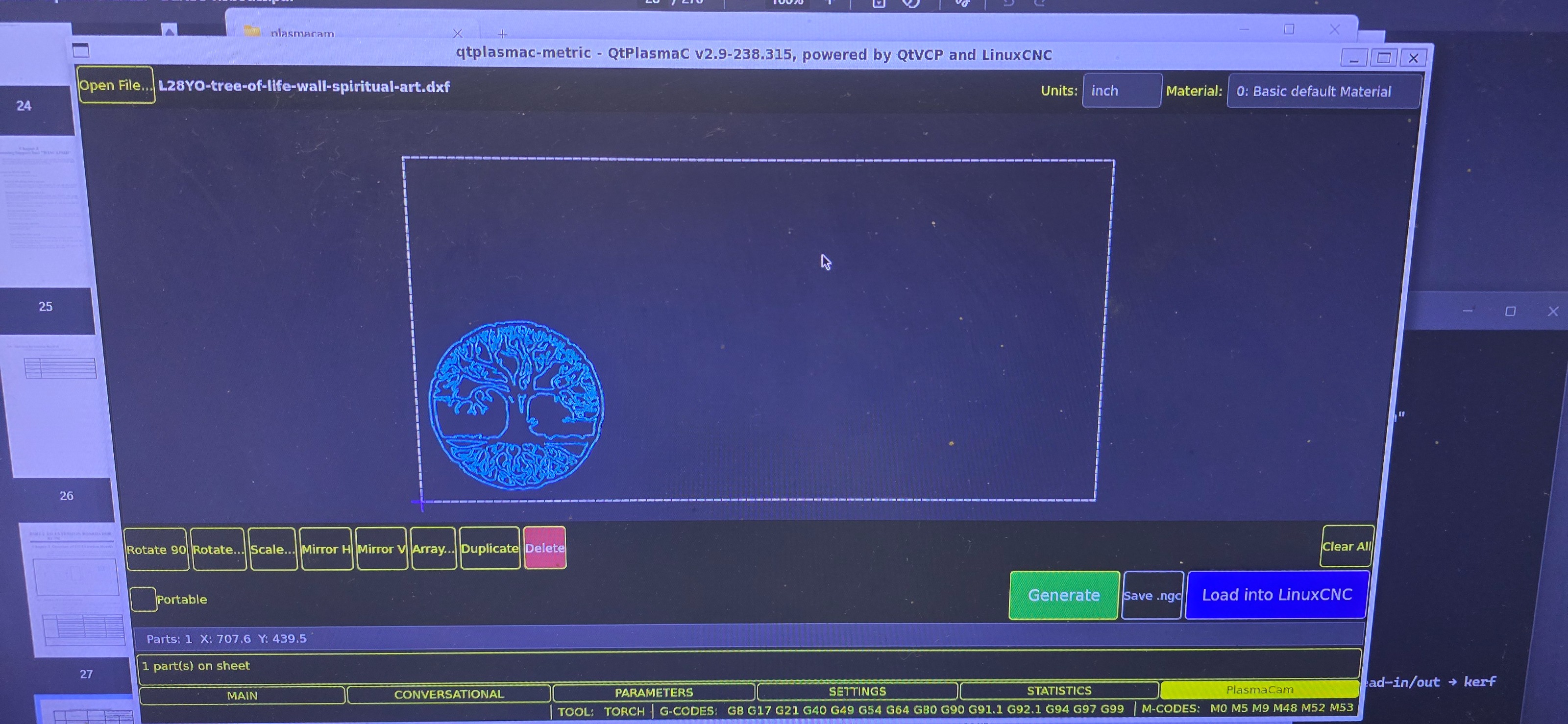
I ran sheet cam for a long time on my mach 3 plasma table. Maybe I am a little confused with qtplasmac its my first time using it. I just dont understand why you would have a materials tab and then end up setting all your speeds and feeds in sheet cam? Is this only for the conversational? Either way all in one would be much better. I am trying to keep it super simple so that I can teach people super easy how to run my machine. There also is no automatic nesting in sheet cam and I know this is not a easy task but, for a basic version should not be to crazy. This is what I have done so far, all internal to qtplasmac  
  • Marcos DC
21 Feb 2026 06:54
Replied by Marcos DC on topic How good is Ethercat motion control?
This is just an interpretation from reading similar issues here(forum), not empirical experience.

But the pattern you describe (random errors on startup, weird state after homing, reboot fixing it, and then everything staying stable) really looks like something in the startup / state synchronization / handshake is sometimes not lining up cleanly.

It doesn’t sound like a continuous motion control problem, more like: sometimes the system and the drives don’t start in exactly the same state (mode, position reference, command bits, etc.), and once that initial state is “clean”, everything behaves fine.

Things like edge-triggered vs level-triggered command bits, timing of enable/mode changes, or initial position/mode sync could easily lead to this kind of “works most of the time, but not always at startup” behavior.

So my guess would be to look closely at the startup sequence and state/mode/position synchronization, rather than at EtherCAT performance or servo tuning itself.
  • Lcvette
21 Feb 2026 04:40
Replied by Lcvette on topic Add Buttons in Probe Basic
On the probe page in qt designer, there is a button where the probe to is and the output from linuxcnc goes to the led on the probe graphic, use that as a template
  • Hakan
20 Feb 2026 22:41
Replied by Hakan on topic QTPLASMAC integrated cad/cam
@tcbmetalworks, focus on the features you like to have.
I'm sure it will spark some interest when you show us.
  • snowgoer540
20 Feb 2026 19:38
Replied by snowgoer540 on topic QTPLASMAC integrated cad/cam
It really seems to me like you are confusing what QtPlasmaC does and what the conversational inside of QtPlasmaC does.

QtPlasmaC does control the Z axis on its own, with exceptions being things like turning the THC on and off via g-code.

QtPlasmaC does not add lead-ins
QtPlasmaC does use the material feed rates


QtPlasmaC Conversational can add lead-ins if you so choose. It is also set up so that the material you have selected when creating the conversational file will be the material used for the generated g-code, thus using its feed rates.


QtPlasmaC is not a CAM package at all. Nor was its included conversational intended to be a replacement for a good plasma CAM package. It's there for convenience only.

This kindof makes a mess if you want to use sheet cam or something similar.

I suspect this view point to be a result of your inexperience with Plasma cutting. I create all of my cut jobs using g-code provided by SheetCAM. It's not a mess at all, and allows for great control of cutting.

aswell as theres not really a great way to run sheetcam via linux as far a i know.

Is the download link at the bottom of this link too convenient?
sheetcamshop.myshopify.com/pages/download-sheetcam

SheetCAM in Linux works fine.
  • RobC
20 Feb 2026 19:31
Replied by RobC on topic Poll to See Who Still Uses RTAI
I still use RTAI - not on cnc comp so I don't remember the version (likely one from 2023 or 2024)
  • 2tinker
20 Feb 2026 18:48
Replied by 2tinker on topic AMB FME-U 1400 DI
Hmm... eine seltsame Antwort.
Erinnert mich an Äpfel und Birnen.
Aber erst einmal danke dafür.
Falls jemand noch etwas über den genannten AMB Motor zu berichten hat,
würde mich das helfen.
  • Avion
20 Feb 2026 18:21
oh yes, nice thank you. I did search for it but as usual, internal search did not like my keywords.

Thanks man, i will read through. My goal is to finish the primary portal CNC retrofit and to finally build my large custom 4 Axis wirecutter ;) But before I delve into that i want to have flushed out the processes and issues on the cnc and mesa and linuxcnc to fully understand everything.

BTW: What helps most if I basically have concrete issues. Shall i share configuration files or something? I don't want to dump blindly stuff ;D
  • snowgoer540
20 Feb 2026 17:47 - 20 Feb 2026 17:55

-what should i monitor for the issue where the machine moves to a cut position and just stays there? This happens sometimes even when doing a manual cut where pressing F9 shows the machine running on screen but nothing moves. DRO does not change, machine state does. Again this happens a lot on QtPlasmaC, do not recall this happening on PlasmaC so might be a QT thing.

Again, I'd want to know if motion.eoffset-limited goes true when this occurs. I am also curious what state it's stuck in, so I would want you to turn on plasmac.debug-print before starting any cutting, etc. and copy and paste the terminal output from when it hung up.


The following commit will catch any commanded motion that would put the offending axis outside of the eoffset limits (soft limits) - this precludes you from having to monitor motion.eoffset-limited:
github.com/LinuxCNC/linuxcnc/commit/d179...e54c97ccc2bc0c58bf34

The following commit will catch any z-motion state transition issues (z-motion stalls in the same state for more than 3 seconds):
github.com/LinuxCNC/linuxcnc/commit/e2f0...30feba767f8588b2f28e

If you should encounter either of these error messages, please comment here with a recent backup of your QtPlasmaC config made from the SETTINGS tab, and the g-code file you were attempting to cut.
Displaying 6691 - 6705 out of 11378 results.
Time to create page: 0.529 seconds
Powered by Kunena Forum